





Thursday, 22 October 2026 · 11 Jumada I 1448 AH Sun – Thu · 9:00 – 18:00
+971 56 914 9477 العربية
WhatsApp

OPC51204BC-1

iiyama OPC51204BC-1 OPS Slot PC with Intel Core i5 for Interactive Displays

System
Windows 11 IoT Enterprise
Memory
DDR4 3200MHz 8GB
WhatsApp
Priceon request
QuotationWithin 1 working day
DeliveryConfirmed with your quote, based on stock
XLSXDownload datasheet (OPC51204BC-1_Specifications.xlsx)
Overview

The iiyama OPC51204BC-1 is an OPS slot PC that fits inside compatible iiyama interactive displays, so the display runs as a self-contained system without an external computer. It carries an Intel Core i5-12450H processor, 8GB DDR4 memory expandable to 32GB, a 256GB M.2 SSD, Windows 11 IoT Enterprise and Wi-Fi 6. Schools, meeting rooms and boardrooms across Qatar can use it to reduce cable clutter. Request a quote.

What the OPC51204BC-1 adds to an iiyama display

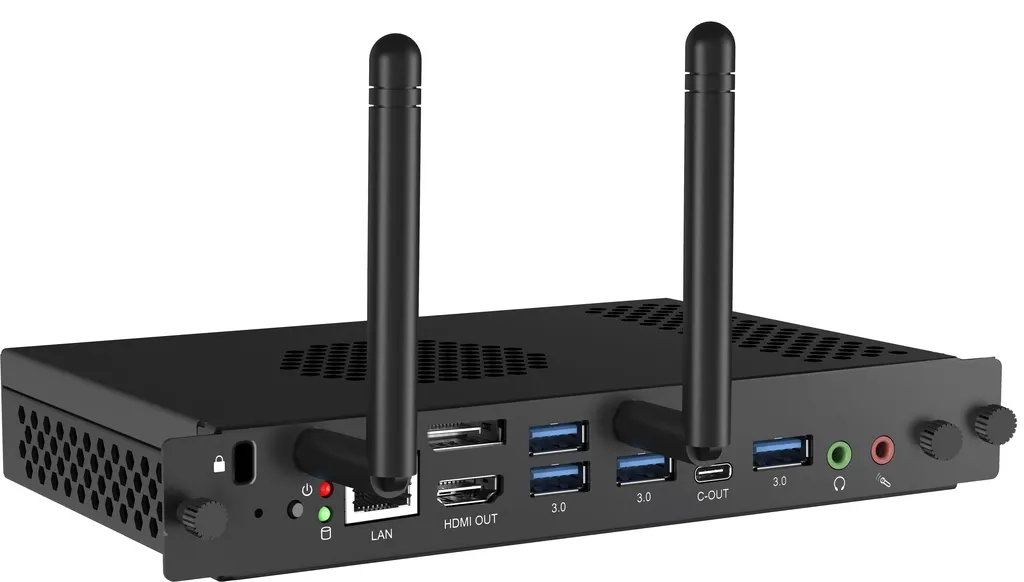
The OPC51204BC-1 is an OPS slot PC, a compact computer module that slides into the rear OPS slot of a compatible iiyama interactive display. Once fitted, the display runs its own Windows 11 IoT Enterprise environment, so there is no separate tower or mini PC to place behind the screen or on a floor stand. In a classroom or boardroom, that removes one device, its power lead and a run of cables.

Processor, memory, storage and security

The module is built around an Intel Core i5-12450H processor from the 12th Gen family, with integrated Intel UHD Graphics. It has 8GB of DDR4 3200MHz memory, which the manufacturer rates to a maximum of 32GB, and a 256GB PCIe M.2 SSD for storage. TPM 2.0 (Trusted Platform Module) is also included, which matters for organisations that apply device security policies across their fleet.

Ports and connectivity that matter in a room

Video output comes from one HDMI 2.0 port and one DisplayPort 1.4 port, each supporting up to 3840 x 2160 at 60Hz. The module has four USB 3.0 ports and one USB 3.2 Type-C port. That Type-C port does not support DP Alt mode, so it cannot be used to send video to another screen. Networking covers one gigabit RJ45 LAN port, 802.11 a/b/g/n/ac/ax (Wi-Fi 6) and Bluetooth 5.2. Audio connections are a headphone connector, one microphone input and one audio output.

Noise, power and temperature limits

The noise level is below 34dB at 100% CPU load, measured at one metre, which suits lecture halls and quiet meeting rooms. Typical power consumption is 80.7W, falling to 2.9W in standby. The operating temperature range is 0°C to 45°C at 10% to 95% humidity, and storage is rated from -10°C to 50°C. Qatar summer temperatures can exceed 45°C, so the module should sit in an air-conditioned room with airflow around the display. Confirm the cabinet, window position or lobby location with the SmartRooms Qatar team before installation.

Where it fits in Qatar

  • Schools: a private school in Al Wakrah equipping several classrooms, where each interactive display carries its own computer and no shared PC cart is needed.
  • Boardrooms: a corporate office in West Bay or Msheireb where presentations start from the screen and no laptop has to be connected for every meeting.
  • Training centres: a training room in Education City or the Industrial Area where instructors move between Arabic and English course materials on the same display.

What to plan before you order

Confirm the host display is an iiyama model with an OPS slot that accepts this module. The module measures 180 x 119 x 30 mm and weighs 0.60 kg without its box, so it is light, but access to the back of the display and cable routing still need planning. Map out network points for the RJ45 port or Wi-Fi 6 coverage, and check that audio and video cables reach the ports you intend to use. SmartRooms Qatar offers free site surveys for installations like this.

For schools and government offices ordering several units, a purchase order (LPO) or a government tender can be used, with payment by bank transfer, cheque or purchase order. Quotations are usually issued within one working day. Request a quote from SmartRooms Qatar and we will confirm the right configuration for your room.

Highlights

  • Intel Core i5-12450H processor from the 12th Gen family
  • 8GB DDR4 3200MHz memory, expandable to a 32GB maximum
  • 256GB PCIe M.2 SSD storage
  • Windows 11 IoT Enterprise with TPM 2.0 included
  • HDMI 2.0 and DisplayPort 1.4 outputs up to 3840 x 2160 at 60Hz
  • Typical power 80.7W; noise below 34dB at full CPU load

Estimated timeline

Quotation within 1 working day · delivery timing depends on stock availability, and we confirm it with your quotation.

Specifications

28 specifications · Source: manufacturer · checked Oct 2026
Device18
Type
OPS slot PC
CPU
Intel® Core™ i5-12450H (12th Gen), TPM 2.0 (Trusted Platform Module)
RAM
DDR4 3200MHz 8GB, Max. 32GB
SSD
PCle 256GB M.2
Graphics
Integrated Intel® UHD Graphics for 12th Gen Intel® Processors
Chipset
Intel®
Sound card
Integrated High Definition 100B Audio Stereo
Network
10/100/1000M Adapter
WiFi
802.11 a/b/g/n/ac/ax (Wifi 6)
Bluetooth
5.2
Operating system
Windows 11 IoT Enterprise
LAN (RJ45)
x1
USB
3.0 x4, 3.2 (Type C) x1 (Not support DP Alt mode)
DisplayPort Out
x1, DP1.4 (Max resolution 3840 x 2160 60Hz)
HDMI Out
x1, HDMI2.0 (Max resolution 3840 x 2160 60Hz)
Headphone connector
yes
Microphone In
x1
Audio
1x Audio out
POWER MANAGEMENT1
Power usage
80.7W typical, 2.9W stand by
DIMENSIONS / WEIGHT5
Product dimensions L x W x H
180 x 119 x 30mm
Box dimensions W x H x D
260 x 192 x 72mm
Weight (without box)
0.60kg
Weight (with box)
0.957kg
EAN code
4948570033331
Environmental conditions4
Operation temperature range
0°C - 45°C
Operation humidity
10% - 95%
Storage temperature range
- 10°C - 50°C
Storage humidity
10% - 95%

Downloads

2 files from the manufacturer

Questions about OPC51204BC-1

What is an OPS slot PC and what does the OPC51204BC-1 do for my display?
The OPC51204BC-1 is an OPS slot PC, a computer module that slides into the rear slot of a compatible iiyama interactive display. It runs Windows 11 IoT Enterprise on an Intel Core i5-12450H processor, so the display can run applications and presentations without an external computer. This suits meeting rooms in Doha or West Bay that need a screen ready to use as soon as it is switched on, with fewer devices around it.
What processor, memory and storage does the module have?
The module uses an Intel Core i5-12450H from the 12th Gen family, with integrated Intel UHD Graphics. Memory is 8GB of DDR4 3200MHz, and the manufacturer rates it to a maximum of 32GB. Storage is a 256GB PCIe M.2 SSD. If your room runs heavy software or needs more memory, review the requirements with the SmartRooms Qatar team before placing an order.
Can it drive a second screen?
The module has one HDMI 2.0 output and one DisplayPort 1.4 output, each supporting up to 3840 x 2160 at 60Hz. The USB 3.2 Type-C port does not support DP Alt mode, so it cannot be used to send video to another display. If your room needs a second screen, confirm the setup with the SmartRooms Qatar team before issuing a purchase order.
Is it quiet enough for a lecture theatre or a quiet meeting room?
Yes, the data sheet rates the noise level below 34dB at 100% CPU load, measured at one metre. That makes it practical for lecture halls at education institutions in Education City and for boardrooms where fan noise would distract attendees or affect audio recording. The figure reflects the manufacturer's test conditions, so compare it with the room's acoustic needs when planning the layout.
Will it cope with Qatar's summer heat?
The operating range is 0°C to 45°C at 10% to 95% humidity, and storage is rated from -10°C to 50°C. Qatar summer temperatures can exceed 45°C, so install the module in an air-conditioned room with airflow around the display. If the display sits near a sunlit window or an open lobby entrance, ask the SmartRooms Qatar team to review the location before installation.
What wireless and Bluetooth options are included?
The module supports 802.11 a/b/g/n/ac/ax, known as Wi-Fi 6, and Bluetooth 5.2. This allows wireless network connection and pairing with Bluetooth accessories, subject to each device's compatibility. It also has one gigabit RJ45 LAN port for buildings where a fixed wired connection is preferred for a meeting room or classroom network.
How much power does it use?
Typical power consumption is 80.7W, dropping to 2.9W in standby. These figures help facilities managers estimate the load on each room's circuit when several displays are installed, which is useful for schools and government buildings. The data does not specify the power input arrangement for the module, so confirm the supply setup with the SmartRooms Qatar team before planning the installation.
Is it compatible with the iiyama display I already own?
The module is designed for the OPS slot of compatible iiyama large format displays. Before ordering, confirm that your display model has an OPS slot that accepts this module. The SmartRooms Qatar team can check your model number as part of the quotation process, and a free site survey can confirm the mounting arrangement in your room.
How do schools and government offices buy this through SmartRooms Qatar?
SmartRooms Qatar supplies the module with delivery to all eight municipalities of Qatar and accepts purchase orders (LPOs) and government tenders, including Monaqasat. Payment is by bank transfer, cheque or purchase order, and quotations are usually issued within one working day. A school equipping several classrooms can combine the units into one purchase order. The product is covered by the manufacturer's warranty.
What are the physical dimensions and weight?
The module measures 180 x 119 x 30 mm and weighs 0.60 kg without its box. Its small size and light weight make it easy to handle during installation. Still, access to the rear of the display and cable routing need planning. If the rear space is tight, request a free site survey so the team can check the arrangement before a purchase order is raised.
Does it support Arabic language software?
The data lists Windows 11 IoT Enterprise as the operating system but does not specify language packs or Arabic support. If your lessons or meetings need Arabic and English interfaces and applications, confirm these requirements with the SmartRooms Qatar team before ordering rather than assuming support.
How does it compare with a separate desktop PC for a room?
Instead of a separate computer on a shelf or floor stand, the module sits inside the display's OPS slot, leaving one device to power, update and keep tidy. For an office in Lusail or Doha, this reduces visible cables and simplifies routine maintenance. If a room needs more processing power than this configuration offers, the SmartRooms Qatar team can compare options with you before you commit.

Similar models

Hisense OPS72D/72E Hisense OPS72D/72E OPS On Board Computer for Interactive Displays
8GB
Clevertouch OPS i5 Clevertouch OPS i5 PC Module with Intel Core i5 and 256GB SSD
Windows 11 - Home / Pro /… Memory: 16GB DDR4
Clevertouch OPS i7 Clevertouch OPS i7 PC Module with Intel Core i7 13620H
Windows 11 - Home / Pro /… 16GB DDR4
Hikvision DS-D5AC12G5-8S2 Hikvision DS-D5AC12G5-8S2 OPS Module for Interactive Panels
8G 256G
Hikvision DS-D5AC13G7-16S5 Hikvision DS-D5AC13G7-16S5 OPS Module with Intel Core i7-13620H
16G 512G
Email Call




