





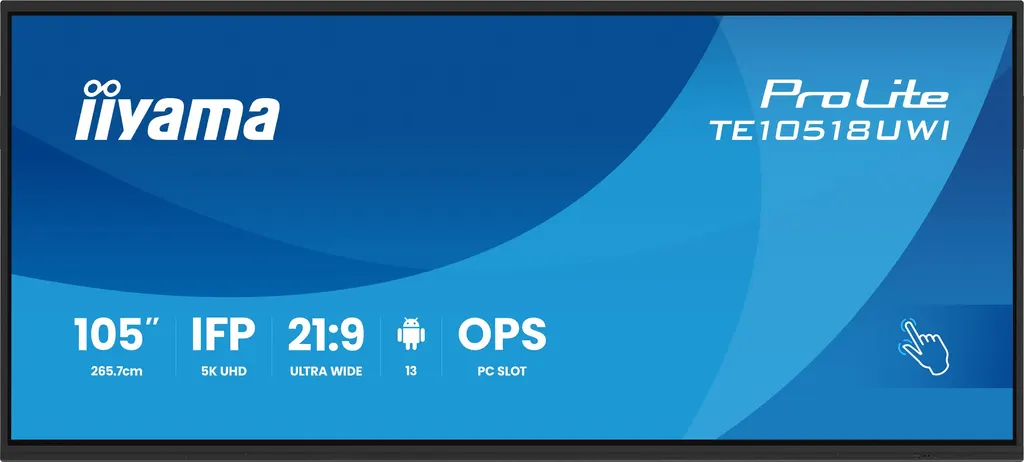
TE10518UWI-B1AG
iiyama ProLite TE10518UWI-B1AG 105-inch 5K Ultra-Wide Interactive Display
- Screen size
- 104.6" / 265.7cm
- Resolution
- 5120 x 2160 (14.75 megapixel
- Touch
- PureTouch-IR⁺
- Brightness
- 450 cd/m²
The iiyama ProLite TE10518UWI-B1AG is a 105-inch interactive display with a 5K UHD panel at 5120 x 2160 in a 21:9 format. It combines PureTouch-IR+ touch with 40 touch points, an 8-array microphone, 2 x 16W speakers with a subwoofer, and USB-C ports that charge connected devices at up to 100W. It suits boardrooms, lecture halls and control rooms in Doha, Lusail and Education City.
A 105-inch canvas for side-by-side work
The TE10518UWI-B1AG is a 105-inch display with a 21:9 panoramic format and a native resolution of 5120 x 2160, which is 5K UHD. The viewable area measures 2450 x 1033.6 mm, so several documents, a live video call and a dashboard can sit side by side without shrinking any of them. The VA panel is rated at 450 cd/m² with a 4000:1 static contrast ratio, and its colour performance covers 90% of NTSC with 10-bit depth.
A pixel pitch of 0.479 mm keeps small text readable at the close distances of a boardroom table. The thin matte black bezel and 3 mm glass with 7H hardness give the screen a clean, finished edge.
Touch, writing and built-in software
PureTouch-IR+ touch supports 40 touch points, and 32-point writing is available when the operating system supports the HID driver. Touch accuracy is rated at ±1 mm, and the surface responds to a stylus, a finger or a gloved hand, with palm rejection to stop a resting hand from marking the screen. Four dual-function touch pens with anti-bacterial tips are supplied.
The panel runs iiWare 11 on Android 13 with 8GB of RAM and 64GB of storage. Built-in tools include Note, a web browser, a file manager, cloud drive access, WPS Office and wireless screen sharing from Windows, iOS and Android devices. Kiosk mode, anti image retention and a 16/7 non-stop operating rating make it practical for reception or information use as well.
Connectivity for a modern meeting room
The panel is designed to run on as few cables as possible. Its ports are grouped as follows:
- Video inputs: four HDMI (one HDMI 2.1), one DisplayPort and two USB-C
- Power delivery: 15W on the front USB-C port and 100W on the rear port
- Outputs: one HDMI and one USB-C for multi-screen display (MSD) connections, plus optical S/PDIF and a mini jack
- Network: two RJ45 LAN ports at 1000 Mb with automatic switching between PC and Android
- Control: RS-232c input and eight USB ports across the front, back and top
A WiFi 6 module (OWM002) is included, operating on 2.4 GHz and 5 GHz with Bluetooth 5.0. There is also a slot for an optional OPS PC module, which can be fitted behind the display.
Where it fits in Qatar
In a boardroom in Lusail or West Bay, the format lets a leadership team review a budget sheet, join a video call with a project team abroad and mark up a site plan on the same screen. The 8-array microphone picks up voices up to 8 m away, which covers a long conference table.
At a university or training centre in Education City, a lecture hall can show a full-width timeline or two windows next to the lecturer's slides, and the lecturer can annotate directly on the screen. In a hotel meeting room in The Pearl, the built-in speakers may be enough for smaller sessions, while larger halls should be checked during the site survey.
Planning the installation
The display measures 2507.2 x 1130.1 x 103 mm and weighs 91.4 kg without its box, so the wall or frame must be checked for load, and the bracket must match the 1000 x 400 mm VESA pattern. A wall mounting bracket for this pattern is included. Because the screen is more than 2.5 m wide, SmartRooms Qatar recommends a free site survey before installation to confirm wall structure, cable routes and access for lifting.
The operating range is 0°C to 40°C, so the room should be air-conditioned. Qatar summers can exceed 45°C, which makes lobbies with sun-facing glazing or spaces with weak cooling unsuitable. The power input is rated 100 to 240 V AC at 50/60 Hz and draws 282 W typically, which covers Qatar's 240 V, 50 Hz mains.
Schools, ministries and companies ordering several units can send a single request. Quotations are usually issued within one working day, and SmartRooms Qatar accepts purchase orders (LPOs) and government tenders. Request a quote and the team will confirm the package and installation scope for your room.
Highlights
- 105-inch 21:9 panel at 5120 x 2160 (5K UHD)
- PureTouch-IR+ with 40 touch points and ±1 mm accuracy
- WiFi 6 module OWM002 included, dual-band 2.4/5 GHz
- USB-C ports rated 15W front and 100W rear power delivery
- 8-array microphone with 8 m pick-up and 2 x 16W speakers plus subwoofer
- Operating range 0°C to 40°C; 5-year manufacturer warranty
Classroom fit
At 105″ the farthest student should sit within about 7.8 m (6× the screen height).
Estimated timeline
Quotation within 1 working day · delivery timing depends on stock availability, and we confirm it with your quotation.
Specifications
DISPLAY CHARACTERISTICS17
- Design
- Thin bezel
- Diagonal
- 104.6", 265.7cm
- Panel
- VA
- Touch Glass
- AG coated glass, zero bonding
- Native resolution
- 5120 x 2160 (14.75 megapixel, 5K UHD)
- Aspect ratio
- 21:9
- Panel brightness
- 450 cd/m²
- Light transmittance
- 92%
- Static contrast
- 4000:1
- Dynamic contrast
- 5000:1
- Response time (GTG)
- 6.5ms
- Viewing zone
- horizontal/vertical: 178°/178°, right/left: 89°/89°, up/down: 89°/89°
- Colour support
- 1.07B 10bit (NTSC 90%)
- Horizontal Sync
- 30 - 135kHz
- Viewable area W x H
- 2450 x 1033.6mm, 96.5 x 40.7"
- Pixel pitch
- 0.479mm
- Bezel colour and finish
- black, matte
TOUCH7
- Touch technology
- PureTouch-IR⁺
- Touch points
- 40, 32pt writing (HID, only with supported OS)
- Touch accuracy
- +- 1mm
- Touch method
- stylus, finger, glove
- Touch interface
- USB
- Supported operating systems
- All iiyama monitors are Plug & Play and compatible with Windows and Linux. For details regarding the supported OS for the touch models, please refer to the driver instruction file available in the downloads section.
- Palm rejection
- yes
INTERFACES / CONNECTORS / CONTROLS9
- Digital signal input
- HDMI x4 (1x 2.1, max. 5120x2160 @60Hz; 3x 2.0, max. 3840x2160 @60Hz, YUV444) DisplayPort x1 (5120) USB-C x2 (3.2 Gen 1, 3840x2160 @60Hz, DP Alt mode 1.2, Touch, front: 15W PD, back: 100W PD)
- Audio input
- Mini jack x1
- Monitor control input
- RS-232c x1
- Digital signal output
- HDMI x1 (3840x2160 @60Hz, YUV/RGB444) USB-C x1 (3.2 Gen 1, 3840x2160 @60Hz (DP 1.2 Alt mode, Touch, 5W PD, MSD (Multi-Screen Display))
- Audio output
- S/PDIF (Optical) x1 Mini jack x1 Speakers 2 x 16W (Front + 16W Subwoofer)
- HDCP
- HDMI, DP & USB-C: 2.3
- USB ports
- x8 (media playback / peripherals / storage – front: 2x 3.2 (Gen 1, 5Gbit), 1x USB-C 3.2 (Gen 1, 15W PD), back side: 2x 3.2 (Gen 1, 5Gbit), 1x USB-C 3.2 (Gen 1, 100W PD), top side: 2x 3.2 (Gen 1, 5Gbit))
- RJ45 (LAN)
- x2 (IN/OUT, Auto switch for PC & Android, 1000MB)
- Microphone
- 8-Array (8m voice pick-up, Front facing)
FEATURES12
- Integrated software
- iiWare 11 (Android 13 OS) featuring iiyama DMS, iiyama OS, iiyama Class, Note, web browser, file manager, cloud drives, WPS office, iiyama Share and EShare for wireless connection with Windows/iOS/Android devices
- WiFi
- yes (WiFi 6 Module OWM002 - Dual WiFi Bandwidth: 2.4GHz/5GHz, WiFi Standard: IIEEE 802.11 a/b/g/n/ac/ax, Bluetooth Support: 2.1+EDR/ 3.0/ 4.x/ 5.0)
- Hardware
- CPU: A311D2, A76*4+A55*4(2.4GHz), GPU: Mali G610, RAM: 8GB, ROM: 64GB
- Extra
- WiFi 6 Module (OWM002), Slot for optional OPS Slot PC, 4x Touch pen
- Kiosk mode
- yes
- Max. non-stop operating time
- 16/7
- Anti image retention
- yes
- Media playback
- yes
- Glass thickness
- 3mm
- Glass hardness
- 7H
- Housing (bezel)
- metal
- OSD key lock
- yes
GENERAL6
- OSD languages
- EN, DE, FR, ES, IT, RU, CZ, NL, PL, CAT, SV, FI, DA, NB
- Control buttons
- Power, Power Indicator, Remote Sensor, Ambient Light Sensor, USB-C Connector (3.2), USB Connector (3.2), Microphone Indicator
- User controls
- common settings (input, volume, backlight), audio settings (volume, bass, treble, balance, sound mode, mute), screen settings (pixel shift, eye care, auto light, ECO, ECR, auto colour temp.), display settings (brightness, contrast, hue, sharpness, display mode, colour temp.), settings (wireless & networks, personal, input & output, application, system)
- Blue light reducer
- yes
- Plug&Play
- DDC2B
- Warranty
- 5 years (for details and eligible countries please check the Warranty section of our website)
MECHANICAL6
- Orientation
- landscape
- Fanless design
- yes
- VESA mounting
- 1000 x 400mm
- Operation temperature range
- 0°C - 40°C
- Storage temperature range
- - 20°C - 60°C
- MTBF
- 50.000 hours (excluding backlight)
ACCESSORIES INCLUDED5
- Cables
- power, USB, HDMI
- Touch pen
- x4 (Dual function tips, Anti-Bacterial)
- Guides
- quick start guide, safety guide
- Other
- WiFi Module (OWM002), Wall Mounting Bracket (VESA 1000x400mm), Mounting bracket for NUC, Mounting bracket for webcam
- Remote control
- yes (batteries included)
POWER MANAGEMENT3
- Power supply unit
- internal
- Power supply
- AC 100 - 240V, 50/60Hz
- Power usage
- 282W typical, 0.5W stand by, 0.3W off mode
SUSTAINABILITY2
- Regulations
- CB, CE, TÜV-Bauart, EAC, RoHS support, ErP, WEEE, REACH (RoHS)
- REACH SVHC
- above 0.1%: Lead, Lead monoxide
DIMENSIONS / WEIGHT5
- Product dimensions W x H x D
- 2507.2 x 1130.1 x 103mm
- Box dimensions W x H x D
- 2668 x 1305 x 280mm
- Weight (without box)
- 91.4kg
- Weight (with box)
- 119.5kg
- EAN code
- 4948570122011
COMPATIBLE ACCESSORIES1
- Other
- OPS PC Slot




