





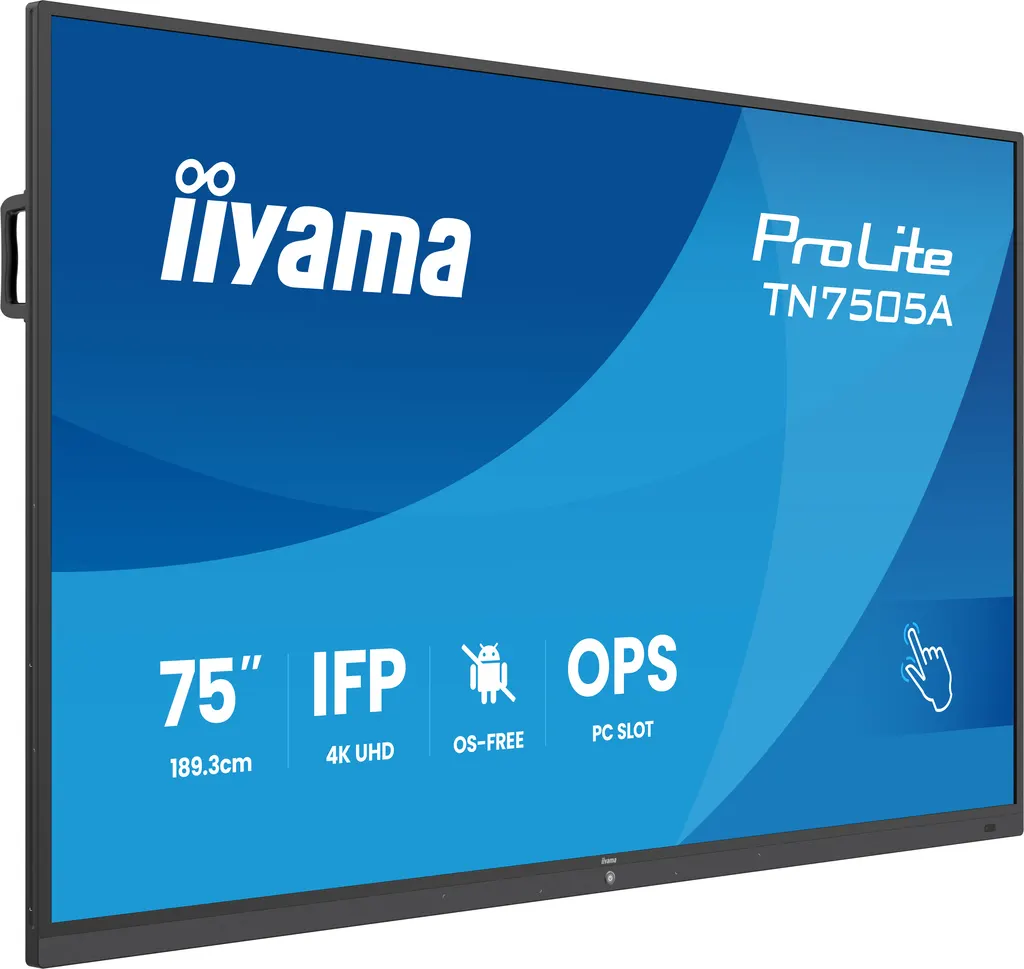
TN7505A-B1AG
iiyama ProLite TN7505A-B1AG 75-inch OS-Free Professional Touch Display
- Screen size
- 74.52" / 189.273cm
- Resolution
- 3840 x 2160 (8.3 megapixel 4K UHD)
- Touch
- DeepContrast-IR+
- Brightness
- 500 cd/m²
The iiyama TN7505A-B1AG is a 75-inch 4K UHD interactive touch display that ships without an operating system, so your IT team decides what runs on the screen. It offers DeepContrast-IR+ touch with plus or minus 1 mm accuracy, an Intel OPS80 slot for an OPS PC module, and a USB-C port that carries video, touch and 65W power on one cable. It suits boardrooms, banks, government offices and universities in Doha. Request a quote today.
What the TN7505A-B1AG is and how it is set up
The iiyama TN7505A-B1AG is a 75-inch interactive display with no operating system installed. Its IPS panel has a 74.52-inch diagonal and is built for organisations that manage their own computers and want full control over the software on every screen. Connect a laptop, a PC or another media source and the picture appears. Because the display carries no system software of its own, there is nothing on the panel to patch, license or configure before use.
Image and touch performance that matters in a room
The panel resolves 3840 x 2160 pixels, which is 4K UHD at a 16:9 aspect ratio. Spreadsheets, engineering drawings and small text remain sharp at the distances used in boardrooms and training rooms. Typical brightness is 450 cd/m² and static contrast is 1,200:1. The viewing zone is rated at 178 degrees horizontally and vertically, so participants seated at the sides of a long table still get a readable image.
Touch uses DeepContrast-IR+ with an accuracy of plus or minus 1 mm and palm rejection. The glass has an anti-glare finish with an anti-gloss treatment, an anti-bacterial coating and optical bonding, which helps limit reflections in rooms with windows. Touch runs over USB, and the display is plug and play with Windows and Linux. The manufacturer driver file lists the supported operating systems for touch.
Connectivity, the OPS slot and sound
The ports cover most meeting room sources:
- Two HDMI inputs with CEC and ARC support
- One DisplayPort input and one VGA input
- One USB-C port with 65W Power Delivery, DisplayPort Alt mode, data and touch on a single cable
- Two RJ45 LAN ports, one RS-232c port and a 3.5 mm audio input
The rear OPS slot follows the Intel OPS80 standard. A compatible OPS PC module lets a room run its own computer inside the display, so no separate box sits on the table. The built-in audio system has two 20W speakers and a 20W subwoofer, with a 3.5 mm audio output for external sound.
Where it fits in Qatar
- A ministry office in West Bay: the IT team wants a locked-down computer on the OPS slot and presenters who connect only through the approved port, with no third-party software on the screen.
- A training room in Education City: a lecturer writes over slides with one of the four included styluses while students follow on a 75-inch screen that suits a room of that size.
- A bank meeting room in Msheireb: confidential material is shown from a laptop over a single USB-C cable, which also charges the device during the session.
Qatar summers regularly pass 45°C, while the rated operating range for this display is 0°C to 40°C with storage from -20°C to 60°C. Install it in an air-conditioned room and confirm the conditions with the SmartRooms Qatar team before fitting it near a window or in a space that is not climate controlled.
What to plan before installation
The display weighs 54.5 kg without its box and measures 1710.2 x 1036.3 x 120.4 mm. The VESA pattern is 800 x 400 mm and a wall mount bracket is included. A free site survey confirms the wall construction, the bracket position and the route for cables before installation day. Typical power use is 175W, with 0.5W in standby and 0.3W in off mode. The package also includes a webcam bracket, a 3 m HDMI cable, a 3 m USB cable, an RS-232c cable, a power cable and a remote control with batteries.
Schools, government bodies and companies that need several units can request one quotation covering the full order, and SmartRooms Qatar can supply and install across all eight municipalities of Qatar. Request a quote for the TN7505A-B1AG and we will confirm the configuration, mounting and delivery plan with you.
Highlights
- 75-inch 4K UHD IPS panel with 3840 x 2160 resolution
- Ships with no operating system; the source controls the screen
- DeepContrast-IR+ touch with plus or minus 1 mm accuracy
- Intel OPS80 slot for a compatible OPS PC module
- USB-C with 65W Power Delivery, DP-Alt, data and touch
- Operating range 0°C to 40°C; install in air-conditioned rooms
Classroom fit
At 75″ the farthest student should sit within about 5.6 m (6× the screen height).
Estimated timeline
Quotation within 1 working day · delivery timing depends on stock availability, and we confirm it with your quotation.
Specifications
DISPLAY CHARACTERISTICS13
- Diagonal
- 74.52", 189.273cm
- Panel
- IPS, AG coating & Anti-Bacteria coating, haze 25%
- Touch Glass
- Anti-Glare glass with Anti-Gloss treatment, Anti-Bacterial coating, Ultra Smooth writing, Optical Bonding
- Panel (2)
- IPS
- Native resolution
- 3840 x 2160 (8.3 megapixel 4K UHD)
- Aspect ratio
- 16:9
- Panel brightness
- 500 cd/m²
- Brightness
- 450 cd/m² (typ.)
- Static contrast
- 1200:1
- Response time (GTG)
- 5ms
- Viewing zone
- horizontal/vertical: 178°/178°, right/left: 89°/89°, up/down: 89°/89°
- Horizontal Sync
- 30 - 135kHz
- Viewable area W x H
- 1650.0 x 928.0mm, 65.0 x 36.5"
TOUCH5
- Touch technology
- DeepContrast-IR+
- Touch accuracy
- +- 1mm
- Touch interface
- USB
- Supported operating systems
- All iiyama monitors are Plug & Play and compatible with Windows and Linux. For details regarding the supported OS for the touch models, please refer to the driver instruction file available in the downloads section.
- Palm rejection
- yes
INTERFACES / CONNECTORS / CONTROLS9
- Analog signal input
- VGA x1 (FHD)
- Digital signal input
- HDMI x2 (CEC/ARC) DisplayPort x1 USB-C x1 (Power Delivery 65W, DP-Alt, Data, Touch)
- Audio input
- Mini jack x3.5 mm
- Monitor control input
- RS-232c x1 RJ45 (LAN) x2
- Audio output
- Mini jack x1 Speakers 2 x 20W (Subwoofer 1x 20W)
- Monitor control output
- OPS Slot x1 (Intel OPS80 standard)
- USB ports
- x1 2.0 (2x 3.2 (USB-B up for touch HDMI1/DP/VGA))
- RS-232c
- x1
- RJ45 (LAN)
- x2 ((in/out))
FEATURES3
- Integrated software
- No operating System
- PiP
- yes
- PbP
- yes
GENERAL2
- OSD languages
- EN, DE, FR, ES, IT, RU, JP, NL
- User controls
- Color temp., image mode (including eye protection mode), sound mode, no signal standby ( Off / 1 min. / 3 min. / 5 min. / 15 min. / 30 min.), meeting mode, time scheduler, key lock, PIP & PBP, brightness / contrast.
MECHANICAL4
- Fanless design
- yes
- VESA mounting
- 800 x 400mm
- Operation temperature range
- 0°C - 40°C
- Storage temperature range
- - 20°C - 60°C
ACCESSORIES INCLUDED3
- Cables
- RS-232c
- Other
- 4x Stylus, Webcam bracket, Wall mount, HDMI 3m, USB 3m, Power
- Remote control
- yes (batteries included)
POWER MANAGEMENT2
- Power supply unit
- internal
- Power usage
- 175W typical, 0.5W stand by, 0.3W off mode
SUSTAINABILITY3
- Regulations
- CB, CE, TÜV-Bauart, EAC, RoHS support, ErP, WEEE, REACH, UKCA
- Energy efficiency class (Regulation (EU) 2017/1369)
- G
- REACH SVHC
- above 0.1%: Lead
DIMENSIONS / WEIGHT3
- Product dimensions W x H x D
- 1710.2 x 1036.3 x 120.4mm
- Weight (without box)
- 54.5kg
- EAN code
- 4948570127078




