





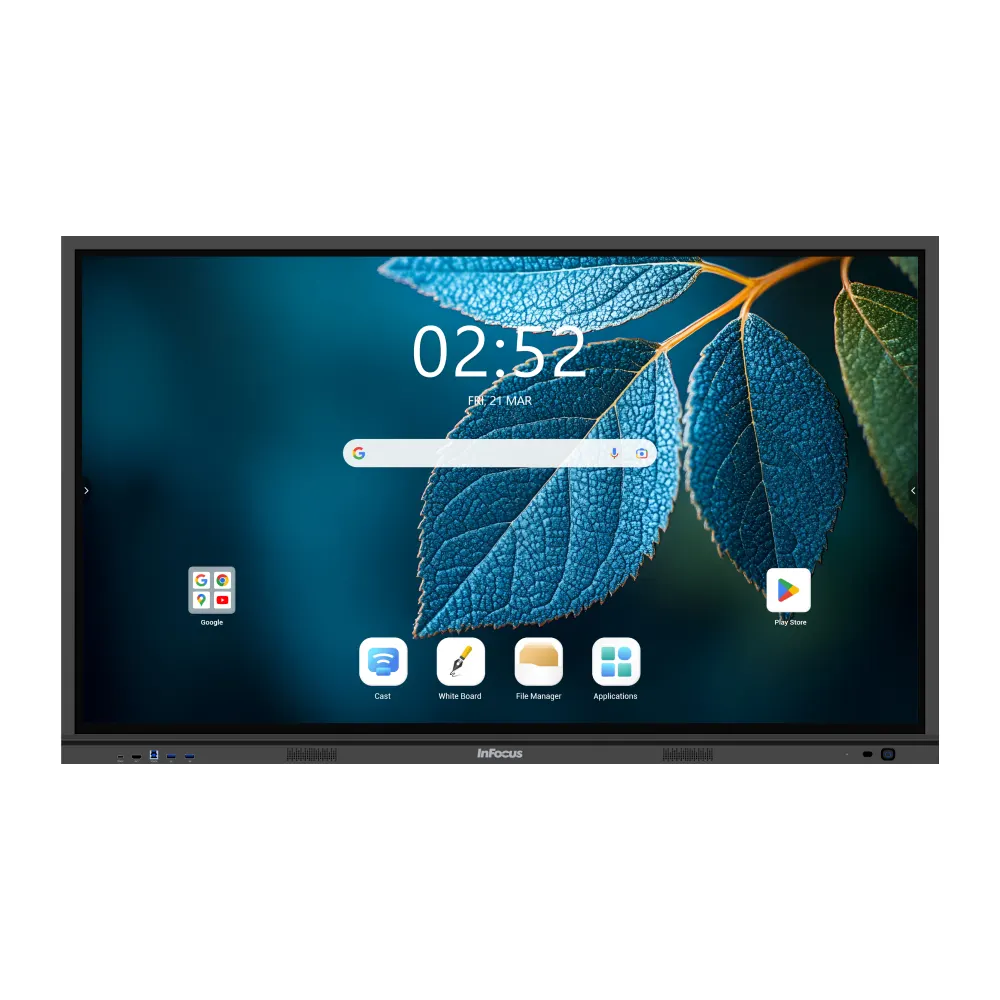
IN5513e
InFocus JTouch Series 13e IN5513e 55-inch Interactive Flat Panel
- Screen size
- 55"
- Resolution
- 4K (UHD) 3840 × 2160
- Touch
- Infra-Red
- System
- MTK9679
The InFocus IN5513e is a 55-inch 4K interactive flat panel from the JTouch Series 13e range, with infrared touch, 40 touch points, Android 14 and Google EDLA certification for classrooms and meeting rooms. The manufacturer lists this model as no longer available, so SmartRooms Qatar can quote a current equivalent from the same range for schools and offices in Qatar that need a compact interactive display for smaller rooms.
What the IN5513e is and who it suits
The InFocus IN5513e is a 55-inch interactive flat panel from the JTouch Series 13e range, designed for classrooms, training rooms and small meeting spaces where a teacher or presenter writes, annotates and shares content directly on the screen. Its 16:9 display runs at 4K resolution (3840 x 2160), and the infrared touch system is rated at 40 touch points in the base configuration.
Display and touch figures that matter in daily use
The panel is rated at 400 cd/m² brightness or more, with a typical contrast ratio of 1,200:1 and a dynamic contrast of 30,000:1. Its 10-bit panel produces 1.07 billion colours, and the anti-glare, tempered surface is rated 7 on the Mohs scale. Touch accuracy is rated at 1 mm with a typical response time below 5 ms, so ink follows the pen closely. The manufacturer rates the typical lifetime at 50,000 hours, and the refresh rate is 60Hz.
Android 14, Google tools and remote management
The IN5513e runs Android 14 on an MTK9679 processor with an ARM Cortex A73 quad-core CPU, 8 GB RAM and 128 GB storage, figures the manufacturer marks as base-configuration values. Google EDLA certification gives access to Google Play, Google Drive and Google Docs, so teachers and students can work on the same lesson files and assignments. School IT administrators can manage several devices remotely, control which apps are installed and apply security policies through Google's enterprise tools. EDLA certification also brings regular security patches and automatic updates from Google.
Ports, power and expansion
Port details below are for the base configuration.
- Front: two USB 3.0 ports, one HDMI input and one Type C input
- Side: two HDMI inputs, DisplayPort, AV input, Type C, two USB 3.0 and two USB 2.0 ports, plus an HDMI output and a touch USB-B 3.0 link
- Rear: VGA input with VGA audio input, a microphone input, audio output and S/PDIF
- Network and control: two LAN ports and one RS232 port
Power input is rated AC 100–240V at 50/60Hz, drawing up to 160 W in use and up to 0.5 W on standby. The built-in audio uses two 20 W speakers and a 20 W subwoofer, and wireless connectivity covers WiFi 6E and Bluetooth 5.2. An optional OPS slot accepts an Intel Core i5 or i7 computer that supports Windows 11 Enterprise, but the Windows licence is not included.
Planning the installation in Qatar
At 38 kg net, with a footprint of 1270.9 x 796.9 x 87 mm, the panel suits a wall-mounted or stand-mounted setup in a standard classroom, but the wall or stand must be checked before fitting. SmartRooms Qatar offers a free site survey for exactly this purpose. The operating range is 0 to 40°C, so during Qatar's summers, when outdoor temperatures can exceed 45°C, the room must be air-conditioned. The storage range is -10 to 45°C.
Schools and offices ordering several units can issue a purchase order (LPO), and government buyers can work through tenders, including Monaqasat. Quotations usually follow within one working day. To request a quote for the IN5513e or a current equivalent from the same range, send the SmartRooms Qatar team your room size, the quantity you need and any mounting requirements.
Highlights
- 55-inch 4K display (3840 x 2160) with 16:9 aspect ratio
- Infrared touch with 40 touch points in base configuration
- Google EDLA certified with Android 14 operating system
- Brightness of 400 cd/m² or more with anti-glare surface
- Operating range 0 to 40°C; confirm room conditions before install
- Optional OPS slot for Intel Core i5 or i7 computers
Classroom fit
At 55″ the farthest student should sit within about 4.1 m (6× the screen height).
Estimated timeline
Quotation within 1 working day · delivery timing depends on stock availability, and we confirm it with your quotation.
Specifications
IN5513e59
- variation_title
- IN5513e
- size
- 55"
- specs · General Info · Screen Size (Diagonal)
- 55"
- specs · General Info · Native Resolution
- 4K (UHD) 3840 × 2160
- specs · General Info · Touch Technology
- Infra-Red
- specs · General Info · Lifetime Max Hours (typical)
- 50,000
- specs · General Info · Brightness (max cd/m²)
- ≥400
- specs · General Info · Weight (kg, net)
- 38
- specs · General Info · Product Status
- No longer available
- specs · Display · Size
- 55"
- specs · Display · Native Resolution
- 4K (UHD) 3840 x 2160
- specs · Display · Aspect Ratio
- 16:9
- specs · Display · Brightness (max cd/m²)
- ≥400
- specs · Display · Contrast Ratio
- 1200:1 (Typical), 30,000:1 (Dynamic)
- specs · Display · Colour Depth (bit)
- 10
- specs · Display · Display Colours (billion)
- 1.07
- specs · Display · Viewing Angle (H–V°)
- 178 / 178
- specs · Display · Surface Treatment
- Anti-Glare, 7 Mohs, Tempered
- specs · Display · Lifetime Max Hours (typical)
- 50,000
- specs · Display · Refresh Rate
- 60Hz
- specs · Connectivity · Front Input
- USB3.0 x 2, HDMI Input, Type C*
- specs · Connectivity · Front Output
- Touch B 3.0
- specs · Connectivity · Side Input
- HDMI x 2, Type C*, USB 3.0 x 2, USB 2.0 x 2, AV In, Display Port
- specs · Connectivity · Side Output
- HDMI Out, Touch USB-B 3.0
- specs · Connectivity · Rear Input
- VGA In, VGA Audio In, MIC In
- specs · Connectivity · Rear Output
- Audio Out, S/PDIF
- specs · Connectivity · Networking/Control
- LAN x 2, RS232
- specs · Power · Power Supply
- AC 100–240V 50/60Hz
- specs · Power · Power Consumption (W)
- ≤160
- specs · Power · Standby Consumption (W)
- ≤0.5
- specs · Touch System · Touch Technology
- Infra-Red
- specs · Touch System · Touch Points
- 40*
- specs · Touch System · Accuracy (mm)
- 1
- specs · Touch System · Pixel Pitch (mm)
- 0.315 x 0.315
- specs · Touch System · Touch Resolution
- 32768 x 32768
- specs · Embedded System · OS Version
- Android 14.0
- specs · Embedded System · SoC
- MTK9679
- specs · Embedded System · CPU
- ARM Cortex A73 x 4
- specs · Embedded System · GPU
- G52 MC1@650MHz
- specs · Embedded System · RAM (GB)
- 8*
- specs · Embedded System · ROM (GB)
- 128*
- specs · Embedded System · Supported OS
- Win 11/10/8/7/XP, Linux, Mac, Android, Chrome
- specs · General · Speaker (W)
- 2 x 20
- specs · General · Subwoofer (W)
- 20*
- specs · General · Wireless
- WiFi 6E, BT 5.2*
- specs · General · Operating Temp (°C/°F)
- 0°–40° / 32°–104°
- specs · General · Operating Humidity (%)
- 10–80
- specs · General · Storage Temp (°C/°F)
- -10°–45° / 59°–113°
- specs · General · Product Dimensions (L×H×W, mm)
- 1270.9 x 796.9 x 87
- specs · General · Shipping Dimensions(L×H×W, mm)
- 1390 x 885 x 210
- specs · General · Product Weight (kg)
- 38
- specs · General · Shipping Weight (kg)
- 47
- specs · General · Safety & Regulatory
- CB, CE (LVD, EMC, RF), cTUVus, REACH, FCC, TUV Low Blue Light, TUV Flicker-free
- specs · General · Environmental
- RoHS, ErP
- specs · General · OPS (Optional)
- Intel Core i5/i7, Supports Windows 11 Enterprise (license not included)
- specs · General · In the Box
- 2x Stylus, USB Cables, Power Cord, Remote (no battery), User Guide
- specs · General · *
- *Specifications shown here reflect a base configuration; final specifications may vary by country or project requirements. InFocus offers product variations to meet tender requirements. Please contact your local InFocus representative for further information.
- availability
- No longer available
- datasheet_page
- https://infocus.com/datasheet/in5513e/




