





Thursday, 22 October 2026 · 11 Jumada I 1448 AH Sun – Thu · 9:00 – 18:00
+971 56 914 9477 العربية
WhatsApp

INOPS4

InFocus INOPS4 OPS Slot-In PC Module, Intel Core i7, Windows 11 Enterprise

System
Windows 11 Enterprise
Memory
16GB DDR4 2666Mhz
Storage
512GB SSD
WhatsApp
Priceon request
QuotationWithin 1 working day
DeliveryConfirmed with your quote, based on stock
PDFDownload datasheet (INOPS4_Datasheet.pdf)
Overview

The INOPS4 is an OPS slot-in PC module that turns a compatible InFocus interactive display into a Windows 11 Enterprise computer. It pairs an Intel Core i7-12650H processor with 16GB of DDR4 memory and a 512GB SSD, and it drives two screens at up to 4K 60Hz. Schools and offices in Doha use it where the panel needs its own PC. Request a quote to confirm compatibility.

A full Windows 11 Enterprise PC built into a compatible InFocus display

The INOPS4 is an OPS slot-in computer module. It fits into the OPS slot of a compatible InFocus interactive display and turns the panel into a self-contained PC, so teachers and presenters do not need a separate desktop beside the screen. Each module comes with Windows 11 Enterprise installed and licensed, ready to use once it is seated in the display.

Compatibility is the first thing to confirm. The INOPS4 is listed for the JTouch Series 13, 10 and 12, excluding the SP5512. Send your exact display model to the SmartRooms Qatar team before ordering, because the module has to match the panel it is fitted into.

Processor, memory and storage for lessons and meetings

The module is built around an Intel Core i7-12650H processor with Intel UHD Graphics for 12th Gen Intel processors. It carries 16GB of DDR4 memory rated at 2666MHz and a 512GB SSD, enough to run a video call, shared documents and presentation software side by side.

  • Intel Core i7-12650H processor with Intel UHD Graphics
  • 16GB DDR4 2666MHz memory and 512GB SSD storage
  • Windows 11 Enterprise installed and licensed
  • TPM 2.0 hardware-level security

Connectivity, dual-screen output and security

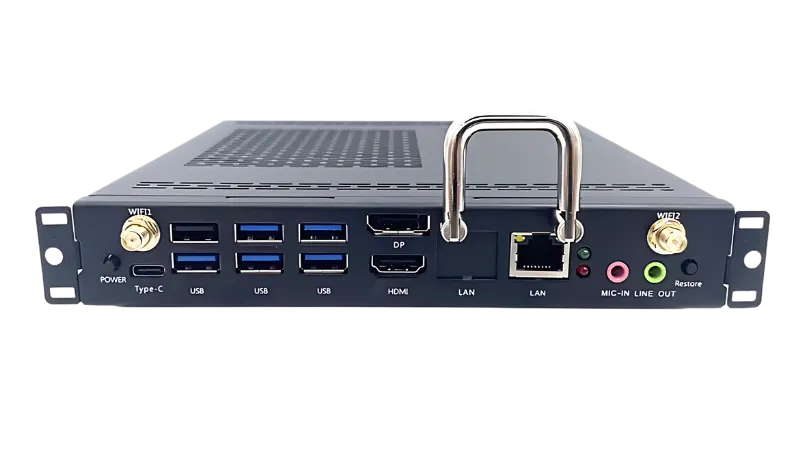
Wireless networking comes from Intel Wi-Fi 6 with 2.4GHz and 5GHz support across 802.11 a, b, g, n, ac and ax, paired with Bluetooth 4.2. A Gigabit Ethernet RJ45 port covers wired networking. On the module itself you get five USB 3.0 ports, a USB 2.0 port, a USB Type-C 2.0 port, a microphone input, audio output, and HDMI 2.0 and DisplayPort 1.4 outputs.

Dual-screen synchronous display shows identical content on two screens at up to 4K 60Hz, which suits a lecturer who needs the same material visible in two parts of a hall. Security is provided by TPM 2.0, a trusted platform module that adds hardware-level protection against malware and sophisticated cyber attacks.

Where the INOPS4 fits in Qatar

In a secondary school in Al Wakrah refitting its science rooms, the module lets each interactive display run lessons, digital textbooks and assessment tools without a separate PC cart at the front of the class. In a ministry meeting room in Msheireb, a single panel can host bilingual Arabic and English presentations while staff join a call with colleagues in other cities.

In a university seminar room in Education City, the dual-screen output can show one set of slides on a main display and a second screen at the back of a larger room.

Planning for heat, power and installation

The module is rated for operation from 0°C to 45°C, with storage from -40°C to 80°C and humidity from 10% to 95% non-condensing at 40°C. Qatar summers can exceed 45°C, so the display should sit in an air-conditioned room with clear airflow around the module. Confirm the location during a free site survey before installation.

Each module measures 195 x 30 x 180 mm and weighs 1.2 kg. Its power specification is 19V DC at 4.7A, with rated consumption of 89W in use and 0.5W in standby. Plan cable routing and access to the module when the panel is mounted, so it can be reached later.

SmartRooms Qatar supplies the INOPS4, delivers to all eight municipalities of Qatar, offers professional installation and usually issues quotations within one working day. Request a quote for the INOPS4 and tell us your display model and the number of units, and we will confirm compatibility and lead time in your quotation.

Highlights

  • Intel Core i7-12650H processor with 16GB DDR4 2666MHz memory
  • 512GB SSD storage and Intel UHD Graphics for 12th Gen
  • Windows 11 Enterprise installed and licensed
  • Dual synchronous display up to 4K 60Hz via HDMI and DisplayPort
  • TPM 2.0 hardware-level security protection
  • Compatible with JTouch Series 13, 10 and 12, excluding SP5512

Estimated timeline

Quotation within 1 working day · delivery timing depends on stock availability, and we confirm it with your quotation.

Specifications

27 specifications · Source: manufacturer · checked Oct 2026
General Info6
Processor
Intel® Core™ i7-12650H
RAM
16GB DDR4 2666Mhz
Storage
512GB SSD
Compatible with
JTouch Series 13, 10 and 12 (exclude SP5512)
WIFI
Intel® Wi-Fi 6 2.4GHz/5GHz (802.11 a,b,g,n, ac, ax)
Weight (kilograms/pounds)
1.2/2.65
Connectivity4
Inputs
5 x USB 3.0, USB 2.0, Mic in, USB Type-C 2.0
Outputs
HDMI 2.0 (4K/60Hz), Display Port 1.4, Audio out
Rear Connector
JAE 80PIN
Networking
RJ45 (Ethernet)
Power3
Power Supply
19V ⎓ 4.7A
Power Consumption
89W
Standby Mode
0.5W
Embedded System6
Processor
Intel® Core™ i7-12650H
Random Access Memory (RAM)
16GB DDR4 2666MHz
Storage
512GB SSD
Graphics Processing Unit (GPU)
Intel® UHD Graphics for 12th Gen Intel® Processors
Display
HDMI/DP/Supports synchronous dual display
WiFi
Intel® Wi-Fi 6 2.4GHz/5GHz (802.11 a,b,g,n, ac, ax), Bluetooth 4.2 PCIe 2230
General8
Dimensions W x H x D (mm/in)
195 x 30 x 180 / 7.7 x 1.19 x 7.09
Box Dimensions W x H x D (mm/in)
TBA
Weight (Kilograms/Pounds)
1.2 / 2.65
Package Weight (Kilograms/Pounds)
TBA
Operation Temperature (Celsius / Fahrenheit)
0° - 45° / 32° - 113°
Storage Temperature (Celsius / Fahrenheit)
-40° - 80° / -40° - 176°
Operating Humidity (Celsius / Fahrenheit)
10% - 95% @ 40°/104° Non-condensing
Operating System
Windows 11 Enterprise

Downloads

4 files from the manufacturer

Questions about INOPS4

What is the INOPS4 and who should consider it?
The INOPS4 is an OPS slot-in PC module with an Intel Core i7-12650H processor, 16GB of DDR4 memory and a 512GB SSD, running Windows 11 Enterprise. It suits schools, government offices and companies that already own or plan to buy a compatible InFocus interactive display and want the panel to run a full Windows computer without a separate desktop beside it. It is a module for the display, not a standalone PC.
Which InFocus displays is the INOPS4 compatible with?
The INOPS4 is listed as compatible with the JTouch Series 13, 10 and 12, excluding the SP5512. Because the module must match the display's OPS slot, send your exact panel model when requesting a quote. The SmartRooms Qatar team will check it against the compatibility list before you place a purchase order, so a school or ministry can order with confidence.
How does the INOPS4 differ from the INOPS5?
The INOPS4 is configured with an Intel Core i7-12650H, 16GB DDR4 2666MHz memory and a 512GB SSD. Compare the processor, memory, storage and connectivity lines against the INOPS5 page before choosing. Once you know which configuration fits your software needs and the number of users in your room, request a quote for that model.
Is Windows 11 Enterprise included with the module?
Yes. The INOPS4 comes with Windows 11 Enterprise installed and licensed, so it is ready to use once it is seated in a compatible display. A school or government office does not need to source a separate operating system copy to start using the module. Ask SmartRooms Qatar about the licensing arrangements that apply to your organisation when you request a quote.
Can the INOPS4 show the same content on two screens?
Yes. Its dual-screen synchronous display mode shows the same content on two screens at up to 4K 60Hz, using the HDMI 2.0 and DisplayPort 1.4 outputs. This is useful in a lecture hall at Education City or a training room where a presenter must be visible from two positions. Check the second screen's resolution and input before ordering, because the picture quality depends on the screen receiving it.
Are 16GB of memory and 512GB of storage enough for classroom use?
For typical lessons, meetings and presentations, the INOPS4 provides 16GB of DDR4 memory at 2666MHz and a 512GB SSD. A secondary school in Al Wakrah running interactive lessons, shared files and browser-based tools will usually find this suitable. Plan storage around how much content you keep locally compared with what is held in cloud services, since that determines how the SSD fills over time.
What wireless and wired networking does the module support?
The module includes Intel Wi-Fi 6 with 2.4GHz and 5GHz support across 802.11 a, b, g, n, ac and ax, Bluetooth 4.2 and a Gigabit Ethernet RJ45 port. In a meeting room in Msheireb where wireless coverage is weak, the wired port offers a more reliable connection. Confirm your network layout during the free site survey before installation.
Can the INOPS4 operate in Qatar's summer heat?
The module is rated for an operating temperature of 0°C to 45°C, with humidity from 10% to 95% non-condensing at 40°C. Summer temperatures in Qatar can exceed 45°C, so install the display in an air-conditioned room, keep airflow clear around the module and avoid sun-facing lobbies or unventilated rooms. Confirm the exact location with SmartRooms Qatar before installation.
What space and weight should I plan for?
Each module measures 195 x 30 x 180 mm and weighs 1.2 kg (2.65 lb). Its compact size means it sits within the display's slot rather than needing a separate shelf or cabinet. Before ordering several units for a school or office, review the slot position in each display and the cable route behind the panel. SmartRooms Qatar offers free site surveys to confirm the layout.
How much power does the module use?
The INOPS4 has a power supply specification of 19V DC at 4.7A, with rated power consumption of 89W in operation and 0.5W in standby. For a school or organisation planning to run several displays, these figures give a clear basis for estimating electrical load. Ask SmartRooms Qatar to confirm the power arrangement for your display model as part of the quotation.
How does TPM 2.0 help protect the module?
TPM 2.0 is a trusted platform module that adds hardware-level protection to the INOPS4, helping defend against malware and sophisticated cyber attacks. In a government office or bank that displays sensitive documents on a shared meeting screen, this hardware layer supports a stronger security posture than software protection alone. It does not replace your organisation's own security policies.
How do I order several INOPS4 modules for a school or government tender?
Send SmartRooms Qatar the display models, the number of units and the installation site, and we will prepare a quotation, usually within one working day. Purchase orders (LPOs) and government tenders, including Monaqasat, are supported, and payment can be made by bank transfer, cheque or purchase order. Delivery covers all eight municipalities of Qatar, with professional installation available.

Similar models

Hisense OPS72D/72E Hisense OPS72D/72E OPS On Board Computer for Interactive Displays
8GB
Clevertouch OPS i5 Clevertouch OPS i5 PC Module with Intel Core i5 and 256GB SSD
Windows 11 - Home / Pro /… Memory: 16GB DDR4
Clevertouch OPS i7 Clevertouch OPS i7 PC Module with Intel Core i7 13620H
Windows 11 - Home / Pro /… 16GB DDR4
Hikvision DS-D5AC12G5-8S2 Hikvision DS-D5AC12G5-8S2 OPS Module for Interactive Panels
8G 256G
Hikvision DS-D5AC13G7-16S5 Hikvision DS-D5AC13G7-16S5 OPS Module with Intel Core i7-13620H
16G 512G
Email Call




