





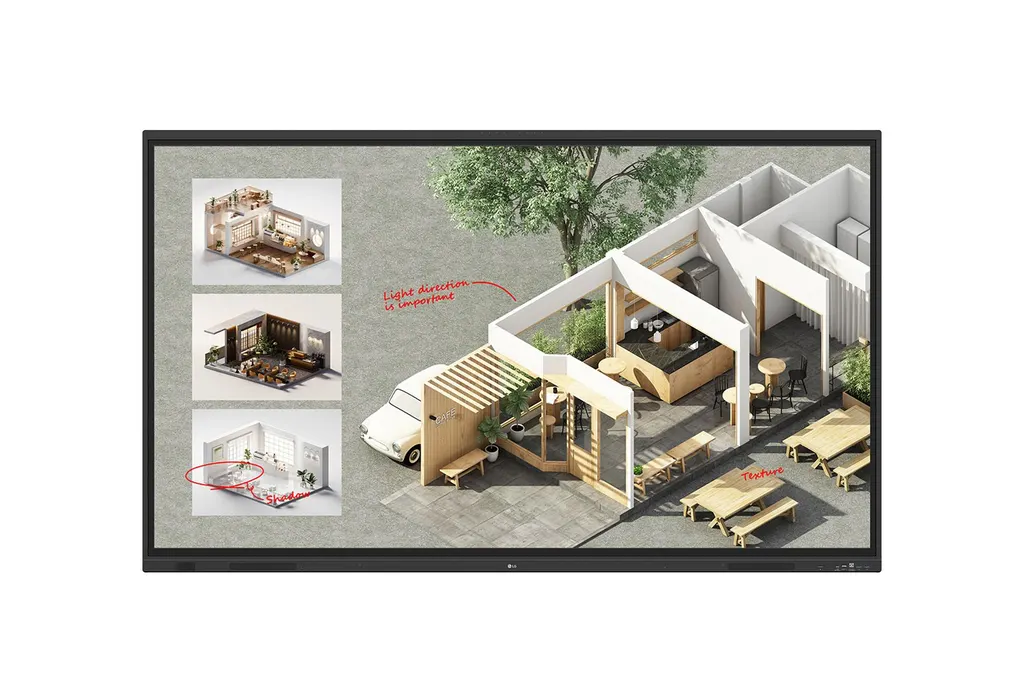
55TR3DQ
LG CreateBoard Standard 55TR3DQ 55-inch Interactive Display
- Screen size
- 55"
- Resolution
- 3840 x 2160 (UHD)
- Touch
- Max 50 Point
- System
- Android14(EDLA)
The LG 55TR3DQ is a 55-inch CreateBoard interactive display with a 3840 x 2160 UHD panel, 50-point multi-touch and an OPS slot for Windows software on a separately sold module. Android 14, wireless screen sharing and eight built-in microphones suit classrooms, training rooms and meeting rooms across Qatar where teams work in Arabic and English. Request a quote for a 55-inch board that fits a smaller room.
What the LG 55TR3DQ is built for
The LG 55TR3DQ is a 55-inch member of the CreateBoard TR3DQ series, an interactive display that combines a large touch surface, built-in Android 14 software and collaboration tools in one unit. It is aimed at rooms where a teacher, trainer or team lead writes, annotates and shares content with a group, rather than at a screen used only for viewing.
Display and touch performance
The VA panel delivers a native 3840 x 2160 UHD resolution with 400 nit typical brightness and a 5000:1 contrast ratio. Its 60Hz refresh rate and 6.5ms response time suit presentations and video playback. The 3.2 mm tempered, anti-reflective glass is also shatter-proof, which matters in busy classrooms. The touch layer recognises up to 50 simultaneous points, detects objects from 2 mm in diameter and registers writing from a height of 2 mm or less, so several people can write at the same time.
Two points to note when comparing models: the panel is listed for landscape use only, and the operating range is 0°C to 40°C with 10% to 90% humidity.
Connectivity and in-room sharing
The front of the unit carries display ports and a USB-C connection, so a presenter can plug in a laptop without reaching behind the screen. Across the unit there are three HDMI inputs, one DisplayPort input, one VGA input, an audio input, an RS232C port, LAN in and out, and one HDMI output. The front USB-C port offers 65W power delivery when no OPS module is installed. Wireless screen sharing lets up to 9 screens appear on the board in real time, and a 6-digit code connects a device without cables.
Where it fits in Qatar
- Classrooms in Al Wakrah or Education City: a teacher can stand anywhere in the room, use built-in templates such as rulers and tables, and share notes to students' devices after the lesson.
- Meeting rooms in West Bay or Lusail: staff in Doha can share from their laptops while colleagues join from abroad, with eight built-in microphones and 20W speakers covering the room.
- Training centres near the Industrial Area: the built-in OPS slot runs a Windows PC module at the screen itself, provided the module is purchased separately.
What to plan before ordering
The head unit weighs 26.65 kg and 31.55 kg packed, so two people should handle installation. The panel measures 1269.1 x 783.4 x 99.7 mm and uses a 400 x 200 mm VESA mounting pattern. The accessory list does not include a wall bracket, so include mounting hardware in your request. Power input is AC 100-240V at 50/60Hz with a built-in power supply, which covers Qatar's 240 V, 50 Hz mains. Typical consumption is 135W and maximum is 290W. LG ConnectedCare lets IT teams monitor, schedule and adjust several displays from one dashboard. SmartRooms Qatar offers a free site survey before wall mounting, so the wall, sightlines and power position can be checked before delivery.
Request a quote
Send us your room type, quantity and wall details, and the SmartRooms Qatar team will return a quotation, usually within one working day. We supply and deliver to all 8 municipalities of Qatar, arrange professional installation, and accept purchase orders (LPOs), government tenders and payment by bank transfer, cheque or purchase order. Request a quote for the LG 55TR3DQ today.
Highlights
- 55-inch VA panel at 3840 x 2160 UHD resolution
- Multi-touch detects up to 50 points at once
- Built-in OPS slot; OPS module sold separately
- Android 14 with 8GB RAM and 64GB storage
- Wireless screen sharing from up to 9 screens
- Operating range 0°C to 40°C, 10% to 90% humidity
Classroom fit
At 55″ the farthest student should sit within about 4.1 m (6× the screen height).
Estimated timeline
Quotation within 1 working day · delivery timing depends on stock availability, and we confirm it with your quotation.
Specifications
INFO3
- Product
- Touch
- Year
- Y25
- Month
- M01
PANEL17
- Screen Size (Inch)
- 55"
- Panel Technology
- VA
- Back Light Type
- Direct
- Aspect Ratio
- 16:9
- Native Resolution
- 3840 x 2160 (UHD)
- Refresh Rate
- 60Hz
- Brightness
- 400nit (Typ.)
- Contrast Ratio
- 5000:1
- Dynamic CR
- 5000:1
- Color Gamut
- NTSC 72%
- Viewing Angle (H x V)
- 178 x 178
- Color Depth (Number of Colors)
- 8bit+FRC, 1.07G
- Response Time
- 6.5ms
- Surface Treatment (Haze)
- 25%
- Life time
- 50,000 Hrs(L50, Min.)
- Operation Hours (Hours/Day)
- 16/7
- Portait / Landscape
- No / Yes
Connectivity (Jack Interface)11
- HDMI In
- Yes(3, Front1/Back2)
- DP In
- Yes(1)
- RGB In
- Yes(1, VGA)
- Audio In
- Yes(1)
- RS232C In
- Yes(1)
- RJ45(LAN) In
- Yes(1)
- USB In
- USB3.0 Type A(5) - Front2/Back2/Top1 USB2.0 Type A(1), USB Type-C(2, For the front 1, PD 65W without OPS/ DP-Alt ) - Front1/Back1
- HDMI Out
- Yes (1)
- Audio Out
- Yes(1), Optical Yes(1, SPDIF)
- Touch USB
- Yes(3, Front1/Back2)
- RJ45(LAN) Out
- Yes(1)
Mechanical7
- Bezel Color
- Black
- Bezel Width
- T/R/L/B:25.6/15/15/43.5mm
- Weight (Head)
- 26.65Kg
- Packed Weight
- 31.55Kg
- Monitor Dimensions (W x H x D)
- 1269.1×783.4×99.7mm
- Carton Dimensions (W x H x D)
- 1428×868x185mm
- VESA TM Standard Mount Interface
- 400x200mm
Protection Glass4
- Thickness
- 3.2
- Tempered / Chemical strengthening
- Yes
- Anti-Reflective
- Yes
- Shatter-Proof
- Yes
HW Feature6
- Internal Memory (eMMC)
- 64GB
- Wi-Fi/BT (Built-in)
- Yes (Slot type)
- Auto Brightness Sensor
- Yes
- Power Indicator
- Yes
- Local Key Operation
- Yes
- MIC (Built-in)
- Yes(8)
SW Feature13
- OS Ver. (webOS)
- Android14(EDLA)
- Booting Logo Image
- Yes
- RS232C Sync
- Yes (LG RS232C Command)
- PIP
- Yes(1) external source
- PBP
- Yes(4)
- Screen Share
- Yes (CreateBoard Share)
- Setting Data Cloning
- Yes
- Crestron Connected
- Yes
- Smart Energy Saving
- Yes (Energy Saving)
- Wake on LAN
- Yes
- Network Ready
- Yes (Fast Power On)
- HDMI-CEC
- Yes
- webRTC
- Yes(CreateBoard Share website mirr used WebRTC)
Environment Conditions2
- Operation Temperature
- 0℃ to 40℃
- Operation Humidity
- 10% to 90%
POWER2
- Power Supply
- AC 100-240V~, 50/60Hz
- Power Type
- Built-In Power
POWER Consumption6
- Typ.
- 135W(measured:125W)
- Max.
- 290W(measured:265W)
- BTU (British Thermal Unit)
- TBD
- Smart Enegy Saving (70%)
- Yes
- DPM
- Yes
- Power off
- <0.5W
SOUND1
- Speaker (Built-in)
- speaker:Yes (20Wx2 + 20W) output:Yes (18Wx2 + 18W)
CERTIFICATION4
- Safety
- IEC 62368-1:2018; UL 62368-1:2019
- EMC
- FCC Class "A" / CE / KC
- ErP / Energy Star
- Yes / Yes
- ePEAT(US only)
- Yes(Bronze)
OPS Compatibility2
- OPS type compatible
- Yes (Slot)
- OPS Power Built-in
- Yes
SOFTWARE COMPATIBILITY1
- Connected Care
- Yes
Language1
- OSD
- English, Simplified Chinese, Czech, Danish, Arabic(Egypt), Finnish, French, German, Greek, Italian, Korean, Netherlands(Dutch), Norwegian, Polish, Portuguese(Europe), Portuguese(Brazil), Romanian, Russian, Spanish, Swedish, Turkish, Ukrainian, Traditional Chinese, Hungarian, Thai, Indonesian, Kazakh, Catalan, Basque, Japanese, Estonian, Lithuanian
Accessory2
- Basic
- Power Cord 3 M*1, USB Cable(Type A-Type B) 5 M*1, USB Type-C Cable(C to C) 1.8 M*1, HDMI Cable 3 M*1, Writing Pen*2pcs, User Manual, QSG, Carton Box, Remote Controller(include battery 2ea), Wifi module
- Optional
- WIB6540B
Special Feature3
- Overlay Touch Compatibility
- Yes
- Conformal Coating (Power Board)
- Yes
- Power Protection
- Yes
TOUCH9
- Available object size for touch
- Ø2 mm ↑
- Response Time
- 5ms ↓
- Writing Height
- 2mm ↓
- Accuracy (Typ.)
- ±1mm
- Interface
- USB2.0
- Protection Glass Thickness
- 3.2mm (Anti-Glare)
- Protection Glass Transmission
- 88% (Typ.)
- Operating System Support
- Windows 10/ Windows 8/ Windows 7/ Android/ Linux/ macOS (Linux/ macOS 1 Point)
- Multi touch point
- Max 50 Point
Android System9
- CPU
- Octa core A73x4 +A53x4 (A311D2)
- GPU
- Mali-G52 MP8
- Memory(RAM)
- 8GB
- Storage
- 64GB
- Wi-Fi
- WiFi 6E
- LAN
- Gigabit LAN
- Bluetooth
- Bluetooth 5.3
- OS ver. (Android)
- Android 14(EDLA)
- NFC Sensor
- Yes




