





F7550
MAXHUB F5 Series F7550 75-inch Interactive Flat Panel
- Screen size
- 75″
- Resolution
- 3840(H)×2160(V)
- Touch
- Infrared recognition
- System
- Android 15.0
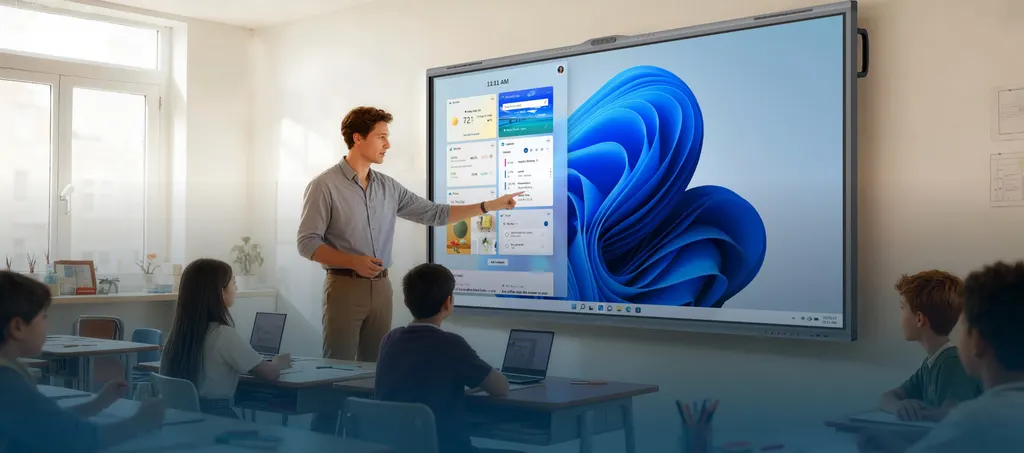
The MAXHUB F7550 is a 75-inch 4K interactive flat panel from the F5 Series, built for classrooms and training rooms. It pairs a 3840 x 2160 display rated at 400 nits typical with 50-point infrared touch, built-in Android 15.0, and an optional Windows 11 Pro PC module. Five cameras and a 2.2-channel SkyWave speaker system suit lecture rooms in Doha, Lusail and Education City. Request a quote for supply and installation.
A 75-inch 4K panel for mid-sized teaching and meeting rooms
The F7550 is the 75-inch member of the MAXHUB F5 Series, a 16:9 interactive panel with 3840 x 2160 resolution. At this size it fits a standard classroom wall or a meeting room without the extra space a larger screen demands, which makes it practical where viewing distances are shorter. The 178 degree viewing angle keeps content readable from side seats, and the panel is rated at 98% sRGB typical colour gamut with colour accuracy of ΔE≤1.
Touch, annotation and two operating systems
The infrared touch system supports 50 touch points with ±1.5 mm accuracy, so several students can write or move objects at the same time. Think&Ink annotation provides direct annotation, multi-level object recognition and a single pen that switches between two colours. The built-in Android 15.0 system runs on an octa-core A55 processor, while the MT82S PC module brings Windows 11 Pro with a 13th generation Intel Core i5 processor, 8GB RAM upgradable to 32GB and 256GB storage upgradable to 1TB, for software that needs Windows.
Where the F7550 fits across Qatar
- A secondary classroom in Al Sadd where the teacher shares video, writes directly on the surface and uses the camera array for student activities.
- A university training room in Education City where lecturers connect laptops through the HDMI inputs and the 8-mic array supports hybrid sessions with remote students.
- A government meeting room in Msheireb that joins Doha staff with colleagues abroad, using the 2.2-channel speakers and the camera array to frame participants.
What to plan before installation
Start with the room. The panel is rated at 88 dB sound pressure level at 1 metre, and its 2.2-channel speaker output is 2 x 8W + 2 x 18W, which suits rooms of moderate size. Test speech clarity in the room during the site survey. Heat matters too: the operating temperature range is 0 to 40 degrees Celsius, and Qatar summer temperatures can exceed 45 degrees outdoors, so the room should be air-conditioned. Confirm the environment with the SmartRooms Qatar team before ordering.
The power input is AC 100 to 240V at 50/60Hz, which covers Qatar's 240V, 50Hz supply, and standby consumption is 0.5W or less with ENERGY STAR certification. Plan socket locations, cable routes and network and HDMI cabling early. The IP5X dust protection helps in dusty spaces, but keep the panel away from direct sources of dust and keep ventilation clear.
Ordering from SmartRooms Qatar
SmartRooms Qatar supplies the F7550 with delivery to all eight municipalities of Qatar and professional installation, following a free site survey. Quotations are usually issued within one working day. Schools, ministries and companies can order against a purchase order (LPO) or a Monaqasat tender, and pay by bank transfer, cheque or purchase order. The panel carries a 3-year limited warranty from the manufacturer.
Send your room list, the number of units and whether you need the PC module, and request a quote for the MAXHUB F7550 today.
Highlights
- 75-inch 4K display, 3840 x 2160 resolution, 178 degree viewing angle
- 50-point infrared touch with plus or minus 1.5 mm accuracy
- Built-in Android 15.0 with MT82S Windows 11 Pro PC module option
- Five-camera system with 5x optical zoom and person counting
- SkyWave 2.2-channel sound system rated 88 dB at 1 metre
- IP5X dust protection and 3-year limited warranty
Classroom fit
At 75″ the farthest student should sit within about 5.6 m (6× the screen height).
Estimated timeline
Quotation within 1 working day · delivery timing depends on stock availability, and we confirm it with your quotation.
Specifications
F755054
- Display · Diagonal Size (inch)
- 75
- Display · Aspect Ratio
- 16:9
- Display · Resolution
- 3840(H)×2160(V)
- Display · Viewing Angle
- 178° (H/V)
- Display · Panel Type
- Wide Viewing Angle Panel
- Display · Panel Brightness
- 400 nits (typ.) 450 nits (max.)
- Display · Side-Viewing Brightness
- ≥ 1/3 of center brightness (±60°)
- Display · Contrast Ratio
- 5,500:1 (typ.) 50,000:1 (dynamic)
- Display · Color Depth
- 1.07B (10bit)
- Display · Color Gamut (typ.)
- 98% sRGB
- Display · Color Accuracy
- ΔE≤1
- Display · Glass
- Zero parallax 3mm thickness 9H tempered
- Display · Surface Technology
- Anti-glare, 25% haze
- Display · Eyes Care
- TÜV Flicker Free TÜV Low Blue Light
- Display · Refresh Rate
- 60Hz
- Display · Response Time
- 6.5ms
- Display · Backlight Unit
- DLED
- Touch System · Touch Technology
- Infrared recognition
- Touch System · Touch Point
- 50 Points touch
- Touch System · Accuracy
- ±1.5mm
- Touch System · MAXHUB Think&Ink
- Direct Annotation Multi-level Object Recognition Single Pen Dual Color
- Operating System (Built-in) · System
- Android 15.0
- Operating System (Built-in) · CPU
- Octa-core A55
- Operating System (Built-in) · GPU
- Mali-G52 MC1
- Operating System (MT82S PC Module) · System
- Windows 11 Pro
- Operating System (MT82S PC Module) · CPU
- 13th Generation Intel® Core™ i5 Processor
- Operating System (MT82S PC Module) · GPU
- Intel® UHD Graphics for 13th Gen Intel® Processor
- Operating System (MT82S PC Module) · RAM
- 8GB(Up to 32GB)
- Operating System (MT82S PC Module) · ROM
- 256GB(Up to 1TB)
- Connectivity · I/O Ports (Interactive Display)
- HDMI IN × 2 USB 2.0 × 1 USB 3.0 × 2 Touch × 1 USB Type-C × 1 AUDIO OUT × 1 RS232 × 1
- Connectivity · I/O Ports (PC Module)
- HDMI OUT × 1 USB 2.0 × 3 USB 3.0 × 3 MIC IN × 1 RJ45 × 1
- Connectivity · PC Module Slot
- Module slot (40 Pins) × 1
- Connectivity · Wi-Fi Module Slot
- Module slot × 1
- Connectivity · Wi-Fi Module (SI07B)
- Wi-Fi 6 supported 802.11ac/b/g/n/a/ax, 2.4GHz/5GHz
- Connectivity · Bluetooth
- 5.2
- Camera · Quantity
- × 5
- Camera · Resolution
- 60MP 8MP Panorama ×1 13MP Telephoto ×2 13MP Fusion Camera ×2
- Camera · Feature
- Person counting Random election Gesture recognition
- Audio · Audio System
- SkyWave Sound System
- Audio · Sound Channel
- 2.2
- Audio · Speaker Power
- 2×8W+2×18W (output) 2×12W+2×25W (maximum)
- Audio · Sound Pressure Level
- 88 dB (1m)
- Microphone · Quantity
- 8-mic array
- Microphone · Pick-up Angle
- 180°
- Microphone · Pick-up Range
- 0~12m
- Microphone · Feature
- AI spatial sound AEC (Auto echo cancellation) ANC (AI noise cancellation) AGC (Auto gain control)
- Environment · Operating Temperature
- 0℃~40℃
- Environment · Storage Temperature
- -20℃~60℃
- Environment · Operating Humidity
- 10%~90%RH
- Environment · Storage Humidity
- 10%~90%RH
- Environment · Altitude
- Below 5000 meters
- Power · Power Supply
- AC 100~240V 50/60Hz
- Power · Power Consumption (standby)
- ≤0.5W
- Power · Power Saving
- Energy Star Certification




