





Thursday, 22 October 2026 · 11 Jumada I 1448 AH Sun – Thu · 9:00 – 18:00
+971 56 914 9477 العربية
WhatsApp

U6530

MAXHUB U3 Series U6530 65-inch Interactive Flat Panel

Screen size
65″
Resolution
3840(H) X 2160(V)
Touch
Intelligent Touchscreen Technology
System
Android 13.0
WhatsApp
Priceon request
QuotationWithin 1 working day
DeliveryConfirmed with your quote, based on stock
Overview

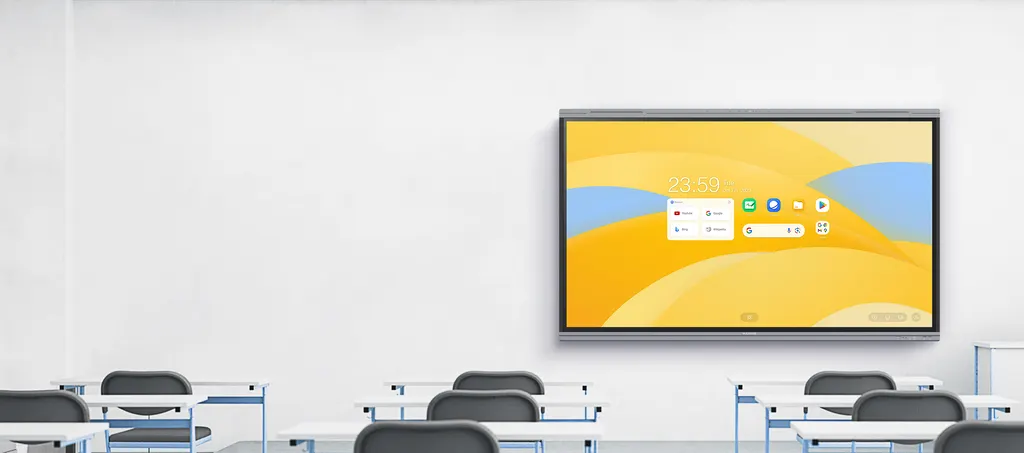
The MAXHUB U6530 is a 65-inch 4K interactive flat panel for classrooms. It pairs a 3840 x 2160 VA display with a 50-point infrared touchscreen, Android 13 and an 8-microphone array. The Type-C port offers up to 100W charging and the panel runs MAXHUB Class whiteboard software. It suits primary and secondary classrooms and small seminar rooms in Qatar. Request a quote from SmartRooms Qatar.

What the MAXHUB U6530 is

The MAXHUB U6530 is a 65-inch interactive flat panel from the U3 Series, designed for education. Its 3840 x 2160 resolution gives 4K UHD detail on a VA panel, and the built-in Android system lets teachers run lessons, apps and whiteboard software without a separate computer. Compared with the 75-inch U7530 and 86-inch U8630, this is the compact option for smaller rooms.

Display brightness, colour and eye care

The panel is rated at 450 nits, which is lower than the 500 nits quoted for the U7530 and U8630. The gap is modest, but it becomes more noticeable in rooms with large windows or strong daylight, so measure the room before choosing a size. The 10-bit colour depth (1.07B colours) and colour accuracy of Delta E ≤ 1.5 suit diagrams, maps and science content where accurate shades matter. The panel also carries TÜV Flicker Free and TÜV Low Blue Light certifications, and its DLED backlight is rated for at least 50,000 hours typical life.

Touch, writing and connectivity

  • 50-point infrared touch, so several people can write or tap at once
  • Pressure sensitivity, so stylus pressure changes line thickness
  • Palm rejection, so a teacher can rest a hand on the glass while writing
  • Type-C port for webcams, microphones, speakers, USB drives and wired networks
  • Type-C port with up to 100W charging performance
  • Type-C and HDMI outputs for linking up to three displays

Android 13, classroom software and memory

The U6530 runs Android 13.0 and holds Google EDLA certification, which the manufacturer links to access to Google's education tools. With 8GB RAM, 64GB storage, an octa-core processor and a 6 TOPS NPU, the built-in system handles lesson apps and video. MAXHUB Class is built for classroom teaching, while MAXHUB Class Pro lets students using tablets, Chromebooks and notebooks take part in lessons and capture what is shown on the board. Students can reach premium educational resources online or offline.

Audio for a 65-inch classroom

An 8-microphone array with a 0-10m pickup range captures a teacher's voice from across the room. The 2.2 channel speakers (2×8W+2×18W outputs, 2×12W+2×25W maximum) cover a classroom of this size without external speakers. Check the teaching position and the furthest seat against the pickup range before ordering.

Where it fits in Qatar

  • A primary school in Al Wakrah fitting out new Arabic-curriculum classrooms, where teachers want one panel for writing, video and class apps.
  • A training centre near Education City running short courses for adult learners who bring their own laptops and need to display shared work.
  • A small team meeting room in West Bay, where a 65-inch screen suits the wall without dominating it.

What to plan before ordering

Confirm the wall or stand position, viewing distance, window and blind layout, and the route for Type-C and HDMI cables. SmartRooms Qatar offers free site surveys, which are worth booking before wall-mounting a panel of this size. The source data does not list the panel's dimensions, weight or power input, so please confirm these with the SmartRooms Qatar team before ordering. Schools buying several units can raise a purchase order (LPO), and government tenders, including Monaqasat, are supported.

Request a quote from SmartRooms Qatar for the MAXHUB U6530, and we will send a quotation usually within one working day.

Highlights

  • 65-inch 4K display with 3840 x 2160 resolution on a VA panel
  • 450 nits brightness with 10-bit colour depth (1.07B colours)
  • 50-point infrared touch with pressure sensitivity and palm rejection
  • Android 13.0 with Google EDLA certification, 8GB RAM and 64GB ROM
  • 8-microphone array with a 0-10m pickup range
  • Type-C port with up to 100W charging and HDMI for up to three displays

Classroom fit

At 65″ the farthest student should sit within about 4.9 m (6× the screen height).

Estimated timeline

Quotation within 1 working day · delivery timing depends on stock availability, and we confirm it with your quotation.

Specifications

24 specifications · Source: manufacturer · checked Oct 2026
U653024
Display · Diagonal Size (inch)
65
Display · Resolution
3840(H) X 2160(V)
Display · Panel Type
VA
Display · Panel Brightness
450 nits
Display · Color Depth
1.07B (10bit)
Display · Color Gamut (typ.)
72% NTSC
Display · Color Accuracy
Delta E ≤ 1.5
Display · Eyes Care
TÜV Flicker Free TÜV Low Blue Light
Display · Response time
6.5ms
Display · Backlight Unit
DLED
Display · Backlight Life (typ.)
≥ 50,000 Hours
Built-in System · Operating System
Android 13.0
Built-in System · Certification
Google EDLA certification
Built-in System · RAM
8GB
Built-in System · ROM
64GB
Built-in System · CPU
A76×4+A55×4 Octa-core
Built-in System · GPU
Mali-G610 MP4
Built-in System · NPU
6 TOPS
Touch System · Touch Technology
Intelligent Touchscreen Technology (infrared recognition)
Touch System · Touch Point
50 Points touch
Audio · Built-in Microphone
8-Microphone array
Audio · Microphone Pick Up Range
0-10m
Audio · Sound Channel
2.2
Audio · Speaker
2×8W+2×18W Outputs 2×12W+2×25W Maximum

Downloads

0 files from the manufacturer
No downloadable files are listed for this model yet. Ask us and we will send the datasheet.

Questions about U6530

Who is the MAXHUB U6530 designed for?
The U6530 suits primary and secondary classrooms, language rooms and small seminar rooms where students need a clear view from the back row. Its 3840 x 2160 display, 50-point touch and 8-microphone array cover writing on the board, playing video and running class software. It is a practical choice for a classroom of typical size in Doha or Al Rayyan, though the room layout should be checked before ordering.
How does its brightness compare with the U7530 and U8630?
The U6530 is rated at 450 nits, while the U7530 and U8630 are rated at 500 nits. The difference is modest, but it matters most in a room with large windows or strong daylight. If your classroom faces west or has many windows, measure the room and ask the SmartRooms Qatar team to compare the three sizes against your lighting before you choose.
Is the panel 4K, and how accurate are the colours?
Yes. The panel has a 3840 x 2160 resolution on a VA panel with 1.07B colours (10-bit), a 72% NTSC typical colour gamut and colour accuracy of Delta E ≤ 1.5. These figures suit diagrams, maps and photographs used in science and art lessons. The panel also carries TÜV Flicker Free and TÜV Low Blue Light certifications, which matter in long teaching sessions.
Which operating system and certifications does it use?
The U6530 runs Android 13.0 and holds Google EDLA certification. The manufacturer points to this certification for access to Google's suite of education apps. Because the system is built in, teachers can open lesson apps and whiteboard software directly on the screen without a separate PC. Confirm which Google services your school account needs with the SmartRooms Qatar team before purchase.
How much memory and storage does the U6530 have?
It has 8GB of RAM and 64GB of ROM, with an octa-core CPU (four A76 cores and four A55 cores), a Mali-G610 MP4 GPU and an NPU rated at 6 TOPS. For a classroom panel, this is enough for the built-in system, lesson software and video playback. The data does not specify how much of the 64GB is free after the operating system, so confirm storage needs for large video libraries with the team.
How does the touchscreen handle writing and palm contact?
The panel uses infrared touch recognition with 50 touch points, so several people can write or tap at the same time. Pressure sensitivity lets a stylus change line thickness depending on how hard the teacher presses. Palm rejection means a teacher can rest a hand on the glass while writing. For a classroom where pupils take turns at the board, the 50-point capacity is the figure to compare.
Can teachers connect laptops, webcams and USB drives?
Yes. The Type-C port connects webcams, microphones, speakers, USB flash drives and wired network cables. Type-C and HDMI outputs also let you link up to three displays for an extended desktop, and the built-in display manager arranges applications across them. The Type-C port offers up to 100W charging performance, which can keep a connected laptop powered during a long lesson.
Can students use their own tablets or Chromebooks with it?
Yes. MAXHUB Class Pro is designed to work with tablets, Chromebooks and notebooks, so students can take part in lessons and capture what is shown on the board. In a secondary school in Al Sadd where pupils bring their own devices, this keeps lessons interactive. Students can reach educational resources online or offline, so test the setup with your IT team before the first lesson.
Will the built-in microphones work for a hybrid lesson?
The 8-microphone array has a pickup range of 0-10m, which suits capturing a teacher who moves across the front of the room. Hybrid lesson quality also depends on the video platform you use and where speakers sit. Test the setup before the first session, including where the teacher stands and how far the furthest seat is from the panel.
Is the U6530 suitable for a hot room in Al Khor?
The source data does not give an operating temperature range for this model, so we cannot confirm performance in high ambient heat. Qatar summers regularly exceed 45°C, so the U6530 should be installed in an air-conditioned classroom or meeting room. Before ordering, ask the SmartRooms Qatar team to confirm room conditions, ventilation and mounting requirements for your site in Al Khor.
How should we plan wall mounting for a 65-inch panel?
Plan the mounting position, viewing distance, wall structure and cable route before the panel arrives. The source data does not list the dimensions or weight of the U6530, so measure the wall and check mounting details with the team. SmartRooms Qatar offers free site surveys, which are especially useful in buildings with block walls or restricted ceiling space.
Can a school order several units through an LPO or tender?
Yes. SmartRooms Qatar accepts purchase orders (LPOs) and supports government tenders, including Monaqasat. Payment can be made by bank transfer, cheque or purchase order. If a school is equipping several classrooms with U6530 panels, send your room list and required quantity so the quotation covers every unit and the installation plan. Products are covered by the manufacturer's warranty.

Similar models

BenQ CM7505 BenQ Board CM7505 75-inch Interactive Display
75″ UHD 3840 × 2160 pixels Ultra Precision IR
SMART SBID-6286S-V3 SMART Board 6086S-V3 86-inch Interactive Display with iQ
86″ 4K UHD (3840 × 2160) HyPr Touch with InGlass
SMART SBID-6286S-V3-P SMART Board 6086S-V3 Pro 86-inch Interactive Display with iQ
86″ 4K UHD (3840 × 2160) HyPr Touch with InGlass
Clevertouch Clevertouch Edge 65" Clevertouch Edge 65" 4K Interactive Display with Camera and Speakers
65″ 4K UHD (3840x2160 @60Hz) Android 15
Clevertouch Clevertouch Edge 86" Clevertouch Edge 86" 4K Interactive Flat Panel
86″ 4K UHD (3840x2160 @60Hz) Android 15
Email Call



