





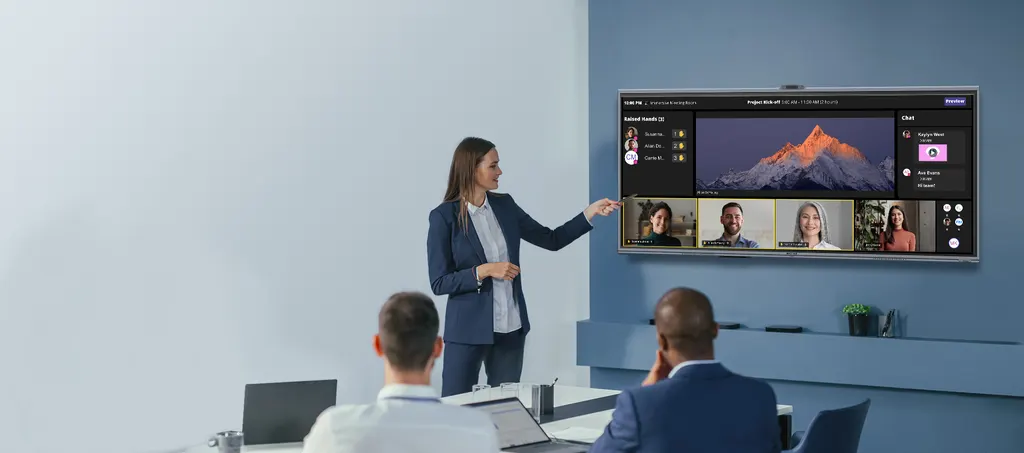
XBoard for Microsoft Teams Rooms
MAXHUB XBoard for Microsoft Teams Rooms 55-92 inch Collaboration Board
- Resolution
- 3840x2160
- Touch
- Intelligent Touchscreen…
- System
- Windows 11 lOT
- Storage
- 256GB SSD(M.2)
The MAXHUB XBoard for Microsoft Teams Rooms is a collaboration board for meeting rooms, combining a 3840x2160 touch display, a 50MP camera, a 16-microphone array and a slot-in Windows 11 IoT PC. It suits boardrooms, training rooms and hybrid meeting spaces in Doha, Lusail and West Bay that run Microsoft Teams Rooms. Sizes run from 55 to 92 inches. Request a quote for the size that fits your room.
What the MAXHUB XBoard is
The MAXHUB XBoard for Microsoft Teams Rooms brings the display, camera, microphones, speakers and computer for a meeting room into one unit. The series is offered in 16:9 sizes of 55, 65, 75 and 86 inches, plus a 92-inch version with a 21:9 aspect ratio. The panel is a 3840x2160 display with a 25% haze non-glare surface, a 178-degree viewing angle and 90% NTSC colour gamut, so content stays readable from across a room.
Camera, microphone and audio for hybrid meetings
A wide 50MP camera with an 86-degree horizontal field of view works alongside two 50MP telephoto cameras that combine to 72 degrees, with hybrid 5x zoom. AI auto framing, speaker tracking, multi-speaker tracking and intelligent focus keep the right people in the frame as they move. A 16-microphone array covers a 180-degree pickup angle, with a best distance of 8 m and a maximum of 15 m, and adds echo cancellation, noise cancellation and automatic gain control. The 2.1 sound channel delivers 2x10W+20W speaker power, and up to three UC BM45 expansion speakerphones can connect for larger tables.
Touch, built-in PC and connectivity
The infrared touch system supports 50 touch points, recognises objects from 1.5 mm and has a writing height of 1 mm or less, which supports pick-and-write whiteboarding. The slot-in PC module is included with the board and provides a 12th gen Intel Core i5-1240P, 16GB DDR4 memory, a 256GB M.2 SSD, Windows 11 IoT, TPM 2.0, Wi-Fi 6 and Bluetooth 5.1. Ports include three USB-A 3.0, an HDMI input for content sharing, Ethernet and an RJ45 connection for the optional TCP30T touch console. Two HDMI outputs are provided for future use and do not support a second display in Teams Rooms mode at present.
Where it fits in Qatar
- Government and ministry meeting rooms in Doha: hybrid meetings with colleagues in other cities or abroad, using the SIP/H.323 calling and cross-cloud meeting capabilities listed in the product data.
- Seminar and training rooms in Education City: an instructor presents from the board while the camera follows the speaker and the touch surface supports live annotation.
- Boardrooms in West Bay or Lusail: executives join from Doha and abroad, and a 92-inch 21:9 display gives wide layouts for shared documents.
What to plan before ordering
Choose the size by room depth, seating distance and wall width. Before wall-mounting an 86-inch or 92-inch unit, arrange a free site survey to check the wall, power and network points. Summer temperatures in Qatar can exceed 45 degrees Celsius, and the source data does not state an operating temperature range for this board, so confirm the installation environment with the SmartRooms Qatar team before placing it in a non-air-conditioned or window-facing space. The product is covered by the manufacturer's warranty, which the manufacturer states as 3 years for its portfolio, and the board is ENERGY STAR-certified. Purchase orders (LPOs) and government tenders are supported, and quotations are usually issued within one working day.
Send your room dimensions, seating layout and number of units to SmartRooms Qatar and request a quote for a configuration matched to your meeting space.
Highlights
- 3840x2160 display with 25% haze non-glare surface
- Slot-in PC: Intel Core i5-1240P, 16GB memory, 256GB SSD
- 50MP cameras with 5x hybrid zoom and AI speaker tracking
- 16-mic array with 180-degree pickup up to 15m
- Infrared touch with 50 touch points
- ENERGY STAR-certified with a 3-year manufacturer warranty
Estimated timeline
Quotation within 1 working day · delivery timing depends on stock availability, and we confirm it with your quotation.
Specifications
XBoard for Microsoft Teams Rooms44
- Display · Surface Technology
- 25% haze; Non-glare technology
- Display · Resolution
- 3840x2160
- Display · Refresh Rate
- 60 Hz
- Display · Viewing Angle (HxV)
- 178"/178°
- Display · Color Gamut
- 90% NTSC
- Display · Display Orientation
- Landscape
- Display · Response Time
- 8 ms
- Display · Life Time
- >50,000 hours
- Display · Operation Hours (Hour / Day)
- 16 / 7
- Display · Display Color
- 1.07 B (10 bit)
- Display · Color Accuracy
- Delta E ≤ 1.5
- Display · Sensor
- Ambient light sensor; Motion sensor
- Connectivity · HDMI In (2.0) x 2
- To Connect an external source (disabled as default)
- Connectivity · USB-A 2.0 x 1
- To pair with wireless dongle -WTl3M/WT13S To connect keyboards or mouse, etc.
- Connectivity · Audio In x 1
- To connect an external audio source to make XBoard a speaker
- Connectivity · Audio Out x 1
- 3.5 mm mini-jack, to connect an external speaker system
- Connectivity · RS232 x1
- 9 pin
- Connectivity · Mic In (RJ45) x 1
- To Connect up to a maximum of three UC BM45 as expansion speakerphones
- Connectivity · Wireless Access Point
- Yes (for wireless presentation )
- Camera · Wide Camera
- 50MPx1 HFOV 86°
- Camera · Telephoto Camera
- 50MP x 2 HFOV (combined) 72°
- Camera · Zoom
- Hybrid 5x
- Camera · Al Features
- Auto framing Speaker tracking Multiple-speaker tracking Intelligent focus
- Audio · Sound Channel
- 2.1
- Audio · Speaker Power
- 2x10W+20W
- Microphone · Quantity
- 16-mic array
- Microphone · Pick-up Angle
- 180°
- Microphone · Pick-up Range
- Best distance-8m / 26.2ft Maximum distance 15m / 49.2ft
- Microphone · Feature
- Intelligent audio fence Al spatial sound AEC (Auto echo cancellation) ANC (Al noise cancellation) AGC (Auto gain control)
- Touch System · Touch Technology
- Intelligent Touchscreen Technology (infrared recognition)
- Touch System · Touch Point
- 50 points touch
- Touch System · Object Recognition Range
- ≥1.5 mm (0.06 inch)
- Touch System · Accuracy
- ±0.5 mm(0.02 inch)
- Touch System · Response Time
- ≤2.5 ms
- Touch System · Writing Height
- ≤ 1 mm (0.04 inch)
- PC Module (Slot-in,included in the package) · CPU
- 12th gen Intel Core i5-1240p
- PC Module (Slot-in,included in the package) · GPU
- Intel® Iris® Xe Graphics eligible
- PC Module (Slot-in,included in the package) · Memory
- 16GB DDR4 (8GB x2)
- PC Module (Slot-in,included in the package) · Storage
- 256GB SSD(M.2)
- PC Module (Slot-in,included in the package) · Operating System
- Windows 11 lOT
- PC Module (Slot-in,included in the package) · TPM 2.0
- Yes
- PC Module (Slot-in,included in the package) · Inputs & Outputs
- USB-A 3.0 x3 HDMlIn (2.0)x1* (Content share in Teams Rooms mode) HDMI Outx2 (For future use, do not support a 2nd display in teams room mode currently) RJ45 x1(Ethernet) RJ45x1 (For optional touch console -TCP30T)
- PC Module (Slot-in,included in the package) · Wi-Fi
- Wi-Fi 6
- PC Module (Slot-in,included in the package) · Bluetooth
- Bluetooth 5.1




