





Thursday, 22 October 2026 · 11 Jumada I 1448 AH Sun – Thu · 9:00 – 18:00
+971 56 914 9477 العربية
WhatsApp

86" C Series

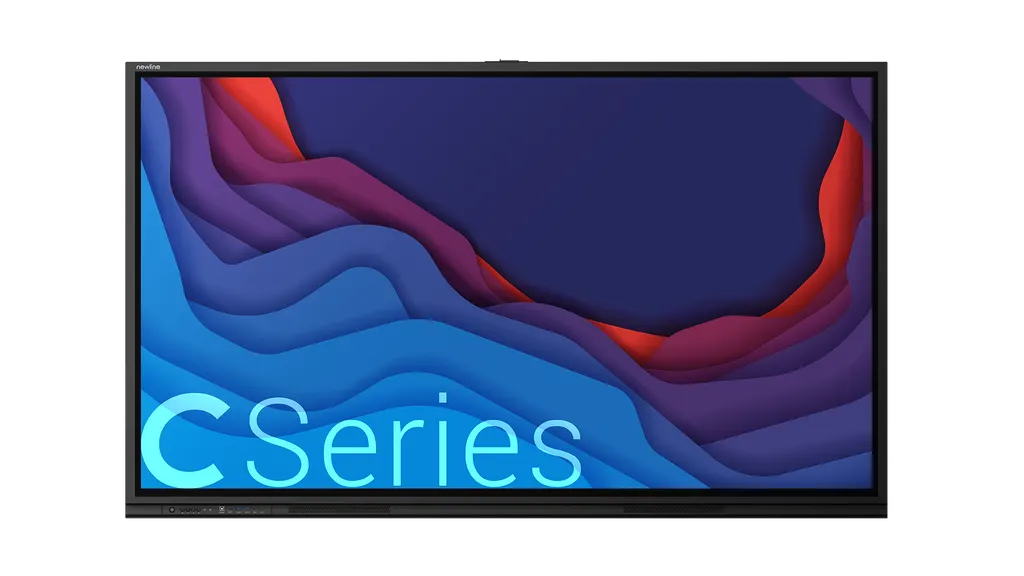
Newline 86-inch C Series 4K Interactive Display

Screen size
86″
Resolution
3840 × 2160 (4K)
Touch
Infrared Touch(IR)
Brightness
400 cd/m²
WhatsApp
Priceon request
QuotationWithin 1 working day
DeliveryConfirmed with your quote, based on stock
Overview

The Newline 86-inch C Series is a 4K LCD interactive display with a 1896 x 1066 mm display area, infrared touch for up to 40 points, and a single USB Type-C connection for video, audio, power, data and touch. It has no built-in operating system, so a laptop, desktop or Mini PC supplies the software. It suits boardrooms, lecture halls and training rooms in Doha, Lusail and Education City that need one large surface for the whole group. Request a quote.

A 4K interactive display for large shared spaces

The Newline 86-inch C Series is an LCD interactive display with a direct LED backlight, a 3840 x 2160 (4K) panel and a display area of 1896 x 1066 mm. It is the largest model in the C Series range, which makes it the right choice when a room needs one surface that a whole group can read and touch. The 178° viewing angle keeps content legible from the side seats of a lecture hall or the far end of a boardroom table.

Touch uses infrared technology and supports up to 40 points. The datasheet rates that at 40 points on Windows and 20 points on Android, macOS and Linux, so confirm the figure that matches your operating system before you specify the panel. The surface is anti-glare glass with certified zero bonding, and the response time is 5 ms, which keeps writing and annotation responsive.

No on-board operating system: what it means in practice

The panel has no built-in operating system. Your laptop, desktop, Chromebox or Mini PC supplies the software, so IT teams keep the security and update policies they already run. A single USB Type-C cable carries video, audio, power, data and touch from a laptop. For a Windows computer inside the display itself, an OPS computer module fits the rear OPS slot.

Ports, sound and the figures to check on site

  • Front: one USB Type-C, one HDMI IN 2.0 (4K at 60 Hz), two USB 3.0 Type-A, one USB 2.0 Type-B touch port and a microphone input
  • Rear: two HDMI IN 2.0, one VGA input, one USB Type-C camera slot, one OPS slot, one RS232, one gigabit RJ45 in and out, one SPDIF and one 3.5 mm line out, plus an embedded USB 2.0 Type-A port
  • Two 15 W front-facing speakers
  • Power consumption of 146 W in standard mode and below 0.5 W in standby
  • Net weight 74 kg, outline dimensions 1981 x 1186 x 111 mm, VESA pattern 800 x 400 mm

Where it fits in Qatar

A boardroom in West Bay that holds hybrid meetings with colleagues abroad can use the panel as one shared screen for documents and video calls, with the laptop connected by a single cable. A seminar room in Education City can run interactive lectures for a larger class, where the 40-point touch lets several students work on the board at the same time. In the Industrial Area, a training centre can use it for safety briefings and induction sessions where diagrams need to be annotated on the spot.

Government offices often buy through tenders, including Monaqasat, or against a purchase order (LPO). A buyer working that way can request one quotation that covers the panel, delivery and professional installation together.

Planning the wall, room and power

At 74 kg, the panel needs a wall or frame rated for its weight, and the 800 x 400 mm VESA pattern must match the mount. Book a free site survey before fixing anything, so the wall, the cable route and the distance from windows and doors are checked. The source data does not give an operating temperature range, so confirm the room conditions with the SmartRooms Qatar team before placing the panel near a window, a lobby or a sunlit wall, where Qatar summer heat and dust can matter. Keep the rear connections accessible for an OPS module or a camera.

The panel is covered by the manufacturer's warranty, and SmartRooms Qatar supplies, delivers to all 8 municipalities and installs it professionally.

Request a quote from SmartRooms Qatar for the 86-inch C Series. We will usually send the quotation within one working day, with installation planned around your site survey.

Highlights

  • 86-inch 4K LCD panel with a 1896 x 1066 mm display area
  • Infrared touch supporting up to 40 points
  • Single USB Type-C cable for video, audio, power, data and touch
  • No on-board OS; works with your laptop, desktop or OPS module
  • 178° viewing angle with anti-glare glass
  • Net weight 74 kg with 800 x 400 mm VESA pattern

Classroom fit

At 86″ the farthest student should sit within about 6.4 m (6× the screen height).

Estimated timeline

Quotation within 1 working day · delivery timing depends on stock availability, and we confirm it with your quotation.

Specifications

9 specifications · Source: manufacturer · checked Oct 2026
86" C Series9
General · Screen Size
86″
General · Display Area(mm)
1896 x 1066
General · Net Weight(kg)
74
General · Screen Type
LCD (Direct LED Backlight)
General · Resolution
3840 × 2160 (4K)
General · Brightness
400 cd/m²
General · Viewing Angle
178°
General · Touch Technology
Infrared Touch(IR)
General · Touch Points
Up to 40 Points

Downloads

0 files from the manufacturer
No downloadable files are listed for this model yet. Ask us and we will send the datasheet.

Questions about 86" C Series

Who is the 86-inch C Series designed for?
The 86-inch C Series suits rooms where a large group needs one shared screen, such as a boardroom in West Bay, a lecture hall in Education City or a training room in the Industrial Area. Its 1896 x 1066 mm display area and 40-point touch let several people write or annotate at the same time, while the 178° viewing angle keeps content readable from the side seats. It is a practical fit for teams that run long sessions on one large surface.
What sets the 86-inch model apart from the other C Series sizes?
The 86-inch model is the largest size in the C Series. It has a net weight of 74 kg and outline dimensions of 1981 x 1186 x 111 mm, and it uses an 800 x 400 mm VESA pattern. Choose this size when the room is large enough to need it and the wall can carry the weight. A site survey will confirm the wall, the viewing distance and the space around the panel before you order.
Does the panel come with an operating system?
No. The C Series has no on-board operating system, so it displays whatever your laptop, desktop, Chromebox or Mini PC sends to it. IT teams keep their existing software and security policies. If you want Windows running inside the display, add an OPS computer module to the rear OPS slot. The manufacturer lists the system as No OS, so the software always comes from the device you connect.
How many people can touch the screen at once?
Infrared touch supports up to 40 points. The datasheet rates 40 points on Windows and 20 points on Android, macOS and Linux, so check which operating system your teaching or meeting software runs on. The panel accepts a passive pen, a finger or a fist, and two styluses come with it. In a classroom in Doha or a meeting room in Lusail, several students or staff can annotate together.
How do I connect a laptop with a single cable?
Connect the laptop to the front USB Type-C port with one USB-C cable. The datasheet describes that cable as carrying audio, video, power, data and touch, which makes it the quickest setup for a presenter who needs to start a meeting at once. For a second source, use the front HDMI IN 2.0 port, which supports 4K at 60 Hz. Confirm that your laptop's USB-C port supports video output before you buy.
What inputs and outputs does the panel have?
At the front there is one USB Type-C port, one HDMI IN 2.0 (4K at 60 Hz), two USB 3.0 Type-A ports, one USB 2.0 Type-B touch port and a microphone input. At the rear there are two HDMI IN 2.0 ports, one VGA input, one USB Type-C camera slot, one OPS slot, one RS232 port, a gigabit RJ45 input and output, one SPDIF output, one 3.5 mm line out and an embedded USB 2.0 Type-A port. Map these to your AV plan before the site survey.
Is the 4K resolution and 178° viewing angle enough for a large room?
Yes for content that must be read across a big space. The 3840 x 2160 resolution keeps text and diagrams sharp, and the 178° viewing angle keeps them readable from many seats. The panel is rated at a 4000:1 contrast ratio and a 5 ms response time. The manufacturer's specification table lists brightness at 400 cd/m², while its datasheet gives 450 cd/m² for this size, so confirm the figure on your quotation.
Can the panel be wall-mounted in a boardroom, and what should I plan for?
It can, because the panel has an 800 x 400 mm VESA pattern. At 74 kg, however, the wall or frame must be checked before fixing. SmartRooms Qatar offers a free site survey and professional installation. Plan the cable route, the power supply and access to the rear ports, and check how the panel will be lifted into place, since it is a heavy single-person-unsafe install.
How does the panel cope with Qatar's summer heat and dust?
The source data does not give an operating temperature range, so we cannot quote one. Ask the SmartRooms Qatar team to confirm the room conditions during the site survey, and avoid positions that receive direct sun from a window or sit in an open lobby exposed to dust. This matters most in summer, when outdoor temperatures in Qatar regularly exceed 45°C and rooms with large glass areas heat up quickly.
How much power does it draw, and why does it matter for procurement?
The panel draws 146 W in standard mode and below 0.5 W in standby. These figures help when you plan circuits for several rooms in a school, office or training centre. Newline lists EPEAT Silver certification for its displays, which many procurement teams ask about. Check the current certification status before you include the model in a tender submission.
Can a government office buy this model through a tender or purchase order?
Yes. SmartRooms Qatar supplies government tenders, including Monaqasat, and accepts purchase orders (LPOs), with payment by bank transfer, cheque or purchase order. The service covers delivery to all 8 municipalities of Qatar and professional installation, and the product is covered by the manufacturer's warranty. Quote the tender reference when you request a quotation so the document matches your submission.
What should I send when I request a quote for this panel?
Send the room dimensions, the wall type and the planned mounting position, the number of devices you will connect and their ports, and whether you need an OPS computer module. If the purchase is for a tender or an LPO, include the reference number. SmartRooms Qatar usually replies with a quotation within one working day and arranges a free site survey before installation.

Similar models

BenQ CM7505 BenQ Board CM7505 75-inch Interactive Display
75″ UHD 3840 × 2160 pixels Ultra Precision IR
SMART SBID-6286S-V3 SMART Board 6086S-V3 86-inch Interactive Display with iQ
86″ 4K UHD (3840 × 2160) HyPr Touch with InGlass
SMART SBID-6286S-V3-P SMART Board 6086S-V3 Pro 86-inch Interactive Display with iQ
86″ 4K UHD (3840 × 2160) HyPr Touch with InGlass
Clevertouch Clevertouch Edge 65" Clevertouch Edge 65" 4K Interactive Display with Camera and Speakers
65″ 4K UHD (3840x2160 @60Hz) Android 15
Clevertouch Clevertouch Edge 86" Clevertouch Edge 86" 4K Interactive Flat Panel
86″ 4K UHD (3840x2160 @60Hz) Android 15
Email Call




