





Thursday, 22 October 2026 · 11 Jumada I 1448 AH Sun – Thu · 9:00 – 18:00
+971 56 914 9477 العربية
WhatsApp

Google EDLA OPS PC

Newline Google EDLA OPS PC Android 15 OPS Computer

System
Android 15
Memory
16 GB
Storage
256 GB
WhatsApp
Priceon request
QuotationWithin 1 working day
DeliveryConfirmed with your quote, based on stock
PDFDownload datasheet (OPS_EDLA_PC_Specsheet_Newline_EN_Web_v26.pdf)
Overview

The Newline Google EDLA OPS PC is an Android 15 computer module for Newline interactive displays that lack native EDLA certification. It brings Google Play and Google Workspace apps to the panel, backed by a Rockchip RK3588 processor, 16 GB DDR4 memory and a 6 TOPS NPU, with WiFi 6 and Bluetooth 5.0. It suits schools, government offices and companies in Qatar that want Google tools on existing Newline screens. Request a quote.

What this OPS computer adds to a Newline display

The Newline Google EDLA OPS PC is an Android 15 computer module for compatible Newline interactive displays. It is made for panels that do not carry native EDLA certification, giving them access to Google Play and Google Workspace tools such as Docs, Sheets, Slides and Drive. Teachers and staff can open these apps directly on the panel instead of connecting a separate computer.

Processing power, memory and AI capacity

The unit runs on a Rockchip RK3588 processor with an 8-core CPU, made up of four Cortex-A76 cores at 2.4 GHz and four Cortex-A55 cores at 1.8 GHz. It has 16 GB of DDR4 memory, an ARM Mali-G610 MP4 GPU and a dedicated NPU rated at 6 TOPS. These figures matter when several apps, a video call and a shared whiteboard run at the same time, which is typical in a boardroom or a busy classroom.

  • Memory: 16 GB DDR4
  • Connectivity: WiFi 6 on 2.4 GHz and 5 GHz, Bluetooth 5.0, 10/100/1000M wired LAN
  • Operating system: Android 15 with multiuser management and OTA updates

Ports and controls on the unit

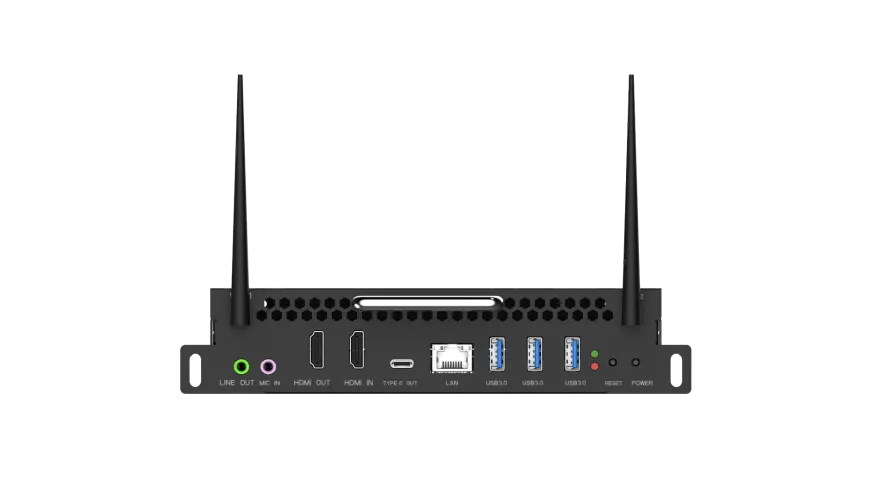
The front I/O panel provides three USB-A 3.0 ports, one USB-C port, one RJ45 10/100/1000M network port, one HDMI OUT 2.1 and one HDMI IN 2.1, both rated for 4K at 60 Hz. Two 3.5 mm jacks handle microphone input and line output. Power, reset and status LED controls are on the unit. Keeping the USB-A ports free for keyboards and other peripherals helps when several people share one display.

Where it fits in Qatar

A private school in Al Wakrah with Newline panels in several classrooms could add the OPS PC to rooms that need Google Workspace for group work, so teachers do not have to move laptops between rooms. A consultancy in West Bay that runs client meetings from a boardroom screen could use it to edit cloud documents during a call. A training centre in Education City could use the multiuser management and OTA update features to manage several units from one place.

Planning for heat, power and installation

The operating range is 0°C to 45°C, with storage between -20°C and 70°C and humidity from 5% to 95% non-condensing. Summer temperatures in Qatar can go above 45°C, so the display and OPS unit should sit in an air-conditioned room. The SmartRooms Qatar team can help you confirm the environment before a quotation is issued. The working voltage is DC 19 V at 3 A. The unit measures 180 x 119 x 42 mm and weighs 0.76 kg net, so confirm the fitting space on site. We offer a free site survey when a panel is going into a new room or lobby.

Send your Newline display model and room details to SmartRooms Qatar and request a quote. Quotations are usually issued within one working day, and we deliver to all eight municipalities of Qatar.

Highlights

  • Android 15 with Google EDLA certification
  • Rockchip RK3588 processor with an 8-core CPU
  • 16 GB DDR4 memory and 6 TOPS NPU
  • WiFi 6 on 2.4 GHz and 5 GHz, plus Bluetooth 5.0
  • HDMI 2.1 in and out, 4K at 60 Hz
  • Operating range 0°C to 45°C; CE, REACH, RoHS certified

Estimated timeline

Quotation within 1 working day · delivery timing depends on stock availability, and we confirm it with your quotation.

Specifications

10 specifications · Source: manufacturer · checked Oct 2026
General10
Name
EDLA OPS PC
Part Number
WB76110A
CPU
RK3588
GPU
GPU ARM Mali-G610 MP4
NPU
6 TOPS
Storage
256 GB
RAM
16 GB
WiFi
WiFi 6 2.4GHz + 5GHz
Bluetooth
Bluetooth 5.0
OS
Android 15

Downloads

4 files from the manufacturer

Questions about Google EDLA OPS PC

Which displays can take the Newline Google EDLA OPS PC?
It is made for Newline interactive displays that lack native EDLA certification. The data we hold does not list every compatible panel, so confirm your display model with the SmartRooms Qatar team before requesting a quote. The unit, part number WB76110A, is intended for Newline panels used in schools, offices and government rooms across Qatar.
What Google services come with the OPS PC?
The unit gives access to Google Play and Google Workspace tools, including Docs, Sheets, Slides and Drive, on the Android 15 system. Teams can edit documents together on the panel and share content in real time. According to the manufacturer, the Google EDLA certification covers compatibility with Google Workspace applications, so the same tools work as they do on a laptop.
How powerful are the processor and memory?
It uses a Rockchip RK3588 with an 8-core CPU: four Cortex-A76 cores at 2.4 GHz and four Cortex-A55 cores at 1.8 GHz. It has 16 GB of DDR4 memory, an ARM Mali-G610 MP4 GPU and a dedicated NPU rated at 6 TOPS. In a school or boardroom running a whiteboard, a video call and cloud documents together, this headroom keeps multitasking smooth.
What ports does the unit have?
The front I/O includes three USB-A 3.0 ports, one USB-C port, one RJ45 port for 10/100/1000M Ethernet, one HDMI OUT 2.1, one HDMI IN 2.1 and two 3.5 mm jacks for microphone input and line output. Power, reset and LED controls are on the unit. Check cable lengths and access to the ports with your installer before fitting it.
Does it support 4K video?
Both HDMI ports are listed as HDMI 2.1 supporting 4K at 60 Hz. Use cables rated for HDMI 2.1 bandwidth when running 4K60 signals. Confirm the input and output path with SmartRooms Qatar when planning a lecture hall or conference room where the source and the display must match.
What wireless and network options are included?
The unit has WiFi 6 on both 2.4 GHz and 5 GHz, Bluetooth 5.0 and a 10/100/1000M wired LAN port. In a bank branch or a hotel meeting floor in Doha, the wired port can give a stable connection while wireless covers mobile devices. Plan the network, including access points and address allocation, with your IT team before installation.
Can it run Newline's own software?
The specification lists compatibility with Cast+, Signage Pro, Whiteboard, Display Management Plus, Classroom Tools, Vote and Visualizer from the Newline software ecosystem. A school in Al Wakrah using Classroom Tools and Vote in several classrooms could run them on the panels the unit serves. The data does not give software version numbers, so check licence and version needs with the team before buying.
How hot can the room get for this unit?
The operating temperature range is 0°C to 45°C, storage is rated from -20°C to 70°C, and humidity is 5% to 95% non-condensing. Qatar summer temperatures can exceed 45°C, so keep the display and OPS unit in an air-conditioned room, especially in a lobby with glass frontage or a room facing west. Confirm room conditions with SmartRooms Qatar before you request a quote.
What power does the OPS PC need?
The working voltage listed in the specification is DC 19 V at 3 A. That is the unit's rating and not the mains voltage on the wall. Ask the SmartRooms Qatar team how the unit will be powered in your installation, including whether the display provides this supply, before you plan cabling in a new office fit-out in Lusail or The Pearl.
How big is it and can it be fitted behind a panel?
Dimensions are 180 x 119 x 42 mm, with a net weight of 0.76 kg and a gross weight of 0.9 kg. The manufacturer's manuals reference a 30 mm slim version and a 42 mm regular version, and the specification for this model lists 42 mm. The small footprint may suit a rear or side fitting, but confirm clearance on site through a free site survey.
Can an IT team manage several units remotely?
The specification lists over-the-air (OTA) updates and multiuser management. For a school group or a government ministry with many rooms, this means updates can be delivered without visiting each room. Ask your IT team which management tools suit your network, and ask SmartRooms Qatar to confirm the configuration you will receive.
How do I buy this from SmartRooms Qatar?
Send the display model, the number of units and the site location, and request a quote. Quotations are usually issued within one working day. We supply, deliver and install across all eight municipalities of Qatar, accept purchase orders (LPOs) and government tenders including Monaqasat, and accept payment by bank transfer, cheque or purchase order. Products are covered by the manufacturer's warranty.

Similar models

Hisense OPS72D/72E Hisense OPS72D/72E OPS On Board Computer for Interactive Displays
8GB
Clevertouch OPS i5 Clevertouch OPS i5 PC Module with Intel Core i5 and 256GB SSD
Windows 11 - Home / Pro /… Memory: 16GB DDR4
Clevertouch OPS i7 Clevertouch OPS i7 PC Module with Intel Core i7 13620H
Windows 11 - Home / Pro /… 16GB DDR4
Hikvision DS-D5AC12G5-8S2 Hikvision DS-D5AC12G5-8S2 OPS Module for Interactive Panels
8G 256G
Hikvision DS-D5AC13G7-16S5 Hikvision DS-D5AC13G7-16S5 OPS Module with Intel Core i7-13620H
16G 512G
Email Call




