





Thursday, 22 October 2026 · 11 Jumada I 1448 AH Sun – Thu · 9:00 – 18:00
+971 56 914 9477 العربية
WhatsApp

Elara Pro

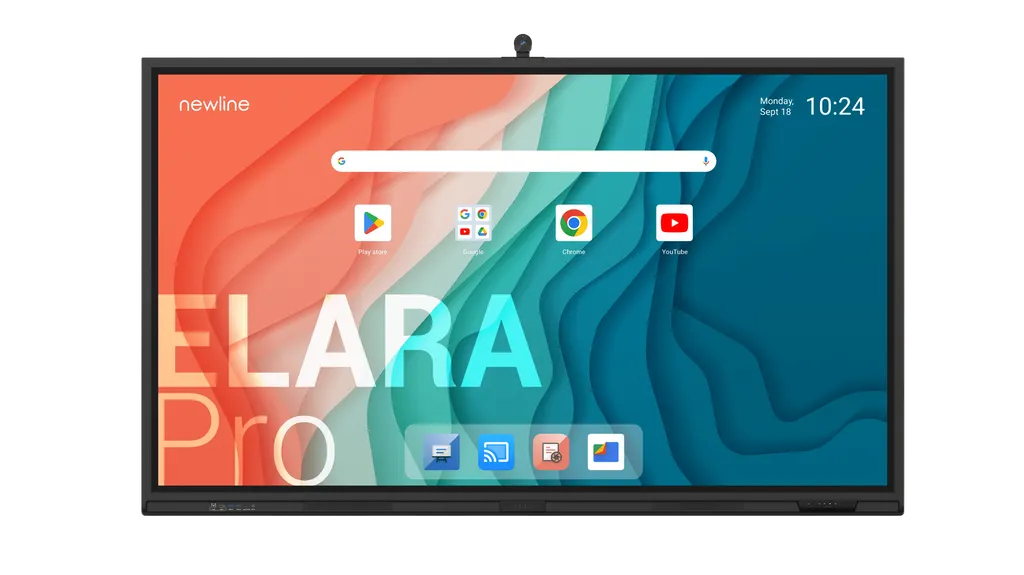
Newline Elara Pro Android 15 Interactive Display

WhatsApp
Priceon request
QuotationWithin 1 working day
DeliveryConfirmed with your quote, based on stock
PDFDownload datasheet (ElaraProQCA_Newline_Specsheet_EN_v3.pdf)
Overview

A 4K interactive display running Android 15 with Google EDLA certification, sold in 65, 75 and 86-inch sizes. Its 100 W USB Type-C port charges a connected laptop during use, while built-in Wi-Fi 6 and a 4K ModCam+ camera support video calls. It suits Doha classrooms, boardrooms and hybrid meeting rooms that need one screen for teaching, meetings and collaboration.

A single screen for teaching, meetings and video calls

The Newline Elara Pro is a 4K interactive display built for rooms where lessons, presentations and video calls share one panel. It runs Android 15 on a Rockchip RK3588 octa-core processor, with 16 GB of DDR4 memory and 320 GB of expandable storage. The 3840 x 2160 panel delivers 450 cd/m² brightness, a 5000:1 contrast ratio and a 5 ms response time, with a 178° viewing angle, so people seated across the room can read the same content.

Google EDLA certification and the interactive software

The Elara Pro carries Google EDLA (Enterprise Device Licensing Agreement) certification, which the manufacturer presents as confirmation of compatibility with Google applications and services. Staff and students can sign in with an NFC card or sticker rather than typing a password, which keeps credentials out of sight in a shared room. The Newline Interactive Ecosystem adds tools for starting video conferences, concept mapping, screen sharing and broadcasting. The model also carries EPEAT Silver certification, which the manufacturer links to lower energy use and responsible materials.

Connections, camera and power

  • Front USB Type-C: rated at 100 W, to charge a connected laptop during use.
  • Video inputs: HDMI IN 2.1 with HDCP 2.2 at 4K 60 Hz, two at the rear and one at the front, plus DisplayPort 1.2 at the rear.
  • Expansion: OPS slot, SDM-S slot and a Wi-Fi module slot at the rear.
  • Camera: ModCam+ 4K camera with a 120° field of view at 30 fps.
  • Audio: two 20 W front-facing speakers and a 20 W subwoofer.
  • Power draw: 116 W, 124 W and 150 W in standard mode for the 65, 75 and 86-inch sizes, under 0.5 W in standby.

Where it fits in Qatar

A private school in Al Wakrah refitting classrooms could use the 65-inch model in a smaller room, with the ModCam+ camera for hybrid lessons. A research group in Education City could place the 75-inch model in a seminar room for presentations and calls with partners abroad. In a boardroom in West Bay or Lusail, the 86-inch model suits a team reviewing documents together while joining colleagues from other sites.

What to plan before installation

Weight rises from 39 kg at 65 inches to 52 kg at 75 inches and 65 kg at 86 inches, so the wall or stand must be assessed for that load. VESA mounting patterns are 600 x 400 mm for the 65-inch model and 800 x 400 mm for the 75 and 86-inch models. The manufacturer describes dimensions and weights as indicative, so confirm them before fixing. The source data does not give an operating temperature range, so have the SmartRooms Qatar team confirm the room environment and ventilation before installation.

SmartRooms Qatar offers free site surveys, professional installation and delivery to all eight municipalities of Qatar. Schools and government bodies can order on a purchase order (LPO) or tender. Send us the room size, number of units and mounting type, and our team will return a quotation, usually within one working day. Request a quote today for the Elara Pro size that fits your room.

Highlights

  • Android 15 operating system with Google EDLA certification
  • 4K panel at 3840 x 2160 with 450 cd/m² brightness
  • Built-in Wi-Fi 6 and Bluetooth 5.2 module
  • 100 W USB Type-C port charges a connected laptop
  • ModCam+ 4K camera with 120° field of view
  • Available in 65, 75 and 86-inch sizes

Estimated timeline

Quotation within 1 working day · delivery timing depends on stock availability, and we confirm it with your quotation.


Specifications

Source: manufacturer · checked Oct 2026
The full specification and datasheet for this model are available on request; we send them with your quotation.

Downloads

5 files from the manufacturer

Questions about Elara Pro

Which sizes and model codes does the Elara Pro come in?
The Elara Pro is listed in three sizes: 65-inch (TT-6523QCA+), 75-inch (TT-7523QCA+) and 86-inch (TT-8623QCA+). The 65-inch display area measures 1428 x 803 mm, while the 86-inch area measures 1895 x 1066 mm. Choose the size by room length and the distance to the furthest seat, and ask SmartRooms Qatar to confirm the exact model code in your quotation.
Is the Elara Pro suited to a classroom or a boardroom?
Yes. The 65-inch size suits smaller classrooms and meeting rooms, while the 86-inch size suits large classrooms and boardrooms where people sit farther back. The 4K resolution, 5000:1 contrast ratio and 5 ms response time keep slides and handwritten notes clear. The built-in ModCam+ camera and speakers cover the basics of a mixed in-room and remote meeting.
What does Google EDLA certification mean for my school or office?
Google EDLA (Enterprise Device Licensing Agreement) certification means the manufacturer states the panel is compatible with Google applications and services. Staff can edit shared documents and share ideas during a meeting. Before rollout, check which Google accounts and licences your organisation uses, because access depends on your own setup.
Does the Elara Pro accept 4K video input?
Yes. It has two HDMI IN 2.1 ports at the rear and one at the front, each with HDCP 2.2 support for 4K at 60 Hz. A DisplayPort 1.2 input is also at the rear. To get full 4K at 60 Hz, your laptop or source device must output that resolution, so list your source devices when you request a quote.
How does the 100 W USB Type-C port work?
The front USB Type-C port is rated at 100 W, and the manufacturer says it keeps a connected laptop charged during use. That lets a teacher connect one laptop and start a lesson quickly. Check that your laptop charger and USB-C cable support the full wattage before buying, because the charging level depends on the device.
Can the Elara Pro be wall-mounted in a Doha office?
Yes, with a suitable wall or stand. The VESA pattern is 600 x 400 mm for the 65-inch model and 800 x 400 mm for the 75 and 86-inch models. The 86-inch panel weighs 65 kg, so have the wall checked for load first. SmartRooms Qatar offers free site surveys before installation, and professional installation can be included in your quotation.
How should I plan the ports and cable routing in a lecture hall?
Plan cable routes before fixing the panel. The front has a USB Type-C port, HDMI input, USB Type-A ports and a microphone input. The rear adds more HDMI and DisplayPort inputs, RJ45 networking, RS232 control, an audio line out and OPS and SDM-S slots. Ask SmartRooms Qatar to confirm the position of power outlets and cable trunking for a lecture hall in Education City.
What are the OPS and SDM-S slots for?
The OPS slot accepts a compatible computer module that follows the Open Pluggable Specification standard, a common way to add a PC inside a display. The SDM-S slot takes a compatible display module. The datasheet lists both slots and describes the panel as SDM-S ready. Confirm which modules are supported with SmartRooms Qatar before ordering, so the quotation matches your use.
Does the Elara Pro include Wi-Fi and Bluetooth?
Yes. It includes a Wi-Fi 6 and Bluetooth 5.2 module, which the datasheet lists as replaceable. The manufacturer says the Wi-Fi 6 module supports secure connectivity for up to 30 devices. A gigabit RJ45 port at the rear gives a wired option for rooms that prefer cabled networking.
How does the 65-inch model differ from the 86-inch model?
The 65-inch model (TT-6523QCA+) weighs 39 kg, draws 116 W in standard mode and uses a 600 x 400 mm VESA pattern. The 86-inch model (TT-8623QCA+) weighs 65 kg, draws 150 W and uses 800 x 400 mm. Both share the 4K panel, Android 15 platform and ModCam+ camera. Compare the dimensions against your wall space before choosing a size.
Can a Doha office use the Elara Pro for calls with teams abroad?
Yes. The ModCam+ 4K camera offers a 120° field of view at 30 fps, and two front-facing speakers with a subwoofer handle the audio. The panel connects to office networks by Wi-Fi 6 or by the rear RJ45 port. Choose your meeting software before ordering and confirm it works with your network policy and the Google-certified platform you plan to use.
Can a school in Qatar buy several Elara Pro panels on one LPO?
Yes. SmartRooms Qatar accepts purchase orders (LPOs) and can quote for several panels in one order, such as a set of classrooms or a floor of meeting rooms. If room sizes differ, list each model code on the order. Payment is by bank transfer, cheque or purchase order, and delivery covers all eight municipalities of Qatar.

Similar models

BenQ CM7505 BenQ Board CM7505 75-inch Interactive Display
75″ UHD 3840 × 2160 pixels Ultra Precision IR
SMART SBID-6286S-V3 SMART Board 6086S-V3 86-inch Interactive Display with iQ
86″ 4K UHD (3840 × 2160) HyPr Touch with InGlass
SMART SBID-6286S-V3-P SMART Board 6086S-V3 Pro 86-inch Interactive Display with iQ
86″ 4K UHD (3840 × 2160) HyPr Touch with InGlass
Clevertouch Clevertouch Edge 65" Clevertouch Edge 65" 4K Interactive Display with Camera and Speakers
65″ 4K UHD (3840x2160 @60Hz) Android 15
Clevertouch Clevertouch Edge 86" Clevertouch Edge 86" 4K Interactive Flat Panel
86″ 4K UHD (3840x2160 @60Hz) Android 15
Email Call


