





Thursday, 22 October 2026 · 11 Jumada I 1448 AH Sun – Thu · 9:00 – 18:00
+971 56 914 9477 العربية
WhatsApp

TT-6521IP

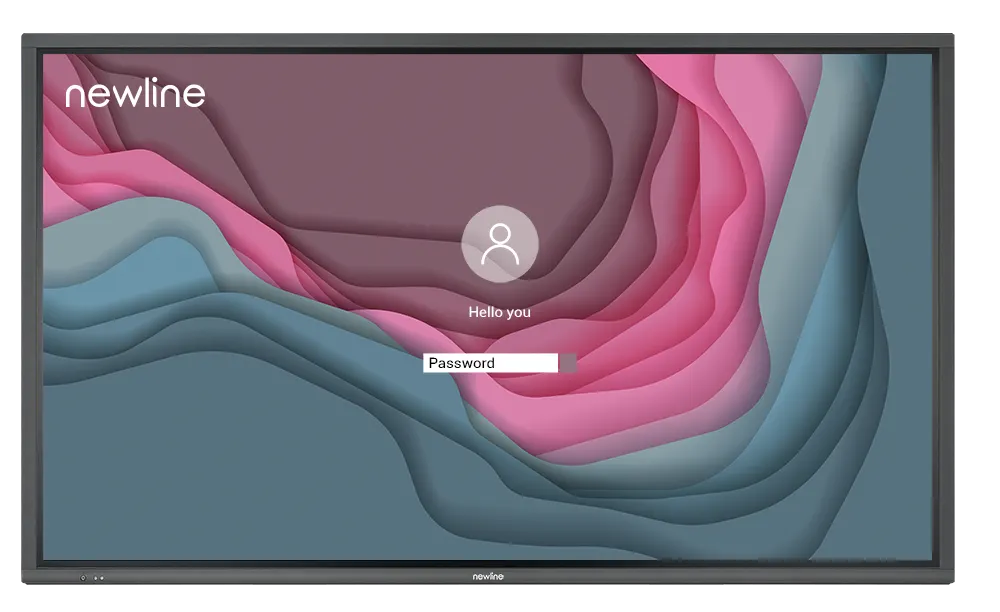
Newline TT-6521IP 65-inch Interactive Display with Linux OS

Screen size
65″
Resolution
3840 × 2160 (4K)
Touch
P-Cap
WhatsApp
Priceon request
QuotationWithin 1 working day
DeliveryConfirmed with your quote, based on stock
Overview

The Newline TT-6521IP is a 65-inch 4K interactive flat panel built on Linux rather than Android, with 20-point capacitive touch and a 178° viewing angle. Its OPS-PC slot lets you add an on-board PC, and its USB-C port carries video, audio, data and power over one cable. It suits meeting rooms and mid-sized classrooms in Doha, Lusail and Al Wakrah where network security matters. Request a quote.

A 65-inch interactive panel with a Linux platform

The Newline TT-6521IP is a 65-inch member of the IP+ Series of interactive flat panels. It combines a 4K LED display with projected capacitive touch and runs a Linux-based operating system instead of Android. For IT teams that must keep a shared screen on a corporate or school network, the operating system is the main reason to consider this model. Its active display area measures 1428 × 804 mm, and the unit weighs 36 kg net.

Why the Linux platform matters

The IP+ Series is designed for enterprise security. Administrators can keep control of the device and keep the network out of reach of visitors, while people who walk up to the screen can still use it easily. This separation suits government offices, banks and schools where a shared display must not become a route into internal systems.

Display, touch and connections

  • Picture: 3840 × 2160 (4K) resolution, 178° viewing angle, minimum 400 cd/m2 brightness and 4000:1 dynamic contrast.
  • Touch: projected capacitive touch with 20 touch points, an anti-glare surface and passive pen writing.
  • Video inputs: three HDMI inputs supporting 4K at 60Hz, with ARC on HDMI 1, plus one HDMI output.
  • USB and expansion: a USB-C 3.0 port rated for 60W power delivery, a USB 3.0 port, three USB Type-B touch connections and an OPS-PC slot for an on-board PC.
  • Audio and control: two 15 W speakers, a microphone input, audio line out, S/PDIF, RS-232 and an RJ-45 network connection.

Where the 65-inch size fits in Qatar

The 65-inch size suits a mid-sized classroom, a training room or a meeting room for a small team. A private school in Al Sadd fitting out a science room, or a company in Lusail equipping a project room, will find the display area large enough for group work without the weight and wall load of the larger models. In a government office in Msheireb, a shared meeting room can use the Linux platform to keep the network separate while staff connect laptops by USB-C with a single cable. A training centre in Education City or Al Rayyan can use the three HDMI inputs to switch between sources during sessions with colleagues in Doha and abroad.

What to plan before you order

Temperature is the first check. The working range is 0 to 40°C at 20 to 80% relative humidity, non-condensing, and storage is rated from -10 to 45°C. Qatar summer temperatures can exceed 45°C, so install the panel in an air-conditioned room away from direct sunlight rather than an open lobby or glazed corridor. Confirm the room conditions with the SmartRooms Qatar team before installation.

Power input is rated AC 100 to 240V, with maximum consumption of 350W, an eco mode figure of 250W and standby draw below 0.5W. Qatar's 240 V supply falls within this range, so confirm the power cord and socket arrangement during the site survey. The panel is wall-mounted or fitted to an optional mobile stand. Its outline size is 1509 × 865 × 86 mm, with a net weight of 36 kg and a gross weight of 46.5 kg, so plan for two people when lifting and check the wall structure first.

SmartRooms Qatar offers a free site survey, professional installation and delivery to all eight municipalities of Qatar. Quotations are usually issued within one working day, and we handle purchase orders (LPOs) and government tenders, including Monaqasat. Send your room dimensions, the number of units and your mounting preference, and request a quote for the TT-6521IP today.

Highlights

  • 65-inch 4K (3840 × 2160) LED display, 1428 × 804 mm active area
  • Linux-based operating system instead of Android
  • 20-point P-Cap touch with passive pen writing
  • 178° viewing angle and 400 cd/m2 minimum brightness
  • USB-C 3.0 port with 60W power delivery over one cable
  • OPS-PC slot for adding an on-board PC

Classroom fit

At 65″ the farthest student should sit within about 4.9 m (6× the screen height).

Estimated timeline

Quotation within 1 working day · delivery timing depends on stock availability, and we confirm it with your quotation.

Specifications

7 specifications · Source: manufacturer · checked Oct 2026
TT-6521IP7
General · Screen Size
65″
General · Display area (mm)
1428 × 804
General · Weight (kg)
36
General · Touch Technology
P-Cap
General · Resolution
3840 × 2160 (4K)
General · Viewing Angle
178°
General · Backlight
LED

Downloads

0 files from the manufacturer
No downloadable files are listed for this model yet. Ask us and we will send the datasheet.

Questions about TT-6521IP

Is the 65-inch TT-6521IP the right size for a classroom or meeting room in Doha?
Yes, for a mid-sized classroom, training room or meeting room for a small team. Its 1428 × 804 mm display area suits group work at a table or a short row of seats, and it weighs 36 kg net, which keeps wall loading lighter than the 75-inch and 86-inch models. For a large lecture hall or a boardroom with long viewing distances, the larger variants are better matches.
Why does the Linux-based system matter for a government office in Msheireb?
The IP+ Series replaces Android with a Linux-based operating system and is designed for enterprise security. Your IT team can keep the network out of reach of anyone who walks up to the screen, while staff and visitors can still use the display for presentations. For a ministry that shares meeting rooms with other departments, this separation reduces the risk that a shared panel becomes a way into internal systems. Discuss your security policy with the SmartRooms Qatar team when you request a quote.
Can a school in Education City or Al Sadd buy several units on an LPO?
Yes. SmartRooms Qatar accepts purchase orders (LPOs) and government tenders, including Monaqasat, and payment can be made by bank transfer, cheque or purchase order. Each TT-6521IP is quoted with its installation, so a school fitting out several classrooms can send one LPO for the full quantity. Quotations are usually issued within one working day. Tell the team the room count, mounting type and delivery address.
Can a 65-inch panel be wall-mounted in a West Bay boardroom?
Yes, the TT-6521IP is wall-mounted or fitted to an optional mobile stand. It has an outline size of 1509 × 865 × 86 mm and a net weight of 36 kg, with a gross weight of 46.5 kg when packed. Book a free site survey before ordering. The team can check the wall structure, the cable route to the sockets and access for lifting, and you should plan for two people to handle the unit.
Can the panel go in an unconditioned lobby or near windows in Al Khor?
Not without climate control. The working range is 0 to 40°C at 20 to 80% relative humidity, non-condensing, and storage is rated up to 45°C. Qatar summer temperatures can exceed 45°C and dust storms are common, so install it in an air-conditioned room away from direct sunlight. For a lobby or window-facing location, confirm the environment with the SmartRooms Qatar team before you request a quote.
Does it run on Qatar's 240 V mains supply?
The power input is rated AC 100 to 240V, so 240V sits inside the stated range. Maximum current for this model is 3.0A and maximum power consumption is 350W, with an eco mode figure of 250W and standby draw below 0.5W. Confirm the power cord and wall sockets available in the room during the site survey so the installation is planned correctly.
Can I add a PC to the TT-6521IP?
Yes, the panel has an OPS-PC slot for an on-board PC, so a computer can sit inside the display itself. The manufacturer describes using Windows with the on-board PC. The data does not list which PC modules are supported or included with this model, so confirm the compatible module and the quantity needed when you request a quote. Without a module, the panel works with external sources through its HDMI and USB-C inputs.
What touch and pen features does it offer?
The TT-6521IP uses projected capacitive (P-Cap) touch with up to 20 touch points. Its anti-glare surface has 88% ± 3 transparency and 8H surface hardness, and it supports writing with a passive pen. The manufacturer says capacitive touch responds much like a smartphone or tablet, which suits whiteboarding and handwriting for teachers and presenters in lessons and meetings.
How many devices can connect at once?
The panel has three HDMI inputs that support 4K at 60Hz, with ARC on HDMI 1, and one HDMI output for a second display. It also has a USB-C 3.0 port with 60W power delivery, a USB 3.0 port, a USB 2.0 port, three USB Type-B touch connections, an RS-232 control port and an RJ-45 network port. The number of sources you use at the same time depends on your setup, and the team can map your devices to the ports when you request a quote.
How does the 65-inch model differ from the 75-inch TT-7521IP?
The TT-6521IP has a 1428 × 804 mm display area and weighs 36 kg net, while the TT-7521IP has a 1650 × 928 mm area and weighs 49 kg. Both share 4K resolution, a 178° viewing angle, P-Cap touch and a Linux-based system. Choose the 65-inch for a smaller room or a wall that needs lighter fixings, and the 75-inch for a larger classroom or meeting room where people sit further away.
Does the Newline Ecosystem software come with every unit?
The Newline Ecosystem is described as a set of software, tools and apps for teaching, and it is designed to work alongside other software, documents and devices. The product data does not list which licences or apps are bundled with each unit, so ask the SmartRooms Qatar team to confirm what your quotation covers before you order.

Similar models

BenQ CM7505 BenQ Board CM7505 75-inch Interactive Display
75″ UHD 3840 × 2160 pixels Ultra Precision IR
SMART SBID-6286S-V3 SMART Board 6086S-V3 86-inch Interactive Display with iQ
86″ 4K UHD (3840 × 2160) HyPr Touch with InGlass
SMART SBID-6286S-V3-P SMART Board 6086S-V3 Pro 86-inch Interactive Display with iQ
86″ 4K UHD (3840 × 2160) HyPr Touch with InGlass
Clevertouch Clevertouch Edge 65" Clevertouch Edge 65" 4K Interactive Display with Camera and Speakers
65″ 4K UHD (3840x2160 @60Hz) Android 15
Clevertouch Clevertouch Edge 86" Clevertouch Edge 86" 4K Interactive Flat Panel
86″ 4K UHD (3840x2160 @60Hz) Android 15
Email Call




