





Thursday, 22 October 2026 · 11 Jumada I 1448 AH Sun – Thu · 9:00 – 18:00
+971 56 914 9477 العربية
WhatsApp

Lyra Pro

Newline Lyra Pro 4K Android 14 Interactive Display

WhatsApp
Priceon request
QuotationWithin 1 working day
DeliveryConfirmed with your quote, based on stock
PDFDownload datasheet (LyraLPRO23QA_Specsheet_Corp_Newline_7.26_EN_Web_TD.pdf)
Overview

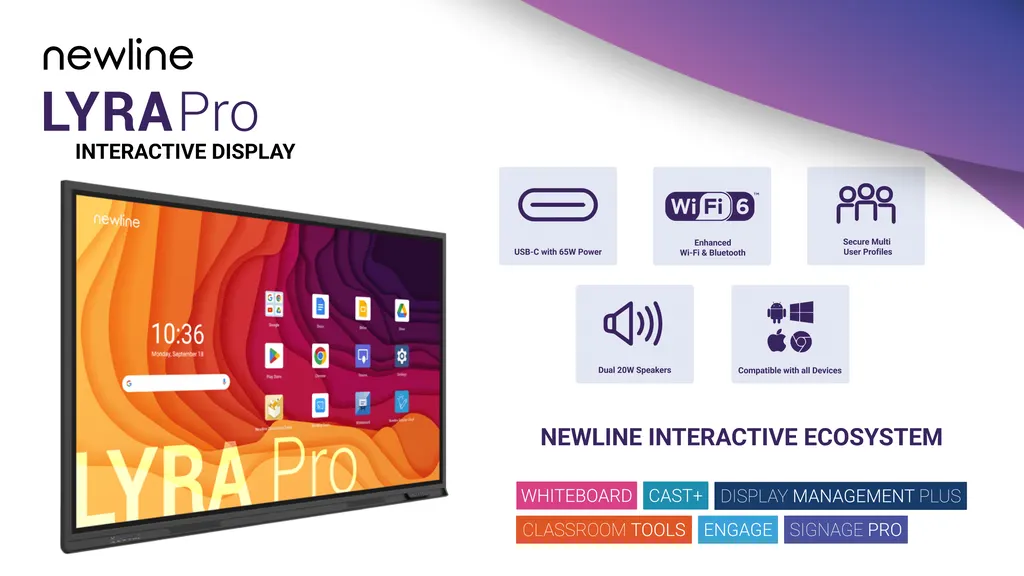
The Newline Lyra Pro is a 4K interactive display running Android 14, with native Google EDLA certification for Google Classroom and Google Drive use. It offers a 178° viewing angle, 450 cd/m² brightness, a 65 W USB-C port that charges a connected laptop, integrated Wi-Fi 6 and an OPS slot. Suited to schools, universities and meeting rooms in Qatar. Request a quote.

What the Newline Lyra Pro is

The Newline Lyra Pro is a 4K interactive display that runs Android 14 and carries native Google EDLA certification, so Google Classroom and Google Drive open directly on the panel. Newline lists it under the EMEA model code 23QA. The specification sheet for the Lyra Pro series covers 55, 65, 75, 86 and 98-inch versions, so confirm the exact size when you request a quote.

Google EDLA and Android 14 for shared rooms

Google EDLA certification is the main reason to shortlist this panel for a Google-based teaching or meeting environment. The manufacturer states that it ensures compatibility and optimal performance with Google applications, and staff can edit documents and share ideas in real time. Android 14 supports separate user profiles, so a teacher keeps personal apps and settings while a project team uses a different toolset on the same screen. IT teams can manage units remotely through Newline Display Management, deploying apps, configuring displays and pushing updates from a web portal.

Display, touch and audio figures to compare

  • Resolution: 3840 x 2160 (4K) with 1.07 billion colours
  • Brightness and contrast: 450 cd/m² and a 5000:1 contrast ratio
  • Viewing angle: 178° for viewers seated at the front or back
  • Glass: anti-glare, zero bonding, 7H surface hardness
  • Touch: passive pen, finger and fist input, ±1 mm accuracy, real palm rejection
  • Audio: two 20 W front-facing speakers
  • Display life: 50,000 hours or more

Ports and wireless for daily use

The front panel has a 65 W USB Type-C port that powers a connected laptop, an HDMI 2.1 input with HDCP 2.2, a USB Type-B touch connection, two USB 3.2 Type-A ports and a microphone input. The rear adds an OPS slot, an HDMI output, a gigabit RJ45 port, an RS232 port and an audio line-out. Wi-Fi 6 and Bluetooth 5.2 are integrated, and the manufacturer says the Wi-Fi 6 module connects up to 30 devices.

Where it fits in Qatar

A private school in Al Wakrah fitting out classrooms for a Sunday-to-Thursday timetable can connect teachers' laptops quickly between lessons, while user profiles keep each teacher's apps separate. In West Bay, a boardroom that holds meetings with teams abroad can use the display for shared documents, with the 178° viewing angle and front-facing speakers serving people seated along a long table. A training centre near Education City can run workshops where trainers switch between personal and shared profiles without resetting the screen.

What to plan before ordering

Wall structure and weight come first. The 65-inch model weighs 39 kg and the 86-inch model weighs 63 kg, so a site survey before wall-mounting is worth doing, and SmartRooms Qatar offers free site surveys. The data lists VESA patterns from 400 x 400 mm up to 800 x 600 mm. Standard-mode power is 106 W for the 65-inch and 126 W for the 86-inch, with standby below 0.5 W. The source does not give an operating temperature range, so confirm room conditions with the SmartRooms Qatar team before placing the panel near windows, in dusty lobbies or in spaces without air conditioning. Multi-unit school or government orders can be raised on an LPO or through a Monaqasat tender.

Send the room size, mounting wall and number of units to SmartRooms Qatar and request a quote. Quotations are usually issued within one working day.

Highlights

  • Native Google EDLA certification with Android 14
  • 4K resolution, 450 cd/m² brightness, 178° viewing angle
  • 65 W USB-C port charges a connected laptop
  • Integrated Wi-Fi 6 and Bluetooth 5.2
  • Rear OPS slot for computer module expansion
  • EPEAT Silver certified for electronics sustainability

Estimated timeline

Quotation within 1 working day · delivery timing depends on stock availability, and we confirm it with your quotation.


Specifications

Source: manufacturer · checked Oct 2026
The full specification and datasheet for this model are available on request; we send them with your quotation.

Downloads

6 files from the manufacturer

Questions about Lyra Pro

What is the Newline Lyra Pro used for?
The Lyra Pro is a 4K interactive display for classrooms, lecture theatres and meeting rooms where people write, annotate and share content on one large screen. It runs Android 14 with native Google EDLA certification, so Google Classroom and Google Drive open directly on the panel. It suits schools, universities and corporate teams that want one panel for both lessons and meetings.
Which screen sizes does this model come in?
The manufacturer's specification sheet for the Lyra Pro series lists 55, 65, 75, 86 and 98-inch versions, each with its own dimensions, weight and power figures. Before ordering, confirm the exact size with SmartRooms Qatar when you request a quote, so that the mounting plan, weight and power figures match your room.
Is the Lyra Pro Google EDLA certified?
Yes. The manufacturer describes the Lyra Pro as having native Google EDLA certification and lists Android 14 as the operating system. For a school or company that relies on Google applications, this means Google Classroom, Google Drive and other Google apps work within the panel itself, and staff can edit documents and share ideas in real time.
How many touch points does it support?
The manufacturer's product text quotes support for up to 50 points of touch, but its specification table lists 20 touch points. Ask SmartRooms Qatar to confirm the figure for your chosen size before ordering, especially if your lessons involve several users writing at the same time. The panel distinguishes fingers, pens and palms during writing.
Can the panel charge a teacher's laptop?
Yes. The front USB Type-C port supplies up to 65 W, which the manufacturer states is enough to keep a connected laptop charged. A teacher connects one cable, the laptop shares its screen on the panel, and the lesson can start quickly between periods in a classroom in Doha.
What wireless connectivity does it have?
Wi-Fi 6 and Bluetooth 5.2 are integrated, and the Wi-Fi module is listed as replaceable. The manufacturer says the built-in Wi-Fi 6 module provides secure connectivity for up to 30 devices, which suits a meeting room or classroom where several tablets, phones and laptops connect at once. Check the network plan with your IT team before installation.
Can I add a computer or an OPS module?
The rear panel has one OPS slot, the usual location for a plug-in computer module that adds an operating system or a dedicated PC to the display. The source data does not list which modules are compatible, so ask SmartRooms Qatar to confirm the module you intend to use before you request a quote.
How do user profiles work in a school with several teachers?
Android 14 supports separate user profiles, so each teacher can keep their own apps, settings and theme on the panel. The manufacturer also describes a profile for a team that uses only certain tools. In a shared-classroom school in Al Wakrah, this removes the need to reset the panel each time a different teacher uses it.
Is it suitable for video conferencing in a boardroom?
The panel has HDMI and USB-C connections on the front, and an HDMI output, gigabit RJ45 port and audio line-out at the rear. These suit a boardroom in West Bay that links the display to a conferencing system, but the data does not name specific conferencing platforms or codecs. Ask SmartRooms Qatar to check your camera, codec and cable routes before ordering.
Can it go near windows or in a hot lobby in Doha?
The source data does not give an operating temperature range, so it cannot confirm how the panel handles heat, dust or humidity. Summer temperatures in Doha often exceed 45°C, so install it in air-conditioned indoor spaces and confirm room conditions with the SmartRooms Qatar team before placing it near windows or in open lobbies.
What should we check before wall-mounting an 86-inch panel?
The 86-inch model weighs 63 kg and has outline dimensions of 1982 x 1191 x 119 mm, so the wall structure must be checked before mounting. The data lists VESA patterns from 400 x 400 mm up to 800 x 600 mm. SmartRooms Qatar offers free site surveys to check the wall, power supply and cable routes before installation.
Can schools and government entities order several units on an LPO or tender?
Yes. SmartRooms Qatar accepts purchase orders (LPOs), government tenders including Monaqasat, and payment by bank transfer, cheque or purchase order. When fitting out several classrooms, state the size, quantity and mounting type in your request so that one quotation covers the full set. Products are covered by the manufacturer's warranty.

Similar models

BenQ CM7505 BenQ Board CM7505 75-inch Interactive Display
75″ UHD 3840 × 2160 pixels Ultra Precision IR
SMART SBID-6286S-V3 SMART Board 6086S-V3 86-inch Interactive Display with iQ
86″ 4K UHD (3840 × 2160) HyPr Touch with InGlass
SMART SBID-6286S-V3-P SMART Board 6086S-V3 Pro 86-inch Interactive Display with iQ
86″ 4K UHD (3840 × 2160) HyPr Touch with InGlass
Clevertouch Clevertouch Edge 65" Clevertouch Edge 65" 4K Interactive Display with Camera and Speakers
65″ 4K UHD (3840x2160 @60Hz) Android 15
Clevertouch Clevertouch Edge 86" Clevertouch Edge 86" 4K Interactive Flat Panel
86″ 4K UHD (3840x2160 @60Hz) Android 15
Email Call


