





Thursday, 22 October 2026 · 11 Jumada I 1448 AH Sun – Thu · 9:00 – 18:00
+971 56 914 9477 العربية
WhatsApp

TT-8623NT

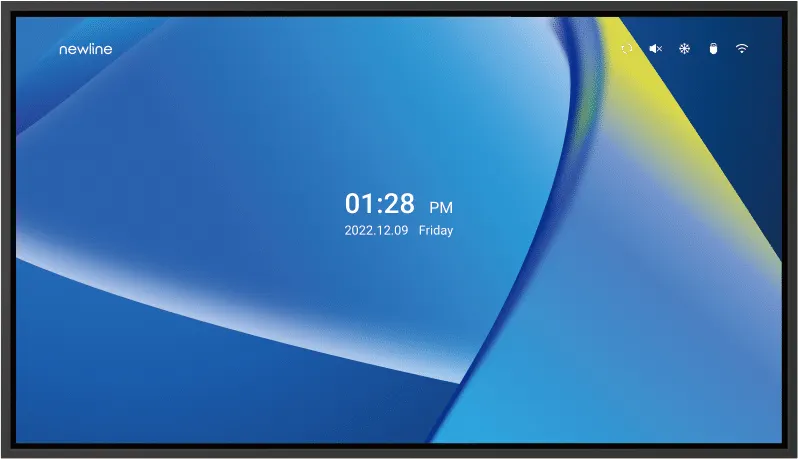
Newline NT+ Series TT-8623NT 86-inch Non-Touch Display

Resolution
3840 x 2160
Brightness
400 cd/m²
WhatsApp
Priceon request
QuotationWithin 1 working day
DeliveryConfirmed with your quote, based on stock
Overview

The Newline TT-8623NT is an 86-inch non-touch display from the NT+ Series, offering 3840 x 2160 resolution and 400 cd/m² center brightness. It suits lecture halls, boardrooms and training rooms in Doha where presenters connect laptops and mobile devices wirelessly. At 42 kg net, it needs a site survey before wall mounting. Request a quote from SmartRooms Qatar.

What the TT-8623NT is and how it works

The Newline TT-8623NT is the 86-inch model in the NT+ Series, a non-touch display built for shared viewing in classrooms and meeting rooms. Because it does not accept touch or pen input, the panel works as a large screen that you drive from a laptop, desktop, tablet or phone. The 16:9 panel runs at 3840 x 2160 resolution across an active area of 1896 x 1066 mm, and its narrow bezel keeps the picture as large as possible for the footprint.

The specifications that matter in a large room

Center brightness is rated at 400 cd/m², with typical contrast of 4000:1 and a typical response time of 8 ms. The 178° viewing angle means people seated at the sides of a boardroom see the same picture as those at the front. The panel is rated for a life of 50,000 hours or more, which matters for a screen that may run through a full school day or a long meeting. Display colour is listed as 1.07G (8 bit + FRC).

Built-in software and connectivity

The TT-8623NT runs Android 13 on a quad-core ARM Cortex-A55 processor clocked up to 1.9 GHz, with 4 GB of RAM and 32 GB of storage. Staff can cast wirelessly from phones, tablets, and Windows, Mac or Chrome laptops, so presenters need not connect a cable each time. The connection set includes:

  • Two HDMI inputs, one HDMI input with ARC and one HDMI output
  • One DisplayPort and one USB Type C port
  • Three USB 2.0 Type A ports
  • LAN in and LAN out, plus RS232 for control
  • One S/PDIF output and one 3.5 mm line output

There is no OPS slot, so a computer must sit outside the panel. Central remote management lets an administrator oversee multiple displays from one control point, install applications, change settings and broadcast messages. Firmware can be updated over USB or over the air.

Where the 86-inch TT-8623NT fits in Qatar

A lecture hall at a university in Education City or a training room in the Industrial Area needs a screen that can be read from the back row, and 86 inches provides that distance. In a West Bay boardroom where executives review documents and join calls with teams abroad, wireless casting lets a visitor share a slide without handling cables. An Arabic-curriculum school in Al Rayyan refitting several classrooms could standardise on this model for consistent control and lesson delivery.

Planning the installation and site conditions

  • Net weight 42 kg and gross weight 59 kg (±2 kg), so the wall and bracket must be checked before delivery
  • VESA mount pattern of 800 x 400 mm; a mobile cart is available as an optional installation method
  • Outline 1946 x 1116 x 94 mm without the wall bracket thickness
  • Working temperature 0 to 40 °C at 20 to 80% relative humidity, non-condensing; storage 15 to 45 °C
  • Working voltage AC 100 to 240 V, maximum 3.5 A; power use 350 W in standard mode and under 0.5 W on standby

Qatar summers often exceed 45 °C, so plan to place the screen in an air-conditioned room. Portrait mounting is listed only for the 55-inch and 65-inch models, so plan this 86-inch unit for landscape installation and confirm with the team. Send the room dimensions, wall plan and number of units to the SmartRooms Qatar team and request a quote.

Highlights

  • 86-inch 3840 x 2160 display with 1896 x 1066 mm active area
  • 400 cd/m² center brightness and 4000:1 typical contrast
  • Wireless casting from phones, tablets and laptops
  • Android 13 on quad-core ARM Cortex-A55 processor
  • 800 x 400 mm VESA pattern; 42 kg net weight
  • Rated life of 50,000 hours or more

Classroom fit

At 86″ the farthest student should sit within about 6.4 m (6× the screen height).

Estimated timeline

Quotation within 1 working day · delivery timing depends on stock availability, and we confirm it with your quotation.

Specifications

8 specifications · Source: manufacturer · checked Oct 2026
TT-8623NT8
General · Size
86″
General · Weight(G.W.)
42±2kg
General · Backlight
DLED
General · Display area (mm)
1896 x 1066
General · Display Ratio
16:9
General · Resolution
3840 x 2160
General · Brightness Center brightness
400 cd/m²
General · Viewing Angle
178°

Downloads

0 files from the manufacturer
No downloadable files are listed for this model yet. Ask us and we will send the datasheet.

Questions about TT-8623NT

Is the Newline TT-8623NT a touch screen?
No. The TT-8623NT is a non-touch display, so the glass does not accept finger or pen input. Presenters work from a connected laptop, desktop, tablet or phone, and the physical buttons on the unit (power, directional keys, OK, return and menu) handle basic navigation. If your classes depend on writing directly on the glass, tell the SmartRooms Qatar team before ordering so the quotation matches your workflow.
Which rooms in Qatar suit the 86-inch size best?
The 86-inch size suits large spaces such as a lecture hall in Education City, a training room in the Industrial Area or a boardroom in West Bay where people sit at a distance from the screen. The 1896 x 1066 mm active area gives a readable picture at range, and the 178° viewing angle keeps the image consistent for people seated at the sides. For a smaller meeting room, the 65-inch model in this series is a better fit.
Can the TT-8623NT be mounted in portrait orientation?
The manufacturer lists portrait mounting only for its 55-inch and 65-inch models, so this 86-inch unit should be planned for landscape wall mounting. If a corridor or narrow wall in your building calls for portrait use, ask the SmartRooms Qatar team to confirm before ordering. Check the wall width against the 1946 x 1116 mm outline dimension, which excludes the bracket thickness.
What wall mount and wall structure does it need?
The VESA mounting position is 800 x 400 mm, and the unit can be wall-mounted or used on a mobile cart as an option. At 42 kg net and 59 kg gross, the wall must carry the weight on a suitable bracket. A free site survey from SmartRooms Qatar can check wall construction, cable routes and power outlet position before installation, which helps avoid last-minute changes in a school or office.
Can it run in a Qatar summer without air conditioning?
No. Plan for an air-conditioned room. The working range is 0 to 40 °C at 20 to 80% relative humidity, non-condensing, while Qatar summers often exceed 45 °C. Storage is rated 15 to 45 °C, so keep unpacked units out of hot containers and storerooms. Confirm the room temperature with your facilities team before delivery, especially in glass-fronted lobbies or rooms exposed to afternoon sun.
Does it work with Qatar's 240 V mains supply?
Yes. The TT-8623NT lists a working voltage of AC 100 to 240 V with a maximum current of 3.5 A, which covers the 240 V mains used in Qatar. Power draw is 350 W in standard mode and under 0.5 W on standby. Ask your electrical contractor to confirm the socket and circuit for the mounting position, particularly where several panels share one circuit in a school.
Which ports should I check against my laptop and room system?
The panel includes two HDMI inputs, one HDMI input with ARC, one HDMI output, one DisplayPort, one USB Type C port, three USB 2.0 Type A ports, LAN in and LAN out, RS232, an S/PDIF output and a 3.5 mm line output. Check whether your presentation laptop outputs HDMI, DisplayPort or USB-C video, and note any control system that needs RS232 or LAN so the room plan is complete before you request a quote.
Can staff cast from their own phones and laptops?
Yes. The built-in wireless casting supports mobile devices, tablets, and Windows, Mac and Chrome laptops, so a visiting presenter can share a screen without a cable. This suits a meeting in West Bay where a delegation joins from abroad, or a classroom where students present from their own tablets. Ask your IT team to confirm the network arrangements they need before you order.
Can I install a PC inside the display?
No. The TT-8623NT lists no OPS slot, so a computer, media player or other source must connect from outside the panel through HDMI, DisplayPort or USB-C. The built-in Android 13 system, with a quad-core ARM Cortex-A55 processor, 4 GB RAM and 32 GB storage, runs apps for everyday presentations, so many rooms need no extra computer for basic lessons or meetings.
How can IT teams manage several units across a school group?
The built-in remote display management lets an administrator see all displays in an organisation from a central control point. From there the team can install applications, change display settings and broadcast a message to screens. An Arabic-curriculum school group in Al Sadd with several campuses can keep classrooms consistent without visiting each room. Include the number of units and sites in your request so the quotation reflects the full rollout.
Does SmartRooms Qatar deliver and install the TT-8623NT?
Yes. SmartRooms Qatar supplies the unit, delivers to all eight municipalities of Qatar and arranges professional installation. A free site survey is recommended for this model because of its 42 kg net weight and 800 x 400 mm mount pattern. Quotations are usually issued within one working day, and products are covered by the manufacturer's warranty. Lead times are estimates confirmed in the quotation.
Can a ministry or school buy several units through an LPO or tender?
Yes. SmartRooms Qatar accepts purchase orders (LPOs) and government tenders, including those published on Monaqasat, and accepts payment by bank transfer, cheque or purchase order. A school fitting out several rooms with the 86-inch model should send a room list and mounting locations with its request, so the quotation covers each unit and its wall position.

Similar models

BenQ CM7505 BenQ Board CM7505 75-inch Interactive Display
75″ UHD 3840 × 2160 pixels Ultra Precision IR
SMART SBID-6286S-V3 SMART Board 6086S-V3 86-inch Interactive Display with iQ
86″ 4K UHD (3840 × 2160) HyPr Touch with InGlass
SMART SBID-6286S-V3-P SMART Board 6086S-V3 Pro 86-inch Interactive Display with iQ
86″ 4K UHD (3840 × 2160) HyPr Touch with InGlass
Clevertouch Clevertouch Edge 65" Clevertouch Edge 65" 4K Interactive Display with Camera and Speakers
65″ 4K UHD (3840x2160 @60Hz) Android 15
Clevertouch Clevertouch Edge 86" Clevertouch Edge 86" 4K Interactive Flat Panel
86″ 4K UHD (3840x2160 @60Hz) Android 15
Email Call




