





Thursday, 22 October 2026 · 11 Jumada I 1448 AH Sun – Thu · 9:00 – 18:00
+971 56 914 9477 العربية
WhatsApp

On-board Computer (OPS)

Newline On-board Computer (OPS) for Interactive Displays

WhatsApp
Priceon request
QuotationWithin 1 working day
DeliveryConfirmed with your quote, based on stock
PDFDownload datasheet (OPS-SpecSheet_20231024.pdf)
Overview

The Newline On-board Computer is an OPS module that fits the OPS slot on compatible Newline interactive displays, giving the panel its own Windows 11 Pro desktop. Three variants offer Intel Core i5 or i7 processors, 8GB or 16GB memory and 256GB SSD storage, plus Wi-Fi 6E and Bluetooth 5.2. It suits Qatari schools and ministries that want whiteboard software on the display. Request a quote for your room.

What the OPS slot adds to a Newline display

An OPS module is a compact computer built to the Open Pluggable Specification and fitted into a dedicated slot inside the interactive display. The On-board Computer uses that slot to run a full Windows 11 Pro desktop within the panel, so a presenter can start a lesson or board meeting without bringing a laptop into the room. Annotation, whiteboard and presentation software stay installed on the module and remain available to whoever uses the display next.

Choosing between the three variants

The three models share the same graphics, storage, wireless and port layout, so the choice comes down to processor and memory:

  • WB5C820U: Intel 12th Gen Core i5 (1240P) with 8GB memory.
  • WB7C820U: Intel 12th Gen Core i7 (1260P) with 8GB memory.
  • WB7C120U: 16GB of memory in two 8GB modules running dual-channel. The source data does not list a processor for this model, so confirm the build in your quotation.

All three carry an 18 MB cache with speeds up to 4.70GHz, Intel Iris Xe graphics and a 256GB SSD. The datasheet also lists support for M.2 SATA and PCIe NVMe storage, which matters if you plan to manage large lesson or media libraries over time.

Ports and connectivity for meeting rooms

The module brings a full set of connections to the back of the display, which reduces the number of boxes and cables in the room:

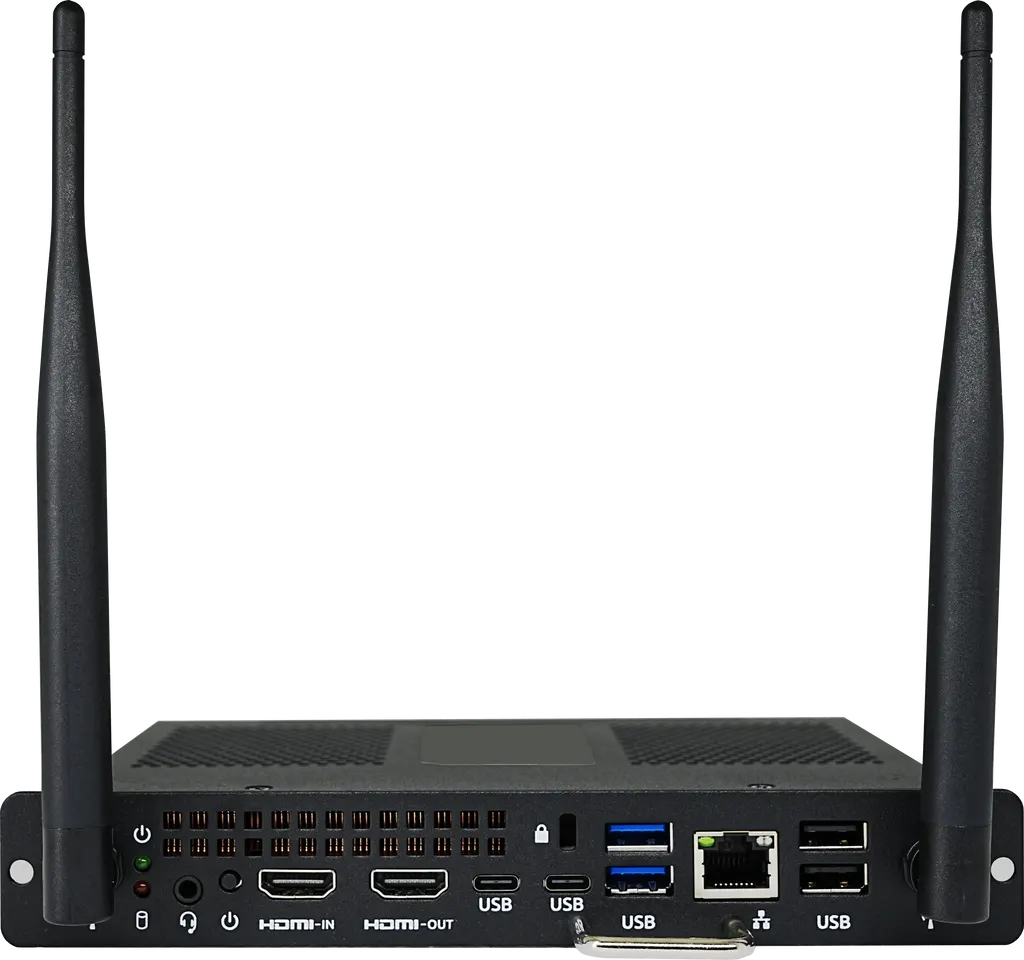
  • One HDMI Out 2.0 port supporting 4K at 60Hz.
  • One HDMI In 1.4 port supporting 4K at 30Hz.
  • Two USB Type-C ports (Thunderbolt 4.0), two USB 3.0 and two USB 2.0 ports.
  • One self-adaptive 10/100/1000M LAN port.
  • Wi-Fi 5/6/6E and Bluetooth 5.2, with a TPM 2.0 trusted platform module.

The HDMI In port is limited to 4K at 30Hz, so check the output of any external source before connecting it.

Where it fits across Qatar

A private school in Al Rayyan equipping each classroom with one interactive display can keep lesson software on the module, so teachers avoid swapping cables between periods.

A ministry meeting room in West Bay where every presenter starts from the same desktop, with documents arriving over the office Wi-Fi or from a USB Type-C drive, keeps the room setup consistent from one meeting to the next.

A hotel conference room in Lusail hosting visiting trainers, where each speaker opens the same prepared desktop rather than connecting a personal laptop, shortens changeovers between sessions.

Planning the install and operating environment

The module is rated for an operating range of 0°C to 55°C at 10% to 90% humidity, non-condensing, with storage from -20°C to 60°C. Summer temperatures in Qatar regularly exceed 45°C, so ask the SmartRooms Qatar team to check the display's ventilation and the room's cooling during the free site survey before committing to a hot or enclosed location.

Plan for a module measuring 180 x 119 x 30 mm and weighing about 1.24 kg, a DC 19V/5A power supply and a noise level below 38dB, which suits quiet classrooms and boardrooms. Professional installation is available, quotations are usually issued within one working day, and orders can be placed by LPO, bank transfer, cheque or purchase order, including for government tenders through Monaqasat.

Request a quote for the variant that matches your display, room size and software needs.

Highlights

  • Intel Core i5 (1240P) or i7 (1260P) processor options
  • 8GB or 16GB memory with 256GB SSD storage
  • Wi-Fi 5/6/6E and Bluetooth 5.2 wireless connectivity
  • HDMI 2.0 output and HDMI 1.4 input, up to 4K
  • Two USB Type-C, two USB 3.0 and two USB 2.0 ports
  • Windows 11 Pro license included; operating range 0°C to 55°C

Estimated timeline

Quotation within 1 working day · delivery timing depends on stock availability, and we confirm it with your quotation.


Specifications

Source: manufacturer · checked Oct 2026
The full specification and datasheet for this model are available on request; we send them with your quotation.

Downloads

2 files from the manufacturer

Questions about On-board Computer (OPS)

What is the Newline On-board Computer (OPS)?
It is an OPS computer module that fits the OPS slot on compatible Newline interactive displays. Once installed, the display runs its own Windows 11 Pro desktop with an Intel Core i5 or i7 processor, so presenters do not need to connect a laptop. Whiteboard and annotation software stays installed on the module and is available to whoever uses the display.
Which Newline displays accept this module?
The module is designed for Newline interactive displays that have an OPS slot, and the manufacturer states that each interactive display comes with one. Before ordering, share your display model with the SmartRooms Qatar team so the quotation matches the slot you already have in place.
What is the difference between the WB5C820U, WB7C820U and WB7C120U?
The WB5C820U has an Intel Core i5-1240P and 8GB of memory. The WB7C820U has an Intel Core i7-1260P and 8GB of memory. The WB7C120U has 16GB of memory in two 8GB modules, but its processor is not listed in the source data, so confirm it before buying. All three share 256GB SSD storage, Intel Iris Xe graphics and Wi-Fi 5/6/6E.
Does the room still need a separate PC or laptop?
Not for running the display's built-in software, because the module provides a full Windows 11 Pro desktop. A personal laptop can still be connected through the HDMI In port if a presenter needs their own applications. That port supports 4K at 30Hz, so check the laptop's output setting before connecting.
Which operating system and security features are included?
The datasheet lists Windows 11 Pro with the license included, a TPM 2.0 trusted platform module and an Insyde BIOS. These details help IT managers in government and school settings confirm the platform meets their baseline requirements before a quotation is approved.
How much storage does the module have, and can it be expanded?
Each variant includes a 256GB SSD. The datasheet also lists support for M.2 SATA and PCIe NVMe storage. Confirm any change to the storage configuration with the SmartRooms Qatar team before ordering, because the quotation will reflect the exact build you request.
Does it support Wi-Fi 6E and Bluetooth for wireless use?
Yes. The module lists Wi-Fi 5/6/6E and Bluetooth 5.2. Offices in Doha with Wi-Fi 6E access points can use the 6E band where their network supports it, and Bluetooth 5.2 supports wireless peripherals in the meeting room.
Can the module run in a hot room in Doha during summer?
The rated operating range is 0°C to 55°C at 10% to 90% humidity, non-condensing. Summer temperatures in Doha can exceed 45°C, so keep the room air-conditioned and have the display's ventilation checked. The SmartRooms Qatar team can confirm the environment during a free site survey before you choose a location.
Can a school in Al Rayyan order several units at once, and how does it pay?
Schools can order several units against a single LPO, and quotations are usually issued within one working day. Payment is by bank transfer, cheque or purchase order. Share the classroom count and display models so that each module is quoted with the correct variant.
Can a ministry buy this module through a government tender?
Yes. SmartRooms Qatar supports government tenders, including those on Monaqasat, as well as purchase orders. For a tender, list the exact variant code, either WB5C820U, WB7C820U or WB7C120U, so the specification in your bid matches the product supplied.
What size and weight should I plan for when installing the module?
The module measures 180 x 119 x 30 mm and weighs about 1.24 kg. Its noise level is below 38dB, which suits quiet classrooms and boardrooms. Because the module sits inside the display, a free site survey before installation helps confirm the slot position, cabling route and power supply arrangement.
How does it compare with a mini PC connected to the display?
A mini PC connected by cable needs its own power point, a cable run and a separate enclosure, while the OPS module sits within the display itself. To compare fairly, check the specifications here against any alternative you are considering, and request quotations for matching processor and memory configurations.

Similar models

Hisense OPS72D/72E Hisense OPS72D/72E OPS On Board Computer for Interactive Displays
8GB
Clevertouch OPS i5 Clevertouch OPS i5 PC Module with Intel Core i5 and 256GB SSD
Windows 11 - Home / Pro /… Memory: 16GB DDR4
Clevertouch OPS i7 Clevertouch OPS i7 PC Module with Intel Core i7 13620H
Windows 11 - Home / Pro /… 16GB DDR4
Hikvision DS-D5AC12G5-8S2 Hikvision DS-D5AC12G5-8S2 OPS Module for Interactive Panels
8G 256G
Hikvision DS-D5AC13G7-16S5 Hikvision DS-D5AC13G7-16S5 OPS Module with Intel Core i7-13620H
16G 512G
Email Call


