





Thursday, 22 October 2026 · 11 Jumada I 1448 AH Sun – Thu · 9:00 – 18:00
+971 56 914 9477 العربية
WhatsApp

75" Q+ Pro

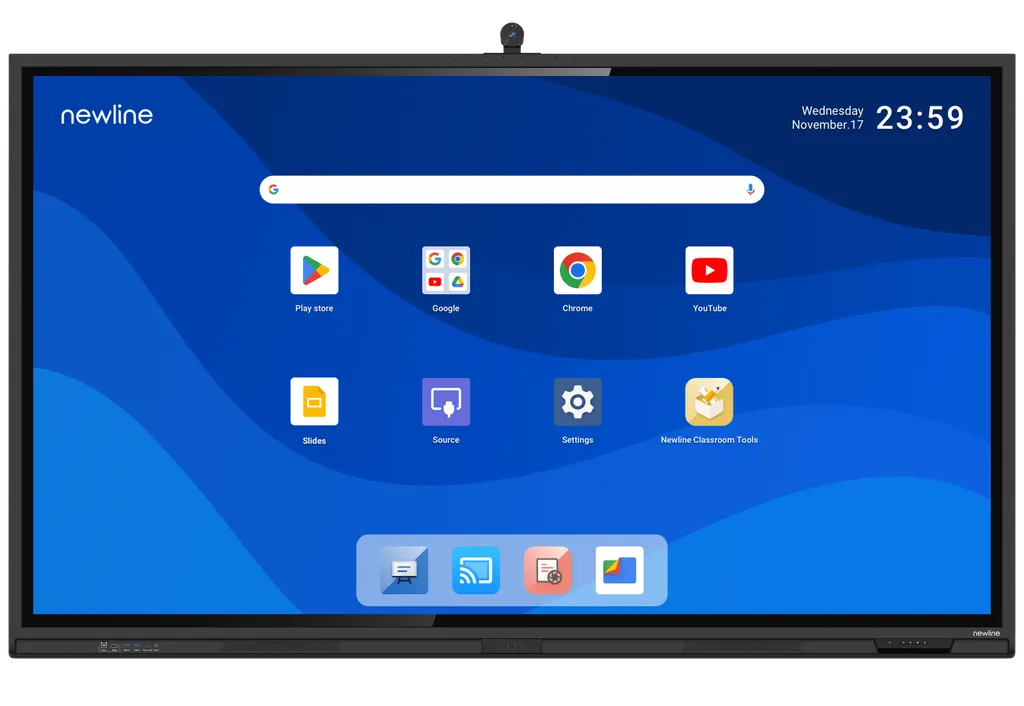
Newline 75" Q+ Pro 75-inch 4K Interactive Display

Resolution
3840 × 2160 (4K)
Touch
IR
System
Android 15
Storage
256 GB
WhatsApp
Priceon request
QuotationWithin 1 working day
DeliveryConfirmed with your quote, based on stock
Overview

The Newline 75" Q+ Pro is a 75-inch 4K interactive display with infrared touch, 40 touch points on Windows and 20 on Android, and Android 15 running on the panel itself. It carries Google EDLA certification, a built-in 4K AI ModCam+ camera with an 8-mic array, NFC login and a 100W USB-C port. It suits medium boardrooms, training rooms and classrooms across Qatar.

What the 75-inch Q+ Pro is built to do

The Newline 75" Q+ Pro (part number TT-7523QCA+) is a 75-inch interactive display with a 4K panel, a 16:9 ratio and a display area of 1650 x 928 mm. Android 15 runs on the unit itself, so a meeting can start from the screen, and the Google EDLA certification is aimed at teams that work in Google Workspace.

Specifications that matter for a meeting room purchase

  • Touch: infrared touch with 40 touch points on Windows and 20 on Android, plus object recognition that separates fingers, pens and palms so writing stays clean.
  • Image: 3840 x 2160 resolution, a 178 degree viewing angle, typical centre brightness of at least 400 cd/m2, a 60 Hz refresh rate and anti-glare, anti-fingerprint glass.
  • Memory: 16 GB RAM and 256 GB ROM, which gives the built-in system room for apps and multi-user profiles.
  • Audio and camera: a built-in 4K AI ModCam+ camera, an 8-mic array at the top front, two 20W front speakers, a 20W rear centre speaker and a subwoofer.
  • Connectivity: a front USB-C port with 100W power delivery, Wi-Fi 5 and Wi-Fi 6 on 2.4 GHz and 5 GHz, Bluetooth 5.2, NFC login, an OPS slot and an SDM-S slot.
  • Power: an AC input rated 100 to 240 V, working consumption up to 620 W and standby consumption below 0.5 W.

Where a 75-inch panel fits in Qatar

A 75-inch screen is large enough for a group of around a dozen people to read slides from the far side of a table, but it is still practical in a room that does not need a lecture-hall display.

  • Government and authority meeting rooms in West Bay or Msheireb where staff in Doha join colleagues abroad. The built-in camera and microphone array cover the room without an external mic set.
  • Training rooms in Education City or Lusail where trainers switch between Arabic and English material. Two rear HDMI inputs let a presenter and a second source share the screen.
  • Classrooms in a private school in Al Wakrah being refitted with interactive screens. Touch with 40 points on Windows suits several students writing at once, and NFC login helps shared devices keep each user's profile separate.

Summer conditions need planning. The working range is 0 to 40 degrees Celsius, and Qatar summers regularly pass 45 degrees, so the room must be air-conditioned to hold that range. Keep the panel away from direct sunlight and windows.

What to plan before ordering

The VESA pattern is 800 x 400 mm, the outline without a wall bracket is 1735 x 1051 x 122 mm and the net weight is 52 kg, so the wall or mounting structure must be checked before fixing. A wall-mounted or mobile stand installation is available as an option. SmartRooms Qatar offers free site surveys, which is the easiest way to confirm wall strength, cable routes and the power outlet position. Confirm the supplied plug type before ordering for BS 1363 sockets.

Ready to plan a 75-inch Q+ Pro for your meeting room? Request a quote from SmartRooms Qatar and we will confirm the mounting, power and room conditions with you before you order.

Highlights

  • 4K (3840 x 2160) resolution on a 75-inch panel
  • Infrared touch: 40 points on Windows, 20 on Android
  • Android 15 with 16 GB RAM and 256 GB ROM
  • Google EDLA certified for Google Workspace use
  • Built-in 4K AI ModCam+ camera with 8-mic array
  • 100W USB-C power delivery over a single cable

Classroom fit

At 75″ the farthest student should sit within about 5.6 m (6× the screen height).

Estimated timeline

Quotation within 1 working day · delivery timing depends on stock availability, and we confirm it with your quotation.

Specifications

13 specifications · Source: manufacturer · checked Oct 2026
75" Q+ Pro13
General · Part Number
TT-7523QCA+
General · Size
75″
General · Display area (mm)
1650 x 928
General · Weight (kg)
52
General · Touch Technology
IR
General · Touch Points
40 Windows / 20 Android
General · Resolution
3840 × 2160 (4K)
General · Viewing Angle
178°
General · Embedded Operating System
Android 15
General · RAM
16 GB
General · ROM
256 GB
General · VESA Mount Pattern(mm)
800 x 400
General · Camera
4K AI ModCam+

Downloads

0 files from the manufacturer
No downloadable files are listed for this model yet. Ask us and we will send the datasheet.

Questions about 75" Q+ Pro

Who is the Newline 75" Q+ Pro best suited for?
It suits a medium boardroom, training room or classroom where a small group needs to present, annotate and join video calls from one screen. Its 1650 x 928 mm display area and 4K resolution keep slides and spreadsheets readable from across a conference table. For a large lecture hall, the 86-inch model is the better fit.
Does the Q+ Pro run Android apps and Google Workspace?
Yes. The panel runs Android 15 with 16 GB RAM and 256 GB ROM, and it carries Google EDLA certification, which is designed for Google Workspace use. Teams can open documents, share files and join meetings directly on the screen without needing a separate computer for basic tasks.
How many touch points does the 75-inch model support?
It uses infrared touch with up to 40 touch points on Windows and 20 on Android. Object recognition tells fingers, pens and palms apart, so a presenter can write with a pen and rest a hand on the glass without leaving marks. Stylus or finger input is supported.
Can a laptop charge and share its screen through one cable?
Yes. The front USB-C port provides 100W power delivery, so a laptop can connect, share its content, control the display and charge through a single cable. This suits a manager who walks into a Doha meeting room and wants to present without fumbling with adapters.
Will the Q+ Pro work with Qatar's mains power?
Its working voltage is rated AC 100 to 240 V, which covers Qatar's 240 V, 50 Hz supply. Working consumption is up to 620 W for the 75-inch model, and standby draw is below 0.5 W. Confirm the supplied plug type for BS 1363 sockets with the SmartRooms Qatar team before ordering.
Can it be placed near windows or in a hot lobby?
The manufacturer rates the working temperature at 0 to 40 degrees Celsius with 20 to 80% humidity, non-condensing. Qatar summers can exceed 45 degrees, so it should sit in an air-conditioned room away from direct sun and dust. It is not specified for outdoor use, so confirm the environment with the SmartRooms Qatar team.
What wall and mounting planning does a 75-inch panel need?
The VESA pattern is 800 x 400 mm, the outline without a wall bracket is 1735 x 1051 x 122 mm, and the net weight is 52 kg. A wall-mounted or mobile stand installation is available as an option. SmartRooms Qatar offers free site surveys to check wall strength and cable routes before installation.
How do the camera and microphones work for video calls?
The unit has a built-in 4K AI ModCam+ camera and an 8-mic array at the top front, so no external microphone array is needed for a typical room. This helps a team in Doha hold hybrid calls with colleagues in other countries, with the camera and audio covering the whole room.
How does NFC login work on a shared screen?
Users tap an NFC card or sticker to open their own profile, so no password is shown on the screen. Multi-user profiles keep each person's settings separate. This suits a shared room in the Industrial Area or Mesaieed, where several departments book the same screen.
Can I add an OPS computer or other expansion module?
Yes. The panel has an OPS slot, which accepts a compatible plug-in computing module, and an SDM-S slot. Check the module specification against the panel before ordering, and ask SmartRooms Qatar to confirm compatibility for your intended setup.
Which ports are available for connecting control systems and extra screens?
The rear panel includes 2 HDMI inputs, 1 DisplayPort, 1 HDMI output, 1 RS232 port, 1 S/PDIF output, LAN input and output, and several USB 3.0 and touch USB ports. RS232 and LAN ports help with room control systems in government and corporate meeting rooms.
How does the 75-inch model differ from the 65-inch and 86-inch versions?
The 75-inch model has a 1650 x 928 mm display area, a 52 kg net weight and an 800 x 400 mm VESA pattern. The 65-inch model is 1428 x 803 mm and 39 kg with a 600 x 400 mm pattern, and the 86-inch model is 1895 x 1066 mm and 65 kg. The 75-inch suits a mid-size room where a larger screen would dominate.
How do I request a quote for this model in Qatar?
Send SmartRooms Qatar the room size, the number of units and whether you need wall mounting or a mobile stand. Quotations usually arrive within one working day, and we can supply purchase orders and tender paperwork, with delivery across all eight municipalities of Qatar. The manufacturer's warranty applies.

Similar models

BenQ CM7505 BenQ Board CM7505 75-inch Interactive Display
75″ UHD 3840 × 2160 pixels Ultra Precision IR
SMART SBID-6286S-V3 SMART Board 6086S-V3 86-inch Interactive Display with iQ
86″ 4K UHD (3840 × 2160) HyPr Touch with InGlass
SMART SBID-6286S-V3-P SMART Board 6086S-V3 Pro 86-inch Interactive Display with iQ
86″ 4K UHD (3840 × 2160) HyPr Touch with InGlass
Clevertouch Clevertouch Edge 65" Clevertouch Edge 65" 4K Interactive Display with Camera and Speakers
65″ 4K UHD (3840x2160 @60Hz) Android 15
Clevertouch Clevertouch Edge 86" Clevertouch Edge 86" 4K Interactive Flat Panel
86″ 4K UHD (3840x2160 @60Hz) Android 15
Email Call




