





Thursday, 22 October 2026 · 11 Jumada I 1448 AH Sun – Thu · 9:00 – 18:00
+971 56 914 9477 العربية
WhatsApp

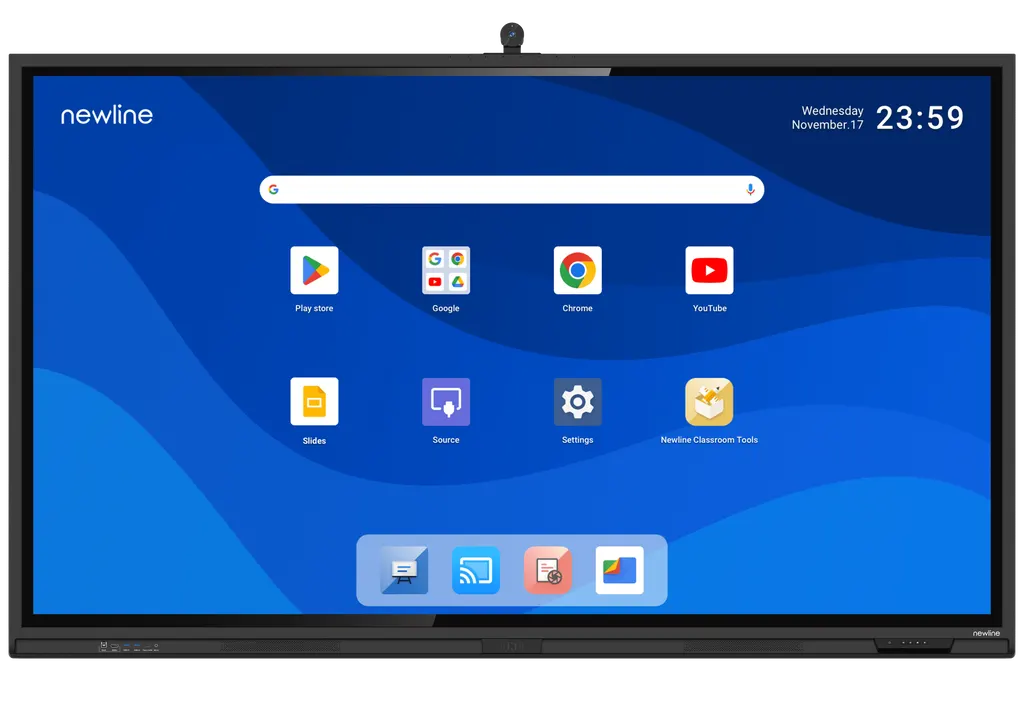
86" Q+ Pro

Newline 86" Q+ Pro 86-inch Interactive Display

Resolution
3840 × 2160 (4K)
Touch
IR
System
Android 15
Storage
256 GB
WhatsApp
Priceon request
QuotationWithin 1 working day
DeliveryConfirmed with your quote, based on stock
Overview

The Newline 86" Q+ Pro is an 86-inch interactive display running Android 15 with Google EDLA certification. Its infrared touch recognises up to 40 touch points on Windows and 20 on Android, and a 100W USB-C port charges a laptop through one cable. A built-in 4K AI ModCam+ camera and 8-mic array suit video calls. It suits boardrooms and lecture halls in Doha and across Qatar.

What the 86-inch Q+ Pro is built to do

The Newline 86" Q+ Pro, part number TT-8623QCA+, is a large interactive display for rooms where a group writes, presents and joins calls from one surface. Its 4K LCD panel offers a display area of 1895 x 1066 mm and the unit weighs 65 kg, so it suits a fixed installation rather than frequent moves. The glass is 3.2 mm tempered, rated 9H, with anti-glare, anti-fingerprint and antimicrobial treatment. The panel runs Android 15 with 16 GB RAM and 256 GB storage, and it holds Google EDLA certification.

Touch, writing and picture quality

Touch uses infrared sensing with zero bonding and accepts a stylus or a finger. The panel recognises up to 40 touch points on Windows and 20 on Android. Object recognition tells fingers, pens and palms apart and switches tools automatically, so a presenter does not have to change tools by hand. The image is 3840 x 2160 at 60 Hz, with typical brightness of at least 400 cd/m², an 8 ms response time and a 178° viewing angle. Typical static contrast is 4000:1, or 1200:1 by OC according to the datasheet.

Connectivity, camera and audio for hybrid meetings

The front and side carry a 100W power-delivery USB-C port, which shares a laptop's screen, controls the display and charges the laptop over one cable. Alongside it sit an HDMI input, a USB touch port, two USB 3.0 ports and a microphone input. The rear adds two HDMI inputs, a DisplayPort, two USB-C ports without power delivery, HDMI output, S/PDIF, RS232 and LAN in and out. An OPS slot and an SDM-S slot are fitted. Wireless options are Wi-Fi 5 and Wi-Fi 6 on 2.4 and 5 GHz, Bluetooth 5.2 and NFC login. The built-in 4K AI ModCam+ camera and an 8-microphone array handle calls without a separate microphone array, and the speakers include a rear-centre unit and a built-in subwoofer.

Where the 86-inch fits in Qatar

The 86-inch size suits rooms where a larger group needs one shared surface. Three typical settings:

  • Boardroom in West Bay or Msheireb: executive meetings with partners in Doha and abroad, using the camera and microphones for the video link.
  • Lecture hall in Education City: a lecturer annotates on the glass while students follow the same screen from the back of the room.
  • Operations room in the Industrial Area or Mesaieed: shared planning screens, with visiting staff connecting a laptop through the USB-C port.

What to plan before installation

Plan the wall or stand before delivery. The unit weighs 65 kg and measures 1982 x 1191 x 119 mm without a wall bracket, so the wall needs a structural check. The source gives VESA mount patterns of 600 x 400 mm for the 65-inch and 800 x 400 mm for the 75-inch, but does not state one for the 86-inch, so the pattern must be confirmed before a bracket is ordered.

The electrical rating is AC 100-240 V, with working consumption of up to 650 W and under 0.5 W in standby. The working temperature range is 0 to 40 °C at 20 to 80% relative humidity, non-condensing. Qatar summers regularly exceed 45 °C, so keep the panel in an air-conditioned room, away from direct afternoon sun and open doors.

To confirm fit, mounting and power for your room, request a quote from SmartRooms Qatar. We provide a free site survey, delivery to all eight municipalities, professional installation and purchase orders for government and school buyers, with quotations usually within one working day.

Highlights

  • 86-inch display area of 1895 x 1066 mm
  • 4K resolution with 178° viewing angle
  • Infrared touch: 40 points on Windows, 20 on Android
  • Android 15 with Google EDLA certification
  • 100W power-delivery USB-C front or side port
  • Built-in 4K AI ModCam+ camera and 8-mic array

Classroom fit

At 86″ the farthest student should sit within about 6.4 m (6× the screen height).

Estimated timeline

Quotation within 1 working day · delivery timing depends on stock availability, and we confirm it with your quotation.

Specifications

12 specifications · Source: manufacturer · checked Oct 2026
86" Q+ Pro12
General · Part Number
TT-8623QCA+
General · Size
86″
General · Display area (mm)
1895 x 1066
General · Weight (kg)
65
General · Touch Technology
IR
General · Touch Points
40 Windows / 20 Android
General · Resolution
3840 × 2160 (4K)
General · Viewing Angle
178°
General · Embedded Operating System
Android 15
General · RAM
16 GB
General · ROM
256 GB
General · Camera
4K AI ModCam+

Downloads

0 files from the manufacturer
No downloadable files are listed for this model yet. Ask us and we will send the datasheet.

Questions about 86" Q+ Pro

Is the 86-inch Q+ Pro suited to a boardroom in West Bay?
Yes, if the room hosts executive or board meetings with partners in Doha and abroad. The 1895 x 1066 mm display area gives a large group one shared surface, and the built-in 4K AI ModCam+ camera handles the video link without a separate camera. Before ordering, check the wall structure and cable routes, since the panel weighs 65 kg. SmartRooms Qatar offers a free site survey to confirm this for your boardroom.
How big is the display area and how heavy is the panel?
The display area is 1895 x 1066 mm. The specification table lists a weight of 65 kg, while the datasheet gives a net weight of 64.5 kg and a gross shipping weight of 82.5 kg. Without a wall bracket, the outline measures 1982 x 1191 x 119 mm. Plan for a mechanical lift or several people at delivery, and confirm that the wall or stand is rated for this load before the panel arrives.
Does it include a camera and microphones for video calls?
Yes. The unit has a built-in 4K AI ModCam+ camera, and the datasheet lists an 8-mic array in the upper front. The manufacturer states that no external microphone array is needed. For hybrid meetings, one device covers the picture, the sound and the shared whiteboard. Confirm the video platform your organisation uses with the SmartRooms Qatar team before quoting, so the room setup matches your meeting software.
How many touch points does the 86-inch model support?
It supports up to 40 touch points on Windows and 20 on Android. The touch layer is infrared and accepts a stylus or a finger. Object recognition distinguishes fingers, pens and palms, and automatic tool switching changes the active tool as the user changes input. For a teacher or presenter, this means writing with a pen and navigating with a finger without manually changing modes.
Can a laptop share content and charge over one cable?
Yes, through the front or side 100W power-delivery USB-C port. One cable carries the laptop's content, lets the display be controlled and charges the laptop. The rear USB-C ports are listed without power delivery, so use the front or side port for charging. Other inputs include an HDMI input on the front and two HDMI inputs and a DisplayPort at the rear, which helps when a visiting presenter brings older equipment.
Does it run Android 15 and work with Google Workspace?
It runs Android 15 with 16 GB of RAM and 256 GB of storage, and it is Google EDLA certified. The manufacturer links EDLA certification to integration with Google Workspace, including real-time collaboration and document sharing. Schools and ministries using Google Workspace can ask SmartRooms Qatar to confirm how the unit fits their account setup during the quotation stage. Check app requirements against your own tenant before ordering.
Is there an OPS slot for a computer module?
Yes. The datasheet lists an OPS slot and an SDM-S slot. OPS is a standard for slot-in computer modules, so a room that needs a Windows PC can host one inside the display rather than beside it. The SDM-S slot is listed separately. The OPS module itself is not part of this product listing, so quote it separately and confirm its requirements with the SmartRooms Qatar team.
What power supply and operating environment does it need?
Working voltage is AC 100-240 V, which covers Qatar's 240 V, 50 Hz mains. Working consumption is up to 650 W, and standby consumption is under 0.5 W. The working range is 0 to 40 °C at 20 to 80% relative humidity, non-condensing, and storage ranges from -20 to 60 °C. Because Qatar summers can exceed 45 °C, install the panel in an air-conditioned room and confirm the power outlet arrangement during the site survey.
Will it suit a lecture hall at Education City?
It suits a lecture hall or seminar room where the lecturer writes, annotates and shares slides while students follow the screen from the back. The 1895 x 1066 mm display area gives a large screen for rows of seats, and the 4K resolution with a 178° viewing angle supports a clear image from different seats. The 4K AI ModCam+ camera helps remote students join a session. Ask for a quote that includes a site survey of seating distances and sight lines.
How does it cope with a window-facing office in Lusail in summer?
Keep it out of direct sunlight. The working range is 0 to 40 °C, and room temperatures can rise above that if the air conditioning struggles, so avoid placing the panel where afternoon sun falls on the glass. The anti-glare treatment reduces reflections, but it does not change the temperature limit. Use an air-conditioned meeting room, and confirm placement during the free site survey.
What should a hotel meeting room in The Pearl plan before mounting it?
Check the wall first. The unit weighs 65 kg and measures 1982 x 1191 x 119 mm without a bracket, so the wall must carry that load safely. It can be wall-mounted or set on an optional mobile stand, which may suit a hotel that changes room layouts. The source data does not state a VESA pattern for the 86-inch, so confirm it before ordering the bracket. A free SmartRooms Qatar site survey can check the wall, cable routes and power outlets.
How does it compare with the 75-inch model for a school in Al Rayyan?
The 86-inch has a 1895 x 1066 mm display area and weighs 65 kg, against 1650 x 928 mm and 52 kg for the 75-inch. It also draws up to 650 W against 620 W. Choose the 86-inch for large halls, lecture rooms or staff rooms where the extra width matters. For smaller rooms, the 75-inch or 65-inch may suit better. All three share 4K resolution and Android 15. Request a quote for the size that matches your room.

Similar models

BenQ CM7505 BenQ Board CM7505 75-inch Interactive Display
75″ UHD 3840 × 2160 pixels Ultra Precision IR
SMART SBID-6286S-V3 SMART Board 6086S-V3 86-inch Interactive Display with iQ
86″ 4K UHD (3840 × 2160) HyPr Touch with InGlass
SMART SBID-6286S-V3-P SMART Board 6086S-V3 Pro 86-inch Interactive Display with iQ
86″ 4K UHD (3840 × 2160) HyPr Touch with InGlass
Clevertouch Clevertouch Edge 65" Clevertouch Edge 65" 4K Interactive Display with Camera and Speakers
65″ 4K UHD (3840x2160 @60Hz) Android 15
Clevertouch Clevertouch Edge 86" Clevertouch Edge 86" 4K Interactive Flat Panel
86″ 4K UHD (3840x2160 @60Hz) Android 15
Email Call




