





Thursday, 22 October 2026 · 11 Jumada I 1448 AH Sun – Thu · 9:00 – 18:00
+971 56 914 9477 العربية
WhatsApp

55" Q Pro

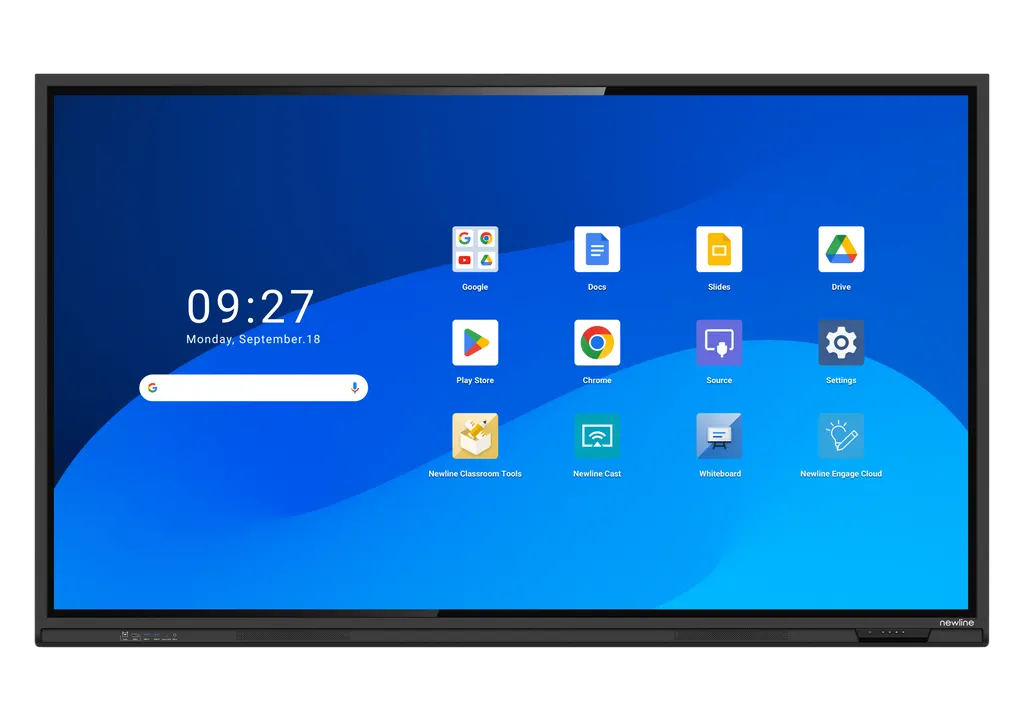
Newline 55" Q Pro Interactive Flat Panel

Screen size
55″
Resolution
3840 × 2160 (4K)
Touch
IR
WhatsApp
Priceon request
QuotationWithin 1 working day
DeliveryConfirmed with your quote, based on stock
Overview

The Newline 55-inch Q Pro is a 4K interactive display with a 1210 x 680 mm active area, infrared touch supporting up to 40 points and a 178° viewing angle. It runs Android 14, carries Google EDLA certification and gives built-in access to Google Docs, Sheets and Slides. Two 20W speakers and a 65W USB Type-C input suit classrooms, huddle rooms and smaller boardrooms across Qatar. Request a quote from SmartRooms Qatar.

What the 55-inch Q Pro is designed to do

The Newline 55-inch Q Pro is the smallest panel in the Q Pro Series, a range of interactive displays built around a 4K screen, Google EDLA certification and an Android 14 operating system. Its active area measures 1210 × 680 mm, which suits a classroom, huddle room or small boardroom where a handful of people write, annotate and present on one surface.

Display, touch and sound facts that matter

  • 4K resolution (3840 × 2160) with 1.07 billion display colours and 400 cd/m² brightness.
  • Infrared touch with up to 40 touch points and a touch response time under 4 ms.
  • 178° viewing angle horizontally and vertically, so content stays readable from the side of the room.
  • Anti-glare, anti-fingerprint and antimicrobial tempered glass with at least 8H hardness, which the manufacturer pairs with an antimicrobial surface coating.
  • Two 20W speakers for in-room audio without extra hardware.

The 400 cd/m² brightness is the figure to weigh against your room's lighting. Rooms with large windows or strong overhead light should be surveyed before the panel is placed, so reflections do not compete with the content on screen.

Android 14 and Google integration in daily use

The panel runs Android 14 with 8GB RAM and 64GB built-in storage, and it carries Google EDLA certification. Teachers and staff can open Google Docs, Sheets and Slides from the home screen and download apps from the Google Play Store. User profiles keep separate home screens and settings for teachers, students, teams or departments, so a shared room does not need reconfiguring at every session. The Wi-Fi module parameters are listed as Wi-Fi 6 and Bluetooth 5.2, and a Wi-Fi module slot is provided.

Where it fits in Qatar

  • A private school in Al Wakrah equipping a primary classroom for lessons, shared reading and group work, where the USB-C input lets a teacher connect a laptop with one cable.
  • A consultancy office in Lusail using a meeting room for client presentations and whiteboard sessions, with the optional 4K AI camera added for video calls with colleagues abroad.
  • A training centre in Education City running short workshops for small groups, where the 40-point touch surface lets several participants annotate the same slide.

What to plan before you order

The manufacturer lists wall mounting or an optional mobile stand. The specification table gives a weight of 31.5 kg for this model, so confirm the wall structure and bracket fixing before installation. SmartRooms Qatar offers free site surveys for this purpose. The operating range is 0 to 40°C at 20 to 80% relative humidity, non-condensing, so place the panel in an air-conditioned room away from direct sun and window glare, which matters during Qatar's summer months.

Power input is listed as AC 100-240 V with a maximum current of 5.5 A and power consumption of up to 550 W, while standby draw is below 0.5 W. The 4K AI camera is an optional accessory with a 120° field of view and a 15° tilt range after installation. Confirm in your quotation whether the camera is included before you plan the meeting room layout.

Send your room size, mounting preference and quantity to the SmartRooms Qatar team and request a quote. Quotations are usually issued within one working day, and we accept purchase orders (LPOs) and government tenders.

Highlights

  • 4K resolution with 178° viewing angle
  • Infrared touch with up to 40 touch points
  • Google EDLA certified with Android 14 operating system
  • Built-in 2×20W speakers and 65W USB Type-C input
  • Anti-glare, anti-fingerprint and antimicrobial tempered glass
  • Wall-mounted or optional mobile stand installation

Classroom fit

At 55″ the farthest student should sit within about 4.1 m (6× the screen height).

Estimated timeline

Quotation within 1 working day · delivery timing depends on stock availability, and we confirm it with your quotation.

Specifications

8 specifications · Source: manufacturer · checked Oct 2026
55" Q Pro8
General · Screen Size
55″
General · Display area (mm)
1210 x 680
General · Weight (kg)
31.5
General · Touch Technology
IR
General · Touch Points
Up to 40
General · Resolution
3840 × 2160 (4K)
General · Viewing Angle
178°
General · Backlight
DLED

Downloads

0 files from the manufacturer
No downloadable files are listed for this model yet. Ask us and we will send the datasheet.

Questions about 55" Q Pro

Who is the 55-inch Q Pro best suited to?
The 55-inch Q Pro suits classrooms, small meeting rooms and huddle spaces where a few people need to write, annotate and present on one screen. Its 1210 × 680 mm active area is smaller than the 65-inch model's, so it fits rooms where a larger panel would dominate the wall. A primary classroom in Al Wakrah or a meeting room in West Bay are typical examples of this size.
Is the Newline 55-inch Q Pro Google certified?
Yes. The Q Pro Series carries Google EDLA certification, which the manufacturer says supports compatibility with Google applications and services. The panel runs Android 14 with built-in Google Docs, Sheets and Slides and access to the Google Play Store. Staff in a Lusail office or teachers in a Doha school can edit documents on the large screen without switching to a laptop. Confirm the certification documents with the SmartRooms Qatar team if your procurement file requires them.
How many touch points does it support and what touch technology does it use?
The specification table lists infrared touch with up to 40 touch points and a touch response time under 4 ms. The datasheet notes a default of 20 points on Android and 40 points on Windows, so confirm the touch configuration you need before ordering. Palm rejection is included, which lets a user rest a hand on the glass while writing. For a classroom where several pupils write at the board, confirm the setting in your quotation.
Can the 55-inch Q Pro handle a Qatar summer near windows?
Keep it indoors in an air-conditioned room. The manufacturer's operating range is 0 to 40°C with 20 to 80% relative humidity, non-condensing, and the storage range is wider at -20 to 60°C. Avoid direct sun and glare from large windows, which add heat and reflections. The SmartRooms Qatar team can check the room environment during the site survey before installation.
Can it be wall-mounted, and what should we check first?
The listed installation methods are wall-mounted or on a mobile stand, with the stand available as an optional item. The specification table gives a weight of 31.5 kg for this model, so check that the wall can carry the panel and bracket. SmartRooms Qatar offers free site surveys that confirm wall construction, sightlines and the routes for power and data before installation. Plan the mounting height around the room's typical users.
What ports and inputs does it provide?
The listed inputs include HDMI IN 2.0 ports, a DisplayPort 1.2 input, a USB Type-C input with 65W power delivery, USB 3.0 Type-A ports, a gigabit RJ45 connection, an RS232 port, an audio line out and an SPDIF output. It also has a USB Type-B touch connection, an OPS slot and a Wi-Fi module slot. Check this list against your laptops, control systems and sources before ordering.
What is an OPS slot, and does this model have one?
An OPS (Open Pluggable Specification) slot accepts a compatible computer module that sits inside the display, so the screen can run its own PC software without a separate box at the front of the room. Yes, the 55-inch Q Pro lists one OPS slot among its rear connections. The OPS module itself is not part of the listed specification, so confirm compatibility with the SmartRooms Qatar team before ordering.
Can I connect a laptop with one cable?
Yes, through the USB Type-C input rated for 65W power delivery. According to the product information, one cable carries data, audio, video and power, so a presenter can plug in and start a lesson or meeting without a separate charger. Touch input runs over the USB Type-B connection. Confirm that your laptop supports the same USB-C video standard before ordering.
Does it include a camera for video calls?
No camera is built in as standard. The manufacturer offers a 4K AI camera as an optional accessory, with a 4K at 30 Hz resolution, a 120° field of view, auto-framing and a 15° tilt range after installation. For a Doha office that holds video calls with teams abroad, add the camera to your request and check the meeting room's wall and ceiling layout. The quotation will confirm whether the camera is included.
Is it suitable for a training centre in Education City?
It suits small workshop groups where participants take turns at the screen or annotate the same slide together. The 40-point touch surface supports several annotations at once, and the anti-glare, anti-fingerprint glass keeps the surface easier to read during long sessions. Instructors can save separate user profiles to switch between sessions without reconfiguring the display. Send the room size and number of units to SmartRooms Qatar so the quotation matches the training plan.
Will it run on Qatar's 240 V power supply?
The power input is listed as AC 100-240 V, which covers the 240 V, 50 Hz supply used in Qatar. The maximum current is 5.5 A and power consumption is up to 550 W, with standby draw below 0.5 W. Qatar sockets follow the BS 1363 Type G standard, so confirm the power cord supplied with your quotation. Schools ordering several units can issue one LPO covering the full set.
Should we arrange a site survey before ordering several units for a school?
Yes, a site survey is worthwhile when a school orders several panels, because each wall needs to carry 31.5 kg per unit with its bracket and each room needs suitable power and data routes. SmartRooms Qatar offers free site surveys that cover wall construction, window glare and mounting height for each classroom. The results feed into a single quotation, which is usually issued within one working day.

Similar models

BenQ CM7505 BenQ Board CM7505 75-inch Interactive Display
75″ UHD 3840 × 2160 pixels Ultra Precision IR
SMART SBID-6286S-V3 SMART Board 6086S-V3 86-inch Interactive Display with iQ
86″ 4K UHD (3840 × 2160) HyPr Touch with InGlass
SMART SBID-6286S-V3-P SMART Board 6086S-V3 Pro 86-inch Interactive Display with iQ
86″ 4K UHD (3840 × 2160) HyPr Touch with InGlass
Clevertouch Clevertouch Edge 65" Clevertouch Edge 65" 4K Interactive Display with Camera and Speakers
65″ 4K UHD (3840x2160 @60Hz) Android 15
Clevertouch Clevertouch Edge 86" Clevertouch Edge 86" 4K Interactive Flat Panel
86″ 4K UHD (3840x2160 @60Hz) Android 15
Email Call




