





Thursday, 22 October 2026 · 11 Jumada I 1448 AH Sun – Thu · 9:00 – 18:00
+971 56 914 9477 العربية
WhatsApp

65" Q Pro

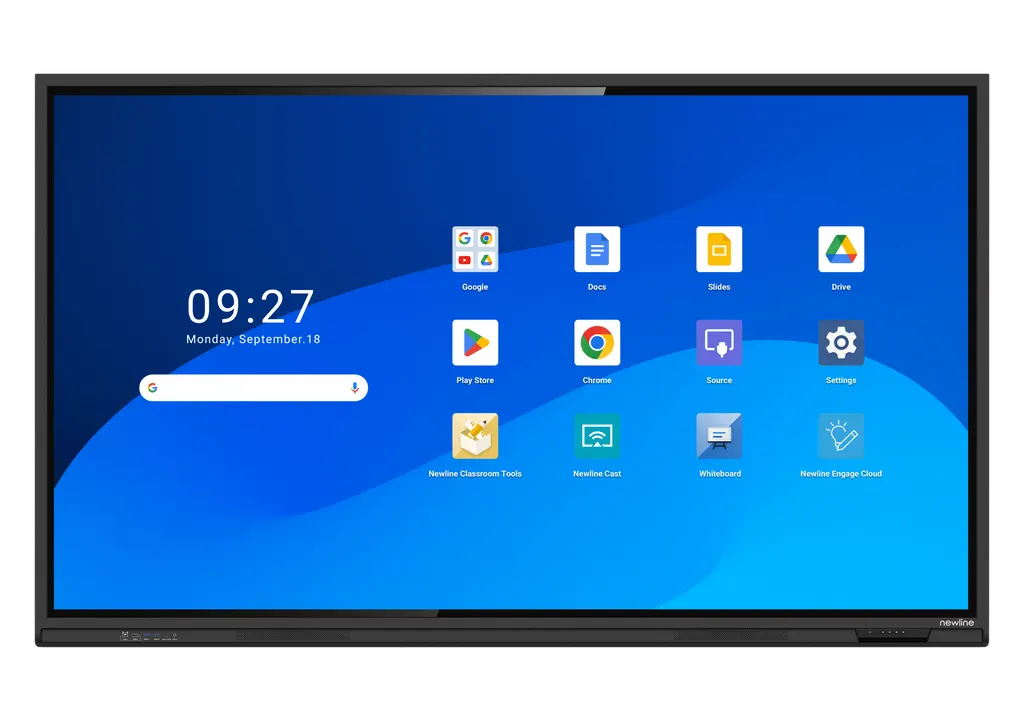
Newline 65" Q Pro 65-inch Interactive Display

Screen size
65″
Resolution
3840 × 2160 (4K)
Touch
IR
WhatsApp
Priceon request
QuotationWithin 1 working day
DeliveryConfirmed with your quote, based on stock
Overview

The Newline 65-inch Q Pro is a 4K interactive display with infrared touch supporting up to 40 touch points, a 1428 x 803 mm display area and Google EDLA certification with Android 14 built in. Its 2 x 20W speakers, USB-C port rated for 65W power delivery and antimicrobial, anti-glare glass suit classrooms, training rooms and meeting rooms across Qatar where teams share documents and work with Google Docs, Sheets and Slides.

A 65-inch 4K panel for classrooms and mid-sized meeting rooms

The Newline 65" Q Pro is a 65-inch interactive display with a 4K (3840 × 2160) panel, a 1428 × 803 mm display area and a 178° viewing angle. People seated at the sides of a room see the same clear image as those at the front, which matters when a teacher walks the floor or when chairs are arranged around a meeting table. At 39 kg it is lighter than the 75-inch model, so it is easier to plan for in a mid-sized teaching room.

Touch, writing and image quality

The infrared touch layer supports up to 40 touch points, so several people can write or annotate at once. The datasheet lists 20 default touch points on Android and 40 on Windows, so confirm which operating environment your teaching or meeting setup will use. The tempered glass carries anti-glare and anti-fingerprint treatment and an antimicrobial coating, which helps in rooms with window light and frequent shared use. Brightness is rated at 400 cd/m², typical response time is 8 ms, and according to the manufacturer the LED backlight includes a blue-light filter applied at the source.

Android 14, Google EDLA and connections

The panel runs Android 14 on an octa-core processor with 8 GB RAM and 64 GB flash storage, and it carries Google EDLA certification. Built-in Google Docs, Sheets and Slides sit alongside access to the Google Play Store, and user profiles let each teacher, team or department save its own home screen and settings. The front panel offers a USB Type-C port rated for 65W power delivery, which the manufacturer describes as carrying data, audio, video and power on one cable, plus HDMI IN 2.0, USB 3.0 Type-A ports and a microphone input. The rear adds HDMI OUT 2.0, DisplayPort 1.2, RS232, RJ45 Gigabit ports, an OPS slot, SPDIF and a Wi-Fi module slot. Two 20W speakers are built in. A 4K AI camera with a 120° field of view and 15° tilt range is an optional accessory, not part of the standard unit.

Where the 65-inch Q Pro fits in Qatar

  • A primary classroom in Al Wakrah: teachers use Google Slides and Docs during lessons, with individual profiles so each teacher’s home screen and settings load at sign-in.
  • A seminar room at a training centre in Education City: a presenter connects a laptop with one USB-C cable and uses the built-in speakers for the session.
  • A boardroom in Msheireb or West Bay: the panel shows documents and video calls with teams abroad, with the optional camera added where remote participants need to see the room.

What to plan before installation

The panel weighs 39 kg net and 48.5 kg gross, and its outline measures 1513 × 927 mm with a depth of 101 mm. Confirm that the wall can carry it, or specify a mobile stand, which the installation options list as an alternative. Our free site survey checks the wall, mounting height and cable routes before any drilling. Working conditions are 0 to 40°C with 20 to 80% humidity, non-condensing, so place the panel in an air-conditioned room away from direct sun and window glare. Qatar summers can exceed 45°C, so do not site it in an unconditioned space and confirm the room temperature during the survey. The power input is rated AC 100–240 V with a maximum current of 6.2 A and consumption up to 620 W, and standby draw is below 0.5 W.

Ordering one panel or a set for a school, government office or company? SmartRooms Qatar supplies the Newline 65" Q Pro, delivers to all eight municipalities of Qatar, installs it, and accepts LPOs, purchase orders, bank transfers, cheques and government tenders including Monaqasat. The panel is covered by the manufacturer’s warranty. Request a quote and our team will usually respond within one working day.

Highlights

  • 65-inch 4K panel with a 1428 x 803 mm display area
  • Infrared touch with up to 40 touch points
  • Google EDLA certified with Android 14 and 8 GB RAM
  • USB-C port with 65W power delivery over one cable
  • Two 20W speakers; optional 4K AI camera available
  • Working range 0 to 40°C, 20 to 80% humidity non-condensing

Classroom fit

At 65″ the farthest student should sit within about 4.9 m (6× the screen height).

Estimated timeline

Quotation within 1 working day · delivery timing depends on stock availability, and we confirm it with your quotation.

Specifications

8 specifications · Source: manufacturer · checked Oct 2026
65" Q Pro8
General · Screen Size
65″
General · Display area (mm)
1428 x 803
General · Weight (kg)
39
General · Touch Technology
IR
General · Touch Points
Up to 40
General · Resolution
3840 × 2160 (4K)
General · Viewing Angle
178°
General · Backlight
DLED

Downloads

0 files from the manufacturer
No downloadable files are listed for this model yet. Ask us and we will send the datasheet.

Questions about 65" Q Pro

Who is the Newline 65" Q Pro for?
It suits classrooms, seminar rooms and mid-sized meeting rooms where a small group writes, annotates and shares content at the same time. Its 65-inch 4K panel with a 178° viewing angle keeps text readable from the back of a room, and its 1428 × 803 mm display area gives teachers and presenters a large working surface without the weight of the 86-inch model. Schools, training centres and corporate meeting rooms across Qatar are typical buyers.
How does the 65-inch model differ from the 55-inch and 75-inch Q Pro?
The 65-inch has a 1428 × 803 mm display area and weighs 39 kg, compared with 1210 × 680 mm and 31.5 kg for the 55-inch, and 1650 × 928 mm and 51 kg for the 75-inch. Resolution, touch technology, touch points and viewing angle are the same across the series, so the choice depends on room size and mounting. For a mid-sized room, the 65-inch is the middle option.
How many touch points does it support, and does that depend on the operating system?
The product data lists up to 40 touch points using infrared touch technology. The datasheet specifies 20 default touch points on Android and 40 on Windows, so the number you get depends on the environment you configure. If several students will write at the same time in a classroom, ask SmartRooms Qatar to confirm the setup in your quotation. The panel also supports stylus or finger input with palm rejection.
Can teachers in a Qatari school use Google Docs and Slides directly on the panel?
Yes. The 65-inch Q Pro carries Google EDLA certification and includes built-in Google Docs, Sheets and Slides, with access to the Google Play Store on Android 14. A teacher in a primary classroom in Al Wakrah can open a lesson plan, annotate a slide and share it with students. User profiles also save each teacher’s home screen and settings, which reduces setup time between lessons.
Can a presenter connect a laptop with a single cable?
The front panel has a USB Type-C port rated for 65W power delivery. According to the manufacturer, one cable can carry data, audio, video and power, so a presenter in a training room at Education City can display content while the laptop is powered, provided the laptop’s charging needs fall within that rating. HDMI IN 2.0, USB 3.0 Type-A ports and a microphone input are also on the front for other devices. Confirm cable and charger specifications in your quote request.
Is a camera built in for video conferencing?
No. A 4K AI camera is available as an optional accessory, with a wide-angle 120° field of view, auto-framing and a tilt range of 15° after installation. The datasheet lists an 8M lens and 4K video at 30 Hz. In a boardroom in Msheireb or West Bay where teams abroad join calls, the camera lets remote participants see the people in the room. Ask for it to be added to your quotation alongside the panel.
Can a standard wall carry 39 kg, and do you survey the site first?
The panel weighs 39 kg net and 48.5 kg gross, so the wall and fixings need checking before installation. Our free site survey covers wall construction, mounting height, cable routes and the position of the power outlet. If the wall is not suitable, a mobile stand is listed as an optional installation method. Tell us the room type when you request a quote so the survey focuses on what matters before any drilling.
Can it be installed in a hot room with a window in Doha?
The working range is 0 to 40°C with 20 to 80% humidity, non-condensing. Qatar summer temperatures can exceed 45°C, so the panel should sit in an air-conditioned room, away from direct sunlight and window glare. During the site survey, check the cooling capacity and sun exposure, especially in a room facing west. If the space cannot be kept within the working range, we will discuss placement before you place an order.
Is the power supply suitable for Qatar mains?
The power input is rated AC 100–240 V with a maximum current of 6.2 A and consumption up to 620 W, while standby draw is below 0.5 W. Qatar’s 240 V supply falls within that input range. The product data does not specify the power cord or plug fitting, so confirm the connection details with SmartRooms Qatar when you request your quotation.
How much memory and storage does it have, and can it be expanded?
The panel has an octa-core processor, 8 GB RAM and 64 GB built-in flash storage. The datasheet lists an extra 64 GB of memory as an optional item. An OPS slot accepts a compatible computer module, and the Wi-Fi module slot is specified with Wi-Fi 6 and Bluetooth 5.2 module parameters. Storage needs depend on the apps you install, so list your planned apps in the quote request.
We are a school ordering several units. Can we pay by LPO?
Yes. SmartRooms Qatar accepts local purchase orders (LPOs), purchase orders, bank transfers and cheques, and can work with government tenders including Monaqasat. Send the number of units, the room list and the screen sizes you need, and we will prepare one quotation for the 65-inch Q Pro. Professional installation and a free site survey can be arranged alongside it. Quotations usually follow within one working day.
What warranty applies to the 65-inch Q Pro?
The panel is covered by the manufacturer’s warranty. The product data supplied does not state a warranty period or terms, so this page does not quote a duration. Ask for the applicable warranty terms in your quotation, and keep proof of purchase for each panel, particularly when ordering several units for a school or government office.

Similar models

BenQ CM7505 BenQ Board CM7505 75-inch Interactive Display
75″ UHD 3840 × 2160 pixels Ultra Precision IR
SMART SBID-6286S-V3 SMART Board 6086S-V3 86-inch Interactive Display with iQ
86″ 4K UHD (3840 × 2160) HyPr Touch with InGlass
SMART SBID-6286S-V3-P SMART Board 6086S-V3 Pro 86-inch Interactive Display with iQ
86″ 4K UHD (3840 × 2160) HyPr Touch with InGlass
Clevertouch Clevertouch Edge 65" Clevertouch Edge 65" 4K Interactive Display with Camera and Speakers
65″ 4K UHD (3840x2160 @60Hz) Android 15
Clevertouch Clevertouch Edge 86" Clevertouch Edge 86" 4K Interactive Flat Panel
86″ 4K UHD (3840x2160 @60Hz) Android 15
Email Call




