





Thursday, 22 October 2026 · 11 Jumada I 1448 AH Sun – Thu · 9:00 – 18:00
+971 56 914 9477 العربية
WhatsApp

75" Q Pro

Newline 75" Q Pro 75-inch 4K Interactive Display

Screen size
75″
Resolution
3840 × 2160 (4K)
Touch
IR
WhatsApp
Priceon request
QuotationWithin 1 working day
DeliveryConfirmed with your quote, based on stock
Overview

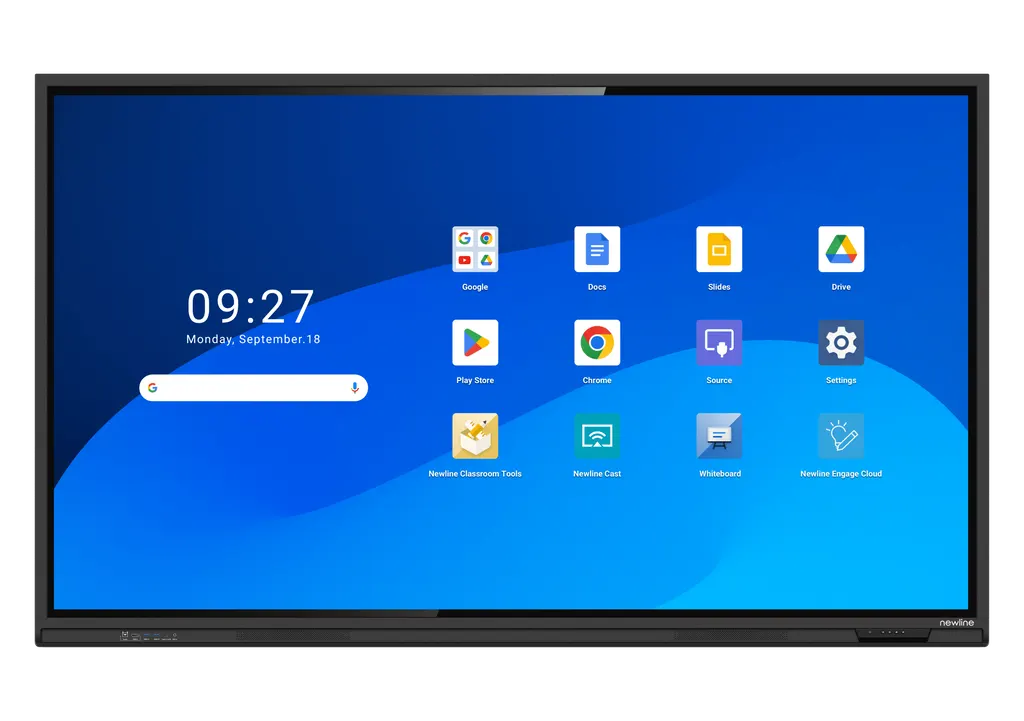
The Newline 75-inch Q Pro is a 4K interactive display with IR touch for up to 40 points and Android 14 built in. Google EDLA certification gives access to Google apps and the Play Store on the panel. Its 2 x 20W speakers and 65W USB-C power delivery suit large classrooms, training rooms and boardrooms. Request a quote from SmartRooms Qatar, including a free site survey for wall mounting.

What the 75-inch Q Pro is built for

The Newline 75-inch Q Pro is a 4K interactive flat panel for rooms where a group needs to write, annotate and share from one large surface. With a 3840 × 2160 resolution, a 16:9 display area of 1650 × 928 mm and a 178° viewing angle, the screen stays readable for people seated across a long room. It weighs 51 kg, so it is a fixed-installation product for most Qatari rooms.

Touch, display and audio facts that matter

  • Touch: infrared touch with up to 40 points. The datasheet lists a default of 20 points on Android and 40 points on Windows.
  • Image: 400 cd/m² brightness, 1.07 billion colours, 8 ms typical response time and a DLED backlight.
  • Glass: anti-glare, anti-fingerprint and antimicrobial tempered glass with 88% ±3 transparency and a surface hardness of 8H or more.
  • Audio: two 20W speakers in a 2.0 channel layout, positioned at the bottom front.

Android 14, Google EDLA and connectivity

The panel runs Android 14 on an octa-core processor with 8GB RAM and 64GB flash storage. Google EDLA certification supports built-in Google Docs, Sheets and Slides, plus access to the Google Play Store, so teams can open the same files they use elsewhere. User profiles keep separate home screens and settings for each teacher, team or department.

The front has a USB Type-C port with 65W power delivery, an HDMI 2.0 input, a USB Type-B touch port, two USB 3.0 Type-A ports and a microphone input. The rear adds further HDMI 2.0 ports, DisplayPort 1.2, RS232, gigabit RJ45 in and out, an OPS slot for an optional computer module, and a Wi-Fi module slot. The Wi-Fi module parameters list Wi-Fi 6 and Bluetooth 5.2.

Where the 75-inch fits in Qatar

Three realistic settings suit this size:

  • A private school in Al Wakrah fitting out a mid-sized classroom or science room, where students in the back row can still read the screen.
  • A ministry meeting room in West Bay for a team that works in Arabic and English and briefs colleagues abroad.
  • A training centre in Education City or Lusail running workshops that need writing and explaining on one large surface.

Planning the installation

At a net weight of 51 kg and a body measuring 1735 × 1051 × 102 mm, the wall must carry the load and the room needs a clear route for power and cables. The specifications list wall mounting and an optional mobile stand, so decide the method before ordering. The working range is 0 to 40°C at 20 to 80% relative humidity, non-condensing. In Qatar's summer, keep the panel in an air-conditioned room away from direct sun. The input range is AC 100 to 240 V, with power consumption up to 650W and standby below 0.5W.

SmartRooms Qatar offers supply, delivery to all eight municipalities of Qatar, professional installation and a free site survey. Request a quote for the 75-inch Q Pro and any optional accessories, and we will usually respond within one working day. Purchase orders (LPOs) and government tenders, including Monaqasat, are welcome.

Highlights

  • 75-inch 4K display at 3840 × 2160 resolution
  • IR touch supporting up to 40 touch points
  • Google EDLA certified with Google Play Store access
  • Android 14 with 8GB RAM and 64GB flash storage
  • Two 20W speakers in a 2.0 channel layout
  • Operating range 0 to 40°C, so keep it in cooled rooms

Classroom fit

At 75″ the farthest student should sit within about 5.6 m (6× the screen height).

Estimated timeline

Quotation within 1 working day · delivery timing depends on stock availability, and we confirm it with your quotation.

Specifications

8 specifications · Source: manufacturer · checked Oct 2026
75" Q Pro8
General · Screen Size
75″
General · Display area (mm)
1650 x 928
General · Weight (kg)
51
General · Touch Technology
IR
General · Touch Points
Up to 40
General · Resolution
3840 × 2160 (4K)
General · Viewing Angle
178°
General · Backlight
DLED

Downloads

0 files from the manufacturer
No downloadable files are listed for this model yet. Ask us and we will send the datasheet.

Questions about 75" Q Pro

Who is the 75-inch Q Pro built for?
The 75-inch Q Pro suits medium and large classrooms, training rooms and meeting rooms where a group needs to see and write on one screen. It sits between the 65-inch and 86-inch models in the Q Pro range, making it a practical choice for rooms where an 86-inch panel would be more screen than the viewing distance needs.
What touch technology does the 75-inch Q Pro use?
The panel uses infrared (IR) touch with up to 40 touch points and works with a stylus or finger. The datasheet lists a default of 20 points when running Android and 40 points on Windows, so check which setting your room needs. Advanced palm rejection supports writing with a hand resting on the glass, and the surface hardness is 8H or higher.
Does it run Google Workspace apps and the Play Store?
Yes. The 75-inch Q Pro carries Google EDLA certification, which the manufacturer describes as ensuring compatibility with Google applications. Google Docs, Sheets and Slides are built in, and the Google Play Store gives access to other apps. For a school or ministry already working in Google Workspace, lesson plans and documents can be opened on the screen without bringing a laptop into the room.
What operating system, processor and memory does it have?
The panel runs Android 14 on an octa-core ARM processor with four A73 and four A53 cores, 8GB RAM and 64GB built-in flash storage. An optional 64GB of extra memory is listed. Compare the Android version with the apps your teams plan to install before you order, so the panel fits your existing software.
Which ports will I need for a laptop and room system?
The front USB Type-C port delivers up to 65W power delivery, so one cable can carry data, audio, video and power from a compatible laptop. The front also has an HDMI 2.0 input, a USB Type-B touch port, two USB 3.0 Type-A ports and a microphone input. The rear adds more HDMI 2.0 ports, DisplayPort 1.2, RS232, gigabit RJ45 in and out, an OPS slot and a Wi-Fi module slot.
Can it be used in a hot space or outdoors during Qatar's summer?
No. It is not suited to outdoor or unconditioned spaces. The working range is 0 to 40°C with 20 to 80% relative humidity, non-condensing, while summer temperatures in Qatar often exceed 45°C. Install the panel in an air-conditioned room, away from windows that receive direct sun. The storage range is -20 to 60°C, which applies only when the unit is not operating.
How heavy is it and what does wall mounting involve?
The net weight is 51 kg and the gross weight with packaging is 64.5 kg. The packing box measures 1859 × 205 × 1160 mm, so plan delivery access and a route into the room. Wall mounting is the main method, and an optional mobile stand is also listed. SmartRooms Qatar offers a free site survey to check the wall structure, cable routes and panel position relative to seating.
Does it include a camera for video conferencing?
The camera module is optional. The 4K AI Camera is listed as an optional accessory, with 4K at 30 Hz resolution, a 120° field of view, auto-framing and a tilt range of 15° after installation. It suits a Doha meeting room that regularly connects with teams abroad. Add it to your quotation request if you need video conferencing from the panel.
How does the glass handle glare, fingerprints and germs?
The tempered glass has anti-glare and anti-fingerprint treatments plus an antimicrobial coating, which the manufacturer describes as TÜV-certified. Transparency is 88% ±3 with haze of 4 to 8%. The manufacturer also says its blue light filter is built into the LED backlight using KSF phosphor, rather than a plastic sheet or software overlay. These treatments suit shared reception areas and training rooms.
What power supply does it need?
The working voltage is AC 100 to 240 V, which covers Qatar's 240 V mains supply. At 75 inches the maximum current is 6.5A, and power consumption is up to 650W at full load, with standby below 0.5W. Ask your electrician to confirm that the circuit suits this load before installation, especially if several units share one distribution board.
Can a school in Al Wakrah order several units under a purchase order?
Yes. SmartRooms Qatar accepts purchase orders (LPOs), government tenders including Monaqasat, and payment by bank transfer, cheque or purchase order. A school fitting out several classrooms can request one quotation covering all its 75-inch units, with delivery to any of the eight municipalities and professional installation after a free site survey. Quotations are usually issued within one working day.
Is the 75-inch right for a West Bay boardroom, or should I choose the 86-inch?
It depends on the room and viewing distance. The 75-inch model has a 1650 × 928 mm display area and weighs 51 kg, which suits a moderate-sized boardroom. The 86-inch model, with a 1895 × 1066 mm area and 63 kg weight, suits larger rooms or seats set farther back. Request a quote, and a site survey will confirm which size fits the room.

Similar models

BenQ CM7505 BenQ Board CM7505 75-inch Interactive Display
75″ UHD 3840 × 2160 pixels Ultra Precision IR
SMART SBID-6286S-V3 SMART Board 6086S-V3 86-inch Interactive Display with iQ
86″ 4K UHD (3840 × 2160) HyPr Touch with InGlass
SMART SBID-6286S-V3-P SMART Board 6086S-V3 Pro 86-inch Interactive Display with iQ
86″ 4K UHD (3840 × 2160) HyPr Touch with InGlass
Clevertouch Clevertouch Edge 65" Clevertouch Edge 65" 4K Interactive Display with Camera and Speakers
65″ 4K UHD (3840x2160 @60Hz) Android 15
Clevertouch Clevertouch Edge 86" Clevertouch Edge 86" 4K Interactive Flat Panel
86″ 4K UHD (3840x2160 @60Hz) Android 15
Email Call




