





Thursday, 22 October 2026 · 11 Jumada I 1448 AH Sun – Thu · 9:00 – 18:00
+971 56 914 9477 العربية
WhatsApp

TT-6521Q

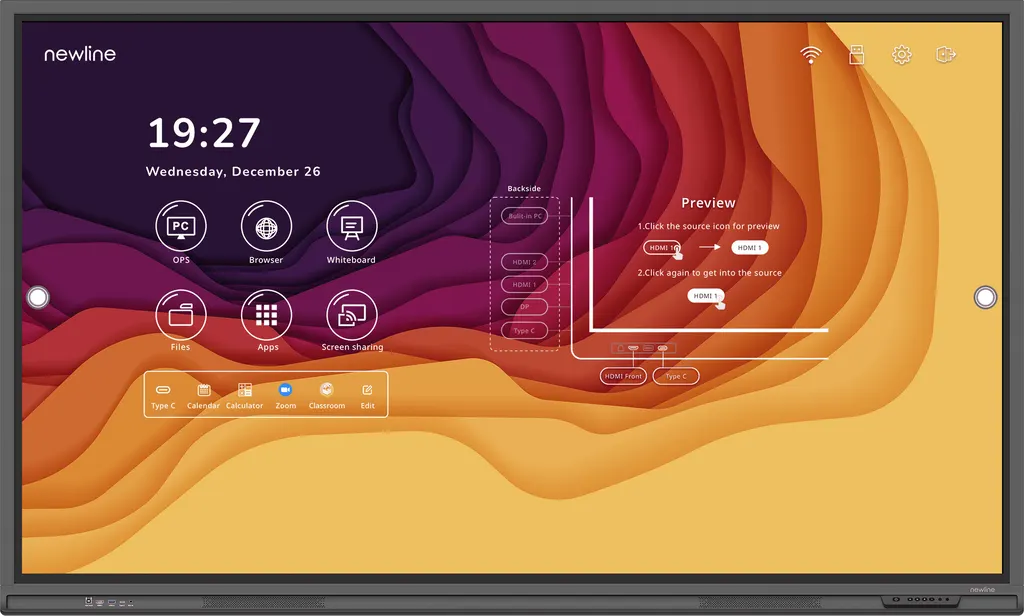
Newline TT-6521Q 65-inch Interactive Display

Screen size
65″
Resolution
3840 × 2160 (4K)
Touch
IR
WhatsApp
Priceon request
QuotationWithin 1 working day
DeliveryConfirmed with your quote, based on stock
Overview

The Newline TT-6521Q is a 65-inch 4K interactive display with infrared touch supporting 20 touch points, Android 11 and a single USB-C cable rated at 65W power delivery. Its 178° viewing angle and two 20W speakers suit classrooms, huddle rooms and meeting rooms in Qatar with limited wall space.

A 65-inch Q Series panel for rooms that need clear 4K detail

The Newline TT-6521Q is a 65-inch interactive display in the manufacturer's Q Series. Its 4K panel, rated at 3840 × 2160 pixels, uses an LED backlight and has a display area of 1428 × 804 mm. The infrared touch layer supports 20 touch points and accepts pen or finger input, so several people can write or annotate on one board at the same time.

At 65 inches rather than 75 or 86, this model suits rooms where wall space or viewing distance is limited. A standard classroom, a huddle room or a boardroom for around ten people can take it without the panel dominating the space.

Picture, touch surface and sound

The manufacturer rates the panel at 400 cd/m² brightness and 5000:1 dynamic contrast, with a typical response time of 8 ms and a 178° viewing angle, so people seated at the sides still see the content clearly. The front glass is anti-glare, anti-fingerprint tempered glass with 7H surface hardness and 88% (±3) transparency. The manufacturer also states that the glass carries a TÜV certified antimicrobial coating, and that the display uses a Low Blue Light design certified by TÜV Rheinland. Two 20W speakers are built in, with a stated output of 80±3 dB.

Connectivity and software in everyday use

The unit runs Android 11 with 4GB RAM and 32GB of storage, and includes Wi-Fi 6 with Bluetooth 5.2. The most useful connection for daily lessons is the USB Type-C port rated at 65W power delivery: one cable from a laptop carries data, audio, video and power, so presenters avoid separate leads for each session. Other ports include three HDMI 2.0 inputs, one DisplayPort 1.2 input, one HDMI 2.0 output, three USB 3.0 Type-A ports, four USB Type-B touch connections, an RS-232 control input, RJ-45 network in and out, a microphone input, an audio line out, S/PDIF and an OPS-PC slot for a compatible computer module.

Where the TT-6521Q fits in Qatar

  • A primary classroom in Al Wakrah being refitted for the new school year, where teachers want saved profiles for different year groups.
  • A meeting room in West Bay for a team of eight to ten people who join calls with colleagues abroad and share documents on the screen during the Sunday to Thursday working week.
  • A training room in Lusail for an industrial company's induction sessions, where a laptop connects through the USB-C port to present technical material.

What to plan before installation

Qatar summers regularly pass 45°C, while this model's rated operating range is 0°C to 40°C at 20% to 80% relative humidity, non-condensing. Plan for an air-conditioned room, keep the panel out of direct afternoon sun, and confirm the room conditions during a free site survey. The outline size is 1513 × 927 × 121 mm, and the unit can be wall-mounted or used with an optional mobile stand. Check the wall structure and bracket rating against the final weight confirmed on your quotation. The power input is rated at 100 to 240V AC with a maximum current of 5.5A, which covers Qatar's 240V mains, and the manufacturer lists eco power consumption at 150W.

SmartRooms Qatar delivers the TT-6521Q to all eight municipalities, provides professional installation and usually issues quotations within one working day. Request a quote and our team will confirm the right mounting option and accessories for your room.

Highlights

  • 65-inch 4K panel with 3840 × 2160 resolution
  • IR touch with 20 touch points and pen or finger input
  • Android 11 with 4GB RAM and 32GB storage
  • One USB-C cable carries data, audio, video and 65W power
  • Two 20W speakers and 178° viewing angle
  • Antimicrobial tempered glass with anti-glare, anti-fingerprint surface

Classroom fit

At 65″ the farthest student should sit within about 4.9 m (6× the screen height).

Estimated timeline

Quotation within 1 working day · delivery timing depends on stock availability, and we confirm it with your quotation.

Specifications

7 specifications · Source: manufacturer · checked Oct 2026
TT-6521Q7
General · Screen Size
65″
General · Display area (mm)
1428 × 804
General · Weight (kg)
36
General · Touch Technology
IR
General · Resolution
3840 × 2160 (4K)
General · Viewing Angle
178°
General · Backlight
LED

Downloads

0 files from the manufacturer
No downloadable files are listed for this model yet. Ask us and we will send the datasheet.

Questions about TT-6521Q

Is the TT-6521Q the right size for a classroom in Doha?
For a standard classroom or a mid-size training room, the 65-inch TT-6521Q with a 1428 × 804 mm display area is a practical choice. For larger halls or long rooms where students sit far from the board, compare it with the 75-inch TT-7521Q, which lists a 1650 × 928 mm display area. A site survey will confirm the room length and wall space before you order.
Will the TT-6521Q work in a West Bay meeting room where teams join calls from abroad?
You can connect sources to it in several ways: a laptop plugs into the USB-C port, which carries data, audio, video and power over one cable, or into one of three HDMI 2.0 inputs. The panel has a microphone input and an RJ-45 network connection. The source data does not list a camera, so plan one separately if your calls need video capture.
Can the TT-6521Q go near a window in an Al Khor office that gets afternoon sun?
Keep it out of direct afternoon sun. The rated operating range is 0°C to 40°C at 20% to 80% relative humidity, non-condensing, while Qatar summers regularly exceed 45°C. Install it in an air-conditioned room and ask for a site survey to check how sunlight and glare fall on the anti-glare glass before the wall bracket is fixed.
What touch technology does the TT-6521Q use, and does it accept pens and fingers?
The TT-6521Q uses infrared (IR) touch and lists 20 touch points. The writing tools are a passive pen or fingers, so teachers and students can write or annotate with either input. The 20-point rating means up to twenty touches can be registered at the same time, which suits group work at the board.
Which operating system and storage does the TT-6521Q include?
The TT-6521Q runs Android 11 with 4GB RAM and 32GB ROM. The manufacturer provides an app store and the Newline Ecosystem software suite. For schools that want personal settings, user profiles can save a home screen and tailored settings for teachers, students, teams or departments, so users do not reconfigure the board at every session.
How do I connect a laptop to the TT-6521Q with one cable?
Use the USB Type-C port rated at PD 65W. One cable carries data, audio, video and power, so a presenter can connect or disconnect in a single step. The panel also has three HDMI 2.0 inputs and a DisplayPort 1.2 input for other sources. Confirm that your laptop supports video over USB-C before ordering, because that depends on the device.
What power supply does the TT-6521Q need in Qatar?
The rated working voltage is AC 100 to 240V with a maximum current of 5.5A, which covers Qatar's 240V, 50 Hz mains supply. The manufacturer lists eco power consumption at 150W. The source data does not specify the plug type supplied, so ask the SmartRooms Qatar team to confirm the socket and cable arrangement for your wall position.
How much wall space does the TT-6521Q need?
The outline dimensions are 1513 × 927 × 121 mm, and the display area is 1428 × 804 mm. The listed mounting options are wall-mounted or a mobile stand, which is optional. Plan a clear wall run and a power point behind the panel, and request a free site survey so the bracket height and cable route are checked before installation day.
What do the antimicrobial glass and low blue light features mean in practice?
The manufacturer states that the front glass has a TÜV certified antimicrobial coating, useful where several people touch the same board. Its low blue light design applies a filter at the LED backlight and is TÜV Rheinland certified. These are manufacturer claims, so check the certificates in the product documentation before citing them in a tender.
We are equipping several classrooms in Al Rayyan. Can we order through an LPO?
Yes. SmartRooms Qatar accepts purchase orders (LPOs) and government tenders, including Monaqasat, and accepts payment by bank transfer, cheque or purchase order. Send us the quantity and a list of rooms, and we will issue a quotation usually within one working day. Ask for a site survey to confirm the wall and power point for each classroom.
How does the TT-6521Q compare with the TT-7521Q and TT-8621Q?
The TT-6521Q has a 1428 × 804 mm display area and an outline of 1513 × 927 × 121 mm. The 75-inch TT-7521Q lists a 1650 × 928 mm display area, and the 86-inch TT-8621Q lists 1895 × 1066 mm. All three share 4K resolution, IR touch and a 178° viewing angle, so choose according to room size, viewing distance and available wall space.
Can the TT-6521Q be used in a training room at a clinic in Doha?
It can suit an air-conditioned training room in a clinic or hospital education space, where the antimicrobial glass and USB-C connection help when staff share one board. The manufacturer states a TÜV certified antimicrobial coating. The source data does not include cleaning instructions, so the clinic should follow its own infection control protocol and request the user manual before use.

Similar models

BenQ CM7505 BenQ Board CM7505 75-inch Interactive Display
75″ UHD 3840 × 2160 pixels Ultra Precision IR
SMART SBID-6286S-V3 SMART Board 6086S-V3 86-inch Interactive Display with iQ
86″ 4K UHD (3840 × 2160) HyPr Touch with InGlass
SMART SBID-6286S-V3-P SMART Board 6086S-V3 Pro 86-inch Interactive Display with iQ
86″ 4K UHD (3840 × 2160) HyPr Touch with InGlass
Clevertouch Clevertouch Edge 65" Clevertouch Edge 65" 4K Interactive Display with Camera and Speakers
65″ 4K UHD (3840x2160 @60Hz) Android 15
Clevertouch Clevertouch Edge 86" Clevertouch Edge 86" 4K Interactive Flat Panel
86″ 4K UHD (3840x2160 @60Hz) Android 15
Email Call




