





Thursday, 22 October 2026 · 11 Jumada I 1448 AH Sun – Thu · 9:00 – 18:00
+971 56 914 9477 العربية
WhatsApp

Vega Pro

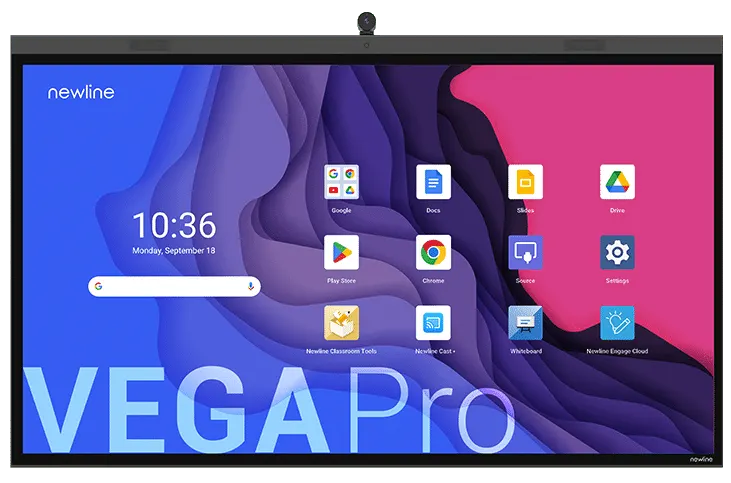
Newline Vega Pro All-in-One 4K Interactive Display

WhatsApp
Priceon request
QuotationWithin 1 working day
DeliveryConfirmed with your quote, based on stock
PDFDownload datasheet (VegaPK_Pro24Z_Specsheet_Newline_General_EN_05.26.pdf)
Overview

The Newline Vega Pro is a 4K all-in-one interactive display with Android 13 and Google EDLA certification, offered in 55, 65, 75 and 86 inch sizes. It pairs touch with an 8-microphone array, 2.1-channel speakers and Wi-Fi 6, and one USB-C cable carries touch, video, audio and data. It suits corporate meeting rooms across Qatar that need one screen for presenting and video calls. Request a quote today.

What the Newline Vega Pro is built for

The Newline Vega Pro is an all-in-one interactive display, so the panel, touch layer, computing, microphones and speakers sit in one unit with no separate PC or conference box to place beside it. It runs Android 13 and carries Google EDLA certification, so users can sign in to their own Google account on the panel and reach Google Play and Google Workspace apps such as Gmail, Drive, Docs, Sheets, Slides and Meet. Password protection, two-step authentication and data encryption are included among its security features.

Display, touch and audio: the specifications that matter

  • 4K resolution at 3840 x 2160 pixels, 450 cd/m² brightness and a 5000:1 contrast ratio.
  • Optical bonding and a 178º viewing angle keep the image clear from side seats as well as the centre.
  • Touch accuracy of ±1 mm, palm rejection and two styluses listed in the specification.
  • Antimicrobial tempered glass with an anti-glare and anti-fingerprint surface.
  • An 8-microphone array with 8 m pick-up distance, echo cancellation and beamforming, plus a 2.1-channel speaker system with two 20 W front speakers and a 15 W subwoofer.

Connectivity and daily use in Qatar

The panel supports Wi-Fi 6 on 2.4 and 5 GHz, Bluetooth 5.2 and a Gigabit Ethernet port. One USB-C cable carries touch, video, audio and data, and the port delivers up to 100W of power to a connected laptop. Three situations where this matters:

  • A meeting room in Msheireb or Lusail where teams join calls with colleagues abroad. The optional 4K AI camera offers auto-framing and works with Zoom, Google Meet, Microsoft Teams and Webex.
  • A private school in Al Wakrah fitting out classrooms, where multi-user profiles let each teacher keep their own apps, settings and themes without swapping devices.
  • A lecture hall at an Education City campus or a hotel training room in Doha, where the 8 m microphone pick-up distance helps speakers at the back of a large room.

Planning the installation

  • Net weight without wall mount: 28 kg (55-inch), 35.5 kg (65-inch), 47 kg (75-inch), 59 kg (86-inch).
  • VESA patterns: 400 x 400 mm (55-inch), 600 x 400 mm (65-inch), 800 x 400 mm (75- and 86-inch).
  • Standard-mode power: 79 W, 89 W, 114 W and 146 W by size. Standby is below 0.5 W.

Because the panels are heavy and large, a free site survey is worth booking before wall mounting, especially for an 86-inch model, to check wall strength and viewing distance. The manufacturer data does not state an operating temperature range, so confirm the environment with the SmartRooms Qatar team before installing near windows or in lobbies exposed to heat and dust. Tell us your room size, seating and whether you need the optional camera. Request a quote and we will send a quotation, usually within one working day, with delivery to all eight municipalities of Qatar and professional installation.

Highlights

  • 4K display, 3840 x 2160 pixels, 450 cd/m² brightness
  • Google EDLA certified with Android 13 built in
  • 8-microphone array with 2.1-channel speaker system
  • One USB-C cable for touch, video, audio and data
  • Up to 100W power delivery over USB-C
  • Optional 4K AI camera with auto-framing for meeting apps
  • Available in 55, 65, 75 and 86 inch sizes

Estimated timeline

Quotation within 1 working day · delivery timing depends on stock availability, and we confirm it with your quotation.


Specifications

Source: manufacturer · checked Oct 2026
The full specification and datasheet for this model are available on request; we send them with your quotation.

Downloads

6 files from the manufacturer

Questions about Vega Pro

Which screen sizes does the Vega Pro come in?
The Vega Pro series is available in 55, 65, 75 and 86 inch sizes, and each has a 3840 x 2160 (4K) panel with a 16:9 ratio. A 55 or 65 inch panel suits a meeting room or classroom of modest size, while the 86 inch model suits a lecture hall or large boardroom. Send us your room dimensions and seating plan when you request a quote, and we will help confirm the best fit.
What does Google EDLA certification add to the Vega Pro?
Google EDLA certification means users can sign in to their own Google account directly on the panel and reach Google Play and Google Workspace apps, including Gmail, Drive, Docs, Sheets, Slides and Meet. The panel also includes password protection, two-step authentication and data encryption. For a team already working in Google Workspace, meetings can start from the same files they use at their desks.
Is the 4K AI camera included, and which meeting apps does it support?
The 4K AI camera is an optional accessory, so mention it in your quotation request if you want it fitted. It works with Zoom, Google Meet, Microsoft Teams and Webex, and offers a wide-angle field of view, auto-framing and a tiltable design. In a hybrid meeting between a Doha office and a team in Lusail or abroad, auto-framing keeps the presenter in shot without a camera operator.
Which size should a boardroom in West Bay choose?
Viewing distance matters more than seat count. In a West Bay boardroom where the farthest seat is several metres from the panel, the 75 or 86 inch model keeps text readable, while a 65 inch panel suits a smaller room with a shorter viewing distance. Measure the wall and the distance to the farthest chair before you choose, and our team can help during a free site survey.
How heavy are the panels and what wall mount do they need?
Net weights excluding the wall mount are 28 kg for the 55 inch, 35.5 kg for the 65 inch, 47 kg for the 75 inch and 59 kg for the 86 inch model. VESA patterns are 400 x 400 mm for the 55 inch, 600 x 400 mm for the 65 inch, and 800 x 400 mm for the 75 and 86 inch models. The 86 inch outline measures 1965 x 1184 mm, so a free site survey helps confirm wall strength before mounting.
How does the touch work in practice?
The Vega Pro uses projected capacitive touch with ±1 mm accuracy and palm rejection that tells a stylus, fingertip, palm or wrist apart. Its specification lists two styluses. Under Windows, with an OPS or SDM module fitted, the manufacturer quotes up to 40 touch points, which lets several people write or annotate at the same time. Ask our team which module suits your Windows setup.
Can I connect a Windows PC or a Linux device?
Android 13 is built in. Windows can run through an OPS or SDM module, and the manufacturer notes an SDM-S type peripheral for integration with Windows or Linux. Video inputs include HDMI IN 2.1 and USB-C, with DisplayPort 1.2 on the rear panel. Confirm your computer type and operating system with the SmartRooms Qatar team before ordering, especially if your organisation relies on specific Windows applications.
Can a presenter charge a laptop through the panel?
Yes. A single USB-C cable carries touch, video, audio and data, and the port offers power delivery of up to 100W. In a hotel meeting room in Doha or a bank's training suite, a presenter can plug in a laptop, present and keep the battery charging without a second cable. Confirm that the laptop and its charger support USB-C power delivery at that level.
Does the Vega Pro support Arabic and English menus?
The manufacturer data for this model does not list interface languages, so we cannot confirm Arabic menu support from it. Offices that work in Arabic and English side by side should ask SmartRooms Qatar to confirm language options before ordering, and should check the user manual supplied by the manufacturer for the software details.
How much power does it draw, and does it help reduce running costs?
Standard-mode power draw is listed as 79 W for the 55 inch, 89 W for the 65 inch, 114 W for the 75 inch and 146 W for the 86 inch model. Standby draw is below 0.5 W, and a proximity sensor can switch the panel on and off based on people present in the room. The model also carries EPEAT Silver certification. For a school in Al Rayyan running classes on a daily timetable, automatic control cuts the time the screen runs in empty rooms.
Can it be placed near a window or in a lobby with strong heat or dust?
The manufacturer data for this model does not give an operating temperature range, so we cannot quote one. Summer temperatures in Qatar can exceed 45°C and dust storms are common, so for a lobby, atrium or room with a sun-facing window, confirm the environment with the SmartRooms Qatar team before installation. Installers can advise on placement, ventilation and shading.
How do I order, and can a school or ministry buy through an LPO?
Request a quote and we usually respond within one working day. We supply and deliver to all eight municipalities of Qatar, arrange professional installation, and accept purchase orders (LPOs), government tenders including Monaqasat, and payment by bank transfer, cheque or purchase order. The Vega Pro is covered by the manufacturer's warranty. Include the exact size and quantity you need in your request.

Similar models

BenQ CM7505 BenQ Board CM7505 75-inch Interactive Display
75″ UHD 3840 × 2160 pixels Ultra Precision IR
SMART SBID-6286S-V3 SMART Board 6086S-V3 86-inch Interactive Display with iQ
86″ 4K UHD (3840 × 2160) HyPr Touch with InGlass
SMART SBID-6286S-V3-P SMART Board 6086S-V3 Pro 86-inch Interactive Display with iQ
86″ 4K UHD (3840 × 2160) HyPr Touch with InGlass
Clevertouch Clevertouch Edge 65" Clevertouch Edge 65" 4K Interactive Display with Camera and Speakers
65″ 4K UHD (3840x2160 @60Hz) Android 15
Clevertouch Clevertouch Edge 86" Clevertouch Edge 86" 4K Interactive Flat Panel
86″ 4K UHD (3840x2160 @60Hz) Android 15
Email Call


