





Thursday, 22 October 2026 · 11 Jumada I 1448 AH Sun – Thu · 9:00 – 18:00
+971 56 914 9477 العربية
WhatsApp

Beacon Badge

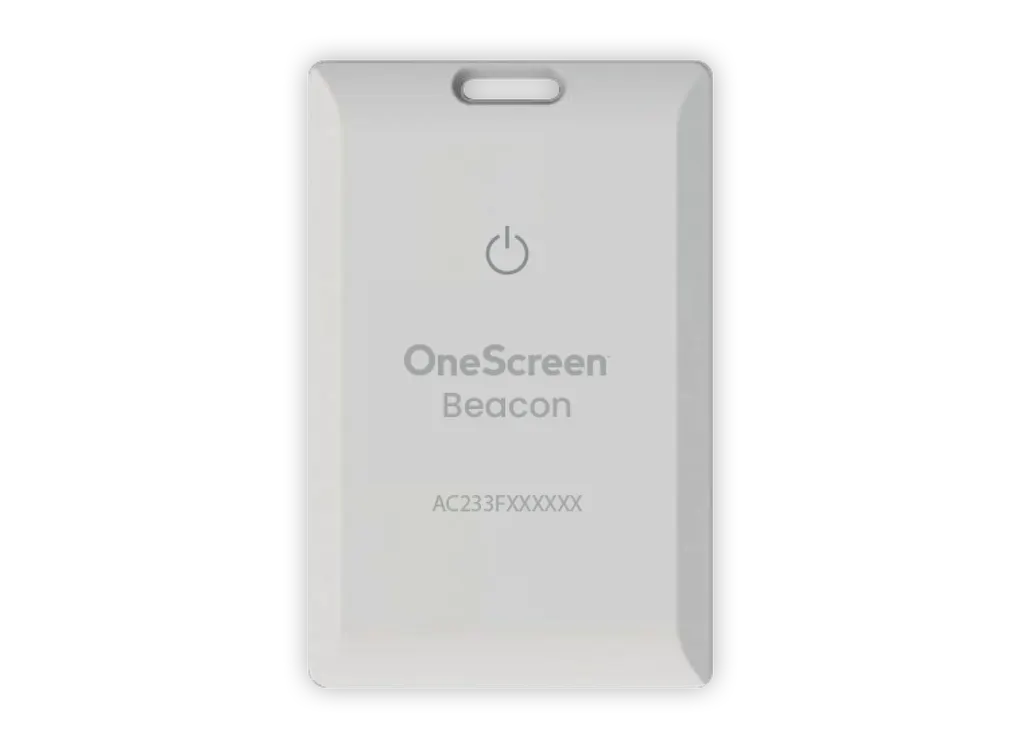
OneScreen Beacon Badge NFC Priority Notification Badge

Warranty
Warranty is covered for as long…
WhatsApp
Priceon request
QuotationWithin 1 working day
DeliveryConfirmed with your quote, based on stock
PDFDownload datasheet (OneScreen_Beacon_Spec_Sheet.pdf)
Overview

The OneScreen Beacon Badge is a compact NFC badge with a priority button that sends alerts through the OneScreen Beacon system. A double or triple click triggers notifications by text, email, phone call or admin panel, and the badge supports real-time location tracking over BLE 5.0. Rated IP65 and fitted with an 800mAh lithium-ion battery, it suits schools, campuses, venues and sites in Qatar that need to track people or equipment. Request a quote.

How the Beacon Badge works inside the Beacon system

The OneScreen Beacon Badge is an accessory for the Beacon solution rather than a standalone device. Each badge combines an NFC chip, which is used to log in to a OneScreen account, with a priority notification button. A double-click or triple-click on that button sends an alert to the recipients set up in the system, so a wearer can raise an urgent request with one simple action.

Every notification includes the badge holder's name, the date and time, the badge ID, and the name and device ID of the OneScreen T7 involved. Recipients can receive alerts as text messages, email, phone calls or notifications on the admin panel, which lets an organisation choose the channel that suits each role.

Location tracking, groups and reporting

Real-time location tracking covers badges assigned to people and to assets. A facilities team can see where a piece of portable equipment is, while a safety coordinator can see where staff are on a site. Users can be grouped, and each group can be given additional priority recipients. That matters during an event: a school can route a class group's alerts to duty teachers, and a venue can send an incident from one zone to its security team rather than to the whole staff list.

Administrators can bulk upload users, recipients, badges and devices instead of entering each record by hand. The password-protected Beacon Portal shows an overview dashboard covering the whole solution. The Beacon application runs on the OneScreen T7, and the web platform works in Google Chrome, Safari, Microsoft Edge, Mozilla Firefox and Opera.

Build, battery and security details

  • Plastic body measuring 3.36 x 2.12 x 0.17 inches and weighing 0.04 lb.
  • IP65 rating, which protects against dust and low-pressure water jets.
  • BLE 5.0 for Bluetooth connection and MQTT for communication.
  • 800mAh lithium-ion battery with a rated lifespan of 2.5 to 3 years.
  • AES 256 encryption for data protection, with unique admin usernames and passwords.

Where it fits across Qatar

Three scenarios show where the badge earns its place.

  • A private school in Al Wakrah fitting out a new campus, with staff badges routed to the duty team and class groups set up before term starts.
  • An event venue in Lusail, where event staff are grouped by zone so that an alert from one area reaches the right people.
  • A logistics yard near Hamad International Airport, where equipment badges support location checks across a large outdoor compound.

What to plan before you order

Decide how many badges each group needs, who should receive each priority alert, and who will manage the Beacon Portal. The warranty is covered for as long as you subscribe to the Beacon Service, because the badge is a service-based solution, so confirm the subscription in your quotation. The manufacturer data does not give an operating temperature range. For hot, dusty or unshaded areas during Qatar's summer, ask the SmartRooms Qatar team to confirm suitability before deployment. Free live online support and training are available, and SmartRooms Qatar offers a free site survey to review your layout before installation.

Request a quote from SmartRooms Qatar. We will confirm quantities, subscription details and delivery to all eight municipalities of Qatar, with quotations usually within one working day.

Highlights

  • NFC login to your OneScreen account
  • Double- or triple-click priority notifications
  • Real-time location for people and assets
  • BLE 5.0 Bluetooth connectivity
  • IP65 rating and 3.36 x 2.12 x 0.17 inch body
  • Rated lifespan of 2.5 to 3 years

Estimated timeline

Quotation within 1 working day · delivery timing depends on stock availability, and we confirm it with your quotation.

Specifications

21 specifications · Source: manufacturer · checked Oct 2026
Hardware Beacon Badge8
Dimensions
3.36 x 2.12 x 0.17 (in)
Weight
0.04 lb
Build Material
Plastic
Bluetooth Protocol
BLE 5.0
NFC
Supported for log in to OneScreen Account
Battery
Lithium-ion battery (800mAh)
Lifespan
2.5 - 3 Years
IP Rating
IP65
B eacon Software8
Notification data
Notifications include name, date, time, badge ID and device name (OneScreen T7 device name) and device ID
Location Service
Real-time location service enabled to track badges (badges can be for assets and persons)
Priority Notifications
Notifications can be sent based on double-click or triple-click of priority button
Types of Notifications Supported
Text, email, phone call, notifications on admin panel
Beacon Portal
Password protected web portal with dashboard view to give an overall report of the solution
User Assignment
Groups of users or students can be assigned to additional priority notification recepients for more effective management in case of events
Bulk Upload
Allows bulk upload of users, recepients, badges and devices
Reports
OneScreen T7 for Beacon Application. Web browser for Beacon Platform (supports Google Chrome, Safari, Microsoft Edge, Mozilla Firefox, Opera Browser)
Security5
Data Protection
AES 256 encryption
Support
Free live online support and training available from Screen Skills Guru support
Communication Protocol
MQTT
Warranty
Warranty is covered for as long as the user is subscribing to the Beacon Service since the Beacon is a service based solution
Login
Unique admin username and passwords to protect unauthorized user access.

Downloads

1 file from the manufacturer

Questions about Beacon Badge

What is the OneScreen Beacon Badge for, and who is it suited to?
The badge is a wearable NFC accessory for the OneScreen Beacon system. Tapping it logs a holder in to a OneScreen account, and its priority button sends alerts to recipients set up in the system. Badges can be assigned to people or to assets, and the Beacon Portal gives administrators a password-protected dashboard. Data is protected with AES 256 encryption. It suits schools, campuses, venues and sites that need fast alerts and location awareness.
How does the priority button work, and how are alerts delivered?
A double-click or triple-click on the priority button sends a priority notification to the recipients set in the Beacon system. Alerts can be delivered as text messages, email, phone calls, or notifications on the admin panel. Each one includes the holder's name, date, time, badge ID, and the name and ID of the OneScreen T7 device involved, which gives responders the context they need. Groups can also be given extra priority recipients for busy periods.
Does the badge track location in real time?
Yes. The Beacon system includes a real-time location service that tracks badges, and badges can be assigned to people or to assets. The badge uses the BLE 5.0 Bluetooth protocol. A facilities team can follow portable equipment, while a safety coordinator can see where staff are on a site. For accuracy in a particular building, review the layout during a free site survey before installation.
Does the badge work with the OneScreen T7?
Yes, the Beacon data references the OneScreen T7 directly. Notifications include the T7 device name and ID, and the Beacon application runs on the OneScreen T7. The web platform works in Google Chrome, Safari, Microsoft Edge, Mozilla Firefox and Opera. Confirm the device and Beacon configuration you need when you request your quotation, so the setup matches your site before delivery.
How long does the battery last?
The badge uses an 800mAh lithium-ion battery and has a rated lifespan of 2.5 to 3 years. The manufacturer data does not give a battery runtime, so it is not stated here. If your badges will be in use for long shifts or across many daily alerts, ask the SmartRooms Qatar team to explain expected usage before you confirm quantities in your quotation.
Is the badge suitable for hot and dusty conditions in Qatar?
The badge has an IP65 rating, which indicates protection against dust ingress and low-pressure water jets. The manufacturer data does not state an operating temperature range, so heat tolerance cannot be confirmed from the specification. Before deploying badges in unshaded yards, vehicles or dusty stores during summer, ask SmartRooms Qatar to confirm the environment is suitable.
Is the badge covered by warranty?
The warranty is covered for as long as you subscribe to the Beacon Service, because the badge is a service-based solution. The data does not give a warranty duration, so the subscription terms should be confirmed in your quotation. SmartRooms Qatar products are covered by the manufacturer's warranty, and our team can explain the terms before you place an order.
How could a private school in Al Wakrah set up badges for staff and classes?
Start by assigning badges to staff, then group users such as classes or year groups and give each group extra priority recipients, such as a duty teacher list. Bulk upload lets the school load users, recipients, badges and devices in one batch before term starts. Large school orders can be issued against a purchase order (LPO), and SmartRooms Qatar will confirm quantities and delivery in the quotation.
How could an event venue in Lusail use the badges during a large event?
Event staff can be divided into groups by zone, with each group given additional priority recipients such as the security lead for that area. A double or triple click sends the alert, and each notification shows the holder's name, time and badge ID. Real-time location tracking helps the team see where badges are across the venue. A free site survey can confirm the layout before the event date is set.
Can the badge help track equipment at a site in Mesaieed or the Industrial Area?
Yes. Badges can be assigned to assets as well as people, and real-time location tracking covers them. A maintenance team could attach badges to portable tools or equipment and check their positions on the Beacon Portal dashboard. IP65 protects the badge against dust, but the operating temperature range is not in the manufacturer data, so confirm conditions with SmartRooms Qatar before deploying it on open, hot ground.
How might a clinic in Doha use the badge for team alerts?
A clinic could use the priority button so a staff member sends an urgent alert with a double or triple click, and recipients receive it by text, email, phone call or on the admin panel. Groups let reception, nursing and support teams each have their own additional recipients. NFC login ties each badge to a OneScreen account. Any use must match the clinic's own policies, and SmartRooms Qatar can confirm the setup in the quotation.
How could a logistics team near Hamad International Airport use the badges?
A logistics team could assign badges to trolleys, pallets, handling equipment and supervisors, then check their locations on the Beacon Portal dashboard. A worker on the floor can send a priority alert to a supervisor with a double or triple click. Bulk upload helps when registering large numbers of badges and devices at once. Because the operating temperature is not stated, ask SmartRooms Qatar to confirm suitability for outdoor use before ordering.

Similar models

BenQ CM7505 BenQ Board CM7505 75-inch Interactive Display
75″ UHD 3840 × 2160 pixels Ultra Precision IR
SMART SBID-6286S-V3 SMART Board 6086S-V3 86-inch Interactive Display with iQ
86″ 4K UHD (3840 × 2160) HyPr Touch with InGlass
SMART SBID-6286S-V3-P SMART Board 6086S-V3 Pro 86-inch Interactive Display with iQ
86″ 4K UHD (3840 × 2160) HyPr Touch with InGlass
Clevertouch Clevertouch Edge 65" Clevertouch Edge 65" 4K Interactive Display with Camera and Speakers
65″ 4K UHD (3840x2160 @60Hz) Android 15
Clevertouch Clevertouch Edge 86" Clevertouch Edge 86" 4K Interactive Flat Panel
86″ 4K UHD (3840x2160 @60Hz) Android 15
Email Call



