





Thursday, 22 October 2026 · 11 Jumada I 1448 AH Sun – Thu · 9:00 – 18:00
+971 56 914 9477 العربية
WhatsApp

Cast2

OneScreen Cast2 Wireless Casting Adapter

Resolution
4K UHD
WhatsApp
Priceon request
QuotationWithin 1 working day
DeliveryConfirmed with your quote, based on stock
PDFDownload datasheet (OneScreen_Cast2_Spec-Sheet.pdf)
Overview

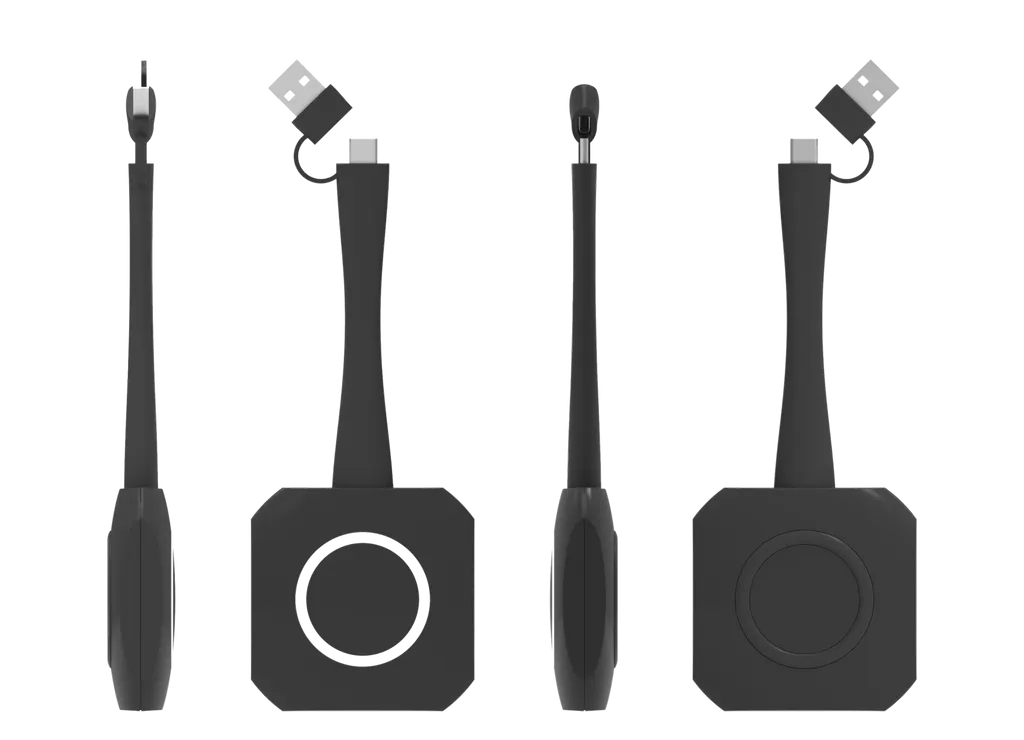
The OneScreen Cast2 is a plug-and-play wireless casting adapter that shares screens without cables. It supports Wi-Fi 6 on 5GHz and 2.4GHz, 4K UHD resolution, and 10-point touch control back to the source. Its USB Type-C interface ships with a USB-A adapter, and it runs with Windows 7 and later, macOS, Chrome OS, Linux and Android. It suits meeting rooms in Qatar where staff connect their own laptops quickly.

What the OneScreen Cast2 does in a room

The OneScreen Cast2 is a wireless casting adapter from the OneScreen Cast line. A presenter connects a laptop, tablet or phone to a room display over Wi-Fi, so no cable has to run from the presenter's device. Its plug-and-play design means users can start sharing without setting up a new connection each time, which suits rooms where people arrive with different devices.

It is an accessory rather than a display. The source data does not describe how the unit connects to the screen itself, so the SmartRooms Qatar team will confirm the display pairing with you before you order.

Wireless, network and control details

Wi-Fi 6 support on both 5GHz and 2.4GHz gives your IT team two bands to test in each room, which matters where walls, glass partitions and furniture affect signal strength. The unit supports WPA2-PSK and WPA2-Enterprise authentication, so it can work on a shared-passphrase network or on a corporate network where each user signs in with personal credentials.

  • Video: 4K UHD resolution, up to 60fps at FHD and 30fps at 4K.
  • Control: mouse control back, 10-point touch control back and one Start / Stop button.
  • Status: a white LED indicator.
  • Sharing: desktop sync, and BYOM access to the camera, speaker and microphone.

Compatibility and the Type-C check

The interface is USB Type-C with a USB-A adapter. Supported systems are Windows 7 and later, macOS, Chrome OS, Linux and Android. Type-C compatibility is listed as any operating system with full-featured Type-C, which means a port that only charges or only carries data may not be enough. Before a bulk order, ask your IT team to check the ports and operating systems on the devices that will actually use the room.

Heat, power and size planning for Qatar

The operating range is 0°C to 40°C (32°F to 104°F) and storage is -20°C to 60°C (-4°F to 140°F). Temperatures in Qatar can exceed 45°C in summer outdoors, so the unit should sit in an air-conditioned room, away from sun-facing windows, and not inside an unventilated cabinet. Electrically, the source lists a 5V input, a 0.9A maximum current and 2W average consumption. It measures 176.0 mm x 57.9 mm x 17.0 mm and weighs 87.0 g, so it needs little space at the display or on a lectern.

Where it fits in Qatar

  • A meeting room in West Bay used Sunday to Thursday, where visiting staff bring Windows and macOS laptops and need to share without swapping cables.
  • A private school in Al Wakrah fitting out classrooms, with one unit per room so teachers can share from their own devices.
  • A sales office in Lusail where agents present from Android phones during client visits.

What to plan before ordering

If units will be spread across several rooms, ask SmartRooms Qatar for a free site survey so the team can check the display, mounting location, heat exposure and network. Government buyers and schools can order by purchase order or through Monaqasat tenders. Quotations are usually issued within one working day, delivery covers all eight municipalities of Qatar, and the product is covered by the manufacturer's warranty.

Request a quote from SmartRooms Qatar with your room list, the devices your staff use and your network type, and the team will confirm compatibility and the quotation before you commit.

Highlights

  • Wi-Fi 6 on 5GHz and 2.4GHz bands
  • 4K UHD resolution, up to 60fps at FHD
  • 10-point touch control back to the source device
  • USB Type-C interface with USB-A adapter included
  • WPA2-PSK and WPA2-Enterprise authentication supported
  • Runs on Windows 7+, macOS, Chrome OS, Linux, Android

Estimated timeline

Quotation within 1 working day · delivery timing depends on stock availability, and we confirm it with your quotation.

Specifications

21 specifications · Source: manufacturer · checked Oct 2026
General2
Product line
OneScreen Cast
Interface
USB Type-C with USB A adapter
Control & Interaction5
BYOM
Yes (Camera, Speaker, Microphone access)
Mouse control back
Yes
Touch control back
Support 10 points
Button
1x Start / Stop Button
LED indicator
White
Connectivity2
Wi-Fi
Wi-Fi 6 (5GHz & 2.4GHz)
Authentication protocol
WPA2-PSK / WPA2-Enterprise
Display & Performance3
Resolution
4K UHD
Frame rate
Up to 60fps (FHD) / 30fps (4K)
Desktop sync
Yes
Compatibility2
OS support
Windows 7+, macOS, Chrome OS, Linux, Android
Type-C compatibility
Any OS with full-featured Type-C
Environmental & Physical4
Operating temperature
32°F ~ 104°F
Storage temperature
-4°F ~ 140°F
Dimensions
6.93" x 2.28" x 0.67"
Net weight
3.07 oz
Power3
Input voltage
5V
Current consumption
0.9A max
Power consumption
2W average

Downloads

2 files from the manufacturer

Questions about Cast2

What is the OneScreen Cast2 and what does it do?
The OneScreen Cast2 is a wireless casting adapter from the OneScreen Cast line. It lets a presenter share a laptop, tablet or phone screen to a room display over Wi-Fi, so no cable is needed on the presenter's side. Its plug-and-play design means each user can start sharing without setting up a new connection, which suits rooms where people arrive with different devices.
Would the Cast2 suit a West Bay meeting room used Sunday to Thursday?
Yes, if visiting staff bring their own laptops and need to share without swapping cables. Its Wi-Fi 6 support on 5GHz and 2.4GHz helps the IT team find a reliable band in each room, and it works with Windows, macOS and the other listed systems. Before ordering, book a free site survey with SmartRooms Qatar to check the display pairing and the room's wireless coverage.
Does the Cast2 support touch control back to the connected device?
Yes. The unit supports 10-point touch control back, along with mouse control back. This allows someone standing at the display to operate the connected device's screen without walking back to the laptop. Confirm with your team that the software and the devices they use behave as expected before placing a larger order.
Which Wi-Fi bands and security methods does it support?
The Cast2 supports Wi-Fi 6 on both 5GHz and 2.4GHz bands. For authentication, it supports WPA2-PSK and WPA2-Enterprise. A shared passphrase suits a small office, while WPA2-Enterprise lets each user sign in with personal credentials, which many corporate and government networks require. Ask your IT team which method your network uses before you request a quote.
Can a bank or ministry in Doha use it on a WPA2-Enterprise network?
The Cast2 lists WPA2-Enterprise among its supported authentication methods, so it is designed for networks where users sign in individually. A bank or ministry in Doha should have its IT team confirm the network settings and test the unit in the meeting room it will serve. SmartRooms Qatar can help plan the setup during the quotation stage, so configuration is agreed before delivery.
What does BYOM access cover on the Cast2?
The source data lists BYOM support with access to the camera, speaker and microphone. In practice, this means a meeting application on a connected device can use the room's camera, speaker and microphone during a call. The data does not name specific meeting platforms, so confirm the platforms your organisation uses and test them on the room's network before buying in bulk.
Will sales staff in a Lusail office be able to cast from Android phones and Macs?
Yes, Android and macOS are both on the supported list. An agent in a Lusail sales office could present property plans from an Android phone during a client visit, while a colleague shares from a macOS laptop. Check each device's connection before ordering, since the data says Type-C compatibility depends on full-featured Type-C support on the device.
Does my laptop need a full-featured USB Type-C port?
The data says Type-C compatibility covers any operating system with a full-featured Type-C port. The Cast2 uses a USB Type-C interface with a USB-A adapter. A port that only charges or only carries data may not be suitable, so check the ports on each laptop model your staff use. Test one laptop from each model group in the room before you order a set.
Can I keep the Cast2 near a sunny window during a Doha summer?
It is not advised. The operating range is 0°C to 40°C (32°F to 104°F), while Qatar summer temperatures can exceed 45°C outdoors. Heat from sun-facing glass can push the temperature near the unit well above room temperature. Keep it in an air-conditioned room, away from direct sunlight, and do not place it in an unventilated cabinet. Storage is rated from -20°C to 60°C.
Would a private school in Al Wakrah fit one unit per classroom?
A school fitting out several classrooms could place one Cast2 in each room, so teachers can share from their own devices without cables. Each unit measures 176.0 mm x 57.9 mm x 17.0 mm and weighs 87.0 g, so it takes little space near the display. Confirm the display connection and Wi-Fi coverage in each room during a free site survey before ordering.
What power and size details should I plan for?
The source data lists a 5V input, a maximum current of 0.9A and average power consumption of 2W. The unit measures 176.0 mm x 57.9 mm x 17.0 mm and weighs 87.0 g. The data does not describe the power supply or socket arrangement, so SmartRooms Qatar will confirm the supply plan with you during the quotation, based on the room and the connected display.
What does SmartRooms Qatar provide with an order and how quickly is a quote issued?
SmartRooms Qatar supplies the Cast2, delivers to all eight municipalities of Qatar, and offers professional installation with free site surveys. Quotations are usually issued within one working day. Payment can be made by bank transfer, cheque or purchase order, and the product is covered by the manufacturer's warranty. Request a quote with your room list and the devices your staff use.

Similar models

BenQ CM7505 BenQ Board CM7505 75-inch Interactive Display
75″ UHD 3840 × 2160 pixels Ultra Precision IR
SMART SBID-6286S-V3 SMART Board 6086S-V3 86-inch Interactive Display with iQ
86″ 4K UHD (3840 × 2160) HyPr Touch with InGlass
SMART SBID-6286S-V3-P SMART Board 6086S-V3 Pro 86-inch Interactive Display with iQ
86″ 4K UHD (3840 × 2160) HyPr Touch with InGlass
Clevertouch Clevertouch Edge 65" Clevertouch Edge 65" 4K Interactive Display with Camera and Speakers
65″ 4K UHD (3840x2160 @60Hz) Android 15
Clevertouch Clevertouch Edge 86" Clevertouch Edge 86" 4K Interactive Flat Panel
86″ 4K UHD (3840x2160 @60Hz) Android 15
Email Call




