





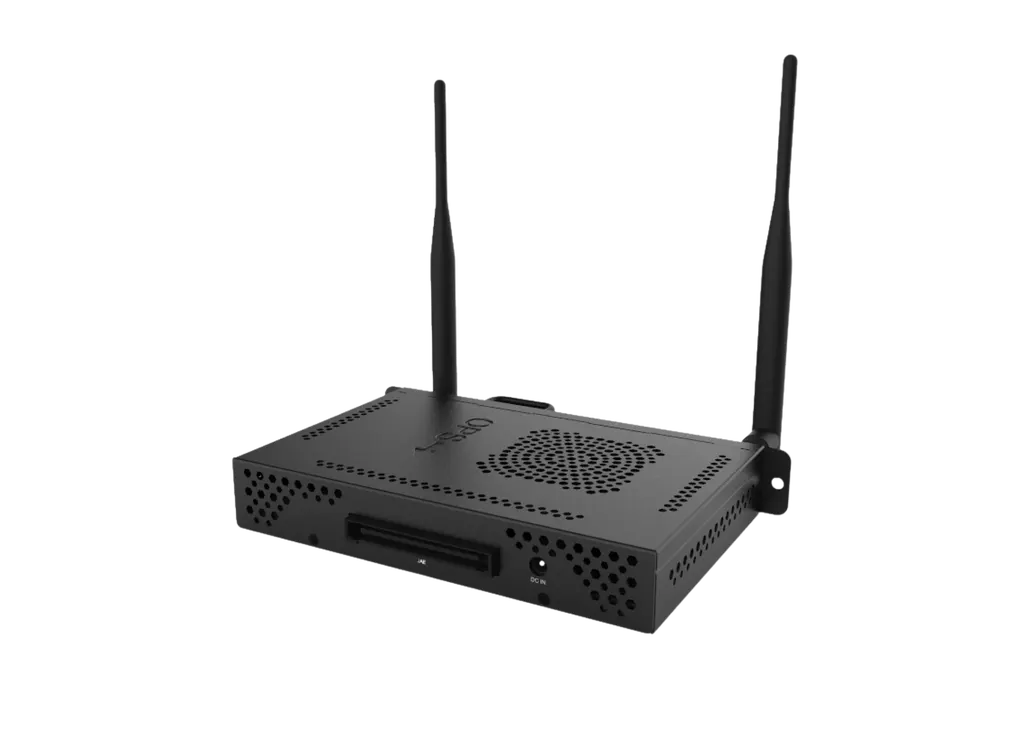
OPS PC i7 11th Gen
OneScreen OPS PC i7 11th Gen Computer Module for Interactive Panels
- System
- Windows 11
- Memory
- 16 GB DDR4
The OneScreen OPS PC i7 11th Gen is a computer module that fits into the 80-pin OPS slot of a compatible interactive panel, so the display runs Windows 11 without a separate PC on the desk. It carries an Intel Core i7-1195G7 processor, 16 GB DDR4 memory, a 256 GB M.2 SATA SSD, Wi-Fi 6 and RJ45 Ethernet. It suits boardrooms, classrooms and training rooms in Qatar that run heavier applications directly on the panel.
What this OPS module is and how it installs
The OneScreen OPS PC i7 11th Gen is a slot-in computer that sits in the OPS bay of a compatible interactive panel, turning the display into a Windows 11 workstation without a separate computer beside it. It connects through an 80-pin OPS interface. The source data lists a power input of 12 to 19V DC, so power arrives through the module's internal power supply connection rather than through a separate adapter at the desk. Maximum power consumption is 90W, and standby consumption is 55W.
Processor, memory and storage for heavier workloads
The module uses an Intel Core i7-1195G7 processor with a minimum speed of 2.9 GHz and a maximum of 3.4 GHz. It is paired with 16 GB of DDR4 memory and a 256 GB M.2 SATA SSD. Graphics come from Intel Iris Xe Graphics. Together these specifications suit presenters who move between office documents, video files and cloud conferencing tools within one session. Because the SSD is 256 GB, teams that keep large video libraries should plan for network or external storage for those files.
Connectivity for meetings and teaching
- Wi-Fi 6 with dual-frequency 2.4G/5G antennas, plus Bluetooth 5.2
- 1x RJ45 Ethernet port for a wired connection where stability matters
- 2x USB 3.1, 1x USB 2.0 and 1x USB Type-C for peripherals and storage
- 1x HDMI 1.4 output, listed at up to 3840×2160 at 60Hz
- 1x headset jack and a dedicated power button
Wired Ethernet is the better choice for a boardroom or lecture hall running video conferencing, while Wi-Fi 6 covers spaces where cabling is impractical. The module is listed as FCC certified.
Where it fits in Qatar
A government office fitting out a boardroom in Msheireb could use the module to run Windows-based presentation and conferencing software directly on the panel, with Ethernet carrying meeting traffic. A private school in Education City could place one in a science or robotics classroom where teachers need a full Windows environment next to the interactive display. A developer running a sales gallery in Lusail could use the panel as a self-contained presentation screen for visitors, without a PC hidden under the desk.
What to plan before ordering
- Confirm that the host interactive panel has a compatible 80-pin OPS slot.
- Check the operating range of 23°F to 113°F (about -5°C to 45°C) and 10% to 90% humidity.
- Keep the panel in air-conditioned rooms, since Qatar summer temperatures can exceed 45°C.
- Plan Ethernet and Wi-Fi coverage close to the panel mounting position.
- Confirm that the connected screen supports the listed HDMI 1.4 output mode.
Physical size is small: the module measures 4.68 x 7.08 x 1.18 in and weighs 1.63 lb net. Most of the space planning concerns the host panel itself, so SmartRooms Qatar offers free site surveys before wall-mounting, and quotations usually follow within one working day. Schools and public bodies ordering several units can issue a purchase order (LPO) or respond to a government tender, and payment is accepted by bank transfer, cheque or purchase order. Products are covered by the manufacturer's warranty. Request a quote to confirm which module and panel combination suits your room.
Highlights
- Intel Core i7-1195G7, 2.9 GHz minimum to 3.4 GHz maximum
- 16 GB DDR4 RAM with 256 GB M.2 SATA SSD
- Windows 11 with TPM 2.0 support
- Wi-Fi 6, Bluetooth 5.2 and RJ45 Ethernet
- 80-pin OPS internal module with 12 to 19V DC input
- Operating range 23°F to 113°F, FCC certified
Estimated timeline
Quotation within 1 working day · delivery timing depends on stock availability, and we confirm it with your quotation.
Specifications
General1
- Max power consumption
- 90W
Processor System3
- Standby power consumption
- 55W
- CPU
- i7-1195G 7
- Speed
- Min 2.9 GHz, Max 3.4 GHz
Environmental4
- Operation temperature
- 23°F~113°F
- Operation humidity
- 10%~90%
- Storage temperature
- -4°F~158°F
- Storage humidity
- 5%~95%
Memory1
- RAM
- 16 GB DDR4
Storage1
- SSD
- M2 SATA 256 GB
Physical Specification4
- Dimensions (w/o package)
- 4.68” x 7.08” x 1.18” (L x W x H)
- Net Weight (lb)
- 1.63 lb
- Gross Weight (lb)
- 2.13 lb
- Dimensions (with package)
- 10 x 7.72 x 3.03 in
Graphics1
- Graphics card
- Intel® Iris Xe Graphics
Software2
- Operating system
- Windows 11
- TPM
- TPM Support - TPM Version: 2.0
Certifications1
- Certifications
- FCC
I/O Interface8
- USB
- 2x USB 3.1, 1x USB2.0, 1x USB Type-C
- Audio
- 1x Headset Jack
- Ethernet
- 1× RJ45
- Wi-Fi
- Wi-Fi 6
- HDMI
- 1 x HDMI1.4 (Max resolution 3840×2160 @60Hz)
- Bluetooth
- ver. 5.2
- Antenna
- 2× 2.4G / 5G Dual frequency antenna
- Power Button
- 1x Power Button
Power2
- Power supply mode
- 80 Pin OPS Internal Power Supply Module
- Power Input
- 12~19V DC IN




