





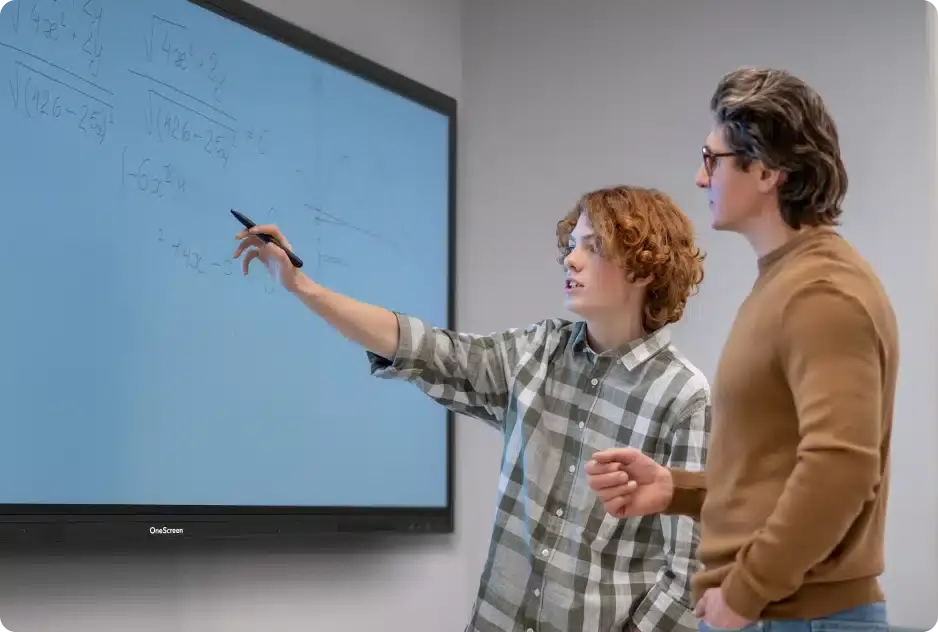
Touchscreen T7 Education 105
OneScreen Touchscreen T7 Education 105-inch Interactive Display
- Screen size
- 105″
- Resolution
- 5120 × 2160
- Storage
- 64 GB
- Brightness
- 400 cd/m2
The OneScreen Touchscreen T7 Education 105 is a 105-inch interactive display for large lecture halls, boardrooms and training rooms. It offers a 5120 × 2160 panel, 50-point IR touch with palm rejection, an 8-array microphone, and a slot for an OPS PC. Schools, universities and government training centres in Qatar can use it for annotation over any source. Request a quote from SmartRooms Qatar.
A 105-inch screen for rooms where everyone needs the same view
The OneScreen Touchscreen T7 Education 105 is the largest model in its family, a 105-inch interactive display for spaces where a full class, a lecture hall or a boardroom table must follow the same content. Its 5120 × 2160 panel uses a wide format, so one screen can show two windows side by side without shrinking the text. Brightness is rated at 400 cd/m2 with glass, the contrast ratio is 4000:1, NTSC colour coverage is 90%, and the DLED backlight is rated for at least 30,000 hours.
Touch, pen and palm rejection
Touch uses infrared technology with zero bonding Gen 2, supports up to 50 touch points and carries an accuracy of ±1 mm. The writing height is 2 mm or less and the smallest object it registers is 2 mm, which helps when a teacher writes small equations or annotates dense diagrams. Palm rejection and pen-and-touch differentiation let a presenter rest a hand on the glass and keep writing. Two stylus pens with an anti-bacterial coating are included, and annotation works over any connected source.
Processing, audio and connections
The panel runs Android 13 on an octa-core processor with four A76 and four A55 cores, a Mali-G610 MP4 GPU, 8 GB of RAM, 64 GB of storage and a 6 TOPS NPU for AI processing. Audio comes from two 16W speakers, a 15W subwoofer and an 8-array microphone with noise reduction, rated at 82 dB sound pressure level with a pickup distance of 0 to 8 m. Connectivity includes four HDMI inputs, one HDMI output, a DP 1.2 port, two RJ45 Ethernet ports, and USB-C inputs rated 15W at the front and 100W at the rear, both carrying USB, video, audio, network and touch. Wi-Fi 6E and Bluetooth 5.3 are built in, and a single OPS PC slot lets you add a computer module inside the display.
Where it fits in Qatar
- Lecture halls in Education City or Doha: students at the back of a large hall can read annotated slides and video from the screen. Where the room is big, the optional Amplifyr kit adds two wireless microphones and a receiver.
- Boardrooms in West Bay or Lusail: a team can present, annotate and join a video call from the same surface, and a laptop can connect through one USB-C link that carries video and touch.
- Training centres in the Industrial Area or Msheireb: the optional sensor box adds motion, humidity, temperature, TVOC and particulate matter detection, helping facilities teams track conditions in the room.
What to plan before installation
At 98.7 inches wide and 44.5 inches high, with a product weight of 201.5 lbs and a shipping weight of 263.5 lbs, this is a heavy wall-mounted unit. The specified mount is a VESA 1000 x 400 flush wall mount, so confirm the wall structure, fixings and bracket before delivery. SmartRooms Qatar offers a free site survey and professional installation, and we recommend a survey for any wall that will carry a panel of this weight. The operating range is 32°F to 104°F (0°C to 40°C) at 10% to 90% relative humidity, so install it in an air-conditioned room. Outdoor temperatures in Qatar often exceed 45°C in summer, so avoid sun-exposed or unconditioned spaces. Typical power draw is 410 W, with a maximum of 580 W and 0.5 W in standby.
Request a quote from SmartRooms Qatar to confirm the wall mount, the installation scope and the right plan for your room. We usually reply within one working day.
Highlights
- 105-inch panel with 5120 × 2160 resolution
- 400 cd/m2 brightness with glass and 4000:1 contrast
- IR touch with 50 points, ±1 mm accuracy and palm rejection
- Two 16W speakers, 15W subwoofer and 8-array microphone
- OPS PC slot, Wi-Fi 6E, Bluetooth 5.3 and two RJ45 ports
- VESA 1000 x 400 flush wall mount; operates 0°C to 40°C
Classroom fit
At 105″ the farthest student should sit within about 7.8 m (6× the screen height).
Estimated timeline
Quotation within 1 working day · delivery timing depends on stock availability, and we confirm it with your quotation.
Specifications
Touchscreen T7 Education 10570
- size_inch
- 105
- datasheet
- datasheets/OneScreen_T7-Education-105_Spec_Sheet.pdf
- datasheet_url
- https://partnerportal.onescreensolutions.com/resources/OneScreen_T7-Education-105_Spec_Sheet.pdf
- specs · General · Touch response time
- ≤5 ms
- specs · General · Palm rejection
- Yes
- specs · Display · Pen and touch differentiation
- Yes
- specs · Display · Technology
- IR touch with zero bonding Gen 2
- specs · Display · Size
- 105"
- specs · Display · Life time
- ≥30000 hours
- specs · Display · Viewing angle
- 178° (H/V)
- specs · Display · Resolution
- 5120 × 2160
- specs · Display · Refresh rate
- 60 Hz
- specs · Display · Display colors
- 1.07 billion colors
- specs · Display · NTSC
- 90%
- specs · Display · Contrast ratio
- 4000:1
- specs · Display · Brightness with glass
- 400 cd/m2
- specs · Display · Backlight
- DLED
- specs · Computing · OS version
- Android 13
- specs · Computing · CPU
- A76×4 + A55×4
- specs · Computing · GPU
- Mali-G610 MP4
- specs · Computing · NPU
- 6 TOPS (for AI processing)
- specs · Computing · Storage
- 64 GB
- specs · Computing · RAM
- 8 GB
- specs · Audio and Microphone · Speaker output
- 2x16W (typ)
- specs · Audio and Microphone · Speaker type
- 2 built-in speakers, left/right
- specs · Audio and Microphone · Sound pressure level
- 82 DB
- specs · Audio and Microphone · Subwoofer (typ)
- 15W
- specs · Audio and Microphone · Microphone
- 8-array built-in microphone with noise reduction
- specs · Audio and Microphone · Pickup distance
- 0-8 m
- specs · Other Features · Blue-light filter
- Yes
- specs · Other Features · Wake-on-LAN
- Supported
- specs · Other Features · Ambient light sensor
- Yes for autobrightness adjustment
- specs · Other Features · Wake-on-HDMI
- Supported
- specs · Physical · Operating humidity
- 10% - 90% RH
- specs · Physical · Operating temperature
- 32°F - 104°F
- specs · Physical · Product weight
- 201.5 lbs
- specs · Physical · Shipping weight
- 263.5 lbs
- specs · Physical · Product dimensions
- 98.7” x 44.5” x 4.1” (L x H X D)
- specs · Physical · Shipping dimensions
- 105.1” x 11.1” x 51.4” (L x W x H)
- specs · Inputs and Outputs · HDMI input
- 4x
- specs · Inputs and Outputs · HDMI output
- 1x
- specs · Inputs and Outputs · DP 1.2
- 1x
- specs · Inputs and Outputs · Type-C in
- 1x Front 15W, 1x rear 100W
- specs · Inputs and Outputs · Type C functionality
- Full feature type C with USB, Video, Audio, Network and touch support
- specs · Inputs and Outputs · Audio in
- 1x 3.5 mm
- specs · Inputs and Outputs · Audio out
- 1x 3.5 mm
- specs · Inputs and Outputs · Touch USB ports
- 3x Touch 2.0
- specs · Inputs and Outputs · USB ports
- 7x (2x Front USB 3.0, 2x Side USB 3.0, 2x Top USB 3.0, 1x Side USB 2.0)
- specs · Inputs and Outputs · SPDIF
- 1x
- specs · Inputs and Outputs · RS232
- 1x
- specs · Inputs and Outputs · Ethernet
- 2x RJ45 (Gigabit ethernet 10M/100M/1000M in/out)
- specs · Inputs and Outputs · OPS PC slot
- 1x OPS PC slot
- specs · Inputs and Outputs · Bluetooth
- 5.3
- specs · Inputs and Outputs · Wi-Fi
- Wi-Fi 6E (2.4 Ghz + 5 Ghz + 6 Ghz)
- specs · Power · Power consumption
- 410 W (typ) 580 W (max)
- specs · Power · Power
- 0.5 W (standby)
- specs · Included Accessories · Wall mount
- VESA standard 1000 x 400 flush wall mount
- specs · Included Accessories · Included cables
- 1x HDMI cable, 1x power cable, 1x USB touch cable
- specs · Included Accessories · Accessories
- 2x Stylus pens with anti-bacterial coating, 1x Remote control for display
- specs · Optional Accessories · Amplifyr
- Optional (Includes 2x wireless mics and 1x receiver). Supports audio amplification
- specs · Optional Accessories · Wireless Keyboard with Trackpad
- Optional
- specs · Optional Accessories · Camera
- Optional
- specs · Optional Accessories · Sensors
- Optional sensor box module (Motion , Humidity, Temperature, TVOC, and particulate matter detection)
- specs · Touch · Surface protection
- Anti-glare, Anti-fingerprint, 9H hardness
- specs · Touch · Touch resolution
- 32768 x 32768
- specs · Touch · Touch accuracy
- ±1 mm
- specs · Touch · Touch points
- 50
- specs · Touch · Writing height
- ≤2 mm
- specs · Touch · Annotation over any source
- Yes
- specs · Touch · Minimum object size
- 2 mm




