





Touchscreen T7 Education 75
OneScreen Touchscreen T7 Education 75-inch Interactive Display
- Screen size
- 75″
- Resolution
- 3840 × 2160
- Storage
- 128 GB
- Brightness
- 450 cd/m2 (typical)
The OneScreen Touchscreen T7 Education 75-inch is a 4K UHD display for teaching spaces. It delivers 450 cd/m2 typical brightness and up to 50 touch points. Android 15 runs on 8 GB RAM and 128 GB storage, with an OPS PC slot and NFC card login. It suits mid-sized classrooms and seminar rooms in Doha, Education City and Al Wakrah. Request a quote from SmartRooms Qatar.
What the 75-inch T7 Education display does in a room
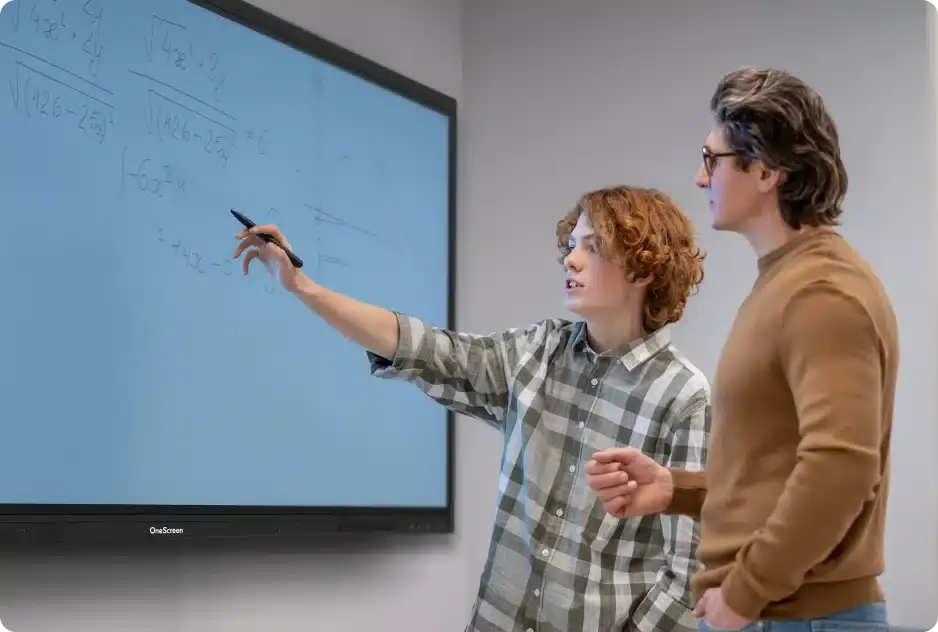
The OneScreen Touchscreen T7 Education 75-inch combines a 4K UHD panel, an infrared touch layer and an Android 15 computing platform in one unit. It is built for teachers and presenters who write, annotate and show video from the same surface, without moving between a whiteboard and a projector.
The panel has a native resolution of 3840 × 2160. It is rated at 450 cd/m2 typical brightness with a 5000:1 contrast ratio, a 60 Hz refresh rate, a 178° viewing angle and 1.07 billion colours. An ambient light sensor adjusts brightness automatically as the light in the room changes during the day.
Touch, pens and annotation
The touch system uses IR technology with Zero Bonding Gen2 construction. It supports up to 50 touch points with touch accuracy of 1 mm and a response time below 2.5 ms. Palm rejection and pen-and-touch differentiation let a teacher rest a hand on the glass while writing with a stylus. Two stylus pens with an anti-bacterial coating and a magnetic whiteboard eraser are included. Annotation works over any connected source, so a teacher can mark up a laptop slide or a playing video without changing input.
Connectivity and the OPS computing slot
- 4 HDMI inputs, 1 HDMI output and 1 DisplayPort 1.2 input
- 5 USB ports plus 2 USB 2.0 touch ports
- Type-C inputs: 100W on the front, 15W on the side and a top port for a webcam
- 2 RJ45 ports for wired networking, plus RS-232 and SPDIF
- Wi-Fi 6E on 2.4 GHz, 5 GHz and 6 GHz, plus Bluetooth 5.3
- 1 OPS PC slot for an OPS PC module
Where the 75-inch size fits in Qatar
At 75 inches, the panel suits a mid-sized classroom or seminar room where the furthest seat is not far from the screen. Three realistic uses are:
- A private school in Al Wakrah fitting out science or maths classrooms, where students come to the front to annotate worked examples.
- A university tutorial room in Education City used for small-group sessions, connected to a lecturer laptop over HDMI.
- A company training room in West Bay running sessions for teams who work in Arabic and English, with a webcam on the top Type-C port for calls with colleagues abroad.
What to plan before installation
The panel weighs 112.0 lbs (about 50.8 kg) and measures 67.3 × 40.9 × 3.4 inches. The wall mount is a VESA 800 × 400 flush pattern, so the wall or mounting frame should be checked for load before fitting. Typical power consumption is 285 W, with 495 W maximum and 0.5 W in standby. The stated operating range is 32°F to 104°F (0°C to 40°C) at 10% to 90% relative humidity. Summer temperatures in Qatar can exceed 45°C outdoors, so the room should be air-conditioned, and the installation location should be confirmed with the SmartRooms Qatar team. A free site survey and professional installation are available.
Request a quote
Send your room size, mounting wall and number of units to SmartRooms Qatar. We will prepare a quotation, usually within one working day. Purchase orders and LPOs are accepted, and we deliver to all eight municipalities of Qatar. Request a quote for the OneScreen Touchscreen T7 Education 75-inch today.
Highlights
- 4K UHD panel at 3840 × 2160 with 450 cd/m2 typical brightness
- IR touch supporting up to 50 touch points at 1 mm accuracy
- Android 15 with 8 GB RAM and 128 GB storage
- 2x 20W speakers, 25W subwoofer and 8-array microphone
- OPS PC slot plus Wi-Fi 6E and Bluetooth 5.3
- NFC card login with five NFC cards included
Classroom fit
At 75″ the farthest student should sit within about 5.6 m (6× the screen height).
Estimated timeline
Quotation within 1 working day · delivery timing depends on stock availability, and we confirm it with your quotation.
Specifications
Touchscreen T7 Education 7567
- size_inch
- 75
- datasheet
- datasheets/OneScreen_T7-Education-75_Spec_Sheet.pdf
- datasheet_url
- https://partnerportal.onescreensolutions.com/resources/OneScreen_T7-Education-75_Spec_Sheet.pdf
- specs · General · GPU
- Mali-G610 MP4
- specs · General · Storage
- 128 GB
- specs · Display · Touch
- Up to 50 points
- specs · Display · RAM
- 8 GB
- specs · Display · Resolution
- 3840 × 2160
- specs · Display · Refresh rate
- 60 Hz
- specs · Display · NPU
- Triple core (up to 6 TOPS) (for AI Processing)
- specs · Display · NTSC
- 72%
- specs · Display · Contrast ratio
- 5000:1
- specs · Display · Back light
- DLED
- specs · Display · Display color
- 1.07 Billion colors
- specs · Display · Viewing angle
- 178° (H/V)
- specs · Display · Brightness
- 450 cd/m2 (typical)
- specs · Other Features · Voice commands
- Supported using Google Voice with dedicated button on remote control
- specs · Other Features · NFC card reader
- Yes, with NFC-based user login support
- specs · Other Features · Webcam connector
- Type-C port on top to support webcam
- specs · Other Features · Ambient light sensor
- Yes, for auto brightness adjustment
- specs · Other Features · Wake-on-LAN
- Supported
- specs · Other Features · Wake-on-HDMI
- Supported
- specs · Other Features · Remote control features
- Google Voice assistant button, 3 hotkey buttons to open any user selected app or function
- specs · Audio · Speaker type
- 2 Built-in speakers, Left/Right
- specs · Audio · Speaker output
- 2x 20W
- specs · Audio · Subwoofer
- 1x 25W
- specs · Audio · Microphone
- Built-in 8 array microphone with noise reduction
- specs · Input & Outputs · HDMI input
- 4x (1x Front, 3x Side)
- specs · Input & Outputs · HDMI output
- 1x
- specs · Input & Outputs · USB ports
- 5x (2x Front 3.0, 2x Side 3.0, 1x Side 2.0)
- specs · Input & Outputs · RS-232
- 1x
- specs · Input & Outputs · RJ45
- 2x ( In / Out 10/100/1000 Mbps)
- specs · Input & Outputs · Touch USB ports
- 2x USB 2.0
- specs · Input & Outputs · Bluetooth
- 5.3
- specs · Input & Outputs · SPDIF
- 1x
- specs · Input & Outputs · DP 1.2
- 1x
- specs · Input & Outputs · Audio in
- 1x 3.5 mm
- specs · Input & Outputs · Audio out
- 1x 3.5 mm
- specs · Input & Outputs · Type-C in
- 3x (1x Front 100W, 1x Side 15W, 1x Top)
- specs · Input & Outputs · Type-C out
- 1x Rear (supports 4K @ 60 Hz video out)
- specs · Input & Outputs · Type-C functionality
- Full feature Type-C with USB, Video, Audio, Network and Touch Support
- specs · Input & Outputs · Wi-Fi
- Wi-Fi 6E (2.4GHz + 5GHz + 6GHz)
- specs · Input & Outputs · OPS PC slot
- 1x OPS PC Slot
- specs · Physical · Operating temperature
- 32°F - 104°F
- specs · Physical · Operating humidity
- 10% - 90% RH
- specs · Physical · Product weight
- 112.0 lbs
- specs · Physical · Shipping weight
- 150.8 lbs
- specs · Physical · Product dimensions
- 67.3” x 40.9” x 3.4”
- specs · Physical · Shipping dimensions
- 73.4” x 45.8” x 8.9”
- specs · Power · Power
- 0.5 W (Standby)
- specs · Power · Power consumption
- 285 W (Typical); 495 W (Maximum)
- specs · Touch · Surface protection
- Anti-glare, Anti-fingerprint, 9H hardness
- specs · Touch · Touch resolution
- 32768 x 32768
- specs · Touch · Touch accuracy
- 1 mm
- specs · Touch · Annotation
- Yes (over any source)
- specs · Touch · Palm rejection
- Yes
- specs · Touch · Pen and touch differentiation
- Yes
- specs · Touch · Technology
- IR touch with Zero bonding Gen2
- specs · Touch · Pens included
- 2x Stylus pens with anti-bacterial coating
- specs · Accessories and Mounting · Wall mount
- VESA Standard 800 x 400 Flush Wall mount
- specs · Accessories and Mounting · Cables and accessories
- 1x HDMI cable, 1x Power cable, 1x USB Touch cable, 2x Stylus pens with anti-bacterial coating, 1x Remote control for display, 1x Whiteboard magnetic eraser, 5x NFC Cards
- specs · Optional Accessories · Amplifyr
- Optional (Includes 2x wireless mics and 1x receiver). Supports audio amplification
- specs · Optional Accessories · Wireless Keyboard with Trackpad
- Optional
- specs · Optional Accessories · Camera
- Optional
- specs · Optional Accessories · Sensors
- Optional Sensor Box Module (Motion , Humidity, Temperature, TVOC, and Particulate Matter Detection)
- specs · Andriod · OS Version
- 15; Android; with EDLA
- specs · Andriod · CPU
- Octa-core processor (4x A76 + 4x A55)




