





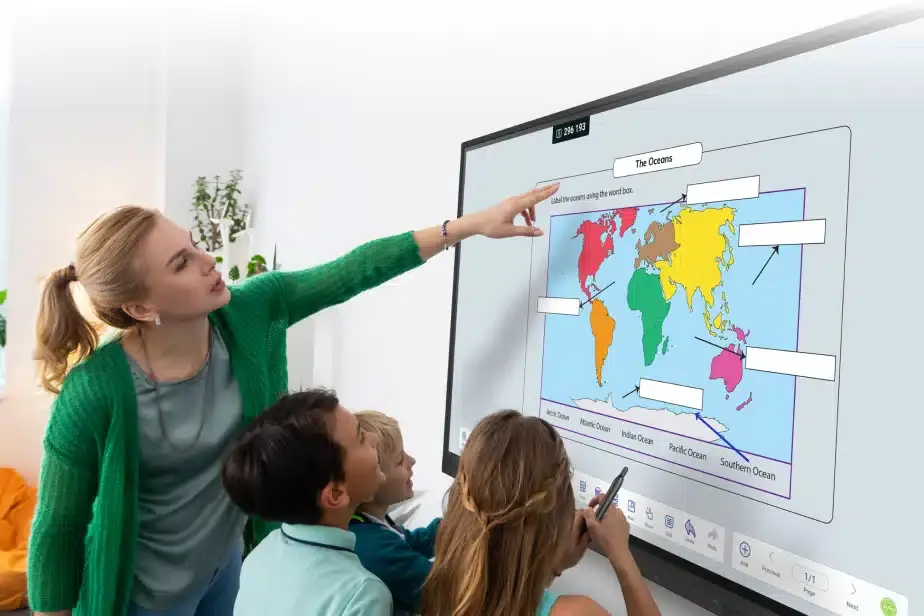
Touchscreen TL7 Education 65
OneScreen Touchscreen TL7 Education 65-inch Interactive Display
- Screen size
- 65″
- Resolution
- 4K UHD (3840 × 2160)
- Touch
- Zero Bonding IR (Gen 2)
- System
- Android 11
The 65-inch OneScreen TL7 Education is a 4K UHD interactive display for classrooms and small meeting rooms. Its zero-bonding infrared touch offers 40 points and 1.5 mm accuracy, and it runs Android 11 with 8 GB RAM and 64 GB storage. An OPS slot and Wi-Fi 6 suit schools in Doha, Al Rayyan and Lusail. Request a quote for supply and installation.
What the 65-inch TL7 Education model is
The OneScreen TL7 Education 65 is an interactive flat panel built for teaching. Its 65-inch screen is a 16:9 LED-backlit panel at 4K UHD resolution (3840 × 2160), rated at 400 cd/m² with a 178° viewing angle, so pupils seated at the side of a room see the same content as those at the front. At this size it suits classrooms, tutorial rooms and medium-sized meeting rooms where a wall-mounted screen is preferred to a projector.
Touch, writing and screen quality
The touch layer uses zero-bonding infrared technology (Gen 2) with 40 touch points, 1.5 mm accuracy and a response time under 7 ms, so handwriting keeps pace with the pen. A blue light filter is included, and an ambient light sensor adjusts brightness to the room lighting. The panel shows 10-bit colour, about 1.07 billion shades. The glass has a Level 7 Mohs anti-glare and anti-fingerprint finish, which helps in rooms with windows or strong overhead light. Two stylus pens with an anti-bacterial coating and a remote control are supplied.
Computing, software and connections
The display runs Android 11 on a quad-core ARM Cortex A55 processor (up to 1.8 GHz), with 8 GB RAM and 64 GB storage, so teaching apps run on the panel itself. An OPS PC slot on the side accepts an OPS-standard computer module for schools that need a PC inside the board. Ports include two HDMI inputs and one HDMI output on the side, a front HDMI input, two USB 3.0 ports on each side, a front USB Type-C port rated 65W PD, VGA input with audio input, RS-232, two RJ-45 ports and a 3.5mm audio output. Wireless links cover Wi-Fi 6 on 2.4 GHz and 5 GHz and Bluetooth 5.2, with Gigabit Ethernet for wired networks. OneScreen Write provides annotation with text and shape recognition, OneScreen Share mirrors up to nine devices, and OneScreen Central manages several panels from one place with settings lock, over-the-air firmware updates and device cloning. LearningHub and QuizWiz add lesson recording and AI-based quiz generation.
Where it fits in Qatar
A private school in Al Wakrah fitting out a block of new classrooms can use the 65-inch panel as the main board in each room, with one model across the set so teachers learn a single interface. A training centre in Education City might place it in a breakout room, where a small group takes turns at the board and shares work from tablets. A company in the Industrial Area or West Bay could use it in a meeting room where a projector would need the blinds closed and the room darkened.
The power supply accepts 100 to 240 V AC at 50 to 60 Hz, which covers Qatar's 240 V, 50 Hz mains. Typical consumption is 200 W and maximum is 360 W. The data gives no operating temperature range for this model, so confirm the room conditions before installation. Summer temperatures above 45°C make this check important for any room with direct sun through windows or limited air conditioning.
Planning the installation
- Wall mount: VESA 600 × 400 flush mount; confirm the wall structure can carry 77.05 lbs
- Size: 58.60 × 35.30 × 3.43 inches (L × H × W) without the carton
- Delivery access: the shipping carton measures 64.09 × 39.57 × 8.19 inches, so check doorways and lifts
- Computer module: decide early whether an OPS PC will be used in the slot
SmartRooms Qatar offers a free site survey, which we recommend before wall mounting a panel of this weight. It checks the wall, cable routes, socket position and room conditions. Quotations are usually issued within one working day. We supply and install through purchase orders (LPOs) and government tenders, including Monaqasat, and accept bank transfer, cheque or purchase order payment. The unit carries the manufacturer's 3-year standard warranty, with options for advanced hardware or extended warranty. Request a quote for the TL7 Education 65 and we will confirm installation details and quantities for your rooms.
Highlights
- 4K UHD (3840 × 2160) 65-inch LED panel in 16:9 format
- 40-point zero-bonding infrared touch with 1.5 mm accuracy
- Android 11 with 8 GB RAM and 64 GB storage
- OPS PC slot and front USB Type-C port rated 65W PD
- 2x 16W stereo speakers and an ambient light sensor
- 3-year standard warranty and VESA 600 × 400 flush wall mount
Classroom fit
At 65″ the farthest student should sit within about 4.9 m (6× the screen height).
Estimated timeline
Quotation within 1 working day · delivery timing depends on stock availability, and we confirm it with your quotation.
Specifications
Touchscreen TL7 Education 6545
- size_inch
- 65
- datasheet
- datasheets/OneScreen-Touchscreen-for-Education-TL7_65-Spec-Sheet.pdf
- datasheet_url
- https://partnerportal.onescreensolutions.com/resources/OneScreen-Touchscreen-for-Education-TL7_65-Spec-Sheet.pdf
- specs · Software & Services · Interactive Whiteboard
- OneScreen Write is a powerful annotation tool with cloud drive integration, built-in browser, multi-user, pressure sensitive touch and multiple types of pens with text recognition and shape recognition
- specs · Software & Services · Device Management
- OneScreen Central provides cloud-based multi-device management, messaging to multiple devices, apps and settings management.
- specs · Software & Services · Screen Sharing
- OneScreen Share allows multi-device screen share and streaming with up to 9 devices supported (iOS, Android, Windows, Chrome, MacOS).
- specs · Software & Services · Secure User Accounts
- OneScreen Accounts integrates Google accounts and cloud drives for each user.
- specs · Software & Services · Student Engagement and Lesson Capture
- OneScreen LearningHub lets you conduct more engaging classroom sessions with real-time student participation analytics. Lessons can be recorded with audio and captions and shared with students over LMS (Moodle, Google Classroom, Canvas etc.)
- specs · Software & Services · Quiz Generation
- OneScreen QuizWiz supports accurate and fast AI-based quiz generation using trusted content. Its integration with Google Drive and Google forms allows easier and more secure content transfers.
- specs · Software & Services · Classroom Tools
- Stopwatch, timer, screen recorder, spotlight, screen capture, cloud drive, freeze and multitasking.
- specs · Software & Services · Adminstration/IT Tools
- Settings lock, OTA firmware updates, centralized control, network settings lock, screen lock and device cloning.
- specs · Touch · Touch Type
- Zero Bonding IR (Gen 2)
- specs · Touch · Touch Points
- 40
- specs · Touch · Touch Accuracy
- 1.5 mm
- specs · Computing · Operating System
- Android 11
- specs · Computing · RAM
- 8 GB
- specs · Computing · Storage
- 64 GB
- specs · Computing · Processor
- 1 Quad-core ARM cortex A55 (up to 1.8 Ghz)
- specs · Power · Power Requirements
- 100 - 240v AC 50-60 Hz
- specs · Power · Power Consumption (typical)
- 200 W
- specs · Power · Power Consumption (Maximum)
- 360 W
- specs · Power · Energy Star
- 78.4 W
- specs · Panel · Screen Size (Diagonal)
- 65”
- specs · Panel · Panel Backlight
- LED
- specs · Panel · Resolution
- 4K UHD (3840 × 2160)
- specs · Panel · Brightness
- 400 cd/m²
- specs · Panel · Aspect Ratio
- 16:9
- specs · Panel · Refresh Rate
- 60Hz
- specs · Panel · Viewing Angle
- 178°
- specs · Panel · Blue light filter
- Yes
- specs · Panel · Display Colors
- 1.07 Billion (10 bit)
- specs · Physical · Product Weight
- 77.05 lbs
- specs · Physical · Product Dimensions (L x H x W)
- 58.60” x 35.30” x 3.43”
- specs · Physical · Shipping Weight
- 98.55 lbs
- specs · Physical · Shipping Dimensions (L x H x W)
- 64.09” x 39.57” x 8.19”
- specs · Ports and Connectivity · Sensors
- 1x Ambient Light Sensor for adaptive screen brightness
- specs · Ports and Connectivity · Connectivity
- Wifi 6 (2.4Ghz & 5Ghz), Gigabit Ethernet (1000M), Bluetooth 5.2
- specs · Ports and Connectivity · Input/Output Ports (Side)
- 2x HDMI-In, 1x VGA-In, 1x VGA Audio-In, 1x HDMI-Out, 1x USB Touch, 1x Audio-Out (3.5mm), 1x RS-232, 2x-RJ- 45, 2x USB 3.0, 1x USB 2.0,1x OPS PC Slot
- specs · Ports and Connectivity · Input/Output Ports (Front)
- 1x HDMI-In, 1x USB Touch, 2x USB 3.0, 1x USB Type-C (65W PD)
- specs · Audio · Speakers
- 2x 16W with stereo output
- specs · Accessories and Mounting · Wall Mount
- VESA Standard 600 x 400 Flush Wall mount
- specs · Accessories and Mounting · Cables & Accessories
- 1x HDMI Cable, 1x Power cable, 1x USB Touch Cable, 1x Type C Cable, 2x Stylus pens with anti-bacterial coating, 1x Remote control for Display
- specs · Glass · Surface Protection
- Level 7 MoHS Anti-Glare and Anti-Fingerprint
- specs · Warranty and Certifications · Warranty
- 3 Years Standard warranty with options for advanced hardware warranty or extended warranty
- specs · Warranty and Certifications · Certifications
- Available, RoHS, FCC, Energy Star, CE, RoHS, WEEE, CB




