





Thursday, 22 October 2026 · 11 Jumada I 1448 AH Sun – Thu · 9:00 – 18:00
+971 56 914 9477 العربية
WhatsApp

Wireless Keyboard

OneScreen Wireless Keyboard with Built-in Trackpad

WhatsApp
Priceon request
QuotationWithin 1 working day
DeliveryConfirmed with your quote, based on stock
PDFDownload datasheet (OneScreen-Keyboard_Spec_Sheet.pdf)
Overview

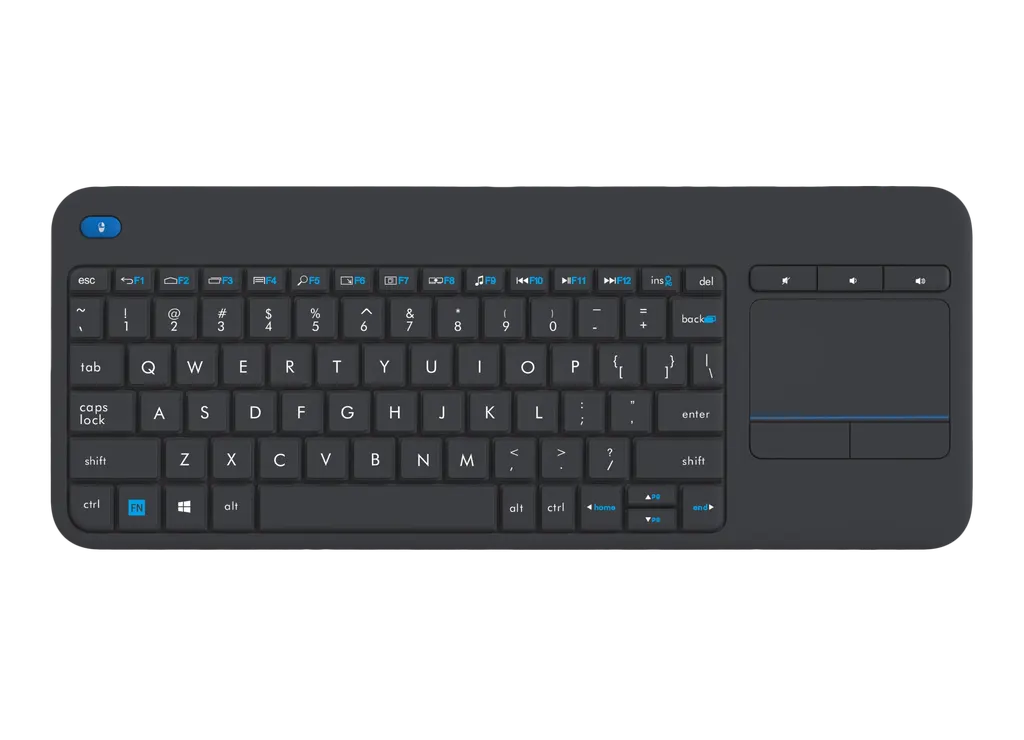
A 2.4 GHz wireless keyboard with 84 keys, an English (USA) layout, three volume and mute keys and a built-in trackpad with left and right click buttons. Its USB receiver works at up to 32 feet, so a presenter can control a display from a seat or lectern. It suits teachers, meeting hosts and trainers across Qatar who want to run a session without returning to the front of the room. Request a quote today.

What this wireless keyboard does for a display

The OneScreen Wireless Keyboard is a 2.4 GHz input device with 84 keys and a built-in trackpad. It lets a presenter or meeting host type, navigate and operate content from a distance, without standing at the screen. The package includes the keyboard and a keyboard receiver with a USB interface.

The specifications that matter for planning

The wireless link is rated for a range of up to 32 feet, which covers many classrooms, meeting rooms and training rooms when the receiver stays within reach of the host device. The layout is English (USA), and the keyboard has three multimedia keys for mute and unmute, volume up and volume down. The trackpad supports multiple touches and gestures and has left and right click buttons.

The keyboard runs on two AA batteries, which are not included, so budget for batteries with your order. The manufacturer rates the key life at 5 million keystrokes. The keyboard measures 14.0 x 5.51 x 2.05 inches and weighs 12.5 oz, so it is light enough to move between a lectern and a desk.

Where it fits in Qatar

  • Schools and universities: a teacher in an Education City classroom or an Arabic-curriculum school in Al Wakrah can move around the room while annotating or switching content, rather than returning to the front desk.
  • Government and corporate boardrooms: a presenter in a West Bay or Msheireb meeting room can sit at the table, use the trackpad to move through slides, and keep the audio controls to hand during a call with teams abroad.
  • Training centres and hotel conference rooms: a trainer in Lusail or The Pearl can run sessions without a second person at the display to change slides or adjust volume.

What to plan before you order

The source data does not describe compatibility with specific panels or host devices. Confirm with the SmartRooms Qatar team that the receiver suits your panel's USB arrangement, especially where USB ports are already used by a camera or conferencing system. Keep the receiver within the stated 32-foot range of the keyboard, and test the connection at the real seating position in larger rooms.

Plan who will supply and replace the AA batteries, and keep a spare set for each room that uses the keyboard. Send SmartRooms Qatar the room type, the number of units and the panel model, and we will prepare a quotation, usually within one working day. Delivery is available to all eight municipalities of Qatar. Request a quote for the OneScreen Wireless Keyboard today.

Highlights

  • 2.4 GHz wireless connection with up to 32 feet of range
  • 84-key English (USA) layout with three multimedia keys
  • Built-in trackpad with multi-touch gestures and left and right click
  • Package includes the keyboard and a USB keyboard receiver
  • Runs on two AA batteries, which are not included
  • Key life rated at 5 million keystrokes

Estimated timeline

Quotation within 1 working day · delivery timing depends on stock availability, and we confirm it with your quotation.

Specifications

14 specifications · Source: manufacturer · checked Oct 2026
General4
Connectivity
2.4 Ghz wireless
Keys (Total)
84
Interface
English (USA)
Multimedia keys
3 (Mute/Unmute, Volume up, Volume down)
Color10
Range
Up to 32 feet
Operating voltage
3V
Operating current
20 mA
Life span
5 Million keystrokes
Battery
2x AA Batteries (not included)
Product weight
12.5 Oz
Product dimensions
14.0" x 5.51" x 2.05"
Trackpad
Supports multiple touches and gestures
Trackpad buttons
Left click & Right click
Included in the box
1x Wireless Keyboard, 1x Keyboard Receiver (USB interface)

Downloads

2 files from the manufacturer

Questions about Wireless Keyboard

What is the OneScreen Wireless Keyboard used for?
It is a wireless input device for controlling a display from a distance. Its 84 keys and built-in trackpad let a presenter type, navigate and operate content without returning to the front of the room. It suits teachers, meeting hosts and trainers in Qatar who want to run sessions from a seat or a lectern. Ask the SmartRooms Qatar team for a quotation if you are equipping several rooms.
How far can the keyboard be used from the receiver?
The wireless connection is rated for up to 32 feet. That covers most classrooms, meeting rooms and training rooms in Doha and elsewhere in Qatar, provided the receiver stays within reach of the host device. In a larger hall, test the connection at the actual distance and seating position before the event, and give us the room size when you request a quote so we can advise.
Does the keyboard include a receiver, and what interface does it use?
Yes. The box includes one wireless keyboard and one keyboard receiver with a USB interface. The source data does not list further connector details, so confirm the port arrangement with the SmartRooms Qatar team before ordering. This matters most where the panel's USB ports are already used by a camera, microphone or conferencing system in a meeting room.
Are batteries included with the keyboard?
No. The keyboard uses two AA batteries, which are not included in the box. Budget for them with your order and decide who will replace them. The manufacturer rates the key life at 5 million keystrokes, but battery life depends on how often the keyboard is used. For a school ordering a classroom set, buy a spare pack of AA batteries for each room.
Is the keyboard available with an Arabic layout?
The keyboard uses an English (USA) layout. The source data does not state that Arabic characters are printed on the keys or that Arabic input is supported, so do not assume it. Offices and schools in Qatar that work in Arabic and English side by side should confirm the layout suits their users before ordering several units. Our team can help you check this when you request a quote.
What does the trackpad do?
The built-in trackpad supports multiple touches and gestures and has left and right click buttons. It lets a presenter move the cursor, click and use gestures without a separate mouse. This is useful in a boardroom in West Bay or Msheireb, where the presenter sits at the table and needs to move through slides, documents or annotations on the display during a meeting.
What are the three multimedia keys for?
The three multimedia keys cover mute and unmute, volume up and volume down. They let the operator adjust audio quickly during a lesson, a town hall or a call with teams abroad, without opening the host device's volume menu. Confirm with the SmartRooms Qatar team that the host device and audio setup in your room respond to these keys before installation.
Is this keyboard suitable for a large lecture hall or auditorium?
The keyboard is designed as a companion for a display, and its 32-foot range suits rooms of typical teaching and meeting size. In a large lecture hall, auditorium or event venue, the operator's position relative to the receiver needs checking on site. Send the room dimensions and seating layout with your request, and the team will advise whether a single keyboard setup is practical for the space.
How large is the keyboard, and will it fit on a lectern or desk?
The keyboard measures 14.0 x 5.51 x 2.05 inches and weighs 12.5 oz. Those dimensions suit a lectern shelf or a meeting table, but measure the surface where it will sit, leaving room for the receiver and any cables. Lightweight units are easy to move between a presenter's desk and a lectern during a session.
Can a school, ministry or other public body order several keyboards at once?
Yes. Schools, ministries and other public bodies in Qatar can order several keyboards on a single purchase order (LPO) or under a government tender, and the quotation covers the total quantity. Tell us how many classrooms or meeting rooms need one and which panel model each room uses, so the keyboards, receivers and spare batteries are planned in one order.
Does the keyboard come with a warranty?
Products supplied by SmartRooms Qatar are covered by the manufacturer's warranty. The source data does not give a warranty period or terms for this keyboard, so ask the team to confirm them in your quotation. For a government or corporate purchase, keep the warranty confirmation on file with the purchase order and delivery note, so the terms are available if a unit needs replacing later.
How can I pay for the keyboard and have it delivered?
SmartRooms Qatar accepts payment by bank transfer, cheque or purchase order. Procurement teams can raise a purchase order against the approved quotation, and the keyboard can be added to the same order as a panel or video conferencing kit. Delivery covers all eight municipalities of Qatar. State your payment method and delivery address when you request a quote.

Similar models

BenQ CM7505 BenQ Board CM7505 75-inch Interactive Display
75″ UHD 3840 × 2160 pixels Ultra Precision IR
SMART SBID-6286S-V3 SMART Board 6086S-V3 86-inch Interactive Display with iQ
86″ 4K UHD (3840 × 2160) HyPr Touch with InGlass
SMART SBID-6286S-V3-P SMART Board 6086S-V3 Pro 86-inch Interactive Display with iQ
86″ 4K UHD (3840 × 2160) HyPr Touch with InGlass
Clevertouch Clevertouch Edge 65" Clevertouch Edge 65" 4K Interactive Display with Camera and Speakers
65″ 4K UHD (3840x2160 @60Hz) Android 15
Clevertouch Clevertouch Edge 86" Clevertouch Edge 86" 4K Interactive Flat Panel
86″ 4K UHD (3840x2160 @60Hz) Android 15
Email Call



