





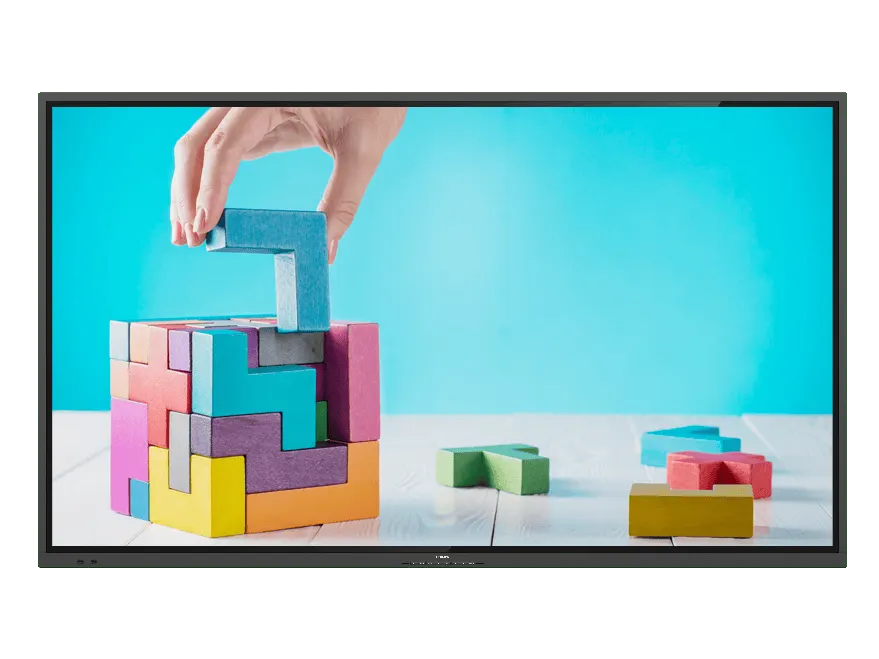
75BDL3052E/00
Philips 75BDL3052E/00 75-inch Interactive Display
- Screen size
- 189.3 cm
- Resolution
- 1920 x 1080 @ 60 Hz
- Touch
- 0-gap Infrared touch
- System
- Android 8.0
The Philips 75BDL3052E/00 is a 75-inch interactive panel with a 3840 x 2160 display and 20 simultaneous touch points. Android 8.0 is built in, so teachers and presenters can annotate, browse and run apps without a separate PC. Tempered anti-glare glass suits busy classrooms and meeting rooms in Doha and beyond, while HDMI 2.0, USB-C and an OPS slot cover most laptop setups. Request a quote today.
What this 75-inch E-Line display is built to do
The Philips 75BDL3052E/00 belongs to the Collaboration 3000 Series (E-Line), a 75-inch interactive display for rooms where several people need to write, annotate and share at the same time. Its screen is listed at 74.5 inches diagonal and uses a 3840 x 2160 panel in a 16:9 format, so lesson material, spreadsheets and slides stay readable from the back of a classroom or boardroom. Up to 20 simultaneous touch points let a group work at the screen rather than passing a single pen along.
Android 8.0 runs on the display itself, supported by an internal processor with two A53 and two A73 cores, 3 GB of memory and 16 GB of storage. Staff can use the built-in environment for apps and content without a computer plugged in, while a laptop or PC can still be connected when a presenter needs their own files and software.
Specifications that affect daily use
- Brightness: 380 cd/m² after the glass, with a typical contrast ratio of 1200:1.
- Touch: 0-gap infrared touch, HID compliant for plug-and-play operation.
- Glass: anti-glare surface over tempered safety glass rated 7 on the Mohs hardness scale.
- Response: 8 ms typical, with a 178-degree horizontal and vertical viewing angle.
- Audio: two built-in 15 W speakers, plus a 3.5 mm audio input and output.
Pixel shift and low-brightness screen-saving modes help reduce the effect of static content such as a timetable or a logo left on screen for long periods.
Connections for classrooms and meeting rooms
Three HDMI 2.0 inputs cover laptops, document cameras and media players, with a DVI-D input and a VGA input for older equipment. The USB-C port is rated for up to 65 W, and the OPS slot accepts a slot-in computer module if you want the PC built into the display. Other connections include RJ45 and RS232C for network and control integration, IR in and out, four USB 2.0 ports, three USB-B ports and a micro SD slot.
Where it fits across Qatar
- A primary classroom in Education City or Al Sadd, where teachers use the surface for lessons and group activities.
- A company meeting room in West Bay or Lusail, where a laptop connects through HDMI or USB-C and the team joins calls with colleagues in other countries.
- A training room in Msheireb or the Industrial Area, where several presenters take turns at the screen during staff induction sessions.
What to plan before installation
The panel weighs 55.77 kg without its stand and 67.60 kg in packaging, so wall mounting needs a survey of the wall, a suitable bracket and a trained lifting team. The wall mount pattern is 600 x 400 mm with M8 fixings. The set measures 1715.5 mm wide and 1007.6 mm high, with a depth of 101.5 mm, or 79.2 mm on the wall mount. The bezel is 17.8 mm on the top, left and right, and 31.7 mm at the bottom.
The display operates between 0 and 40 °C at 20 to 80% relative humidity without condensation, and up to 3000 m altitude. Summer temperatures in Qatar can rise above 45 °C, so install it in an air-conditioned room that keeps the space within the operating range, away from windows that receive direct sunlight.
It runs on 100 to 240 VAC at 50/60 Hz, with typical consumption of 155 W and a maximum of 400 W. Plan a dedicated socket close to the mounting point and confirm the plug arrangement with the SmartRooms Qatar team before delivery.
Request a quote with your room size, mounting position and accessory needs. The SmartRooms Qatar team offers a free site survey before installation, so the wall and room conditions are checked before the panel arrives.
Highlights
- 75-inch display with 3840 x 2160 resolution in 16:9
- 20 simultaneous touch points with 0-gap infrared touch
- Android 8.0 with 3 GB memory and 16 GB storage
- Anti-glare tempered safety glass rated 7 on Mohs scale
- Three HDMI 2.0 inputs, USB-C up to 65 W and OPS slot
- 5-year manufacturer warranty
Classroom fit
At 75″ the farthest student should sit within about 5.6 m (6× the screen height).
Estimated timeline
Quotation within 1 working day · delivery timing depends on stock availability, and we confirm it with your quotation.
Specifications
Operating conditions6
- Humidity range (operation)[RH]
- 20–80% (without condensation)
- Humidity range (storage) [RH]
- 5–95% (without condensation)
- Temperature range (operation)
- 0 ~ 40 °C
- Temperature range (storage)
- -20~60 °C
- MTBF
- 50,000 hour(s)
- Altitude
- 0 ~ 3000 m
Picture/Display17
- Diagonal screen size (metric)
- 189.3 cm
- Response time (typical)
- 8 ms
- Brightness (after glass)
- 380 cd/m²
- Picture enhancement
- 3/2 - 2/2 motion pull down; 3D Combfilter; Motion compens. deinterlacing; Progressive scan; 3D MA deinterlacing; Dynamic contrast enhancement
- Display colours
- 1.07 B
- OS UI resolution
- 1920 x 1080 @ 60 Hz
- Brightness (before glass)
- 410 cd/m²
- Panel resolution
- 3840 x 2160
- Pixel pitch
- 0.4296 (H) x 0.4296 (V) [mm]
- Aspect ratio
- 16:9
- Viewing angle (horizontal)
- 178 degree
- Panel technology
- ADS
- Operating system
- Android 8.0
- Viewing angle (vertical)
- 178 degree
- Contrast ratio (typical)
- 1200:1
- Diagonal screen size (inch)
- 74.5 inch
- Optimum resolution
- 3840 x 2160 @ 60 Hz
Miscellaneous3
- On-Screen Display Languages
- Arabic; Dutch; Danish; English; French; Finnish; German; Italian; Japanese; Norwegian; Polish; Portuguese; Russian; Spanish; Swedish; Simplified Chinese; Turkish; Traditional Chinese
- Warranty
- 5-year warranty
- Regulatory approvals
- CE; FCC, Class A; RoHS; CB; EAC; EMF; ETL
Weight4
- Product without stand (lb)
- 122.95 lb
- Product without stand (kg)
- 55.77 kg
- Product with packaging (kg)
- 67.60 kg
- Product with packaging (lb)
- 149.03 lb
Supported Display Resolution2
- Video formats
- 480i, 60 Hz; 480p, 60 Hz; 720p, 50, 60 Hz; 1080i, 50, 60 Hz; 1080p, 50, 60 Hz; 2160p, 30, 60 Hz; 576i, 50 Hz; 576p, 50 Hz
- Computer formats
- 720 x 400, 70 Hz; 832 x 624, 75 Hz; 1440 x 900, 60 Hz; 1600 x 900, 60 Hz; 1680 x 1050, 60 Hz; 1920 x 1080, 60 Hz; 1024 x 768, 60 Hz; 1152 x 870, 75 Hz; 1280 x 1024, 60 Hz; 1280 x 720, 60 Hz; 3840 x 2160, 30, 60 Hz; 640 x 480, 60, 67, 75 Hz; 800 x 600, 60 Hz
Interactivity4
- Protection glass
- Anti-Glare; Tempered safety glass 7 MOHS
- Plug and play
- HID compliant
- Touchpoints
- 20 simultaneous touch points
- Multi-touch technology
- 0-gap Infrared touch
Connectivity5
- Audio output
- 3.5 mm Mini Jack (x 1)
- External control
- IR (in/out) 3.5 mm jack; RJ45; RS232C (in/out) 2.5 mm jack
- Audio input
- 3.5 mm mini jack (x 1)
- Other connections
- OPS; micro SD; USB-B (x 3)
- Video input
- DVI-D (x 1); HDMI 2.0 (x 3); VGA (Analogue D-Sub) (x 1); USB 2.0 (x4); USB-C (up to 65 W)
Convenience8
- Ease of installation
- AC Out; Smart Insert
- Other convenience
- Carrying handles
- Remote control signal
- Lockable
- Network controllable
- RS232; RJ45
- Keyboard control
- Lockable
- Signal loop through
- RS232; IR Loop through
- Screen-saving functions
- Pixel Shift, Low Brightness
- Placement
- Landscape (18/7)
Accessories2
- Included Accessories
- Cleaning cloth (x 1); HDMI Cable (3 m) (x 1); IR sensor cable (1.8 m) (x 1); Philips logo (x 1); Quick start guide (x 1); Remote control and AAA batteries; RS232 daisy chain cable (x 1); Touch Pen (x 2); USB A to B cable (3 m) (x 1); RS232 cable; AC Power Cord; Cable clip (x 3); AC switch cover and Screw x 1; DVI-D cable; USB cover and screws
- Optional accessories
- Interact dongles
Internal Player4
- CPU
- 2 x A53 + 2 x A73
- Memory
- 3 GB DDR3
- Storage
- 16 GB EMMC
- GPU
- ARM Mali G51
Dimensions10
- Set Width
- 1715.5 mm
- Set Width (inch)
- 67.54 inch
- Wall Mount
- 600 x 400 mm, M8
- Set Height
- 1007.6 mm
- Weight
- 55.77 kg
- Set Depth
- 101.5 mm(D_Max)/79.2 mm(D_Wallmount) mm
- Set Depth (inch)
- 3.99(D_Max)/3.12(D_Wallmount) inch
- Bezel width
- 17.8 mm(T/R/L) x 31.7 mm(B)
- Set Height (inch)
- 39.67 inch
- Smart Insert mount
- 100 x 100 mm, 6xM4L6
Sound1
- Built-in speakers
- 2 x 15 W
Power5
- Power Saving Features
- Smart Power
- Mains power
- 100 ~ 240 VAC, 50/60 Hz
- Energy Label Class
- G
- Consumption (Typical)
- 155 W
- Consumption (Max)
- 400 W
Multimedia Applications3
- USB Playback Video
- H.263; H.264; H.265; MPEG1/2; MPEG4; VP9
- USB Playback Picture
- BMP; JPEG; PNG
- USB Playback Audio
- AAC; MPEG; HEAAC




