





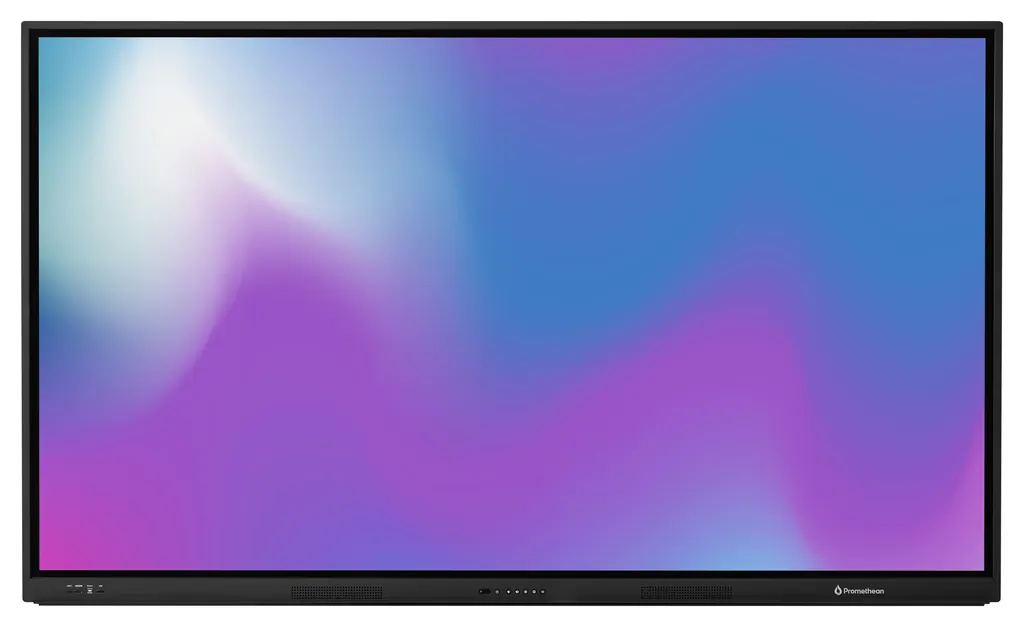
APLX-65
Promethean ActivPanel LX APLX-65 65-inch Interactive Display
- Screen size
- 65" 4K; UHD (3840 x 2160 @ 60 Hz)
- Resolution
- 32768 x 32768 px
- Touch
- Yes
- System
- No OS
The Promethean APLX-65 is a 65-inch 4K UHD interactive display from the ActivPanel LX series, with 20 continuous touch points, 350 cd/m² brightness and a 1.07 billion colour panel. It ships without an operating system, so schools and offices can run Windows, Chrome OS or Android on it. Suited to classrooms, meeting rooms and training suites across Qatar. Request a quote.
What the APLX-65 delivers in a 65-inch frame
The Promethean APLX-65 is a 65-inch 4K UHD interactive display from the ActivPanel LX series, with a 3840 x 2160 resolution at 60 Hz. It uses a TFT LCD panel with direct LED backlighting and an anti-glare surface, protected by 3.2 mm heat-tempered bonded glass. Brightness is rated at 350 cd/m², with 5000:1 dynamic contrast and a 178° viewing angle, so people seated toward the sides of a room can still read the screen.
At 1,482 x 899 x 110 mm and 36.6 kg for the panel alone, it is the smallest of the three sizes in this range. Plan for two people during lifting and use a bracket rated for that load.
Touch, pens and features that matter in daily use
Touch runs on Vellum Touch Technology with 20 continuous touch points, a 10 ms response time, a 200 Hz scan rate and 1 mm touch accuracy. Palm rejection and palm erase let a teacher or presenter rest a hand on the glass while writing, and the panel tells pen input apart from finger touch. Two battery-less pens with 3 mm tips are supplied and sit in an integrated full-length tray.
- Sound: two front-facing speakers rated at 2 x 15 W peak.
- Quiet operation: a fanless design, so no fan noise during lessons or meetings.
- Light control: an ambient light sensor is fitted to the panel.
Choosing your operating system
The APLX-65 has no operating system and no built-in computer, so you decide how it runs. You can connect a Windows PC, a Chrome OS device or an Android-based system, so the screen matches the software your staff already use. It has one OPS slot, and Promethean lists optional OPS-M (Windows), OPS-A (Android) and Chromebox units for the ActivPanel LX range. Compatibility is listed for Windows 7 to 11, several macOS releases, Linux Ubuntu 20.04 LTS and Chrome OS. ActivInspire Personal is included as the education software licence.
Where it fits across Qatar
A 65-inch panel suits a classroom or small huddle room where a group sits within a few metres of the screen. A university training centre in Education City could use it for workshops, while a consultancy in West Bay could review drawings with colleagues in a meeting room. A private school in Al Wakrah fitting out new classrooms could install several units sized to each room.
Its operating range is 0 °C to 40 °C with 20% to 80% non-condensing humidity. Qatar summer temperatures regularly exceed 45 °C outdoors, so install it in an air-conditioned room, away from direct sun through glass. Confirm room conditions with the SmartRooms Qatar team before installing in any space that is not air-conditioned.
Planning power, mounting and delivery
The power input is 100 V to 240 V AC, and the box includes a 3 m regional power cable. Typical consumption is 106 W, and standby draw is 0.5 W or less. The VESA mounting pattern is 600 x 400 mm, and the box includes M6 VESA screws and a mini PC bracket. Promethean recommends installation by a qualified installer, and SmartRooms Qatar offers professional installation and free site surveys before wall mounting. The packed weight is 46.7 kg, so confirm access routes for delivery.
To receive a quotation for the APLX-65, tell us your room size, preferred mounting and quantity. Quotations are usually issued within one working day, and we deliver to all eight municipalities of Qatar. Request a quote from SmartRooms Qatar today.
Highlights
- 65-inch 4K UHD panel at 3840 x 2160 resolution and 60 Hz
- 20 continuous touch points with 10 ms response time
- No operating system; choose Windows, Chrome OS or Android
- Two battery-less pens and an integrated full-length pen tray
- 100 V to 240 V AC input; standby draw 0.5 W or less
- Operating range 0 °C to 40 °C, 20% to 80% humidity
Classroom fit
At 65″ the farthest student should sit within about 4.9 m (6× the screen height).
Estimated timeline
Quotation within 1 working day · delivery timing depends on stock availability, and we confirm it with your quotation.
Specifications
Display18
- Screen Size and Resolution
- 65" 4K; UHD (3840 x 2160 @ 60 Hz) 75" 4K; UHD (3840 x 2160 @ 60 Hz) 86" 4K; UHD (3840 x 2160 @ 60 Hz)
- Screen Type
- TFT LCD (Direct LED Backlight)
- Blue Light Reduction
- Yes
- Bonded Glass
- Yes
- Aspect Ratio
- 16:9
- Display Area
- 65": 1431 x 805 mm (56.3 x 31.7 in) 75": 1652 x 930 mm (65 x 36.6 in) 86": 1897 x 1068 mm (74.7 x 42 in)
- Display Colours
- 1.07 Billion (10-bit)
- LCD Viewing Angle
- 178°
- LCD Response Time
- 8 ms
- LCD Refresh Rate (Panel)
- 60 Hz
- LCD Brightness (Brightness of display without cover glass)
- 400 cd/m²
- LED Lifespan
- 50,000 hours
- Contrast Ratio
- 5000:1 Dynamic 1200:1 Static
- Brightness
- 350 cd/m²
- Ambient Light Sensor
- Yes
- Glass Hardness
- 8H (pencil), 7 (Mohs)
- Glass Type
- Heat tempered, Anti-Glare
- Glass Thickness
- 3.2 mm
Interactivity17
- Vellum Touch Technology
- Yes
- Continuous Touch Points
- 20
- Touch Resolution
- 32768 x 32768 px
- Response Time
- 10 ms
- Touch Accuracy
- 1 mm
- Tracking Rate
- 4 m/s
- Scan Rate
- 200 Hz
- Gestures and Edge Swipes
- Windows ® supported
- Unique Pen IDs
- 1
- Pen and Touch Differentiation
- Yes
- Palm Erase
- Yes
- Palm Rejection
- Yes
- Pens Included
- Yes, 2
- Pen Type
- Battery-less pen
- Pen Holder
- Integrated full-length pen tray
- Pen Tip Diameter
- 3 mm
- Compatibility
- Windows ® 7 to 11; Mac OS ® 10.8 to 10.11; macOS ® Sierra 10.12.1 or later; Linux ® Ubuntu 20.04 LTS; Chrome OS ™
Audio1
- Dual Front-facing Speakers
- 2 x 15 W (peak)
Computing1
- Operating System
- No OS
Connectivity15
- OPS Slot
- 1
- HDMI 2.0 (Front)
- 1
- HDMI 2.0 (Rear)
- 2
- USB-A 2.0 (Front)
- 1
- USB-A 2.0 (Rear)
- 2
- USB-B 2.0 Touch (Front)
- 1
- USB-B 2.0 Touch (Rear)
- 1
- USB-C 2.0 15 W Power Delivery (Front)
- 1
- LAN In (10/100/1000)
- 1
- LAN Out (10/100/1000)
- 1
- VGA
- 1
- Wake-on-LAN
- Yes
- Audio In (3.5 mm)
- 1
- Audio Out (3.5 mm)
- 1
- RS232
- 1
Power3
- Power Requirements
- 100 V - 240 V AC
- Power Consumption (Typical)
- 65": 106 W 75": 132 W 86": 175 W
- Ultra-Quiet Fanless Design
- Yes
Environmental4
- Operating Temperature
- 0 °C to 40 °C (32 °F to 104 °F)
- Storage Temperature
- -15 °C to 55 °C (-5 °F to 131 °F)
- Operating Humidity
- 20% to 80% non-condensing humidity
- Storage Humidity
- 20% to 90% non-condensing humidity
Compliance & Certification2
- Regulatory Certifications
- CE, FCC, IC, UL, CUL, CB, RCM
- Energy Star Certified
- 65": Yes 75": Yes 86": No Page 1
Physical Specifications5
- Panel Dimensions
- 65": 1482 x 899 x 110 mm (58.3 x 35.4 x 4.3 in) 75": 1716 x 1033 x 110 mm (67.6 x 40.7 x 4.3 in) 86": 1962 x 1171 x 110 mm (77.2 x 46.1 x 4.3 in)
- Packed Dimensions
- 65": 1640 x 1010 x 185 mm (64.6 x 39.8 x 7.3 in) 75": 1860 x 1130 x 185 mm (73.2 x 44.5 x 7.3 in) 86": 2095 x 1270 x 185 mm (82.5 x 50 x 7.3 in)
- Panel Net Weight
- 65": 36.6 kg (80.7 lb) 75": 50 kg (110.2 lb) 86": 63.4 kg (139.8 lb)
- Packed Weight
- 65": 46.7 kg (103 lb) 75": 61.6 kg (135.8 lb) 86": 76.6 kg (168.9 lb)
- VESA Mount Point
- 65": 600 x 400 mm (23.6 x 15.7 in) 75": 800 x 400 mm (31.5 x 15.7 in) 86": 800 x 600 mm (31.5 x 23.6 in)
Education Software Licence1
- ActivInspire ® Personal
- Included
Packed Contents1
- What’s in the Box
- 1 x ActivPanel LX 1 x 3 m HDMI Cable 1 x 3 m USB Cable (A-B) 1 x 2 m USB-C Cable 1 x 3 m Regional Power Cable 1 x Remote Control 2 x Batteries for Remote 2 x Pens 1 x Antistatic Bag 4 x Desiccant 4 x VESA Mount Screws (M6) 1 x Mini PC Bracket with Screws 1 x Quick Install Guide
Installation1
- The installation of this product should be not supplied by Promethean or not meeting safety and warranty. For more information,
- completed by a qualified installer. Use of components minimum specifications may impact performance, visit Support.PrometheanWorld.com.
Warranty1
- Warranty term and upgrade options vary information and visit PrometheanWorld.com/Warranty.
- by region. Contact your local reseller or distributor for
Optional Accessories & Stands6
- Promethean OPS-A (Android)
- The Promethean OPS-A is a Google EDLA-certified Android device, designed specifically for use with ActivPanel LX. Pre-loaded with the most popular Google and Promethean apps, it provides easy access to the Google Play Store, and can easily be managed by IT Admins. Availability varies by region. See individual Specification Sheet for more details.
- Promethean Chromebox
- The Promethean Chromebox is the perfect solution for customers wishing to extend their existing Chrome OS ecosystem to the ActivPanel. It provides certified access to your preferred apps from the Google Play Store. Availability varies by region. See individual Specification Sheet for more details.
- Promethean OPS-M (Windows)
- For customers wishing to use the Microsoft ecosystem, the Promethean OPS-M creates an all-in-one, large-format Windows experience on the ActivPanel. Availability varies by region. See individual Specification Sheet for more details.
- Promethean ActivSoundBar
- The Promethean ActivSoundBar provides a powerful, high-quality sound option for the classroom. ActivSoundBar is the perfect addition to any Promethean Interactive Display, delivering crystal-clear, immersive sound. See individual Specification Sheet for more details.
- Promethean Wall mount
- Our fixed wall mount safely keeps your ActivPanel in one place and position for a more permanent display. Compatible with all sizes. See individual Specification Sheet for more details.
- Versatile mounting solutions
- Create the best solution for each classroom with the ActivPanel Stands. Choose from a fixed wall mount, height-adjustable wall mount, fixed-height mobile stand, and height-adjustable mobile stand. Availability varies by region. Compatible with all sizes. See individual Specification Sheets for more details. Page 2
APLX-651
- size_inch
- 65




