





Thursday, 22 October 2026 · 11 Jumada I 1448 AH Sun – Thu · 9:00 – 18:00
+971 56 914 9477 العربية
WhatsApp

WA65F

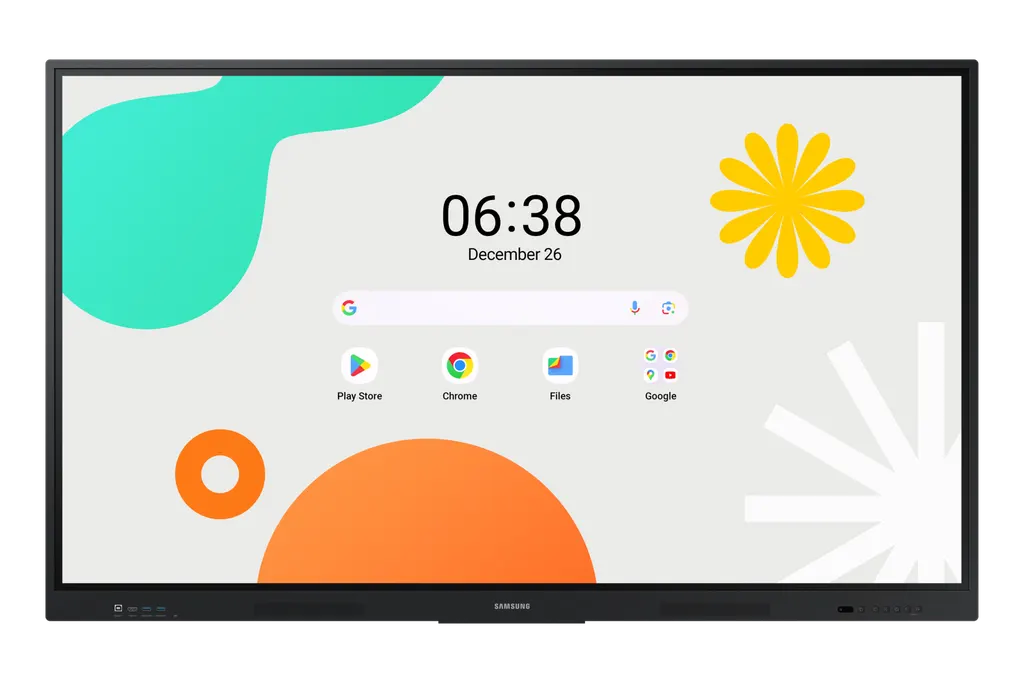
Samsung WA65F 65-inch Interactive Display WAF Series

Screen size
65"
Resolution
3,840 x 2,160
Touch
Yes
Memory
64GB
WhatsApp
Priceon request
QuotationWithin 1 working day
DeliveryConfirmed with your quote, based on stock
XLSXDownload datasheet (WA65F_Specifications_levant.xlsx)
Overview

The Samsung WA65F is a 65-inch 4K interactive display from the WAF series, running Android 14 with an infrared touch layer that supports up to 40 simultaneous touchpoints. It offers 400 nit typical brightness, two HDMI 2.1 inputs, a USB-C port with up to 65W charging and an OPS slot for hosting a Windows PC. Its 0 to 40 degree operating range suits air-conditioned classrooms and meeting rooms across Qatar.

What the Samsung WA65F is

The Samsung WA65F is a 65-inch interactive display from the WAF series, catalogued as LH65WAFWLGCXUE. It combines a 4K touch screen with an Android 14 operating system, so teachers and presenters can write, annotate and open apps directly on the glass without bringing a separate computer. It is built for rooms where a large touch-enabled panel replaces a projector and a whiteboard.

Display and touch performance

The panel uses an IPS layer at 3,840 x 2,160 resolution, so text and fine diagrams stay readable across a classroom or boardroom. Typical brightness is 400 nit, the contrast ratio is 1,200:1 and the viewing angle is 178 degrees both horizontally and vertically, which helps people seated at the edges of the room see the same picture. Response time is 8ms.

Touch uses infrared technology and supports up to 40 simultaneous touchpoints, so several students or staff can write at the same time. Split note mode provides up to four independent note zones on one page, and the dual pen lets users switch between two writing tools without changing settings during a lesson.

Connectivity for mixed Android and PC use

  • Two HDMI 2.1 inputs with HDCP 2.1 support
  • USB-C port for screen mirroring, touch control and charging external devices at up to 65W
  • Four USB ports, an RJ45 input, Wi-Fi 5 (802.11ac) and Bluetooth
  • HDMI output to show whiteboard content on a second, larger screen
  • OPS slot that can host a module to turn the display into a Windows device

Where it fits in Qatar

A 65-inch panel suits a standard classroom, a training room or a medium-sized meeting room where the audience sits within a few metres of the screen. Three typical settings in Qatar illustrate where it works well:

  • A private school in Al Wakrah equipping new classrooms, where teachers use Android lesson apps and annotate over videos during class.
  • A training centre in Education City running workshops in which several trainees write on the board at the same time.
  • A company meeting room in West Bay where staff share screens from laptops and phones with colleagues abroad.

Planning the installation

The set measures 1482.1 x 897.5 x 87.7 mm and weighs 36.2 kg, with a packed weight of 44.5 kg, so plan for at least two people or a lift during delivery and mounting. It uses a 600 x 400 mm VESA pattern, so confirm that the wall bracket or mobile stand matches before ordering. The power input is 100 to 240 V at 50/60 Hz, which covers Qatar's 240 V supply. Typical on-mode consumption is 409 W and sleep mode drops to 0.5 W.

The rated operating range is 0 to 40 degrees Celsius with 10 to 80% humidity, non-condensing. Qatar summers can exceed 45 degrees, so install the panel in an air-conditioned room away from direct sunlight and large glazed walls, and confirm the environment with the SmartRooms Qatar team before installation. SmartRooms Qatar offers free site surveys to check wall loading, cable routes and room conditions.

Request a quote

Send SmartRooms Qatar your room size, number of units and mounting preference, and request a quote for the Samsung WA65F. Quotations are usually issued within one working day. We supply against purchase orders (LPOs) and government tenders, including Monaqasat, deliver to all eight municipalities of Qatar and provide professional installation.

Highlights

  • 65-inch 4K IPS panel at 3,840 x 2,160 resolution
  • Android 14 operating system with EDLA certification
  • Infrared touch with up to 40 simultaneous touchpoints
  • Two HDMI 2.1 inputs plus USB-C with 65W charging
  • OPS slot for hosting a Windows PC module
  • Operating range 0 to 40 degrees, 10 to 80% humidity non-condensing

Classroom fit

At 65″ the farthest student should sit within about 4.9 m (6× the screen height).

Estimated timeline

Quotation within 1 working day · delivery timing depends on stock availability, and we confirm it with your quotation.

Specifications

45 specifications · Source: manufacturer · checked Oct 2026
Display14
Diagonal Size
65"
Panel Type
IPS
Resolution
3,840 x 2,160
Pixel Pitch (HxV, mm)
372(H)x372(V)
Brightness (Typ)
400 nit
Contrast Ratio
1,200:1
Viewing Angle (H/V)
178/178
Response Time
8ms
Color Gamut
72%
Glass Haze
25%
H-Scanning Frequency
13.5KHz
Maximum Pixel Frequency
78MHz
V-Scanning Frequency
60Hz
Operation Time Support
12/7
Connectivity11
HDMI In
2
Version of HDMI
2.1
Version of HDCP
2.1
USB
4
Audio In
Stereo Mini Jack
Audio Out
Stereo Mini Jack
Video Out
Yes
RS232 In
Yes
RJ45 In
Yes
WiFi
Wi-Fi 5: 802.11ac
Bluetooth
Yes
Power3
Power Supply
AC100-240V 50/60Hz
Power Consumption (On Mode, W)
409 W
Power Consumption (Sleep Mode, W)
0.5 W
Dimension2
Set Dimension (WxHxD, mm)
1482.1 x 897.5 x 87.7 mm
Package Dimension (WxHxD)
1640 x 1010 x 185 mm
Weight2
Set Weight
36.2 kg
Package Weight
44.5 kg
Operation Conditions2
Temperature
0℃~40℃
Humidity
10 ~ 80%, non-condensing
Mechanical Specification4
VESA Mount (mm)
600 x 400 mm
Bezel Width (mm)
14.0mm
Bezel Color
Black
Frame Material
Aluminium
Optional Feature1
Touch
Yes
SoC2
OS Version
Android-14
Flash Memory Size
64GB
Eco1
Energy Efficiency
B
Touch1
Touch Technology
IR
Certification and Compliance2
EMC
FCC CFR Title 47, Part 15, Subpart B/EN55032:2015+A11:2020
Safety
IEC62368-1/UL62368-1/IEC60950-1 / IS13252

Downloads

20 files from the manufacturer
XLSX Datasheets WA65F_Specifications_levant.xlsx 5 KB Samsung WA65F datasheets (XLSX, 5 KB) XLSX Datasheets WA65F_Specifications_sa_en.xlsx 5 KB Samsung WA65F datasheets (XLSX, 5 KB) PDF Manuals & guides Samsung_Education_Portal_2.1_User_Manual_v2.1.pdf 1.7 MB Samsung WA65F manuals & guides (PDF, 1.7 MB) DOCX Manuals & guides Samsung_Whiteboard_DMS_UserManual_v1.6.docx 7.0 MB Samsung WA65F manuals & guides (DOCX, 7.0 MB) DOCX Manuals & guides Samsung_Whiteboard_DMS_UserManual_v1.7.docx 6.9 MB Samsung WA65F manuals & guides (DOCX, 6.9 MB) PDF Manuals & guides Screenshare_User_Manual.V3.3.20250930.pdf 5.6 MB Samsung WA65F manuals & guides (PDF, 5.6 MB) PDF Manuals & guides WAF_Web_Manual_Arabic_24.11.29.pdf 8.5 MB Samsung WA65F manuals & guides (PDF, 8.5 MB) PDF Manuals & guides WAF_Web_Manual_English_24.11.05.pdf 4.1 MB Samsung WA65F manuals & guides (PDF, 4.1 MB) PDF Manuals & guides WAF_Web_Manual_French_25.03.26.pdf 2.8 MB Samsung WA65F manuals & guides (PDF, 2.8 MB) PDF Manuals & guides WAF_local_OTA_upgrade.pdf 576 KB Samsung WA65F manuals & guides (PDF, 576 KB) PDF Manuals & guides · Opens on manufacturer site LFD_QSG_WAF_ASIA MENA AFRICA_L6_20241025.pdf Samsung WA65F manuals & guides (PDF) ZIP Manuals & guides · Opens on manufacturer site full_OTA_SOD-A311D2EBWWC-1003.0_20260901214421_user_sign.zip Samsung WA65F manuals & guides (ZIP) ZIP Software & firmware · Opens on manufacturer site LFD_WEB_WAF_XUE_L2.zip Samsung WA65F software & firmware (ZIP) APK Software & firmware · Opens on manufacturer site SEC_ScreenShare_Android_V3.2.1.146_20250620.apk Samsung WA65F software & firmware (APK) PKG Software & firmware · Opens on manufacturer site SEC_ScreenShare_MacOS_v3.2.6.pkg Samsung WA65F software & firmware (PKG) MSI Software & firmware · Opens on manufacturer site SEC_ScreenShare_WIN_v3.3.464.20251110.msi Samsung WA65F software & firmware (MSI) APK Software & firmware · Opens on manufacturer site Samsung_Whiteboard_DMS_23.1000.26_WAC_WAD.apk Samsung WA65F software & firmware (APK) EXE Software & firmware · Opens on manufacturer site Samsung_Whiteboard_DMS_23.1000.27.exe Samsung WA65F software & firmware (EXE) EXE Software & firmware · Opens on manufacturer site Samsung_Whiteboard_DMS_v23.1000.30.exe Samsung WA65F software & firmware (EXE) APK Software & firmware · Opens on manufacturer site Samsung_Whiteboard_DMS_v23.1000.31_WAF.apk Samsung WA65F software & firmware (APK)

Questions about WA65F

What is the Samsung WA65F best suited for?
The Samsung WA65F suits rooms where a 65-inch touch screen replaces a projector and whiteboard, such as a classroom, training room or medium meeting room. Its 3,840 x 2,160 IPS panel and 400 nit typical brightness keep content readable for the whole room, and the Android 14 operating system lets presenters open apps and annotate without a separate computer.
Will the WA65F cope with Qatar's summer heat?
The WA65F has a rated operating temperature of 0 to 40 degrees Celsius and 10 to 80% humidity, non-condensing. Qatar summers regularly exceed 45 degrees, so install it in an air-conditioned room away from direct sun and large glazed walls. For a lobby or any space without temperature control, ask the SmartRooms Qatar team to confirm the environment before you order.
How many people can write on the screen at the same time?
The infrared touch layer supports up to 40 simultaneous touchpoints, so several students or staff can write and draw at once. Split note mode adds up to four independent note zones on a single page, letting each group work in its own area without overwriting others. This suits a workshop at Education City where teams share one board.
Can the WA65F run Windows software?
Yes, through its OPS slot, which can host a module that turns the display into a Windows device. This removes the need for a separate PC in the room and gives users the desktop they already know directly on the panel. Confirm with SmartRooms Qatar which OPS module, if any, is included in your quotation.
How do I share content from laptops and phones?
The WA65F supports screen mirroring from up to nine devices, and the data lists Wi-Fi 5 (802.11ac) and Bluetooth. Mirroring can be used from iOS, Mac, Windows, Android and Chrome OS devices. For a wired connection, the USB-C port also supports screen mirroring and touch control from a connected laptop.
What power supply does the WA65F need in Qatar?
Its rated input is AC 100 to 240 V at 50/60 Hz, so it accepts Qatar's 240 V, 50 Hz mains supply. Typical on-mode consumption is 409 W, and sleep mode drops to 0.5 W. Qatar uses BS 1363 (Type G) sockets, so confirm the plug arrangement with your electrical contractor before installation.
What wall mount or stand does the WA65F need?
The WA65F uses a 600 x 400 mm VESA mounting pattern. Check that the bracket or mobile stand matches this pattern and that the wall can carry 36.2 kg. The set measures 1482.1 x 897.5 x 87.7 mm and the packed weight is 44.5 kg, so plan for at least two people. SmartRooms Qatar offers free site surveys before wall mounting.
Can it show whiteboard content on a second screen?
Yes. The HDMI output shares whiteboard content on a different and larger screen, so students seated at the back of a large room can follow the lesson. Plan the cable route to the second display during the site survey, particularly if the second screen sits on a different wall or in an adjoining space.
What does the Annotation feature do?
The Annotation button is always visible, so a user can write notes over any content with a single press, including video, without first capturing an image. This keeps a lesson moving and avoids saving screenshots just to mark them up. It is useful for teachers who pause a video to highlight a key point.
Is the WA65F suitable for a school ordering several units?
Yes. Schools and universities can order on a purchase order (LPO), and SmartRooms Qatar also supports government tenders, including Monaqasat. Ask for one quotation covering all units, delivery to the relevant municipality and installation. Payment is accepted by bank transfer, cheque or purchase order.
How does the dual pen work?
The dual pen has a double-sided nib, so a user can switch between two different writing tools by turning the pen over. There is no need to change settings or pause the lesson. This helps teachers move between marking and annotating quickly during a session on the display.
Does the WA65F have protection against power surges and humidity?
The product data states that a glass fuse and a 500V DC capacitor absorb sudden voltage spikes, and that anti-humidity glue is applied to a critical area of the chipset. Samsung bases these claims on its own internal testing. A stable supply and an air-conditioned room remain the best practical protection for any display.

Similar models

BenQ CM7505 BenQ Board CM7505 75-inch Interactive Display
75″ UHD 3840 × 2160 pixels Ultra Precision IR
SMART SBID-6286S-V3 SMART Board 6086S-V3 86-inch Interactive Display with iQ
86″ 4K UHD (3840 × 2160) HyPr Touch with InGlass
SMART SBID-6286S-V3-P SMART Board 6086S-V3 Pro 86-inch Interactive Display with iQ
86″ 4K UHD (3840 × 2160) HyPr Touch with InGlass
Clevertouch Clevertouch Edge 65" Clevertouch Edge 65" 4K Interactive Display with Camera and Speakers
65″ 4K UHD (3840x2160 @60Hz) Android 15
Clevertouch Clevertouch Edge 86" Clevertouch Edge 86" 4K Interactive Flat Panel
86″ 4K UHD (3840x2160 @60Hz) Android 15
Email Call



