





Thursday, 22 October 2026 · 11 Jumada I 1448 AH Sun – Thu · 9:00 – 18:00
+971 56 914 9477 العربية
WhatsApp

WA86F

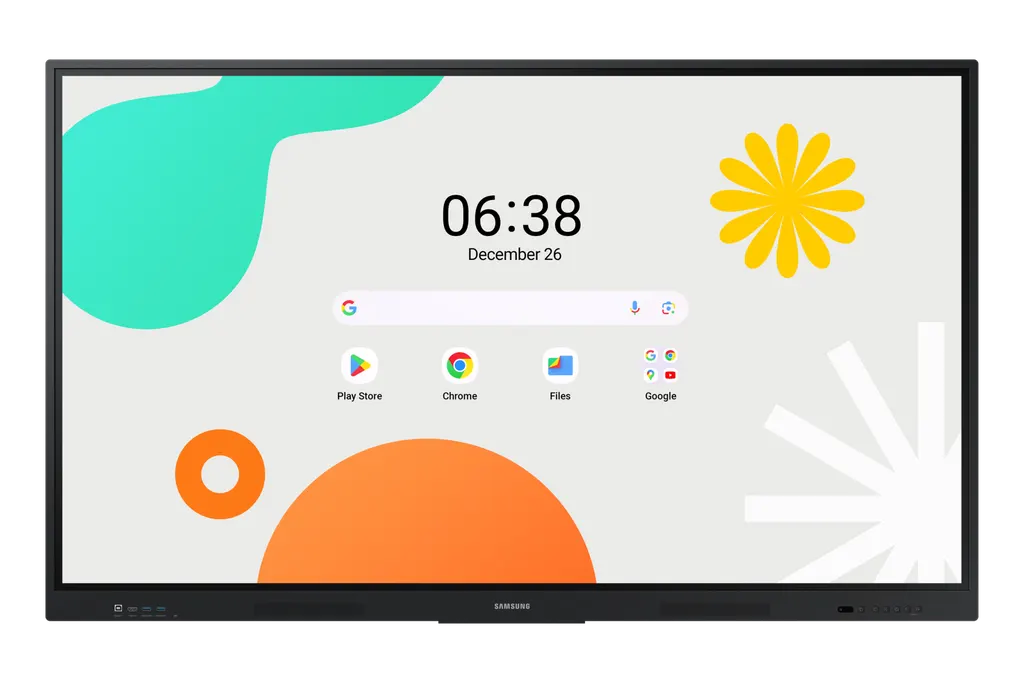
Samsung WA86F 86-inch Interactive Display WAF

Screen size
86"
Resolution
3,840 x 2,160
Touch
Yes
Memory
64GB
WhatsApp
Priceon request
QuotationWithin 1 working day
DeliveryConfirmed with your quote, based on stock
XLSXDownload datasheet (WA86F_Specifications_sa_en.xlsx)
Overview

The Samsung WA86F is an 86-inch interactive display with a 4K IPS panel, 400 nit typical brightness and infrared touch supporting up to 40 simultaneous touchpoints. It runs Android 14 with 64GB storage, carries EDLA certification for Google services and includes an always-visible Annotation button. Two HDMI 2.1 inputs, a 3-in-1 USB-C port and an OPS slot suit lecture halls, boardrooms and training rooms across Qatar.

What the Samsung WA86F Is Built For

The Samsung WA86F is an 86-inch model from the Interactive Display WAF series. It pairs a large 4K IPS panel with infrared touch and an Android 14 platform, so teachers, trainers and presenters can write, annotate and display content from one surface. Its size and touch capacity suit groups of students or meeting participants gathered around a single screen.

Display and Touch Figures Worth Checking

The panel delivers 3,840 x 2,160 resolution with 400 nit typical brightness and a 1,200:1 contrast ratio. Viewing angles are rated at 178 degrees horizontally and vertically, and response time is 8ms. Glass haze is rated at 25 percent. The infrared touch layer supports up to 40 simultaneous touchpoints, so several people can write at once without waiting for a turn.

  • Annotation: an always-visible button lets users write over video or any open content without capturing a screenshot first.
  • Note zones: the upgraded Note app splits one page into up to four independent zones for group work.
  • Device mirroring: screen sharing for up to nine devices, from iOS, Mac, Windows and Android.

Connectivity, Power and Physical Specifications

The data lists two HDMI 2.1 inputs with HDCP 2.1 support, an HDMI output for sending whiteboard content to a larger screen in the room, four USB ports, RS232 and RJ45 connections, Wi-Fi 5 (802.11ac) and Bluetooth. The 3-in-1 USB-C port handles screen mirroring, touch control and charging of external devices at up to 65W. Power input is AC 100-240V at 50/60Hz, rated at 493 W in on mode and 0.5 W in sleep mode, with an energy efficiency class of A. The set measures 1961.8 x 1170 x 87.7 mm and weighs 62.5 kg, with an 800 x 600 mm VESA mount and a 17.2 mm black bezel. The OPS slot can turn the display into a Windows device without a separate PC.

Where It Fits in Qatar

  • A lecture hall at a university in Education City, where a lecturer annotates slides and students work in separate note zones.
  • A boardroom in West Bay, where a leadership team joins a call with colleagues abroad and shares a presentation from a laptop over USB-C.
  • A training room in Msheireb running staff workshops, with the HDMI output feeding the same lesson to an overflow room next door.

Planning Before Installation

At 62.5 kg, the panel needs a wall or stand rated for its weight and the 800 x 600 mm VESA pattern. SmartRooms Qatar offers a free site survey to check wall construction, sightlines, power points and cable routing before any mounting. Keep the unit in an air-conditioned room: the operating range is 0 to +40°C with 10 to 80% humidity, non-condensing, and summer temperatures in Qatar can exceed 45°C. Avoid positions in direct sunlight through glazing, and confirm the environment with the SmartRooms Qatar team if a space is not climate-controlled.

Schools and government buyers can issue a purchase order (LPO) or respond to tenders, including Monaqasat. Quotations are usually issued within one working day, and delivery covers all 8 municipalities of Qatar. Request a quote for the Samsung WA86F and include the room size, mounting type and number of units so the quotation matches your project.

Highlights

  • 4K IPS panel, 3,840 x 2,160 resolution, 400 nit typical brightness
  • Infrared touch supporting up to 40 simultaneous touchpoints
  • Android 14 with 64GB flash memory and EDLA certification
  • Always-visible Annotation button for writing over any content
  • Two HDMI 2.1 inputs, HDMI output and 3-in-1 USB-C port
  • OPS slot for running Windows directly on the display

Classroom fit

At 86″ the farthest student should sit within about 6.4 m (6× the screen height).

Estimated timeline

Quotation within 1 working day · delivery timing depends on stock availability, and we confirm it with your quotation.

Specifications

38 specifications · Source: manufacturer · checked Oct 2026
Display10
Diagonal Size
86"
Panel Type
IPS
Resolution
3,840 x 2,160
Pixel Pitch (HxV)
493.5 x 493.5 mm
Brightness (Typ)
400 nit
Contrast Ratio
1,200:1
Viewing Angle (H/V)
178/178
Response Time
8ms
Glass Haze
25%
Operation Time Support
12/7
Connectivity11
HDMI In
2
Version of HDMI
2.1
Version of HDCP
2.1
USB
4
Audio In
Stereo Mini Jack
Audio Out
Stereo Mini Jack
Video Out
Yes
RS232 In
Yes
RJ45 In
Yes
WiFi
Wi-Fi 5: 802.11ac
Bluetooth
Yes
Power3
Power Supply
AC100-240V 50/60Hz
Power Consumption (On Mode)
493 W
Power Consumption (Sleep Mode)
0.5 W
Dimension2
Set Dimension (WxHxD)
1961.8 x 1170 x 87.7 mm
Package Dimension (WxHxD)
2095 x 1265 x 185 mm
Weight2
Set Weight
62.5 kg
Package Weight (kg)
74.1 kg
Operation Conditions2
Temperature
0 ~ +40℃
Humidity
10 ~ 80%, non-condensing
Mechanical Specification3
VESA Mount
800 x 600 mm
Bezel Width
17.2mm
Bezel Color
Black
Optional Feature1
Touch
Yes
SoC2
OS Version
Android-14
Flash Memory Size
64GB
Eco1
Energy Efficiency Class
A
Touch1
Touch Technology
IR

Downloads

15 files from the manufacturer
XLSX Datasheets WA86F_Specifications_sa_en.xlsx 5 KB Samsung WA86F datasheets (XLSX, 5 KB) PDF Manuals & guides Samsung_Education_Portal_2.1_User_Manual_v2.1.pdf 1.7 MB Samsung WA86F manuals & guides (PDF, 1.7 MB) DOCX Manuals & guides Samsung_Whiteboard_DMS_UserManual_v1.7.docx 6.9 MB Samsung WA86F manuals & guides (DOCX, 6.9 MB) PDF Manuals & guides Screenshare_User_Manual.V3.3.20250930.pdf 5.6 MB Samsung WA86F manuals & guides (PDF, 5.6 MB) PDF Manuals & guides WAF_Web_Manual_Arabic_24.11.29.pdf 8.5 MB Samsung WA86F manuals & guides (PDF, 8.5 MB) PDF Manuals & guides WAF_Web_Manual_English_24.11.05.pdf 4.1 MB Samsung WA86F manuals & guides (PDF, 4.1 MB) PDF Manuals & guides WAF_local_OTA_upgrade.pdf 576 KB Samsung WA86F manuals & guides (PDF, 576 KB) PDF Manuals & guides · Opens on manufacturer site LFD_QSG_WAF_ASIA MENA AFRICA_L6_20241025.pdf Samsung WA86F manuals & guides (PDF) ZIP Manuals & guides · Opens on manufacturer site full_OTA_SOD-A311D2EBWWC-1003.0_20260901214421_user_sign.zip Samsung WA86F manuals & guides (ZIP) ZIP Software & firmware · Opens on manufacturer site LFD_WEB_WAF_XUE_L2.zip Samsung WA86F software & firmware (ZIP) APK Software & firmware · Opens on manufacturer site SEC_ScreenShare_Android_V3.2.1.146_20250620.apk Samsung WA86F software & firmware (APK) PKG Software & firmware · Opens on manufacturer site SEC_ScreenShare_MacOS_v3.2.6.pkg Samsung WA86F software & firmware (PKG) MSI Software & firmware · Opens on manufacturer site SEC_ScreenShare_WIN_v3.3.464.20251110.msi Samsung WA86F software & firmware (MSI) EXE Software & firmware · Opens on manufacturer site Samsung_Whiteboard_DMS_v23.1000.30.exe Samsung WA86F software & firmware (EXE) APK Software & firmware · Opens on manufacturer site Samsung_Whiteboard_DMS_v23.1000.31_WAF.apk Samsung WA86F software & firmware (APK)

Questions about WA86F

Who is the Samsung WA86F designed for?
The WA86F suits rooms where a large group needs to see the same content from a distance, such as lecture halls, boardrooms and training rooms. A private school in Al Rayyan fitting out a science lecture theatre could use it for annotated lessons, while a company head office in West Bay could use it for presentations and video calls. Its 4K IPS panel, 8ms response time and 86-inch size support both uses.
How heavy is the WA86F and can it go on any wall?
The set weighs 62.5 kg and uses an 800 x 600 mm VESA mounting pattern, so it needs a wall or stand rated for that load and matching hole layout. Block and plasterboard walls need different fixings. SmartRooms Qatar carries out a free site survey before installation to check wall structure, sightlines and cable routes. The package weighs 74.1 kg, so plan lifting access and a clear route into the room.
Can the WA86F run in a hot room or outdoors in Qatar?
The data gives an operating range of 0 to +40°C and 10 to 80% humidity, non-condensing. Summer temperatures in Qatar can exceed 45°C, so install the WA86F in an air-conditioned indoor room, away from direct sunlight through windows and from unconditioned lobbies or outdoor areas. If a space is not climate-controlled, confirm the conditions with the SmartRooms Qatar team before ordering.
Does the WA86F work with Qatar's 240 V power supply?
The power input is listed as AC 100-240V at 50/60Hz, which covers Qatar's 240 V, 50 Hz mains. Power draw is 493 W in on mode and 0.5 W in sleep mode, and the energy efficiency class is A. The data does not list the plug type, so confirm the supplied power cord and socket arrangement with the SmartRooms Qatar team before installation.
How many students can write on the display at the same time?
The touch layer supports up to 40 simultaneous touchpoints, so several people can write or draw at once. The Note app can split one page into up to four independent zones, letting groups work without overwriting each other. A primary class in Al Sadd doing group activities could assign one zone per table while the teacher keeps the main board for whole-class content.
How many devices can share their screen to the WA86F?
Screen mirroring supports up to nine devices, including iOS, Mac, Windows and Android. In a staff workshop in Msheireb, participants can mirror laptops and phones to the large screen while the presenter uses split screen and multi-window functions to show two sources side by side. The data does not describe the wireless method for each device, so test the room's network during the site survey.
Can I connect a laptop with a single USB-C cable?
Yes. The 3-in-1 USB-C port supports screen mirroring, touch control and charging of external devices at up to 65W. A presenter can connect one cable, show content on the panel and keep the laptop charged through a long session. Check your laptop's charging requirement against the 65W limit before ordering accessories.
What is the OPS slot for, and is a computer included?
The OPS slot accepts a compatible OPS computing module, which can turn the display into a Windows device so a separate PC is not needed in the room. The source data does not state that a computing module is included with this model, so specify the module you need when you request a quote from SmartRooms Qatar.
How does the Annotation button help during lessons or presentations?
The Annotation button is always visible, so presenters can write over a video, a web page or any open source without capturing an image first. A lecturer at a university in Education City can pause a recorded clip, mark key points and continue the session without switching apps, which keeps the lesson moving and the notes in one place.
Can the same content be sent to a second screen in another room?
The HDMI output shares whiteboard content with a larger or second display in the room. A school in Al Wakrah running an assembly in a hall beside a classroom could feed the same lesson to a second screen, so students who cannot see the main panel still follow along. The WA86F also has two HDMI 2.1 inputs with HDCP 2.1 support.
Can several panels be managed from one place?
The manufacturer describes a device management solution for remote management of whiteboard settings and applications. For a school group or government body deploying several units across buildings, this can reduce the time staff spend visiting each room. The source data does not detail the management features, so ask SmartRooms Qatar to confirm the requirements for your deployment before requesting a quote.
How do I buy the WA86F through SmartRooms Qatar?
Request a quote by sending the model, quantity and room details. Quotations are usually issued within one working day. Purchase orders (LPOs) and government tenders, including Monaqasat, are accepted, and payment can be made by bank transfer, cheque or purchase order. Delivery covers all 8 municipalities of Qatar, and the product is covered by the manufacturer's warranty.

Similar models

BenQ CM7505 BenQ Board CM7505 75-inch Interactive Display
75″ UHD 3840 × 2160 pixels Ultra Precision IR
SMART SBID-6286S-V3 SMART Board 6086S-V3 86-inch Interactive Display with iQ
86″ 4K UHD (3840 × 2160) HyPr Touch with InGlass
SMART SBID-6286S-V3-P SMART Board 6086S-V3 Pro 86-inch Interactive Display with iQ
86″ 4K UHD (3840 × 2160) HyPr Touch with InGlass
Clevertouch Clevertouch Edge 65" Clevertouch Edge 65" 4K Interactive Display with Camera and Speakers
65″ 4K UHD (3840x2160 @60Hz) Android 15
Clevertouch Clevertouch Edge 86" Clevertouch Edge 86" 4K Interactive Flat Panel
86″ 4K UHD (3840x2160 @60Hz) Android 15
Email Call




