





Thursday, 22 October 2026 · 11 Jumada I 1448 AH Sun – Thu · 9:00 – 18:00
+971 56 914 9477 العربية
WhatsApp

WM55B

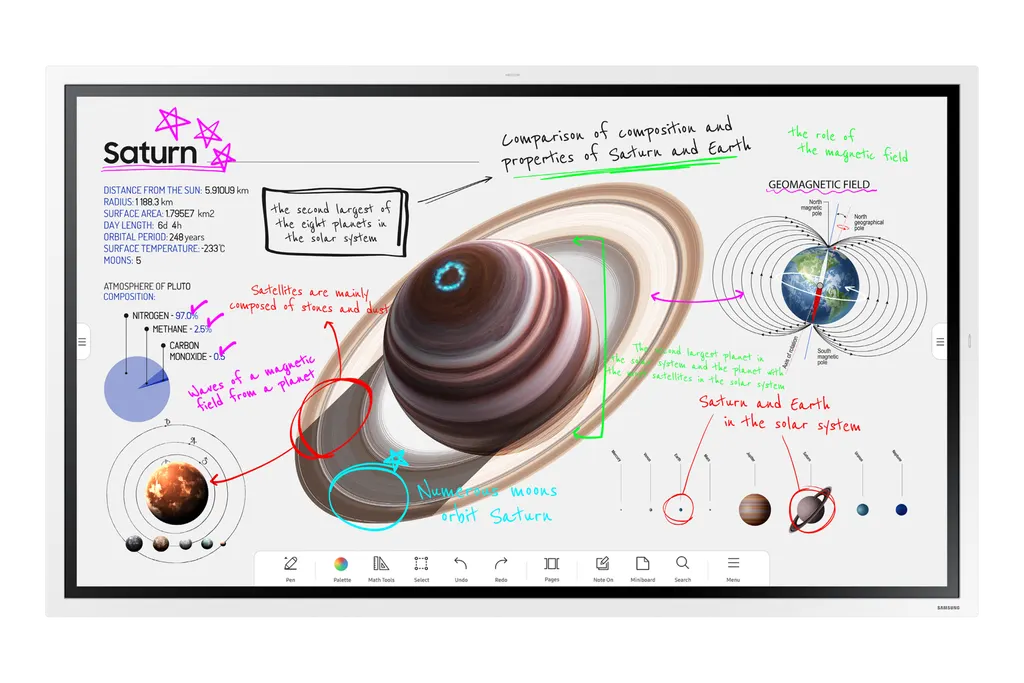
Samsung Flip Pro WM55B 55-inch Interactive Display

Screen size
55"
Resolution
3,840 x 2,160
Touch
Yes
Memory
32GB
WhatsApp
Priceon request
QuotationWithin 1 working day
DeliveryConfirmed with your quote, based on stock
XLSXDownload datasheet (WM55B_Specifications_ae.xlsx)
Overview

The Samsung Flip Pro WM55B is a 55-inch interactive display with a 3,840 x 2,160 VA panel, infrared multi-touch and a 3-in-1 USB-C port that handles screen mirroring, touch control and charging up to 15W. Its 26ms latency and pen and brush writing suit teaching rooms and meeting spaces. It fits schools, training centres and offices in Qatar that need one panel for writing, presenting and wireless sharing.

What the 55-inch 4K panel delivers

The Samsung Flip Pro WM55B pairs a 55-inch 3,840 x 2,160 VA panel with infrared touch, the Tizen 6.5 operating system and 32GB of flash memory. The manufacturer lists typical brightness of 350 without glass and 220 with glass, a contrast ratio of 4000:1 without glass, and viewing angles of 178/178. These figures matter in rooms where students sit at the sides or where a window sits behind the screen.

Writing, touch and connectivity

The manufacturer quotes 26ms touch latency and an 8ms response time. Pen and brush modes, a palette menu and palm erasing let a presenter annotate slides much as they would on a whiteboard. Multi-touch is listed for up to 20 people, but a footnote ties that figure to single-touch use, so confirm the touch behaviour you need against the full specification sheet before ordering.

The WM55B offers two HDMI 2 inputs, one DisplayPort 1.2 input, RS232 control, an RJ45 LAN port, Wi-Fi, Bluetooth and a stereo mini jack output. The 3-in-1 USB-C port handles screen mirroring, touch control and charging of external devices at up to 15W, so a laptop can connect with a single cable. AirPlay 2 and SmartView+ allow up to 50 devices to share wirelessly, with multi-view across four screens. Workspace secured by Knox gives access to remote PCs and network drives, although some third-party apps require a service subscription.

Where it fits in Qatar

  • A primary school in Al Wakrah fitting out new classrooms, where teachers write lesson notes directly on the panel and students share their work wirelessly from their own devices.
  • A company meeting room in West Bay or Lusail, where a laptop connects through USB-C and the RJ45 port keeps the display on the office network.
  • A training centre in Education City running small group sessions, where a 55-inch screen suits a smaller room than a large lecture hall would need.

What to plan before installation

The set measures 1297.4 x 768.2 x 59.9 mm and weighs 28.6 kg, while the package measures 1464 x 915 x 190 mm and weighs 35.9 kg. Plan delivery access and wall fixings before the day. The panel supports a 400 x 400 mm VESA pattern, and the manufacturer lists the WMN-4277SF mount and STN-WM55R stand as optional accessories for this model. SmartRooms Qatar offers a free site survey to check the wall, the power point and the cable route before installation.

Heat is the main environmental point. The operating range is 0 to 40°C at 10 to 80% humidity, non-condensing, while summer temperatures in Qatar can rise above 45°C. Install the panel in an air-conditioned room and confirm the planned conditions with the SmartRooms Qatar team before the quotation is finalised. The power input is AC 100 to 240V at 50/60 Hz, with 154 W in on mode, 0.5 W in sleep mode and energy efficiency class A.

Software, management and next steps

The WM55B runs Tizen 6.5. Organisations managing several panels can use MagicINFO Remote Management to push content, alerts and warnings from a school information system, but this requires a MagicINFO licence and a separately built integration. The manufacturer states that the antimicrobial coating covers the screen surface only and does not protect users against bacteria or viruses, so treat it as a surface feature rather than a health measure.

To request a quote for the Samsung WM55B, send SmartRooms Qatar your room layout and the number of units required. Quotations are usually issued within one working day. We supply, deliver to all eight municipalities of Qatar and install, and we accept purchase orders (LPOs), government tenders and payment by bank transfer, cheque or purchase order.

Highlights

  • 55-inch 3,840 x 2,160 VA panel with 4000:1 contrast without glass
  • Infrared touch with multi-touch listed for up to 20 people
  • 3-in-1 USB-C for screen mirroring, touch and charging up to 15W
  • AirPlay 2 and SmartView+ wireless sharing for up to 50 devices
  • Two HDMI 2 inputs, DisplayPort 1.2, RJ45 LAN, Wi-Fi and Bluetooth
  • Operating range 0 to 40°C; AC 100-240V, 50/60 Hz power input

Classroom fit

At 55″ the farthest student should sit within about 4.1 m (6× the screen height).

Estimated timeline

Quotation within 1 working day · delivery timing depends on stock availability, and we confirm it with your quotation.

Specifications

48 specifications · Source: manufacturer · checked Oct 2026
Display14
Diagonal Size
55"
Panel Type
VA
Resolution
3,840 x 2,160
Pixel Pitch (HxV, mm)
0.315 x 0.315
Brightness (Typ)
350 (w/o glass), 220 (w/glass)
Contrast Ratio
4000:1(without glass)
Viewing Angle (H/V)
178/178
Response Time
8ms
Color Gamut
72%
Glass Haze
2%(without glass)
H-Scanning Frequency
30~81 khz
Maximum Pixel Frequency
594Mhz
V-Scanning Frequency
48~75 Khz
Operation Time Support
12/7
Connectivity11
HDMI In
2
DP In
1
Version of HDMI
2
Version of DP
1.2
Version of HDCP
2.2
USB
1(Rear), 3 (with optional front tray, Internal 1, External 1, USB-C 1)
Audio Out
Stereo Mini Jack
RS232 In
Yes
RJ45 In
Yes
WiFi
Yes
Bluetooth
Yes
Power4
Power Supply
AC100-240V 50/60Hz
Power Consumption (Off Mode, W)
-
Power Consumption (On Mode, W)
154 W
Power Consumption (Sleep Mode, W)
0.5 W
Dimension2
Set Dimension (WxHxD, mm)
‎1297.4 x 768.2 x 59.9‎
Package Dimension (WxHxD, mm)
‎1464 x 915 x 190‎
Weight2
Set Weight (kg)
‎28.6‎
Package Weight
‎35.9‎
Operation Conditions2
Temperature
0℃~40℃
Humidity
10 ~ 80%, non-condensing
Mechanical Specification4
VESA Mount (mm)
‎400 x 400‎
Bezel Width (mm)
‎26.2‎
Bezel Color
Gray White
Frame Material
Plastic
Optional Feature3
Touch
Yes
Mount
Yes(Model Name : WMN-4277SF)
Stand
Yes(Model Name : STN-WM55R)
SoC2
OS Version
Tizen 6.5
Flash Memory Size
32GB
Eco1
Energy Efficiency Class
A
Touch1
Touch Technology
IR
Certification and Compliance2
EMC
Class A FCC (USA) Part 15, Subpart B KCC/EK (Korea) Tuner : KN32 / KN35   Tunerless : KN32 / KN35 CE (Europe) EN55032 : 2012 or 2015   EN55024:2010 or EN 55035:2017 VCCI (Japan) VCCI CISPR32:2016   CCC(China) GB/T9254-2008   GB17625.1-2012 BSMI (Taiwan) CNS13438 ( ITE EMI ) CNS14336-1 ( ITE Safety ) CNS15663 (RoHS)   C-Tick (Australia) AS/NZS CISPR32:2015   GOST(Russia/CIS) ROCT CISPR 24-2013   ROCT CISPR 22:2005
Safety
CB (Europe) : IEC60950-1/EN60950-1CCC (China) : GB4943.1-2011PSB (Singapore ) : PSB+IEC60950-1NOM (Mexico ) : NOM-001-SCFI-1993IRAM (Argentina ) : IRAM+IEC60950-1SASO (Saudi Arabia ) : SASO+IEC60950-1BIS(India) : IEC60950-1 / IS13252NOM(Mexico) : Tuner : NOM-001-SCFI-1993 Tunerless : NOM-019-SCFI-1998KC(Korea) : K 60950-1EAC(Russia) : EAC+IEC60950-1INMETRO(Brazil) : INMETRO+IEC60950-1BSMI(Taiwan) : BSMI+IEC60950-1RCM(Australia) : IEC60950-1/AS/NZS 60950-1UL(USA) : cUL60950


Downloads

13 files from the manufacturer
XLSX Datasheets WM55B_Specifications_ae.xlsx 6 KB Samsung WM55B datasheets (XLSX, 6 KB) XLSX Datasheets WM55B_Specifications_levant.xlsx 6 KB Samsung WM55B datasheets (XLSX, 6 KB) XLSX Datasheets WM55B_Specifications_sa_en.xlsx 5 KB Samsung WM55B datasheets (XLSX, 5 KB) PDF Manuals & guides BN68-14173G-00_QSG_WMB_EU_L25_220527.0.pdf 3.7 MB Samsung WM55B manuals & guides (PDF, 3.7 MB) PDF Manuals & guides BN68-14173H-00_QSG_WMB_ASIA MENA AFRICA_L06_220530.0.pdf 3.4 MB Samsung WM55B manuals & guides (PDF, 3.4 MB) PDF Manuals & guides BN68-14173H-01_QSG_WMB_ASIA MENA AFRICA_L06_231214.0.pdf 3.4 MB Samsung WM55B manuals & guides (PDF, 3.4 MB) PDF Manuals & guides BN81-22636C-07_WEB_WMB_ASIA MENA_ARA_260403.0.pdf 22.0 MB Samsung WM55B manuals & guides (PDF, 22.0 MB) PDF Manuals & guides BN81-22636C-07_WEB_WMB_ASIA MENA_ENG_260403.0.pdf 21.9 MB Samsung WM55B manuals & guides (PDF, 21.9 MB) ZIP Software & firmware · Opens on manufacturer site BN81-22636B-01_WEB_WMB_EU CIS_L28_220808.0.zip Samsung WM55B software & firmware (ZIP) ZIP Software & firmware · Opens on manufacturer site BN81-22636B-07_WEB_WMB_EU_L28_260420.0.zip Samsung WM55B software & firmware (ZIP) ZIP Software & firmware · Opens on manufacturer site BN81-22636C-07_WEB_WMB_ASIA MENA_L27_260403.0.zip Samsung WM55B software & firmware (ZIP) ZIP Software & firmware · Opens on manufacturer site S-PTMEBWWC_1170.0_BEM.zip Samsung WM55B software & firmware (ZIP) ZIP Software & firmware · Opens on manufacturer site S-PTMEBWWC_1170.0_USB.zip Samsung WM55B software & firmware (ZIP)

Questions about WM55B

Who is the Samsung WM55B for?
The Samsung WM55B suits schools, training centres and offices that need one display for writing, presenting and sharing. Its 55-inch size fits a classroom, a training room or a smaller meeting room. Teachers can annotate with pen and brush modes, while staff connect laptops by USB-C or HDMI. It is a sensible choice where a larger screen would be more than the room needs.
How does the 55-inch size suit a classroom in Qatar?
At 55 inches, the WM55B gives a clear image to students seated across a primary or secondary classroom, and it leaves more floor space in front of the panel than a larger model would. The 3,840 x 2,160 resolution keeps small text sharp when a teacher shows a worksheet or spreadsheet. Confirm the viewing distance against your room plan during the free site survey.
What is the 3-in-1 USB-C port used for?
The USB-C port combines three functions: screen mirroring from a laptop, touch control so the panel responds to the connected computer, and charging external devices at up to 15W. A teacher can connect a laptop with one cable instead of separate video and power leads. Before buying, check that your laptop supports video output over USB-C.
How many devices can connect wirelessly?
With SmartView+, up to 50 devices can connect to the WM55B wirelessly at the same time, and multi-view can show content across up to four screens. The feature suits larger meeting rooms and digitised classrooms where students share work from their own devices. Plan Wi-Fi coverage inside the room as part of the free site survey.
Can staff present from an iPhone or Mac?
Yes. The WM55B is integrated with AirPlay 2, so an iPhone, iPad or Mac can show its screen on the 55-inch display without a cable. The manufacturer describes this for presenting on a large screen and creating a wireless dual-display setup, which suits a lecturer who keeps notes on a laptop while students see the slides. Test your devices on the school or office network before installation day.
Can the WM55B be installed in a room without air conditioning?
No. The operating temperature range is 0 to 40°C with 10 to 80% humidity, non-condensing. Summer temperatures in Qatar can rise above 45°C, so the panel should be installed in an air-conditioned room. Confirm the planned location, including any room with a window or a lobby exposed to dust, with the SmartRooms Qatar team before the quotation is finalised.
What wall mount or stand options are available?
The panel has a 400 x 400 mm VESA mounting pattern, and the manufacturer lists the WMN-4277SF mount and STN-WM55R stand as optional accessories for this model. At 28.6 kg, the panel needs a solid wall and proper fixings. SmartRooms Qatar offers a free site survey to check the wall type, the power point position and the cable routing. Ask for the mount option in your quotation.
What is the power consumption?
The WM55B is rated at 154 W in on mode and 0.5 W in sleep mode, with energy efficiency class A. The power input is AC 100 to 240V at 50/60 Hz. When estimating the load on a classroom circuit that runs all day, use the on-mode figure. The installation team will confirm the socket and circuit arrangement on site.
Does multi-touch work for up to 20 people?
The manufacturer lists multi-touch for up to 20 people, but a footnote attached to that claim refers to single-touch use. Check the exact touch behaviour against the full specification sheet, especially if your room depends on group work at the panel. Touch is infrared-based, and the manufacturer quotes 26ms latency. Ask SmartRooms Qatar for the full specification sheet when you request a quote.
Does the screen protect against germs or breakage?
The screen has an antimicrobial coating on its surface only. The manufacturer states that it does not protect users against bacteria or viruses, including Covid-19. The display is also wrapped in a shatterproof film designed to keep the screen intact if it breaks. Treat the coating as a surface feature that supports regular cleaning, not as a health protection.
Do we need a licence to manage several panels remotely?
Yes, for MagicINFO Remote Management. The manufacturer states that the service requires a MagicINFO licence, and the school information system must be built separately and integrated with MagicINFO before content, alerts and warnings can be pushed to classroom displays. Tell us your management needs when requesting a quote so the correct licence is included.
Can we buy several units under a purchase order?
Yes. SmartRooms Qatar accepts purchase orders (LPOs) and supports government tenders, including those on Monaqasat. Payment can be made by bank transfer, cheque or purchase order. A school or ministry ordering several WM55B units can send the quantity, delivery address and room list with the request. Quotations are usually issued within one working day, and lead times are estimates confirmed with the quotation.

Similar models

BenQ CM7505 BenQ Board CM7505 75-inch Interactive Display
75″ UHD 3840 × 2160 pixels Ultra Precision IR
SMART SBID-6286S-V3 SMART Board 6086S-V3 86-inch Interactive Display with iQ
86″ 4K UHD (3840 × 2160) HyPr Touch with InGlass
SMART SBID-6286S-V3-P SMART Board 6086S-V3 Pro 86-inch Interactive Display with iQ
86″ 4K UHD (3840 × 2160) HyPr Touch with InGlass
Clevertouch Clevertouch Edge 65" Clevertouch Edge 65" 4K Interactive Display with Camera and Speakers
65″ 4K UHD (3840x2160 @60Hz) Android 15
Clevertouch Clevertouch Edge 86" Clevertouch Edge 86" 4K Interactive Flat Panel
86″ 4K UHD (3840x2160 @60Hz) Android 15
Email Call


