





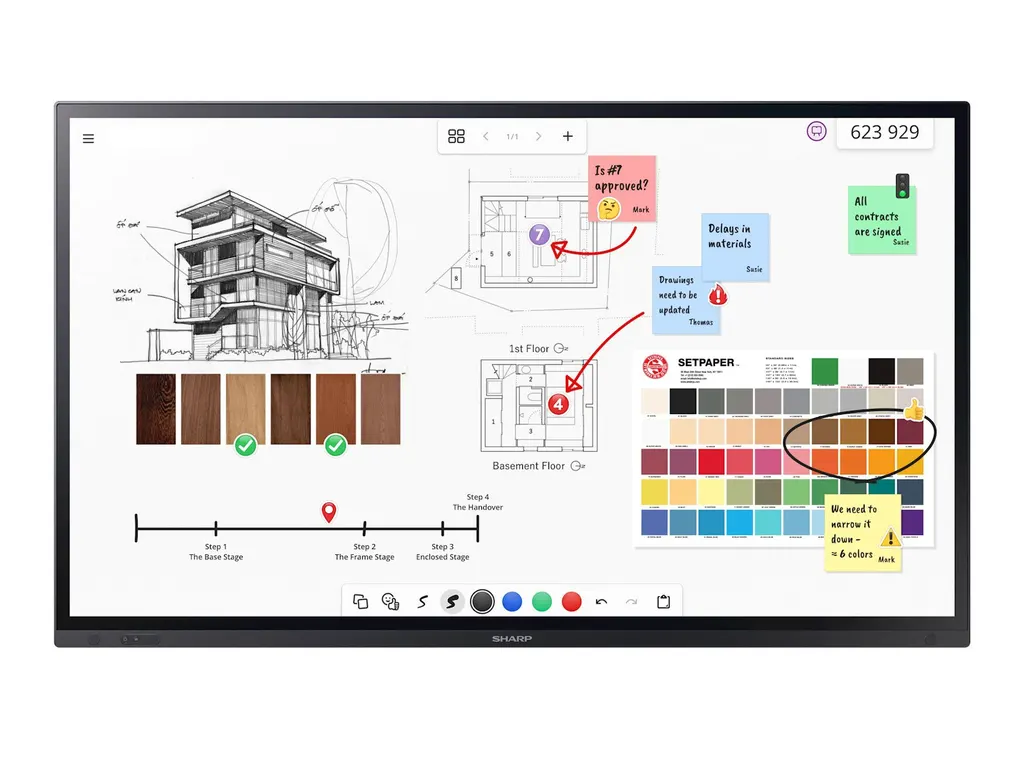
PN-LA652
Sharp PN-LA652 65-inch InGlass Touch Display
- Screen size
- 65 / 163.9
- Resolution
- 3840 x 2160
- Touch
- InGlass™ M5
- Brightness
- 450 nit
The Sharp PN-LA652 is a 65-inch 4K interactive display for boardrooms and hybrid meetings in Qatar. Its InGlass M5 touch layer registers up to 20 touches, and an Intel SDM slot accepts an optional plug-in PC. One USB-C cable carries video, touch and up to 65 W of power. The 450 cd/m² IPS panel and anti-glare glass suit well-lit meeting rooms.
A 65-inch 4K display for hybrid meetings and boardrooms
The Sharp PN-LA652 is a 65-inch interactive display from the PN-LA series, built for rooms where people write on the screen, share content from their own laptops and join video calls with colleagues abroad. Its native 3840 x 2160 resolution and 16:9 IPS panel provide 4K detail for spreadsheets, drawings and slides. Direct LED backlighting, a 60 Hz refresh rate and 10-bit colour depth, with 68% of the DCI colour gamut, give a clear picture in a conference room.
Brightness is rated at 450 cd/m² without the front glass, with a typical contrast ratio of 1200:1 and viewing angles of 178 degrees both horizontally and vertically. The front glass is a 3 mm toughened type with an anti-glare coating and a haze level of 4 to 8 percent.
Touch and writing that hold up in lit rooms
The InGlass M5 touch layer supports real multi-touch with up to 20 touch points, a response time of 15 ms or less and an accuracy below 1 mm. Fingers, gloves and styluses with tips of 2 mm or more all register. Passive pens are pressure-sensitive, Windows Ink is supported, and palm rejection lets a presenter rest a hand on the glass while writing.
The glass is rated 8H or harder. Touch works with Android, Linux, Raspberry Pi and Windows; on Mac OS, touch is single-touch only.
Connections, PC integration and IT control
- USB-C 1: carries video, touch signal and up to 65 W of power over one cable, so a laptop connects with a single lead.
- Two HDMI inputs and a DisplayPort input: each supports UHD at 60 Hz with HDCP 2.2, and HDMI IN 2 includes ARC.
- DisplayPort output: passes the picture on to a second display.
- Intel SDM slot: accepts Intel Smart Display Modules, large and small, rated up to 66 W. The module is optional.
Sharp Meeting Launcher and AirServer are pre-installed for wireless screen sharing. IT teams can manage the display with NaViSet Administrator 2, a free download, and receive automated email alerts. Hardware buttons, USB and LAN ports and infrared control can be disabled, and IEEE802.1X is supported on the LAN port.
The panel is verified for Cisco Collaboration Devices, tested compatible with Barco ClickShare (Conference) and certified for Crestron CCV2, which helps when it is part of an existing video conferencing setup.
Where the PN-LA652 fits in Qatar
- A secondary school in Al Wakrah refitting a science or language classroom, where teachers show lesson material from a laptop and annotate it directly on the glass.
- A ministry department in West Bay running a boardroom where officials who speak Arabic and English join calls with teams in Doha and overseas.
- A training centre in Education City equipping several rooms, with one administrator managing settings and alerts across all the screens.
Planning the installation and power
The panel weighs 49 kg and measures 1,493.5 x 896.1 x 90.7 mm. It uses a 600 x 400 mm VESA pattern with M8 fixings. The wall mount L20PNWALL90EU and the trolley options PD02MHA, PD03MHA and L20PNSR780MEU are listed as available accessories. Because of the weight, a free site survey before wall fixing confirms the wall structure, access route and cable runs.
The operating range is 0 to +35 °C with 20 to 80% humidity, so the display belongs in an air-conditioned room, away from direct sun, dust and hot window areas where Qatar's summer heat can exceed that range. Ask the SmartRooms Qatar team to review the room's cooling and light before you confirm the position. The internal power supply accepts 100 to 240 V AC at 50/60 Hz, which covers Qatar's 240 V, 50 Hz mains. Typical consumption is 190 W, and power savings mode draws under 0.5 W, with an ambient light sensor and human presence detection helping to reduce use in empty rooms.
Warranty, certification and next steps
The PN-LA652 carries a 3-year warranty that includes the backlight, with an optional fourth and fifth year extension. Listed certifications include CE, UKCA, FCC Class B, RCM, SASO, UL/C-UL, RoHS and Energy Star 8. Products are covered by the manufacturer's warranty.
To request a quote, send the number of units, the room layout, the mounting method (wall, trolley or table) and whether you need an Intel SDM module or a camera bracket. SmartRooms Qatar usually returns quotations within one working day and can process purchase orders or LPOs for schools and government bodies.
Highlights
- 65-inch 4K IPS panel with 3840 x 2160 native resolution
- InGlass M5 touch with up to 20 simultaneous touch points
- Intel SDM slot accepts optional modules rated up to 66 W
- Single USB-C cable carries video, touch and 65 W power
- 450 cd/m² brightness with 3 mm anti-glare toughened glass
- 3-year warranty including the backlight
Classroom fit
At 65″ the farthest student should sit within about 4.9 m (6× the screen height).
Estimated timeline
Quotation within 1 working day · delivery timing depends on stock availability, and we confirm it with your quotation.
Specifications
Display11
- Panel Technology
- IPS with Direct LED backlights
- Screen Size [inch/cm]
- 65 / 163.9
- Aspect Ratio
- 16:9
- Brightness (without glass) [cd/m²]
- 450
- Contrast Ratio (typ.)
- 1200:1
- Viewing Angle [°]
- 178 horizontal / 178 vertical (typ. at contrast ratio 10:1)
- Colour Depth [bn]
- 1.073 (10bit)
- Colour Gamut
- 68% of DCI
- Response Time (typ.) [ms]
- 8 (grey-to-grey)
- Panel Refresh Rate [Hz]
- 60
- Supported Orientation
- Face Up 1 ; Landscape; Portrait
Touch9
- Touch Technology
- InGlass™ M5
- Number of Touches
- Real multi-touch up to 20 touches
- Response Time [ms]
- ≤ 15
- Touch Method
- Finger; Gloves; Stylus (≥ 2 mm)
- Supported Operating System
- Android; Linux; Mac OS (single touch); Raspberry Pi; Windows
- Data Interface
- USB-HID
- Accuracy [mm]
- < 1
- Windows Ink
- Yes
- Palm Rejection
- Yes
Protective Glass4
- Type
- Premium toughened glass, anti-glare coating; Zero Bonding
- Thickness [mm]
- 3
- Haze Level [%]
- 4 ~ 8
- Hardness [H]
- ≥ 8
Resolution2
- Native Resolution
- 3840 x 2160
- Supported Resolutions
- 1024 x 768;; 1280 x 1024;; 1280 x 720;; 1360 x 768;; 1366 x 768;; 1400 x 1050;; 1440 x 900;; 1600 x 1200;; 1920 x 1080;; 1920 x 1200;; 1920 x 2160;; 2560 x 1440;; 2560 x 1600;; 3840 x 2160;; 4096 x 2160;; 7680 x 4320
Synchronisation Rate2
- Horizontal Frequency [kHz]
- 15 - 135
- Vertical Frequency [Hz]
- 23 - 76
Connectivity14
- HDMI IN 1
- Video Input; UHD (60 Hz) HDCP (2.2); Audio Input; CEC
- HDMI IN 2
- ARC; Video Input; UHD (60 Hz) HDCP (2.2); Audio Input; CEC
- DP IN 1
- Video Input; UHD (60 Hz) DP 1.2; HDCP (2.2); Audio Input
- DP OUT
- Video Output; UHD (60 Hz) DP 1.2; HDCP (2.2); Audio Output
- USB-A 1
- USB (3.2); 4.5 W; Peripherals; USB Storage
- USB-A 2
- USB (3.2); Peripherals; USB Storage
- USB-A (Service)
- USB 2.0; Service
- USB-C 1
- Touch Signal; Video Input; UHD (60 Hz); DP alt. 1.4; HDCP (2.2); Audio Input; USB 2.0 / 3.2; 65 W
- USB-B 1
- Touch Signal; USB (3.2)
- Audio Output (3.5 mm)
- Audio Output; Line Out
- LAN 1
- 100 MBit/s
- RS-232C
- 9600 bps
- Input Detect
- Custom; Last; First
- PiP / PbP
- Dual-Split; Quad-Split; Scalable picture size
Open Modular Intelligence1
- Intel® SDM
- accepts Intel® Smart Display Modules Large and Small up to 66 W
Sensors3
- Ambient Light Sensor
- Integrated, triggered actions programmable
- Temperature Sensor
- Integrated, 3 sensors, triggered actions programmable
- Presence Sensor
- H angle left: 60°, H angle right: 60°, Distance: 3.6 m
Electrical4
- Power Consumption [W]
- 190 (typ.)
- Power Savings Mode [W]
- < 0.5; < 2 (Networked Standby)
- Power Management
- VESA DPMS
- Power Supply
- 100-240 V AC; 50/60 Hz; internal
Environmental Conditions4
- Operating Temperature [°C]
- +0 to +35
- Operating Humidity [%]
- 20 to 80
- Storage Humidity [%]
- 10 to 80
- Storage Temperature [°C]
- -20 to 60
Mechanical8
- Dimensions (W x H x D) [mm]
- 1,493.5 x 896.1 x 90.7
- Weight [kg]
- 49
- Bezel Width [mm]
- 32.3 (bottom); 4.8 (left/right/top)
- VESA Mounting [mm]
- 4 holes; 600 x 400 (FDMI); M8
- Ingress Protection
- IP6x (front); IP2x (back)
- Packaging Dimensions (W x H x D) [mm]
- 1,660 x 1,010 x 220
- Packaging Weight [kg]
- 59
- Material
- Metal
Available Options1
- Accessories
- Pen software license extension PN-SU01; Trolley (L20PNSR780MEU, PD02MHA, PD03MHA); USB-C cable (USB-C 5M); Wall mount (L20PNWALL90EU)
Regulatory3
- Safety and Ergonomics
- CE; EMC Class B; Energy Star 8; FCC Class B; PSB; RCM; RoHS; SASO; UKCA; UL/C-UL
- Pixel Failure Class
- ISO 9241-307, Class 1
- Resistance to Fire
- Metal backcover, plastic material certified acc. to UL94-5VB
Green Features2
- Energy Efficiency
- Ambient Light Sensor; ECOMode; Human Sensor; LED Backlight; Local Dimming
- Ecological Standards
- EnergyStar 8.0
3Rd Party Certifications3
- Cisco
- Verified for Cisco Collaboration Devices
- Barco ClickShare
- Tested compatible for Barco ClickShare (Conference)
- Crestron
- Certified for Crestron CCV2
Additional Features8
- Special Characteristics
- CEC Support; Clone Settings; Display Browser Control; HDMI ARC; HTTP Server; NaViSet Administrator 2 - free download; OSD rotation for portrait mode; Powered USB Port (65 W)
- Audio
- Integrated Audio Amplifier (for optional speakers up to 2 x 15 W); Integrated Speakers (2 x 10 W)
- Shipping Content
- 1x 300 cm USB Cable; 2 x Passive Stylus; 2x AAA batteries; Blank Sticker; Bracket for Camera; Bracket for Mini PC; Cable Clamps; Display; Power Cable; Remote Control; Setup Manual
- Warranty
- 3 years warranty incl. backlight; additional services available; optional 4. + 5. year warranty extension 2
- Operating Hours
- 24/7
- External Control
- Crestron V2; HDMI CEC; HTTP Browser; Scheduled Timer
- Remote Management
- Automated Email Alerts; NaViSet Administrator 2
- Security
- Disable HW Buttons; Disable IR Functionality; Disable USB and LAN Ports; Emergency Notification; IEEE802.1X (LAN)




