





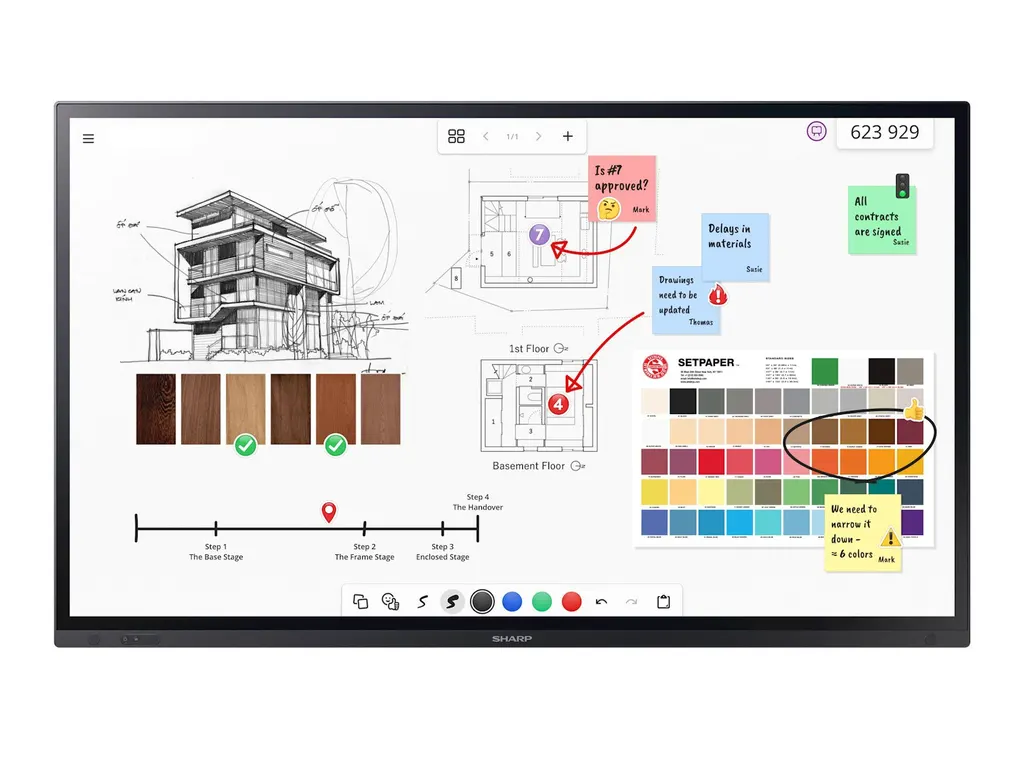
PN-LA752
Sharp PN-LA752 75-inch 4K Interactive Display with InGlass M5 Touch
- Screen size
- 75 / 189.3
- Resolution
- 3840 x 2160
- Touch
- InGlass™ M5
- Brightness
- 500 nit
The Sharp PN-LA752 is a 75-inch 4K UHD interactive display built for boardrooms and hybrid meeting rooms. It pairs InGlass M5 touch, which supports up to 20 touches and pen pressure sensitivity, with an Intel SDM slot for a Windows PC and a single USB-C cable that carries video, touch and 65 W power. Suited to Doha government offices, corporate boardrooms and university meeting rooms. Request a quote.
Built for boardrooms and hybrid meetings
The Sharp PN-LA752 is a 75-inch interactive display with a native 3840 x 2160 resolution, made for enterprise meeting rooms where one screen has to handle presentations, annotation and video calls at the same time. Its IPS panel with direct LED backlighting is rated at 500 cd/m² without the cover glass, and the 3 mm toughened, anti-glare glass with a haze level of 4 to 8 percent keeps reflections and fingerprints from getting in the way in well-lit rooms.
Touch, writing and connectivity
InGlass M5 touch handles up to 20 simultaneous touches with a response time of 15 ms or less, and it accepts fingers, gloves and styluses with a tip of 2 mm or more. Passive pens with pressure sensitivity, Windows Ink support and palm rejection let a presenter write naturally with a hand resting on the glass.
Connectivity covers two HDMI inputs at UHD 60 Hz with HDCP 2.2, one of them with ARC, a DisplayPort 1.2 input and output, and a USB-C port that carries video, touch signals and up to 65 W of power to a laptop. A single cable from the presenter's notebook is enough to start a meeting.
Where it fits in Qatar
- Ministry or authority boardroom in Msheireb or West Bay: a leadership team joins video calls with colleagues abroad while annotating shared documents on the same panel.
- Corporate office in Lusail or The Pearl: a bilingual team runs weekly hybrid reviews, with staff connecting their own notebooks over USB-C.
- University or training centre in Education City: a seminar room where a side-by-side group of three panels is planned, since the LA series supports up to three displays in that arrangement.
What to plan before installation
At 56.5 kg without packaging and 68 kg packed, with dimensions of 1,720.1 x 1,025.9 x 86.5 mm, the PN-LA752 is best lifted by two people and needs a wall or trolley that can carry its weight. It uses a VESA 600 x 400 mounting pattern with M8 holes, and a wall mount (L20PNWALL90EU) and trolley options are available. SmartRooms Qatar offers free site surveys, which we recommend before fixing a panel of this size to a wall in a room used every day.
Environment matters too. The operating temperature range is 0 to +35 °C with 20 to 80 percent humidity, so the panel belongs in an air-conditioned room. In Qatar, where outdoor summer temperatures can exceed 45 °C, avoid sunlit lobbies, hot store rooms and outdoor areas, and check that the room's cooling holds the space within that range.
Power draw is 205 W typical, falling below 0.5 W in power-saving mode, and the internal power supply accepts 100 to 240 V AC at 50 or 60 Hz. Before installation, confirm with the SmartRooms Qatar team that the plug on the supplied power cable matches the sockets in your room.
The panel carries a three-year manufacturer warranty that includes the backlight, with optional fourth and fifth year extensions. To request a quote for one or more PN-LA752 units, including mounting and installation planning for your site, contact SmartRooms Qatar. Quotations are usually issued within one working day, and we accept purchase orders and government tenders.
Highlights
- 75-inch 4K UHD panel with 3840 x 2160 native resolution
- InGlass M5 touch with up to 20 simultaneous touches
- Intel SDM slot for an optional Windows-based PC module
- Single USB-C cable for video, touch and 65 W power
- 500 cd/m² IPS panel with 3 mm anti-glare cover glass
- Three-year manufacturer warranty including the backlight
Classroom fit
At 75″ the farthest student should sit within about 5.6 m (6× the screen height).
Estimated timeline
Quotation within 1 working day · delivery timing depends on stock availability, and we confirm it with your quotation.
Specifications
Display11
- Panel Technology
- IPS with Direct LED backlights
- Screen Size [inch/cm]
- 75 / 189.3
- Aspect Ratio
- 16:9
- Brightness (without glass) [cd/m²]
- 500
- Contrast Ratio (typ.)
- 1200:1
- Viewing Angle [°]
- 178 horizontal / 178 vertical (typ. at contrast ratio 10:1)
- Colour Depth [bn]
- 1.073 (10bit)
- Colour Gamut
- 68% of DCI
- Response Time (typ.) [ms]
- 8 (grey-to-grey)
- Panel Refresh Rate [Hz]
- 60
- Supported Orientation
- Face Up 1 ; Landscape; Portrait
Touch9
- Touch Technology
- InGlass™ M5
- Number of Touches
- Real multi-touch up to 20 touches
- Response Time [ms]
- ≤ 15
- Touch Method
- Finger; Gloves; Stylus (≥ 2 mm)
- Supported Operating System
- Android; Linux; Mac OS (single touch); Raspberry Pi; Windows
- Data Interface
- USB-HID
- Accuracy [mm]
- < 1
- Windows Ink
- Yes
- Palm Rejection
- Yes
Protective Glass4
- Type
- Premium toughened glass, anti-glare coating; Zero Bonding
- Thickness [mm]
- 3
- Haze Level [%]
- 4 ~ 8
- Hardness [H]
- ≥ 8
Resolution2
- Native Resolution
- 3840 x 2160
- Supported Resolutions
- 1024 x 768;; 1280 x 1024;; 1280 x 720;; 1360 x 768;; 1366 x 768;; 1400 x 1050;; 1440 x 900;; 1600 x 1200;; 1920 x 1080;; 1920 x 1200;; 1920 x 2160;; 2560 x 1440;; 2560 x 1600;; 3840 x 2160;; 4096 x 2160;; 7680 x 4320
Synchronisation Rate2
- Horizontal Frequency [kHz]
- 15 - 135
- Vertical Frequency [Hz]
- 23 - 76
Connectivity14
- HDMI IN 1
- Video Input; UHD (60 Hz) HDCP (2.2); Audio Input; CEC
- HDMI IN 2
- ARC; Video Input; UHD (60 Hz) HDCP (2.2); Audio Input; CEC
- DP IN 1
- Video Input; UHD (60 Hz) DP 1.2; HDCP (2.2); Audio Input
- DP OUT
- Video Output; UHD (60 Hz) DP 1.2; HDCP (2.2); Audio Output
- USB-A 1
- USB (3.2); 4.5 W; Peripherals; USB Storage
- USB-A 2
- USB (3.2); 45 W; Peripherals; USB Storage
- USB-A (Service)
- USB 2.0; Service
- USB-C 1
- Touch Signal; Video Input; UHD (60 Hz); DP alt. 1.4; HDCP (2.2); Audio Input; USB 2.0 / 3.2; 65 W
- USB-B 1
- Touch Signal; USB (3.2)
- Audio Output (3.5 mm)
- Audio Output; Line Out
- LAN 1
- 100 MBit/s
- RS-232C
- 9600 bps
- Input Detect
- Custom; Last; First
- PiP / PbP
- Dual-Split; Quad-Split; Scalable picture size
Open Modular Intelligence1
- Intel® SDM
- accepts Intel® Smart Display Modules Large and Small up to 66 W
Sensors3
- Ambient Light Sensor
- Integrated, triggered actions programmable
- Temperature Sensor
- Integrated, 3 sensors, triggered actions programmable
- Presence Sensor
- H angle left: 60°, H angle right: 60°, Distance: 3.6 m
Electrical4
- Power Consumption [W]
- 205 (typ.)
- Power Savings Mode [W]
- < 0.5; < 2 (Networked Standby)
- Power Management
- VESA DPMS
- Power Supply
- 100-240 V AC; 50/60 Hz; internal
Environmental Conditions4
- Operating Temperature [°C]
- +0 to +35
- Operating Humidity [%]
- 20 to 80
- Storage Humidity [%]
- 10 to 80
- Storage Temperature [°C]
- -20 to 60
Mechanical8
- Dimensions (W x H x D) [mm]
- 1,720.1 x 1,025.9 x 86.5
- Weight [kg]
- 56.5
- Bezel Width [mm]
- 32.3 (bottom); 4.8 (left/right/top)
- VESA Mounting [mm]
- 4 holes; 600 x 400 (FDMI); M8
- Ingress Protection
- IP6x (front); IP2x (back)
- Packaging Dimensions (W x H x D) [mm]
- 1,900 x 1,125 x 225
- Packaging Weight [kg]
- 68
- Material
- Metal
Available Options1
- Accessories
- Pen software license extension PN-SU01; Trolley (L20PNSR780MEU, PD02MHA, PD03MHA); USB-C cable (USB-C 5M); Wall mount (L20PNWALL90EU)
Regulatory3
- Safety and Ergonomics
- CE; EMC Class B; Energy Star 8; FCC Class B; PSB; RCM; RoHS; SASO; UKCA; UL/C-UL
- Pixel Failure Class
- ISO 9241-307, Class 1
- Resistance to Fire
- Metal backcover, plastic material certified acc. to UL94-5VB
Green Features2
- Energy Efficiency
- Ambient Light Sensor; ECOMode; Human Sensor; LED Backlight; Local Dimming
- Ecological Standards
- EnergyStar 8.0
3Rd Party Certifications3
- Cisco
- Verified for Cisco Collaboration Devices
- Barco ClickShare
- Tested compatible for Barco ClickShare (Conference)
- Crestron
- Certified for Crestron CCV2
Additional Features8
- Special Characteristics
- CEC Support; Clone Settings; Display Browser Control; HDMI ARC; HTTP Server; NaViSet Administrator 2 - free download; OSD rotation for portrait mode; Powered USB Port (65 W)
- Audio
- Integrated Audio Amplifier (for optional speakers up to 2 x 15 W); Integrated Speakers (2 x 10 W)
- Shipping Content
- 1x 300 cm USB Cable; 2 x Passive Stylus; 2x AAA batteries; Blank Sticker; Bracket for Camera; Bracket for Mini PC; Cable Clamps; Display; Power Cable; Remote Control; Setup Manual
- Warranty
- 3 years warranty incl. backlight; additional services available; optional 4. + 5. year warranty extension 2
- Operating Hours
- 24/7
- External Control
- Crestron V2; HDMI CEC; HTTP Browser; Scheduled Timer
- Remote Management
- Automated Email Alerts; NaViSet Administrator 2
- Security
- Disable HW Buttons; Disable IR Functionality; Disable USB and LAN Ports; Emergency Notification; IEEE802.1X (LAN)




