





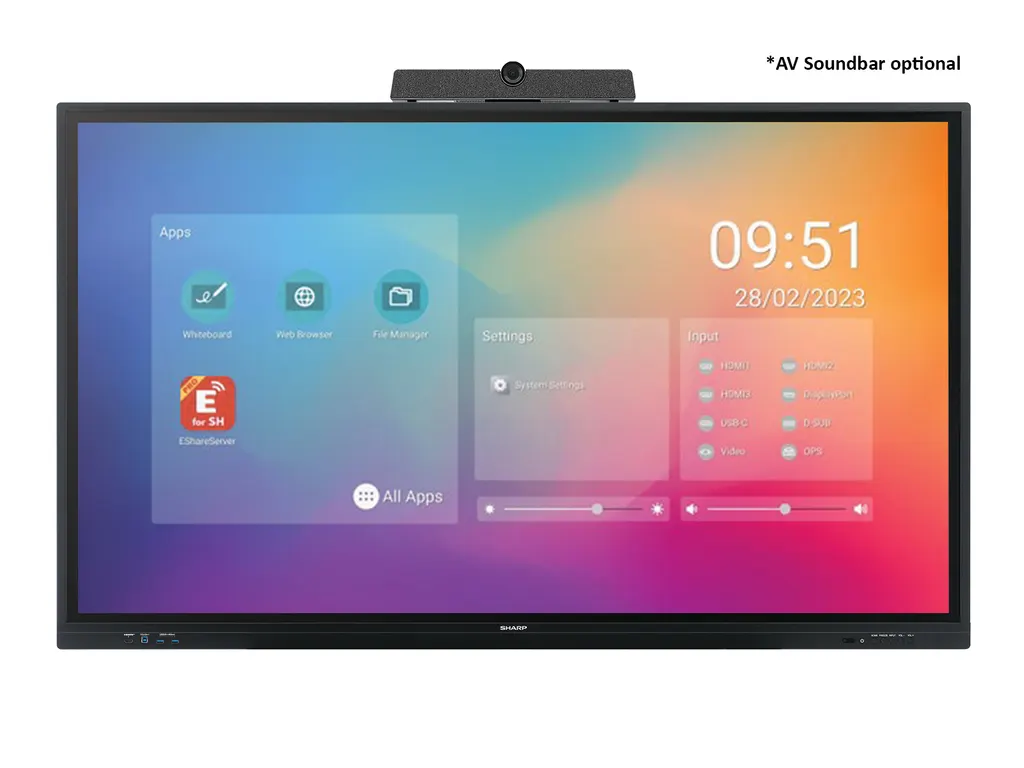
PN-LC862
Sharp PN-LC862 86-inch Infrared Touch Display
- Screen size
- 86 / 217.4
- Resolution
- 3840 x 2160
- Touch
- Infrared
- System
- Native Multi-Touch: Windows…
The Sharp PN-LC862 is an 86-inch interactive display with a 4K UHD IPS panel, infrared touch with zero bonding and 20-point multi-touch. A single USB-C cable carries video, touch data and up to 65 W of power to a laptop, and the built-in Android 11 apps mean no separate computer is needed for basic lessons. It suits classrooms, training rooms and meeting spaces in Qatar. Request a quote.
An 86-inch infrared touch display for shared learning and meeting rooms
The Sharp PN-LC862 belongs to the PN-LC series of entry collaboration displays, aimed at classrooms, small working groups and meeting rooms where people bring their own laptops and tablets. It pairs a 4K UHD IPS panel with infrared touch and built-in Android software, so a teacher or presenter can write, annotate and share content from one screen.
Panel and touch facts that matter in use
- Native 3840 x 2160 resolution on an active area of 1,895 x 1,066 mm with a 0.494 mm pixel pitch.
- Zero bonding infrared touch with a 0.8 mm bonding gap, accuracy of +/- 1 mm and up to 20 simultaneous touches.
- 450 cd/m² brightness and a 1200:1 typical contrast ratio, with 178-degree viewing angles.
- Finger, glove and stylus input, with a dual-tip stylus (3 mm and 9 mm) included.
Zero bonding removes the air gap between the glass and the touch layer, which keeps writing close to the pen tip and reduces parallax. Multi-touch becomes useful when two or three people work at the board together, for example on a group task or a shared review of a document.
One USB-C cable for laptops, plus HDMI-OUT for a second screen
A single USB-C cable carries video, touch data and power, with up to 65 W delivered to the connected laptop while it presents. The display also offers DisplayPort, three HDMI inputs and a VGA input, plus an HDMI output that loops through to a projector or second display so people at the back of a large room see the same content. Embedded Android 11 runs whiteboard, web browser, EShare wireless screen sharing and a voting kit, and the OPS slot accepts a plug-in PC module; Sharp recommends OPS Enterprise Pro or OPS Enterprise Ultra.
Where the PN-LC862 fits across Qatar
A private school in Al Wakrah equipping a Grade 7 to 9 classroom can use the panel for interactive lessons, with students sending tablet content through EShare rather than walking to the front. A training centre in Education City or Msheireb running a workshop for around 20 people can use multi-touch for group exercises and the HDMI output for overflow seating. A consultancy office in West Bay or Lusail with a meeting room used for Arabic and English presentations can let anyone share a laptop or phone from their seat.
What to plan before installation
The unit weighs 65 kg and ships in an 81 kg package, so it needs a suitable wall mount such as the optional SF680P, or one of the trolleys PD02MHA-CB86 and PD03MHA-CB86. The VESA pattern is 800 x 600 mm with M8 fixings. Its rated operating range is +5 to +35 °C and 20 to 80% humidity, so install it in an air-conditioned room; summer temperatures in Qatar can exceed 45 °C outdoors, which means planning the cooling for the room itself. The power supply accepts 100-240 V at 50/60 Hz, which covers Qatar's 240 V mains. Book a free site survey before ordering several units, and use an LPO or tender reference if your organisation buys that way. The manufacturer warranty is three years including the backlight.
If you are comparing the PN-LC862 with other 86-inch displays, request a quote from SmartRooms Qatar and we will confirm the accessories, mounting and quotation details your room needs.
Highlights
- 86-inch 4K UHD IPS panel at 3840 x 2160 native resolution
- Zero bonding infrared touch with 20-point multi-touch
- Single USB-C cable carrying video, touch and up to 65 W
- Built-in Android 11 apps and EShare wireless screen sharing
- HDMI-OUT loop-through and OPS slot for added flexibility
- Three-year warranty including backlight, with optional extensions
Classroom fit
At 86″ the farthest student should sit within about 6.4 m (6× the screen height).
Estimated timeline
Quotation within 1 working day · delivery timing depends on stock availability, and we confirm it with your quotation.
Specifications
Display11
- Panel Technology
- IPS with Direct LED backlights
- Active Screen Area (W x H) [mm]
- 1,895 x 1,066
- Screen Size [inch/cm]
- 86 / 217.4
- Aspect Ratio
- 16:9
- Pixel Pitch [mm]
- 0.494
- Brightness (without glass) [cd/m²]
- 450
- Contrast Ratio (typ.)
- 1200:1
- Viewing Angle [°]
- 178 / 178 (at contrast ratio > 10:1)
- Colour Depth [bn]
- 1.07 (8bit + FRC)
- Response Time (typ.) [ms]
- 8 (grey-to-grey)
- Supported Orientation
- Landscape
Touch8
- Touch Technology
- Infrared
- Number of Touches
- Real multi-touch up to 20 touches
- Touch Method
- Finger; Gloves; Stylus dual pen tip (3mm/9mm)
- Data Interface
- USB 2.0 (full speed) HID; USB powered, plug & play
- Accuracy [mm]
- +/- 1
- Windows Ink
- No
- Palm Rejection
- No
- Operating System
- Native Multi-Touch: Windows 8.1/10/11, Linux, Android 9.0 or higher, Chrome OS 87 or higher; Single Touch (Default Mouse): Mac OS 10.15/11/12
Protective Glass5
- Type
- Thermal-tempered, anti-glare coating; Zero Bonding
- Bonding Gap [mm]
- 0.8
- Thickness [mm]
- 3.2
- Haze Level [%]
- 3 ~ 8
- Hardness [H]
- ≥ 8
Resolution2
- Native Resolution
- 3840 x 2160
- Supported Resolutions
- 1024 x 768;; 1280 x 1024;; 1280 x 960;; 1360 x 768;; 1440 x 900;; 1680 x 1050;; 1920 x 1080;; 1920 x 720;; 3840 x 2160;; 4096 x 2160;; 640 x 480;; 720 x 480;; 720 x 576;; 800 x 600
Connectivity10
- Input Video Analogue
- 1 x VGA
- Input Video Digital
- 1 x DisplayPort (with HDCP); 1 x USB-C (with HDCP, 65 W); 3 x HDMI (with HDCP)
- Input Audio Analogue
- 1 x 3,5 mm jack
- Input Control
- 1 x RS232; LAN 10Base-T/100Base-TX/1000Base-T
- Input Data
- 4 x USB 3.0 (Type-A)
- Input Touch
- 1x USB Type-C (shared with video input); 2 x USB 3 (Type-B)
- Output Video Digital
- 1 x HDMI (loop through: HDMI, DP, OPS slot-in PC, Android SoC)
- Output Audio Analogue
- 1 x 3,5 mm jack
- Output Audio Digital
- 1 x SPDIF
- Input Detect
- Last
Open Modular Intelligence2
- OPS Slot
- Slot Technology: Open pluggable specification (NEC / Intel OPS standard)
- OPS Max. Current / Power Consumption [A / W]
- 4.74 / 90
Electrical3
- Power Consumption [W]
- 260 Eco (shipment setting)
- Power Savings Mode [W]
- < 0.5 (ECO Standby); < 2 (Networked Standby)
- Power Supply
- 100-240 V AC; 50/60 Hz
Environmental Conditions2
- Operating Temperature [°C]
- +5 to +35
- Operating Humidity [%]
- 20 to 80
Mechanical7
- Dimensions (W x H x D) [mm]
- 1,967.9 x 1,170.2 x 87.1
- Weight [kg]
- 65
- Bezel Width [mm]
- 21.9 (left/right/top); 53.2 (bottom)
- VESA Mounting [mm]
- 4 holes; 800 x 600 (FDMI); M8
- Packaging Dimensions (W x H x D) [mm]
- 2,160 x 1,310 x 225
- Packaging Weight [kg]
- 81
- Material
- Aluminum alloy (front side); metal (back side)
Embedded Computing7
- System Version
- Android 11
- CPU
- Arm Cortex-A55 (Quad-Core)
- System Memory
- 4G RAM
- Internal Storage
- 16GB ROM
- Android Features
- Hide compass and side bar
- Built-in Applications
- File Manager; Input Select; Setting; Web Browser; Whiteboard; Wireless Screen Sharing - E-Share
- Built-in Tools
- Annotation overlay mode; Calculator; Calender; Compass for shortcut button; Screen recorder; Timer; Voting Kit
Bluetooth1
- Bluetooth
- 4.2 compliant, supported protocols: A2DP, AVRCP, GATT, HID, HSP, HFP
Wireless Lan1
- WLAN
- IEEE802.11 ac/n/a/g/b compliant
Available Options2
- Accessories
- Pen software license extension PN-SU01; Soundbar (PN-ZCMS1); Trolley (PD02MHA-CB86; PD03MHA-CB86); USB-C cable (USB-C 5M); Wall mount (SF680P)
- OPS Slot
- Recommended: OPS Enterprise Pro, OPS Enterprise Ultra
Regulatory1
- Safety and Ergonomics
- CE; FCC; RCM; REACH; RoHS; UKCA; UL/C-UL
Green Features1
- Energy Efficiency
- ECOMode; LED Backlight
3Rd Party Certifications2
- Barco ClickShare
- Tested compatible for Barco ClickShare (Conference)
- Q-Sys
- Q-Sys Plug-in
Additional Features7
- Special Characteristics
- CEC Support; HDMI ARC; NaViSet Administrator 2 - free download; Powered USB Port (65 W)
- Audio
- Integrated Speakers (15 W + 15 W)
- Shipping Content
- 1x 300 cm USB Cable; 2 x Passive Stylus; 2x AAA batteries; Blank Sticker; Bracket for Camera; Cable Clamps; Display; Pen Tray; Power Cable; Remote Control; User Manual; Wireless Adapter
- Warranty
- 3 years warranty incl. backlight; optional 4. + 5. year warranty extension 1
- Operating Hours
- 16/7
- Remote Management
- NaViSet Administrator 2
- Security
- Disable HW Buttons; Disable IR Functionality; Disable USB and LAN Ports




