





Thursday, 22 October 2026 · 11 Jumada I 1448 AH Sun – Thu · 9:00 – 18:00
+971 56 914 9477 العربية
WhatsApp

USB Type C Interface Board

Sharp USB Type C Interface Board for SDM-L Displays

Resolution
3840 x 2160 @60Hz with USB2.0…
WhatsApp
Priceon request
QuotationWithin 1 working day
DeliveryConfirmed with your quote, based on stock
PDFDownload datasheet (SharpNEC_Datasheet_USB-TypeC-interface-board_en.pdf)
Overview

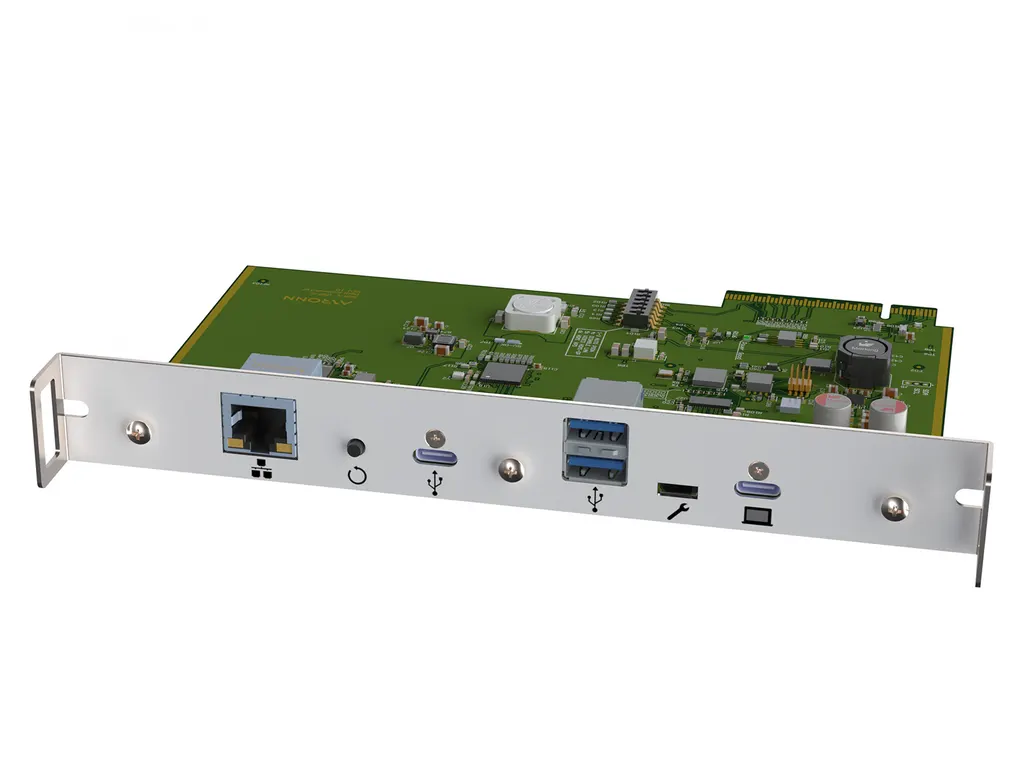
The Sharp USB Type C Interface Board is a slot-in module for Sharp and NEC displays fitted with an Intel Smart Display Module (SDM-L) slot. One USB-C cable carries video and data between a notebook and screen while charging it, and two USB-A ports and Gigabit Ethernet sit on the board. It suits meeting rooms in West Bay and Education City. Request a quote to check compatibility.

What this board adds to a Sharp or NEC display

The Sharp USB Type C Interface Board is an accessory that slots into the Intel Smart Display Module (SDM-L) bay of a compatible Sharp or NEC display. It replaces the usual tangle of HDMI, USB and network leads on the meeting table with one USB-C connection from the presenter's notebook. Once connected, the notebook's content appears on the big screen, with no lengthy setup for the presenter.

Video, charging and peripherals on one cable

  • Notebook charging: up to 45W over USB-C, with 5V at 3A, 9V at 3A, 15V at 3A and 20V at 2.25A profiles, keeps the battery charged during a long session.
  • Peripherals: two USB-A ports and an upstream USB-C port serve soundbars, webcams and microphones, which can be used directly from the display.
  • Network: a Gigabit Ethernet port connects the notebook automatically to a company, guest or internet network.
  • Touch control: on an interactive display, the presenter can control the notebook from the touch screen.

Resolution and compatibility to check before you order

Video output reaches 3840 x 2160 (4K UHD) at 60Hz when the notebook connects through the USB 2.0 path, which uses four DisplayPort 1.4 lanes. Over the USB 3.1 path, which uses two DisplayPort 1.4 lanes, the maximum is 3840 x 2160 at 30Hz. Pick the path that matches how the room is used, since the 60Hz path suits motion-heavy content.

The compatibility list includes the PN-LA652, PN-LA752 and PN-LA862, along with ME501, ME551, ME651, M491, M551, M651, M751, M861 and M981. ME431 and M431 are also listed, but notebook charging is not supported on those two models. The manufacturer describes compatibility with any Sharp or NEC display that has an SDM slot, so confirm your exact display model with the SmartRooms Qatar team before ordering.

Where it fits in Qatar

In a West Bay office boardroom, a regional director presents a quarterly report from a notebook while colleagues join a video call from abroad. The webcam and microphone stay connected to the board, the notebook keeps charging through the session, and the room uses one cable rather than a drawer of adapters.

At a ministry meeting room in Msheireb, visiting delegations bring their own notebooks and need internet access quickly. Connecting through the Ethernet port and the guest network lets each presenter start without a cable hunt at the table.

In a lecture or seminar room at a university in Education City, several lecturers may share the same screen during a day. A single USB-C connection replaces a set of leads between sessions, and the 4K output at 60Hz shows detailed slides and diagrams clearly.

What to plan for before installation

The board must match the SDM-L slot in the display, so check the display model against the compatibility list first. SmartRooms Qatar offers a free site survey and professional installation across all eight municipalities. A survey can confirm the display position, the spot where presenters sit, and the Ethernet point on the wall or table.

The source data for this board does not give an operating temperature range. Confirm the room conditions with the SmartRooms Qatar team before installation, particularly in rooms exposed to heat above 45°C or dust, such as lobbies or areas near windows. Products are covered by the manufacturer's warranty.

Request a quote with your display model numbers and the number of rooms, and the team will confirm compatibility and send a quotation, usually within one working day. Purchase orders (LPOs) and government tenders are welcome, and payment can be made by bank transfer, cheque or purchase order.

Highlights

  • Single USB-C cable for video, data and notebook charging
  • Up to 45W power delivery over USB-C (5V to 20V)
  • 4K (3840 x 2160) at 60Hz over the USB 2.0 path
  • Two USB-A ports and Gigabit Ethernet on the board
  • Fits Sharp or NEC displays with an SDM-L slot
  • Compatible with PN-LA652, PN-LA752 and PN-LA862

Estimated timeline

Quotation within 1 working day · delivery timing depends on stock availability, and we confirm it with your quotation.

Specifications

5 specifications · Source: manufacturer · checked Oct 2026
Specifications5
Format
SDM-L
Interfaces
Upstream for AV equipment: 2x USB-A (up to USB3.1 Gen 1 speed), 1x USB-C (up to USB3.1 speed); Gbit/s Ethernet, 1x USB-C (video/data/power); Service: 1x micro USB
Power Delivery
45W (5VDC@3A; 9VDC@3A; 15VDC@3A; 20V@2.25A)
Resolution
3840 x 2160 @60Hz with USB2.0 (DP Alt Mode 4x DP1.4 lanes); 3840 x 2160 @30Hz with USB3.1 (DP Alt Mode 2x DP1.4 lanes)
Compatibility
ME431*, ME501, ME551, ME651, M431*, M491, M551, M651, M751, M861, M981, LA652, LA752, LA862 *charging of notebook not supported


Downloads

5 files from the manufacturer

Questions about USB Type C Interface Board

What is the Sharp USB Type C Interface Board?
It is an accessory board that slots into the Intel Smart Display Module (SDM-L) bay of a compatible Sharp or NEC display. It gives a meeting room one USB-C connection for video, data and notebook charging, so presenters stop swapping separate HDMI, USB and network leads. Confirm your display has a free SDM-L slot before ordering.
How much power does it deliver to a notebook?
The board supplies up to 45W over USB-C, using 5V at 3A, 9V at 3A, 15V at 3A and 20V at 2.25A profiles, so a notebook battery can charge while it presents. Charging is not supported on the ME431 and M431 models listed for compatibility. Check your notebook charger rating against these profiles before the meeting.
What resolution can it output to the display?
It supports 3840 x 2160 (4K) at 60Hz when the notebook connects through the USB 2.0 path with four DisplayPort 1.4 lanes. Over the USB 3.1 path, using two DisplayPort 1.4 lanes, the maximum is 3840 x 2160 at 30Hz. For boardroom presentations with video content, the 60Hz path gives smoother motion.
Which Sharp models is the board compatible with?
The compatibility list names the PN-LA652, PN-LA752 and PN-LA862, along with ME501, ME551, ME651, M491, M551, M651, M751, M861 and M981, plus ME431 and M431. The manufacturer also describes compatibility with Sharp or NEC displays that have an SDM slot. Because model suffixes matter, send your exact display model to SmartRooms Qatar before ordering.
Can soundbars, webcams and microphones connect through the board?
Yes. The board provides two USB-A ports and an upstream USB-C port for AV equipment, and connected soundbars, webcams and microphones can be used directly from the display. The manufacturer cites proven compatibility with popular meeting room equipment, including soundbars and webcams. Confirm the exact model of each peripheral with SmartRooms Qatar.
Does it give meeting attendees network access?
Yes, the board includes a Gigabit Ethernet connection and automatically connects the notebook to a company, guest or internet network. This helps government and corporate meetings that host visiting delegations who need internet access during a session. The board also has a micro USB service port.
Would it suit a ministry boardroom in Msheireb that hosts visiting delegations?
Yes, for a boardroom where delegations bring their own notebooks and need a quick start. Each presenter connects with one USB-C cable, the notebook charges during long sessions, and the guest network connects automatically. A ministry buying for several rooms can issue a purchase order (LPO), and SmartRooms Qatar can quote each room against its display model.
How does it help a private school in Al Wakrah fitting out classroom displays?
It reduces cable clutter at the teacher's desk. Each classroom needs only one USB-C cable from the teacher's notebook to the display, with USB-A ports available for a webcam or microphone. The notebook stays charged through a long lesson, and the teacher can control it from the touch screen on an interactive display. Check each classroom display for a free SDM-L slot.
Is it useful for a lecture or seminar room at a university in Education City?
Yes, in rooms where lecturers change presenters several times a day. One USB-C connection replaces a set of leads, and 4K output at 60Hz shows detailed slides and diagrams clearly. A camera can be connected to the USB-A ports for recorded or hybrid sessions. Ask SmartRooms Qatar to check your display model against the compatibility list first.
Would a bank boardroom in Lusail benefit from this board?
Yes, where executives present from their own notebooks. The board carries video and data over one USB-C cable, charges the notebook at up to 45W, and provides a Gigabit Ethernet port for the network. When the meeting links to colleagues in other branches by video, a webcam and microphone can be connected to the USB-A ports. Request a quote with your display model.
Can a hotel conference room in West Bay use it?
Yes, for conference rooms that host visiting speakers. A guest connects a notebook with one USB-C cable, the board connects it to the guest network automatically, and power delivery of up to 45W keeps the notebook charged through long sessions. Suitable resolution depends on the display you choose, so confirm the model with the SmartRooms Qatar team.
Do I need a site survey before the board is installed?
A site survey is advisable because the board must match the display's SDM-L slot, and the screen position, presenter seating and network point need planning. SmartRooms Qatar offers free site surveys and professional installation across all eight municipalities. The survey can confirm the display model, the notebook connection point and the Ethernet point. Products are covered by the manufacturer's warranty.

Similar models

Hisense OPS72D/72E Hisense OPS72D/72E OPS On Board Computer for Interactive Displays
8GB
Clevertouch OPS i5 Clevertouch OPS i5 PC Module with Intel Core i5 and 256GB SSD
Windows 11 - Home / Pro /… Memory: 16GB DDR4
Clevertouch OPS i7 Clevertouch OPS i7 PC Module with Intel Core i7 13620H
Windows 11 - Home / Pro /… 16GB DDR4
Hikvision DS-D5AC12G5-8S2 Hikvision DS-D5AC12G5-8S2 OPS Module for Interactive Panels
8G 256G
Hikvision DS-D5AC13G7-16S5 Hikvision DS-D5AC13G7-16S5 OPS Module with Intel Core i7-13620H
16G 512G
Email Call


