





RX275
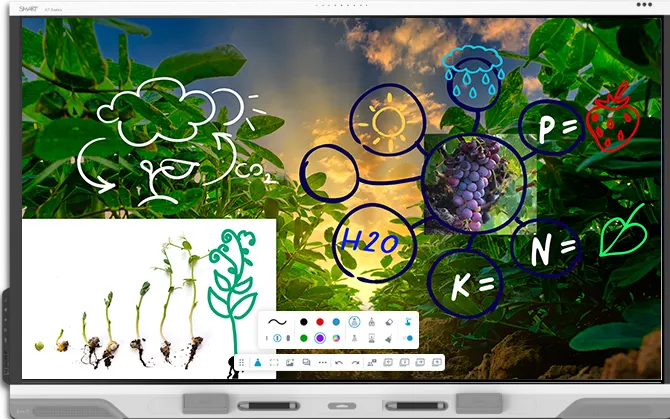
SMART Board RX275 75-inch Interactive Display with iQ
- Screen size
- 65"
- Resolution
- 4K UHD (3840 × 2160)
- Touch
- HyPr Touch with Advanced IR
- System
- Android version 15; Supports an…
The SMART Board RX275 is a 75-inch interactive display with a 4K UHD panel, 490 cd/m² brightness, and iQ 4 running on Android 15 with built-in classroom tools. It includes Tool Explorer recognition, two 20 W speakers with a 15 W subwoofer, an eight-microphone array and Wi-Fi 6E. Suited to mid-sized classrooms, training rooms and learning-support spaces across Qatar. Request a quote.
What the SMART Board RX275 brings to a 75-inch room
The RX275 is the 75-inch member of SMART's RX range, a touch display that runs iQ 4, the company's education-focused embedded operating system, on Android 15. The panel is an LED display with 4K UHD resolution (3840 × 2160), a 16:9 aspect ratio, 490 cd/m² brightness, a 178° viewing angle and a 60 Hz refresh rate. Its glass is optically bonded, anti-glare, anti-fingerprint and heat-tempered.
Touch, tools and simultaneous input
Touch runs on HyPr Touch with advanced infrared, with a typical response time of 4 ms or less, 1 mm accuracy and palm rejection. Up to 50 touch points are supported depending on the operating system. Two styluses with multi-colour select and fine eraser, and two bar erasers, come in the box. Tool Explorer V2 recognises physical objects such as cubes and stamps, which are sold separately, so younger pupils can learn with hands-on objects. Simultaneous tool differentiation lets several people write, touch and erase at the same time while the display keeps each input separate.
Where the RX275 fits in Qatar
- Classrooms in private and Arabic-curriculum schools. A 75-inch panel suits a mid-sized room, and the iQ tools, split screen and multi-page PDF import help teachers prepare lessons quickly.
- Training and meeting rooms in West Bay or Msheireb. Staff can annotate documents with SMART Ink and share laptop screens through SMART Mirror during workshops.
- Learning-support rooms in Al Rayyan or Al Wakrah. Forward-facing ports, illuminated buttons and Tool Explorer support hands-on, non-verbal and kinesthetic learning.
Heat, power and installation planning
The operating temperature range is 5 to 35 °C with 5 to 80% non-condensing humidity, and storage is rated from -20 to 60 °C. Summer temperatures in Doha regularly exceed 45 °C, so the RX275 belongs in an air-conditioned room away from direct sunlight and window glare, with room cooling that keeps the panel inside its range. The power input accepts 100 to 240 V AC at 50 to 60 Hz, with a typical draw of 105 W and standby under 0.5 W. The panel measures 68 3/4 inches wide, 42 1/2 inches tall and 4 1/4 inches deep, weighs 124 lb (56 kg) and uses an M8 VESA pattern of 800 × 400 mm. Leave space around the unit for ventilation. Because the panel is heavy, a free site survey before wall-mounting is recommended.
Ordering from SmartRooms Qatar
SmartRooms Qatar supplies the RX275 across Qatar, delivers to all eight municipalities and can arrange professional installation. Quotations are usually issued within one working day. Schools and public bodies can order on a purchase order or through a government tender, and payment is possible by bank transfer, cheque or purchase order. Lead times are estimates based on stock and are confirmed in your quotation. The panel is covered by the manufacturer's warranty, and terms vary by region, so we confirm them with your quote. Tell us the room size, mounting type and number of units, and request a quote today.
Highlights
- 75-inch 4K UHD display at 3840 × 2160 resolution
- 490 cd/m² brightness with anti-glare, optically bonded glass
- iQ 4 on Android 15, with an automatic Android 17 update supported
- Tool Explorer V2, two styluses and two erasers included
- Two 20 W speakers, 15 W subwoofer, eight-microphone array
- Operating range 5–35°C, 5–80% non-condensing humidity
Classroom fit
At 75″ the farthest student should sit within about 5.6 m (6× the screen height).
Estimated timeline
Quotation within 1 working day · delivery timing depends on stock availability, and we confirm it with your quotation.
Specifications
Display15
- Screen sizes (diagonal)
- 65", 75", 86"
- Backlight
- LED
- Aspect ratio
- 16:9
- Maximum display resolution
- 4K UHD (3840 × 2160)
- Refresh rate
- 60 Hz
- Minimum lifespan
- 50,000 hours
- Brightness
- 490 cd/m²
- Display response time
- ≤ 8 ms
- Viewing angle
- 178°
- Glass
- Optically bonded, Anti-glare, Anti-fingerprint, Heat-tempered
- Frame color
- White
- Convenience buttons
- Power, Home, Volume, Microphone mute, Freeze frame
- Sensors
- Proximity, Ambient light, Infrared, Room temperature, Humidity, Equivalent carbon dioxide (eCO2), Volatile organic compound (VOC), Particulate Matter (PM 2.5 )
- Audio
- Integrated soundbar featuring two 20 W speakers and a 15 W subwoofer; Integrated linear eight-microphone array with visual mute status indicator and support for onboard acoustic echo cancellation
- NFC
- Integrated RFID NFC reader/writer; CCID (chip card interface device) when used with a native operating system driver for Windows , Linux , or Mac; Supported protocols: ISO 14443A/B, ISO 15693, NFC Tag 1-4
Interactive experience10
- Touch technology
- HyPr Touch with Advanced IR
- Touch features
- Tool Explorer (V2); Simultaneous tool differentiation; Object Awareness; Pen ID; Silktouch; Palm rejection
- Typical touch response time
- ≤ 4 ms
- Frame rate
- ≥ 300 Hz
- Accuracy
- 1 mm
- Minimum object size
- 2 mm
- Multitouch capabilities
- Up to 50 touch points (OS dependent)
- Tools included
- Stylus with multi-color select and fine eraser (×2); Erasers with angle of orientation (×2)
- Tool holders
- Intelligent, Magnetic, Frame‑mounted
- Optional tools
- Stamps and cubes
Software2
- Included
- iQ embedded Android OS; SMART Notebook; SMART Product Drivers and SMART Ink; SMART Remote Management; SMART Control
- Optional
- SMART Notebook Plus; Lumio; SMART Control Signage
iQ embedded Android OS9
- Operating system
- Android version 15; Supports an automatic update to Android 17
- CPU
- Octa-core
- Memory
- 8 GB DDR4
- OS architecture
- 64-bit
- Storage
- 64 GB (up to 576 GB)
- User interface
- 4K UHD (3840 × 2160)
- Other features
- Personalized home screen and settings; Split screen; Interactive widgets; Templates, graphic organizers, and manipulatives; File and app libraries; Environmental sensors dashboard; Tool Explorer Image Editor
- Languages supported
- Basque, Catalan/Valencian, Chinese (simplified), Chinese (traditional), Czech, Danish, Dutch, English, Estonian, Finnish, French, Galician, German, Greek, Hungarian, Italian, Japanese, Korean, Latvian, Lithuanian, Norwegian, Polish, Portuguese, Romanian, Russian, Slovak, Slovenian, Spanish, Swedish, Ukrainian, Vietnamese, Welsh
- Updates
- Automatic over‑the‑air ( OTA )
PC computing3
- OPS support
- SMART PCM modules
- PC module power supported OPS
- 100 W
- Optional computing module
- See smarttech.com/accessories
Inputs11
- OPS PC accessory slot
- Front: –; Back: 1
- MicroSD slot with security cover
- Front: –; Back: 1
- HDMI 2.1 4K @ 60Hz with HDCP 1.4, HDCP 2.3, ARC, and eARC support
- Front: 1; Back: 3
- VGA video
- Front: –; Back: 1
- RS-232 (DB-9 connector)
- Front: –; Back: 1
- RJ45 (LAN In)
- Front: –; Back: 1
- USB Type‑C 4K @ 60Hz, Display Port 1.2, USB 2.0 (UFP) for touch and digital audio, USB 3.2 Gen 1 (DFP) for peripherals; 65 W power delivery
- Front: 1; Back: 1
- USB Type‑C, SuperSpeed (5 Gbps); 15 W power delivery
- Front: –; Back: 1 (top) (top)
- USB 2.0 Type-A
- Front: –; Back: 1
- USB 3.2 Gen 1 Type‑A
- Front: 2; Back: 2
- USB 3.2 Gen 1 Type‑B
- Front: 1; Back: 3
Outputs5
- HDMI 2.1 4K @ 60Hz with HDCP 2.3 support
- Front: –; Back: 1
- USB Type-C 4K @ 60Hz Display Port 1.4a, HDCP 2.3 and HDCP 1.3, USB 3.2 Gen 1 (DFP) for touch ingest and peripherals; 4.5 W power delivery
- Front: –; Back: 1
- Stereo 3.5 mm (variable)
- Front: –; Back: 1
- S/PDIF optical (fixed)
- Front: –; Back: 1
- RJ45 (LAN Out)
- Front: –; Back: 1
Included cables and accessories11
- Country-specific power cable
- 1
- 16' 5" ( 5 m ) USB 2.0 A to B cable
- 1
- 6' ( 1.8 m ) USB 3.2 Gen 1 Type-C cable, 5A
- 1
- Stylus with multi-color select and fine eraser
- 2
- Bar erasers
- 2
- External tri-band Wi-Fi (2.4, 5, and 6-7.2 GHz) and Bluetooth (2.4 GHz) antennas
- 2
- Remote control
- 1
- AAA batteries
- 2
- SMART ID cards (for NFC sign in to a SMART Account)
- 2
- Illustrated installation instructions
- 1
- Important information document
- 1
Connectivity3
- Wired
- RJ45 (×2) 1000BASE-T
- Wi-Fi
- IEEE 802.11ax (Wi-Fi 6e) supporting WPA, WPA2, WPA3 PSK, and 802.1X EAP authentication protocols
- Bluetooth
- 5.2 dual mode
Storage and operating requirements4
- Power requirements
- 100V to 240V AC, 50 Hz to 60 Hz
- Operating temperature
- 41–95°F ( 5–35°C )
- Storage temperature
- -4–140°F ( -20–60°C )
- Humidity
- 5–80% relative humidity, non‑condensing
Power consumption1
- Typical
- 65": 94 W; 75": 105 W; 86": 122 W
Certification and compliance6
- Notes
- Product availability may vary by region. This product has received additional certifications not listed here.
- Regulatory models
- IDQR65‑A, IDQR75‑A, IDQR86‑A
- US / Canada
- FCC, ISED, TSCA, CONEG Packaging, Proposition 65
- EU / EEA / EFTA / UK
- CE, UKCA, LVD, CB, EMCD, RED, REACH, RoHS, Battery, WEEE, Packaging, POP, Ecodesign
- Australia / New Zealand
- RCM
- Performance standards
- ENERGY STAR, HDMI, HDCP
Purchasing information1
- _text
- Note; Order numbers may vary by region.
Purchasing information – Order numbers3
- RX265
- SMART Board RX065 interactive display with iQ
- RX275
- SMART Board RX075 interactive display with iQ
- RX286
- SMART Board RX086 interactive display with iQ
Purchasing information – Optional accessories7
- SWC-120UHD
- SMART Ultra HD Camera 120
- TE-4CUBE-V2
- Tool Explorer (V2) cubes
- TE-4STAMP-V2
- Tool Explorer (V2) stamps
- SMS-TE-IQ4
- SMART MultiStylus with Tool Explorer (V2) technology
- SND-LK
- SMART SoundLift voice amplification solution
- SND-FL
- SMART SoundFlow audio broadcasting system
- Other accessories
- See smarttech.com/accessories
SMART Warranty1
- _text
- Terms and conditions and warranty upgrade options vary by region. Visit smarttech.com/warranty or contact your reseller for information.
Installation, dimensions, and weights1
- Notes
- All dimensions ± 1/8" ( 0.3 cm ) . All weights ± 2 lb. ( 0.9 kg ) . Product ships upright. Leave space around the display to ensure adequate ventilation.
Installation, dimensions, and weights – 65" models6
- Dimensions
- Screen (diagonal): 65ʺ; Width: 60ʺ (152.5 cm); Height: 37 1/2ʺ (95.4 cm); Depth: 4 1/4ʺ (10.9 cm)
- Weight
- 92.6 lb. ( 42 kg )
- Shipping dimensions (including pallet)
- 65 1/2" × 46" × 7 1/8" ( 166.5 cm × 117 cm × 18 cm )
- Shipping weight
- 108 lb. ( 49 kg )
- VESA mount
- M8, 600 × 400 mm
- Handles
- 2
Installation, dimensions, and weights – 75" models6
- Dimensions
- Screen (diagonal): 75ʺ; Width: 68 3/4ʺ (174.6 cm); Height: 42 1/2ʺ (107.8 cm); Depth: 4 1/4ʺ (10.9 cm)
- Weight
- 124 lb. ( 56 kg )
- Shipping dimensions (including pallet)
- 74 5/8" × 50 7/8" × 7 1/8" ( 189.5 cm × 129.3 cm × 18 cm )
- Shipping weight
- 147 lb. ( 67 kg )
- VESA mount
- M8, 800 × 400 mm
- Handles
- 2
Installation, dimensions, and weights – 86" models6
- Dimensions
- Screen (diagonal): 86ʺ; Width: 78 1/2ʺ (199.3 cm); Height: 47 7/8ʺ (121.7 cm); Depth: 4 3/4ʺ (12.1 cm)
- Weight
- 154 lb. ( 70 kg )
- Shipping dimensions (including pallet)
- 84 1/4" × 57 1/4" × 7 5/8" ( 214 cm × 145.4 cm × 19.5 cm )
- Shipping weight
- 190 lb. ( 86 kg )
- VESA mount
- M8, 800 × 600 mm
- Handles
- 2
RX2752
- description
- SMART Board RX075 interactive display with iQ
- spec_page
- SMART Board RX series with iQ specifications




