





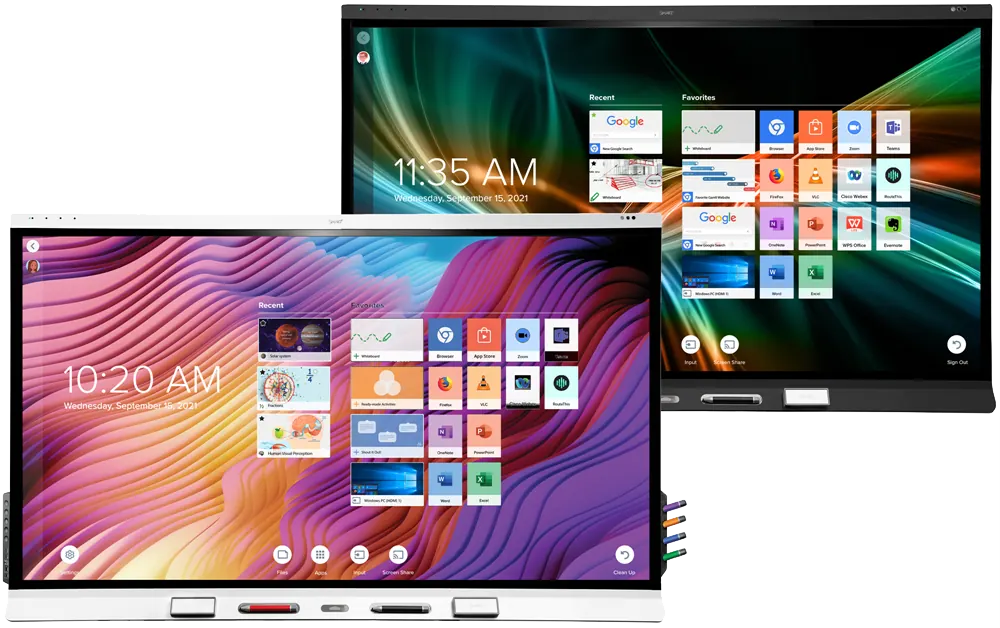
SBID-6086S-V3-P
SMART Board SBID-6086S-V3-P 86-inch Interactive Display
- Screen size
- 65"
- Resolution
- 4K UHD (3840 × 2160)
- Touch
- HyPr Touch with InGlass
- System
- Included
The SMART Board 6086S-V3 Pro is an 86-inch 4K UHD interactive display for boardrooms, lecture halls and classrooms. Its HyPr Touch with InGlass supports up to 40 touch points, a 60 W OPS slot takes a PC module, and two integrated 20 W speakers provide audio. This version has no built-in iQ Android; it ships with SMART Meeting Pro licences. Request a quote from SmartRooms Qatar.
The SMART Board 6086S-V3 Pro is a 4K UHD touch display built for rooms where several people write, annotate and share at once. Its 86-inch diagonal screen gives a large working surface for a boardroom table or a lecture hall where students sit at the back. The LED-backlit panel runs at 16:9 with 3840 × 2160 resolution and a 60 Hz refresh rate, and its maximum brightness is rated at 350 cd/m² or more.
This is the Pro edition without the built-in iQ Android experience. The difference matters when comparing models, because it changes where the content comes from: the screen does not run apps on its own and relies on a computer or laptop connected to it.
Touch, sensors and audio for teaching and meetings
The HyPr Touch with InGlass system has an accuracy of ±1 mm and detects objects as small as 2 mm. Pen ID, Object Awareness and Pressure Sensitive Ink are part of the touch feature set, and up to 40 touch points are supported depending on the operating system. Two pens and two erasers are supplied, and the frame has intelligent, magnetic tool holders.
Inside the frame are proximity, ambient light, infrared, room temperature and humidity sensors, two integrated 20 W speakers and a linear four-microphone array that picks up voices across the room. The fully heat-tempered, anti-glare glass resists smudges and fingerprints, which helps the surface stay clean in a busy classroom.
Ports and how you connect your computer
Because this model has no built-in computer, its ports decide how easily it fits your existing setup:
- OPS slot: one rear slot takes a SMART PCM computing module, with up to 60 W supplied to the module.
- HDMI 2.1: one front and two rear inputs with HDCP 1.4 and 2.3 support, plus one rear HDMI 2.1 output.
- USB-C: one front and one rear port, each with DisplayPort 1.2, 4K at 60 Hz and 65 W power delivery.
- Networking: two RJ45 ports at 1000baseT. No wireless connectivity is listed for this model.
- Other ports: VGA, RS-232, 3.5 mm stereo input and output, S/PDIF, and USB 3.0 Type-A ports at the front and back.
Where it fits in Qatar
In a boardroom in West Bay or a ministry meeting room in Msheireb, an 86-inch screen lets everyone in the room see the same material while colleagues join from abroad. A laptop or conferencing system connects over HDMI or USB-C, and the Meeting Pro Room licence and ten personal licences are included.
In a university lecture room in Education City, the rear OPS slot can hold a computing module so the lecturer does not have to carry a laptop to class. Pen ID and Object Awareness support annotating slides during the lesson. At a school in Al Wakrah fitting out several classrooms, one model across all rooms keeps the setup consistent, with the pens and erasers supplied for each screen.
Planning the installation
The display weighs 86 kg (190 lb), so the wall or structure must be checked before it is fixed. It measures 79 inches wide, 48 1/8 inches high and 4 7/8 inches deep, has two handles, and supports an M8 VESA mount at 600 × 400 mm. The WM-SBID-200 wall mount is included. It ships upright and needs space around it for ventilation; the manufacturer's installation guide sets the specific clearances.
Typical power consumption is 161 W, with 0.4 W in standby. The power supply accepts 100–240 V AC at 50–60 Hz, so it suits Qatar's 240 V, 50 Hz mains. The operating range is 5–35°C at 5–80% relative humidity, non-condensing, so install it in an air-conditioned room away from direct sun and outdoor areas. Summer temperatures in Qatar can exceed 45°C, so confirm the room conditions with the SmartRooms Qatar team before installation.
SmartRooms Qatar offers a free site survey before wall-mounting, delivery to all eight municipalities of Qatar and professional installation, with quotations usually within one working day. The display is covered by the SMART Assure warranty, which includes advanced hardware replacement and access to onsite support; terms vary by region. Request a quote and we will confirm the installation details with your quotation.
Highlights
- 86-inch 4K UHD (3840 × 2160) LED-backlit display
- HyPr Touch with InGlass supports up to 40 touch points
- Rear OPS slot for SMART PCM modules, up to 60 W
- Two integrated 20 W speakers and four-microphone array
- Two RJ45 ports; no built-in iQ Android experience
- Includes SMART Meeting Pro Room and ten personal licences
Classroom fit
At 86″ the farthest student should sit within about 6.4 m (6× the screen height).
Estimated timeline
Quotation within 1 working day · delivery timing depends on stock availability, and we confirm it with your quotation.
Specifications
Display15
- Screen sizes (diagonal)
- 65", 75", 86"
- Backlight
- LED
- Aspect ratio
- 16:9
- Maximum display resolution
- 4K UHD (3840 × 2160)
- Refresh rate
- 60 Hz
- Lifespan
- ≥ 50,000 hours
- Brightness (maximum)
- ≥ 350 cd/m²
- Response time
- 65": ≤ 9 ms; 75": ≤ 8 ms; 86": ≤ 8 ms
- Viewing angle
- 178°
- Glass
- Fully heat-tempered anti-glare glass that resists smudges and fingerprints
- Frame color
- White or black
- Convenience buttons
- Power, home, volume, screen shade, freeze frame
- Sensors
- Proximity, ambient light, infrared, room temperature, humidity
- Audio
- 2 integrated 20 W speakers; Integrated linear four-microphone array
- NFC
- Integrated RFID NFC reader/writer
Interactive experience10
- Touch technology
- HyPr Touch with InGlass
- Touch features
- Tool Explorer; Simultaneous Tool Differentiation; Object Awareness; Pen ID; Silktouch; Pressure Sensitive Ink
- Typical response time
- 9 ms
- Frame rate
- 150 Hz
- Accuracy
- ±1 mm
- Minimum object size
- 2 mm
- Multitouch capabilities
- Up to 40 touch points (OS dependent)
- Tools included
- Pens (×2); Erasers (×2)
- Tool holders
- Intelligent, magnetic, frame‑mounted
- Optional tools
- Multicolor four-pen bundle; Magic pen; Highlighter pen; Stamps and cubes
Software5
- iQ built-in Android experience
- Included
- SMART Notebook
- Included
- SMART Ink and SMART Product Drivers
- Included
- SMART Remote Management
- Subscription for length of the included warranty
- SMART Learning Suite
- Optional
iQ built-in Android experience6
- Operating system
- Android version 11
- Memory
- 6 GB DDR
- Storage
- 32 GB
- Other features
- Personalized home screen and settings; Live input preview; Interactive widgets; Templates, graphic organizers, and manipulatives; File and app libraries; Google Drive and OneDrive access
- Languages supported
- Basque, Catalan/Valencian, Chinese (simplified), Chinese (traditional), Czech, Danish, Dutch, English, Estonian, Finnish, French, Galician, German, Greek, Hungarian, Italian, Japanese, Korean, Latvian, Lithuanian, Norwegian, Polish, Portuguese, Romanian, Russian, Slovak, Slovenian, Spanish, Swedish, Ukrainian, Vietnamese, Welsh
- Updates
- Automatic over‑the‑air (OTA)
PC computing3
- OPS support
- SMART PCM modules
- PC module power supported OPS
- 60 W
- Optional computing modules
- See smarttech.com/accessories
Inputs12
- OPS PC accessory slot (60 W devices)
- Front: –; Back: 1
- HDMI 2.1 with HDCP 1.4 and HDCP 2.3 support
- Front: 1; Back: 2
- VGA video
- Front: –; Back: 1
- Stereo 3.5 mm
- Front: –; Back: 1
- RS-232
- Front: –; Back: 1
- RJ45
- Front: –; Back: 2
- USB Type-C 4K @ 60Hz, Display Port 1.2, USB 2.0 (UFP) for touch and digital audio, USB 2.0 (DFP) for peripherals; 65 W power delivery
- Front: 1; Back: –
- USB Type-C, 4K @ 60Hz, Display Port 1.2, USB 2.0 (UFP) for touch and digital audio, USB 3.2 Gen 1 (DFP) for peripherals; 65W power delivery
- Front: –; Back: 1
- USB 2.0 Type-A
- Front: –; Back: 1
- USB 3.0 Type-A
- Front: 1; Back: 2
- USB 3.0 Type-B
- Front: –; Back: 3
- USB 2.0 Type-B
- Front: 1; Back: –
Outputs3
- HDMI 2.1
- Front: –; Back: 1
- Stereo 3.5 mm
- Front: –; Back: 1
- S/PDIF
- Front: –; Back: 1
Included cables and accessories11
- Country-specific power cable
- 1
- USB cable
- 1
- Pens (red and black)
- 2
- Erasers
- 2
- External dual-band 2.4 and 5 GHz antennae
- 3
- Remote control
- 1
- AAA batteries
- 2
- WM-SBID-200 wall mount
- 1
- SMART ID card (for NFC sign in)
- 2
- Illustrated installation instructions
- 1
- Important information document
- 1
Connectivity3
- Wired
- RJ45 (×2) 1000baseT
- Wi-Fi
- IEEE 802.11 a/b/g/n/ac with 2 × 2 MIMO (both 2.4 and 5 GHz bands) supporting WEP, WPA, WPA2 PSK, and 802.1X EAP authentication protocols
- Bluetooth
- 5.0 dual mode
Storage and operating requirements4
- Power requirements
- 100V to 240V AC, 50 Hz to 60 Hz
- Operating temperature
- 41–95°F ( 5–35°C )
- Storage temperature
- -4–140°F ( -20–60°C )
- Humidity
- 5–80% relative humidity, non‑condensing
Power consumption2
- Typical
- 65": 105 W; 75": 134 W; 86": 161 W
- Standby
- 0.4 W
Certification and compliance6
- Notes
- Product availability may vary by region. This product has received additional certifications not listed here.
- Regulatory models
- IDS665-3, IDS675-3, and IDS686-3
- US / Canada
- UL, FCC, ISED, TSCA, CONEG Packaging, Proposition 65
- EU / EEA / EFTA / UK
- CE, UKCA, LVD, CB, EMCD, RED, REACH, RoHS, Battery, WEEE, Packaging, POP, Ecodesign
- Australia / New Zealand
- RCM
- Performance standards
- ENERGY STAR, HDMI
Purchasing information – Order numbers13
- SBID-6265S-V3
- SMART Board 6065S-V3 interactive display with iQ
- SBID-6275S-V3
- SMART Board 6075S-V3 interactive display with iQ
- SBID-6286S-V3
- SMART Board 6086S-V3 interactive display with iQ
- SBID-6265S-V3-B
- SMART Board 6065S-V3 interactive display with iQ – Black
- SBID-6275S-V3-B
- SMART Board 6075S-V3 interactive display with iQ – Black
- SBID-6286S-V3-B
- SMART Board 6086S-V3 interactive display with iQ – Black
- TS-4PEN-MC
- Tool Explorer multicolor 4-pen bundle (orange, purple, green, blue) with magnetic penwell
- TS-4CUBE-LEARN
- Tool Explorer Learn 4-Cube Bundle
- TS-4CUBE-MATH
- Tool Explorer Math 4-Cube Bundle
- TS-4STAMP-PLAY
- Tool Explorer Play 4-Stamp Bundle
- TS-PEN-HLITE
- Tool Explorer double-ended Highlighter (yellow & green)
- TS-PEN-MAGIC
- Tool Explorer Magic Pen
- SBID-ID-10
- Identification cards for SMART Board 6000S - Qty 10
Purchasing information – Optional accessories1
- Optional accessories
- See smarttech.com/accessories
Warranty1
- SMART Assure warranty
- Includes advanced hardware replacement and access to onsite support. Terms and conditions vary by region. Contact your local reseller or distributor for information and visit smarttech.com/warranty .
Cable requirements5
- HDMI
- Certified premium high speed HDMI (18 Gbps); Maximum length: 23' ( 7 m )
- USB 2.0
- USB 2.0 certified; Hi-Speed (480 Mbps) support; Maximum length: 16' ( 5 m )
- USB 3.0
- USB 3.0 certified; SuperSpeed (5 Gbps) support; Maximum length: 9' ( 3 m )
- USB Type-C
- USB 3.2 Gen 1 certified; SuperSpeed (5 Gbps) support; Maximum length: 6' ( 2 m )
- More information
- See Using recommended cables
Installation, dimensions, and weights1
- Notes
- All dimensions ± 1/8" ( 0.3 cm ) . All weights ± 2 lb. ( 0.9 kg ) . Product ships upright. Leave space around the display to ensure adequate ventilation. See the SMART Board 6000S and 6000S Pro installation and maintenance guide ( smarttech.com/kb/171414 ) for the specific space requirements.
Installation, dimensions, and weights – SBID-6265S-V3/SBID-6265S-V3-B4
- Dimensions
- Screen (diagonal): 65"; Width: 60 1/4" (153.2 cm); Height: 37 5/8" (95.5 cm); Depth: 4 7/8" (12.4 cm)
- Weight
- 112 lb. ( 51 kg )
- VESA mount
- M8, 600 × 400 mm
- Handles
- 2
Installation, dimensions, and weights – SBID-6275S-V3/SBID-6275S-V3-B4
- Dimensions
- Screen (diagonal): 75"; Width: 69 1/4" (175.8 cm); Height: 42 5/8" (108.2 cm); Depth: 4 7/8" (12.4 cm)
- Weight
- 143 lb. ( 65 kg )
- VESA mount
- M8, 600 × 400 mm
- Handles
- 2
Installation, dimensions, and weights – SBID-6286S-V3/SBID-6286S-V3-B4
- Dimensions
- Screen (diagonal): 86"; Width: 79" (200.5 cm); Height: 48 1/8" (122.1 cm); Depth: 4 7/8" (12.4 cm)
- Weight
- 190 lb. ( 86 kg )
- VESA mount
- M8, 600 × 400 mm
- Handles
- 2
SBID-6086S-V3-P2
- description
- SMART Board 6086S-V3 Pro interactive display
- spec_page
- SMART Board 6000S (V3) Pro series specifications




