





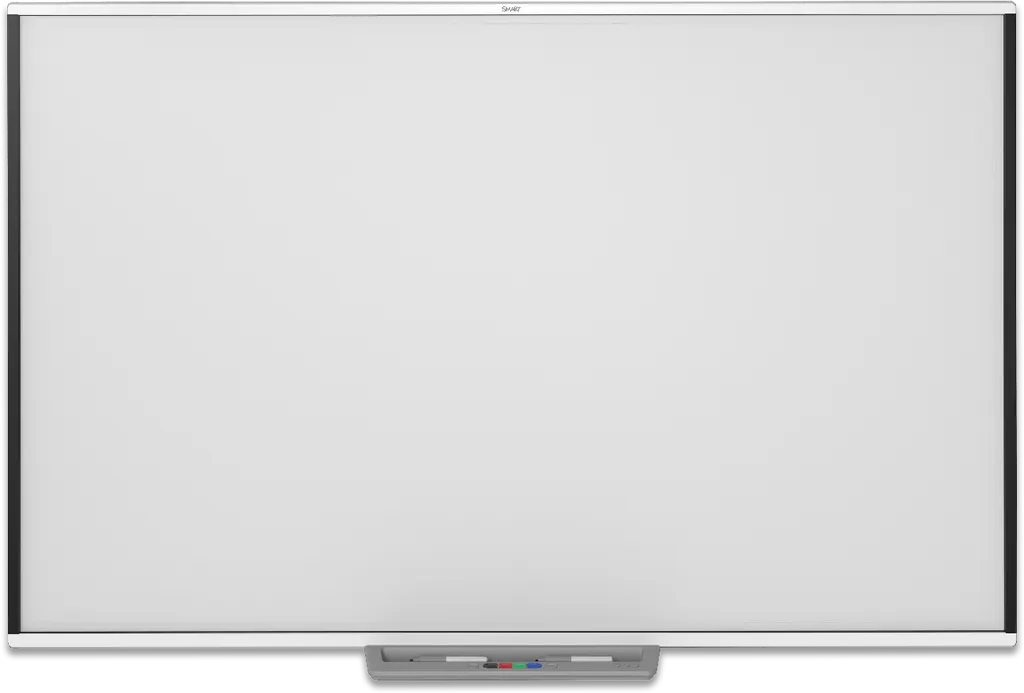
SBM794-169
SMART Board M794-169 94-inch Interactive Whiteboard
- Resolution
- Approximately 32
- Touch
- Advanced IR with Object…
- Warranty
- Three-year limited equipment…
The SMART Board M794-169 is a 94-inch wall-mounted, front-projection interactive whiteboard with an 82-inch projection area and a 16:9 format. It accepts up to 20 touches for two users and tells pens, fingers and palms apart. It draws its power from the computer over USB. Suited to large classrooms and boardrooms with a projector already in place. Request a quote.
What the 94-inch M794-169 adds to a front-projection room
The SMART Board M794-169 is a wall-mounted interactive whiteboard built for front projection. It takes its picture from a computer and a projector placed in front of it, and turns the surface into a touch screen. A finger or one of the two passive pens controls the computer directly: open files, browse websites, play video, and write over any application in digital ink, then save the notes for later use.
Touch performance and the specifications that decide the purchase
Touch detection uses infrared with Object Awareness, which tells a pen, a finger, an eraser and a palm apart. Two users can work at once, with up to 20 simultaneous touches, and each can write, erase, move objects or use gestures without switching modes. Digitising resolution is approximately 32,767 × 32,767.
- Projection area: 82 × 46 1/8 inches (208.3 × 117.2 cm) in a 16:9 format
- Surface: durable hard-coated steel, optimised for projection and compatible with dry-erase markers
- Power and connection: powered from the computer over a 5 m USB cable, below 2.5 W, on full-speed USB 2.0 at 12 Mbps
- Operating range: 5°C to 35°C; storage -20°C to 60°C; humidity up to 80%, non-condensing
Where a 94-inch board fits in Qatar
A lecture room at a university or training centre in Education City. Students at the back of a large room need a readable image, and the wide format gives a shared surface where several learners can work side by side.
A boardroom in West Bay or Lusail. A ministry team or energy company group can review documents, mark up a spreadsheet and join a call with colleagues abroad, while two people write on the screen during the discussion.
A training room in the Industrial Area. A supervisor can walk a crew through a site plan or safety procedure, annotate it live, and save the notes for the record.
Planning the installation
- Measure the wall. The board is 85 3/8 inches wide, 49 5/8 inches high and 5 3/8 inches deep. The pen tray is listed separately at 22 1/2 inches wide.
- Plan for weight. The board weighs 39 lb (18 kg) and ships at 59 lb (27 kg), so arrange a team to lift and mount it.
- Position the projector so the image fills the 82 × 46 1/8-inch area without clipping.
- Keep the room within 5°C to 35°C. Confirm the space and cooling with the SmartRooms Qatar team before fixing the board.
Request a quote for the M794-169
SmartRooms Qatar supplies the SMART Board M794-169 with delivery to all eight municipalities of Qatar and professional installation. We offer a free site survey, so the wall, cabling and projector position can be checked before a 94-inch unit is mounted. Quotations are usually issued within one working day. Purchase orders (LPOs) and government tenders, including Monaqasat, are accepted, with payment by bank transfer, cheque or purchase order. Request a quote and we will confirm the expected lead time with it.
Highlights
- 94-inch model with an 82 × 46 1/8-inch projection area
- Up to 20 simultaneous touches for two users
- Object Awareness separates pen, finger, eraser and palm
- SMART Notebook included; no subscription required
- Powered over USB 2.0 from the connected computer
- Operating range 5°C to 35°C; three-year limited warranty
Classroom fit
At 94″ the farthest student should sit within about 7.0 m (6× the screen height).
Estimated timeline
Quotation within 1 working day · delivery timing depends on stock availability, and we confirm it with your quotation.
Specifications
Overview1
- _text
- The SMART Board M700 series interactive whiteboards are wall-mounted, front projection interactive whiteboards.; These interactive whiteboards let you do everything you can do at your computer by touching the interactive screen with your finger or the included pen: open and close applications, browse through files, hold meetings with others, create new documents or edit existing ones, visit websites, play video clips, and more. When you connect your interactive whiteboard to a computer and a projector, your computer image is displayed on the interactive screen. You can write over any applicati
Interactive experience4
- Touch technology
- Advanced IR with Object Awareness (distinguishes between pen, finger, eraser, and palm)
- Touch and gesture support
- Write and erase digital ink; Perform mouse functions; Use gestures
- Multitouch capabilities
- Support for up to 20 simultaneous touches and up to two users
- Digitizing resolution
- Approximately 32,767 × 32,767
Hardware2
- Screen surface
- Durable hard-coated steel surface; Optimized for projection; Compatible with dry-erase markers
- Frame finish
- White
Software3
- SMART Notebook
- Included
- SMART Ink and SMART Product Drivers
- Included
- SMART Learning Suite
- Optional
Included cables and accessories6
- 16' 5" ( 5 m ) USB cable
- 1
- Pens (passive)
- 2
- Pen tray
- 1
- Self-adhesive cable clips
- 5
- Illustrated installation instructions
- 1
- Important information document
- 1
Computer requirements – Windows and Mac3
- SMART Notebook minimum version
- 20
- SMART Product Drivers minimum version
- 12.16
- Other requirements
- See SMART Notebook 20 software for Windows and Mac
Computer requirements – Linux3
- SMART Notebook minimum version
- 11.1 for Linux
- SMART Product Drivers minimum version
- 12.17 (required for Ubuntu 20.04)
- Other requirements
- See docs.smarttech.com/kb/ 171706
Power and computer connection3
- Power source
- Obtains power from the computer through the USB cable on Windows and Mac computers
- Power consumption
- < 2.5 W (500 mA at 5V)
- Computer connection
- 12 Mbps USB connection (full‑speed USB 2.0)
Storage and operating requirements3
- Operating temperature
- 41°F to 95°F ( 5°C to 35°C )
- Storage temperature
- -4°F to 140°F ( -20°C to 60°C )
- Humidity
- Up to 80% humidity, non‑condensing
Certification and compliance4
- Notes
- Product availability may vary by region. This product has received additional certifications not listed here.
- US / Canada
- UL, FCC, ISED, CONEG Packaging, Cal Prop 65
- EU / EEA / EFTA / UK
- CE, UKCA, LVD, EMCD, REACH, POP, RoHS, WEEE, Packaging
- EAEU
- EAC
Purchasing information4
- Order number: SBM777‑43
- SMART Board M777-43 interactive whiteboard
- Order number: SBM787
- SMART Board M787 interactive whiteboard
- Order number: SBM794‑169
- SMART Board M794-169 interactive whiteboard
- Order number: SBM797
- SMART Board M797 interactive whiteboard
Warranty1
- SMART Warranty
- Three-year limited equipment warranty (see smarttech.com/warranty for more information)
Dimensions and weights1
- _text
- Note; All dimensions ± 1/8" ( 0.3 cm ) . All weights ± 2 lb. ( 0.9 kg ) .
Dimensions and weights – SBM777-436
- Dimensions
- Width: 64 3/4" (164.4 cm); Height: 49 5/8" (126.2 cm); Depth: 5 3/8" (13.6 cm); Pen tray width: 22 1/2" (57.2 cm)
- Projection area
- 61 5/8" × 46 1/4" ( 156.5 cm × 117.4 cm )
- Aspect ratio
- 4:3
- Weight
- 29 lb. ( 13 kg )
- Shipping dimensions
- 69 1/4" × 58" × 3 5/8" ( 175.9 cm × 147.3 cm × 9.2 cm )
- Shipping weight
- 46 lb. ( 21 kg )
Dimensions and weights – SBM7876
- Dimensions
- Width: 76 7/8" (195.3 cm); Height: 49 5/8" (126.2 cm); Depth: 5 3/8" (13.6 cm); Pen tray width: 22 1/2" (57.2 cm)
- Projection area
- 73 3/4" × 46 1/8" ( 187.5 cm × 117.1 cm )
- Aspect ratio
- 16:10
- Weight
- 33 lb. ( 15 kg )
- Shipping dimensions
- 81 1/2" × 58" × 3 5/8" ( 206.9 cm × 147.3 cm × 9.2 cm )
- Shipping weight
- 53 lb. ( 24 kg )
Dimensions and weights – SBM794-1696
- Dimensions
- Width: 85 3/8" (216.9 cm); Height: 49 5/8" (126.2 cm); Depth: 5 3/8" (13.6 cm); Pen tray width: 22 1/2" (57.2 cm)
- Projection area
- 82" × 46 1/8" ( 208.3 cm × 117.2 cm )
- Aspect ratio
- 16:9
- Weight
- 39 lb. ( 18 kg )
- Shipping dimensions
- 89 7/8" × 58" × 3 5/8"( 228.4 cm × 147.3 cm × 9.2 cm )
- Shipping weight
- 59 lb. ( 27 kg )
Dimensions and weights – SBM7976
- Dimensions
- Width: 85 3/8" (216.9 cm); Height: 54 7/8" (139.4 cm); Depth: 5 3/8" (13.6 cm); Pen tray width: 22 1/2" (57.2 cm)
- Projection area
- 82 1/4" × 51" ( 209.5 cm × 129.6 cm )
- Aspect ratio
- 16:10
- Weight
- 51 lb. ( 23 kg )
- Shipping dimensions
- 89 7/8" × 63 1/4" × 3 5/8"( 228.4 cm × 160.7 cm × 9.2 cm )
- Shipping weight
- 74 lb. ( 33 kg )
SBM794-1692
- description
- SMART Board M794-169 interactive whiteboard
- spec_page
- SMART Board M700 series specifications




