





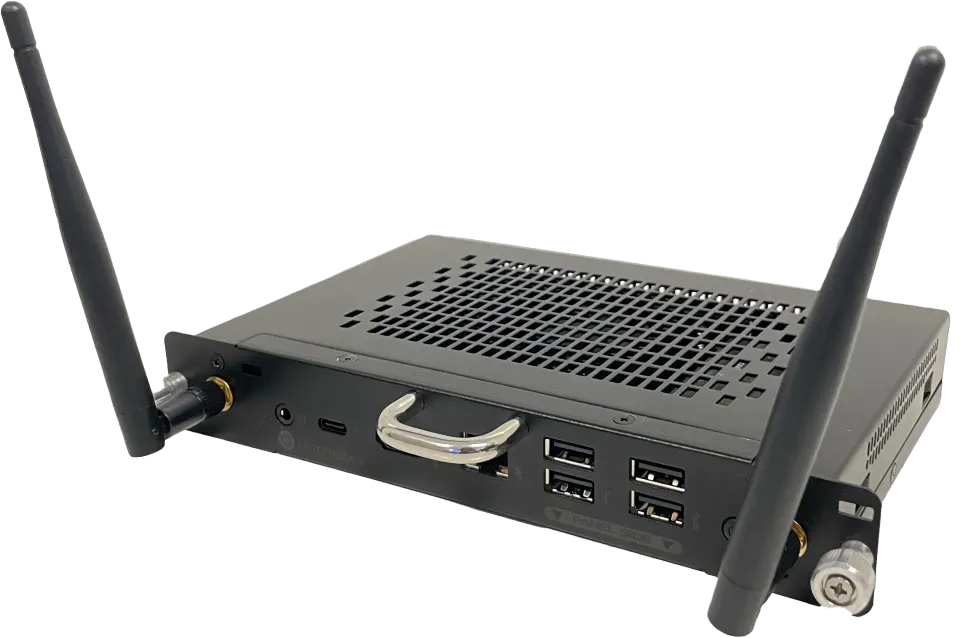
SMART Chromebox OPS CBM13
SMART Chromebox OPS CBM13 ChromeOS Computing Module for SMART Boards
- System
- Chrome OS License
- Memory
- 8 GB DDR4
- Storage
- 256 GB M.2 NVMe SSD
The SMART Chromebox OPS CBM13 is a ChromeOS computing module that fits the accessory slot of supported SMART Board interactive displays, turning the panel into a computer. Choose the Intel Core i3 1315U or Core i5 1335U version, both with 8 GB DDR4 memory, a 256 GB M.2 NVMe SSD, 4K UHD output and Wi-Fi 6E. Suited to Qatari schools and offices wanting a cable-free setup.
What the CBM13 adds to a SMART Board
The CBM13 is an OPS (Open Pluggable Specification) computing module. Rather than running a separate PC beside the display, you fit the module into the accessory slot of a supported SMART Board interactive display, and the panel itself runs a ChromeOS computer. Because the module sits behind the screen, no extra cables need to run across a wall or along a classroom floor, and fewer parts sit on the desk.
Intel i3 or i5, with the same memory and storage
Two order numbers cover the module. The CBM13-i3 uses an Intel Core i3 1315U processor and the CBM13-i5 uses an Intel Core i5 1335U. Both carry 8 GB of DDR4 memory, a 256 GB M.2 NVMe SSD, Intel UHD Graphics and HD audio, so the decision rests mainly on processing demand. A school running browser-based lessons will often be well served by the i3, while a boardroom where several applications run during a video call may justify the i5.
Ports and wireless for classrooms and boardrooms
The module provides one HDMI 2.1 port with full 4K UHD video at 60 Hz, one USB Type-C port, one RJ45 Gigabit Ethernet port with indicator lights, two USB 3.2 Gen 1 Type-A ports, two USB 2.0 Type-A ports and a stereo 3.5 mm audio jack. Wireless uses Intel adapters covering 2.4 GHz, 5 GHz and 6 GHz with 802.11ax (Wi-Fi 6E) and Bluetooth 5.3, and two antennas are included.
Where it fits across Qatar
- Classrooms in Education City or Al Wakrah: a school refitting several classrooms can keep the desk clear and use the same panel for lessons, with Lumio by SMART listed as available software.
- Ministry meeting rooms in Msheireb: staff working in Arabic and English can share documents from a ChromeOS desktop on the panel, over Wi-Fi 6E or wired Gigabit Ethernet.
- Boardrooms in West Bay or Lusail: a team that holds calls with colleagues abroad can run its meeting applications directly from the panel, without bringing in a separate PC.
Planning power, heat and installation
Plan the environment before ordering. The module is rated for 0 to 40°C (32 to 104°F) in operation and 10 to 90% relative humidity, non-condensing. Qatar summers can pass 45°C, so the display should sit in an air-conditioned room, and a lobby or unconditioned space needs confirming with the SmartRooms Qatar team. Power requirement is 12 V to 19 V DC, typical consumption is 90 W and standby is below 0.5 W. Each module weighs 1.0 kg and measures 20 × 14 × 3 cm, and it ships upright. Confirm that your display model is on SMART's compatibility list, and note that the Chromebox is not compatible with SMART Ink.
Request a quote from SmartRooms Qatar
If you need one unit or a full set for a school, office or government site, request a quote and we will confirm the processor option, the compatible display and the installation plan. SmartRooms Qatar delivers to all 8 municipalities of Qatar, offers professional installation and free site surveys, and usually returns quotations within one working day. We accept purchase orders (LPOs) and government tenders, and the module is covered by the manufacturer's warranty, with terms that vary by region. Request a quote today.
Highlights
- Intel Core i3 1315U or Core i5 1335U processor options
- 8 GB DDR4 memory and 256 GB M.2 NVMe SSD storage
- Full 4K UHD video output at 60 Hz via HDMI 2.1
- Gigabit Ethernet, Wi-Fi 6E and Bluetooth 5.3 connectivity
- ChromeOS environment, not compatible with SMART Ink
Estimated timeline
Quotation within 1 working day · delivery timing depends on stock availability, and we confirm it with your quotation.
Specifications
CBM13-i39
- Processor (Raptor Lake)
- Intel Core i3 1315U
- Memory
- 8 GB DDR4
- Storage
- 256 GB M.2 NVMe SSD
- Graphics
- Intel UHD Graphics
- 4K UHD video
- Yes, Full 4K UHD, 60 Hz
- Operating system
- Chrome OS License
- Integrated audio
- HD audio
- LAN
- Gigabit Ethernet
- Wireless
- Intel Wireless (2.4 GHz/5 GHz/6 GHz/BT); IEEE 802.11ax (Wi-Fi 6e); Bluetooth 5.3
CBM13-i59
- Processor (Raptor Lake)
- Intel Core i5 1335U
- Memory
- 8 GB DDR4
- Storage
- 256 GB M.2 NVMe SSD
- Graphics
- Intel UHD Graphics
- 4K UHD video
- Yes, Full 4K UHD, 60 Hz
- Operating system
- Chrome OS License
- Integrated audio
- HD audio
- LAN
- Gigabit Ethernet
- Wireless
- Intel Wireless (2.4 GHz/5 GHz/6 GHz/BT); IEEE 802.11ax (Wi-Fi 6e); Bluetooth 5.3
Inputs and outputs6
- 1
- Type: Stereo 3.5 mm; Qty: 1
- 2
- Type: USB Type-C; Qty: 1
- 3
- Type: HDMI 2.1; Qty: 1
- 4
- Type: RJ45 (including indicator lights); Qty: 1
- 5
- Type: USB 2.0 Type-A; Qty: 2
- 6
- Type: USB 3.2 Gen 1 Type-A; Qty: 2
Included accessories2
- Antennas
- 2
- Illustrated installation instructions
- 1
SMART displays and software (sold separately) – Supported SMART Board interactive displays1
- _text
- See Computing module and appliance compatibility with SMART Board interactive displays; Note; Install the OPS module in the accessory slot of supported SMART Board interactive displays.
SMART displays and software (sold separately) – Available SMART software1
- _text
- Lumio by SMART
Storage and operating requirements4
- Power requirements
- 12V to 19V DC
- Operating temperature
- 32–104°F ( 0–40°C )
- Storage temperature
- -4–140°F ( -20–60°C )
- Humidity
- 10–90% relative humidity, non‑condensing
Power consumption2
- Typical
- 90 W
- Standby
- < 0.5 W
Certification and compliance4
- Notes
- Product availability may vary by region. This product has received additional certifications not listed here.
- Regulatory models
- 0WI
- US / Canada
- UL Recognized, FCC, ISED, CONEG Packaging, California Prop 65
- EU / EEA / EFTA / UK
- CE, REACH, RoHS, Battery, Packaging, POP
Purchasing information2
- Order number: CBM13-i3
- Chromebox OPS, i3 Processor
- Order number: CBM13-i5
- Chromebox OPS, i5 Processor
SMART Warranty1
- _text
- Terms and conditions and warranty upgrade options vary by region. Visit smarttech.com/warranty or contact your reseller for information.
Installation, dimensions, and weights1
- Notes
- All dimensions ± 0.3 cm. All weights ± 0.5 kg. Product ships upright.
Installation, dimensions, and weights – CBM13-i3 / CBM13-i53
- Weight
- 1.0 kg ( 2.23 lbs )
- Product dimensions
- 7 7/8" × 5 3/8" × 1 1/8" ( 20 cm × 14 cm × 3 cm )
- Shipping dimensions
- 9 41/64" × 7 7/8" × 2 9/16" ( 24.5 cm × 20.5 cm × 6.5 cm )




