





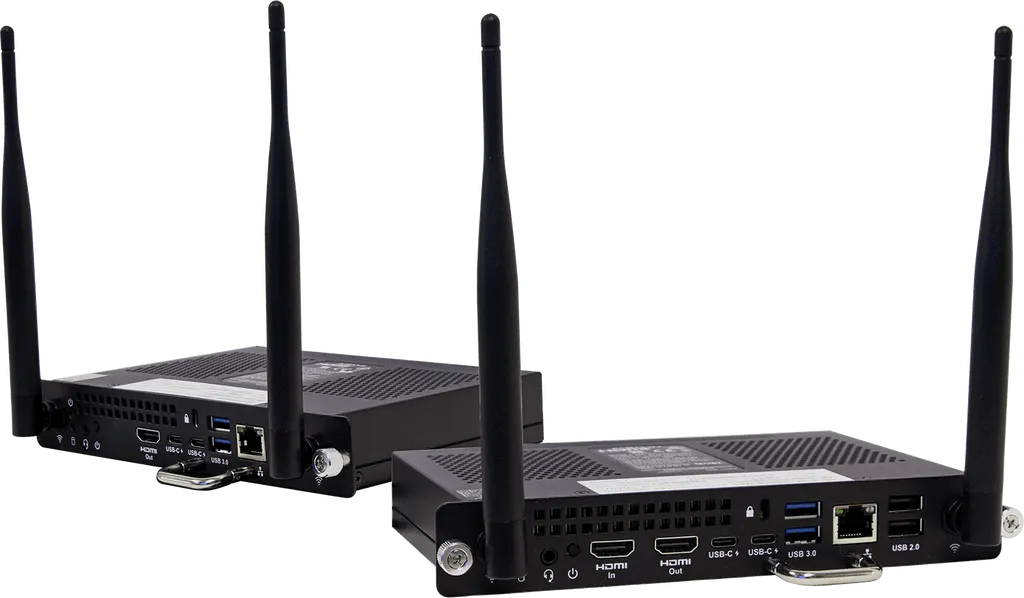
SMART OPS PC module PCM13
SMART OPS PC module PCM13 with Windows 11 Pro for SMART Board displays
- System
- Windows 11 Pro
- Memory
- 8 GB DDR4
- Storage
- 256 GB M.2 NVMe SSD
The SMART OPS PC module PCM13 gives a SMART Board interactive display a Windows 11 Pro computer, installed in the accessory slot with no extra cabling. It is offered with an Intel Core i5 (8 GB memory) or Core i7 vPro (16 GB) and drives full 4K UHD video at 60 Hz. Doha schools, ministries and offices that want an up-to-date computer inside their panel can request a quote.
What the PCM13 adds to a SMART Board
The SMART OPS PC module PCM13 is an Open Pluggable Specification computer that installs in the accessory slot of a supported SMART Board interactive display. Instead of connecting a separate desktop or laptop, teachers and presenters run Windows 11 Pro directly from the panel. Each module is supplied with a full Windows 11 Pro licence, which keeps the operating system current for as long as the display is in use.
Two processor options for different workloads
The module is sold under two order numbers. The PCM13-i5 pairs an Intel Core i5 13420H with 8 GB of DDR4 memory, a 256 GB M.2 NVMe SSD and Intel UHD Graphics. The PCM13-i7v uses an Intel Core i7 1365U vPro with 16 GB (2 × 8 GB) of DDR4 memory, the same 256 GB NVMe storage and Intel Iris Xe Graphics. Both drive full 4K UHD video at 60 Hz, so the choice depends on how many applications run at once rather than on picture resolution.
Ports, wireless and security
The module offers one HDMI 2.0 output, two USB Type-C ports rated for up to 15 W power delivery, two USB 3.2 Gen 1 Type-A ports and two USB 2.0 Type-A ports. A stereo 3.5 mm jack and one RJ45 Gigabit Ethernet port with indicator lights complete the connections. Wireless uses Intel Wi-Fi 802.11ax (Wi-Fi 6E) across 2.4 GHz, 5 GHz and 6 GHz, with Bluetooth 5.3 and two antennas. A Trusted Platform Module 2.0 is fitted. The HDMI 1.4 input is available on the i7v configuration only.
Where it fits in Qatar
A private school in Al Wakrah fitting out new classrooms can add a module to each supported display, giving teachers a Windows environment alongside SMART Ink writing without placing a tower computer on every desk. In West Bay, a ministry meeting room can open shared documents and run the meeting applications its team already uses from the panel itself. A training centre in Education City or Lusail running several rooms can standardise on one configuration so staff learn one set of controls.
Heat matters here. The operating range is 0 to 40 °C, while summer temperatures in Doha can pass 45 °C. Install the display in an air-conditioned room rather than a window-facing lobby or unshaded hall. Storage is rated from -20 to 60 °C, and operating humidity from 10 to 90 percent non-condensing.
What to plan before you order
- Confirm that your display model has the accessory slot and supports the module. Ask the SMART Qatar team to check against your exact model.
- Choose the order number to match the work: PCM13-i5 for lessons and standard applications, PCM13-i7v when more memory or the HDMI 1.4 input is needed.
- Plan the power arrangement. The module needs 12 V to 19 V DC and draws up to 76 W (i5) or 77 W (i7v), with standby under 0.5 W.
- The module measures 20 × 14 × 3 cm and weighs 750 g. Antennas are not included in the dimensions.
SMART software including SMART Notebook, SMART TeamWorks, SMART Meeting Pro and SMART Remote Management is available separately from the module. The module carries the manufacturer's warranty. Send your display models and a room list to the SMART Qatar team and request a quote; quotations are usually returned within one working day, and purchase orders and government tenders are accepted.
Highlights
- Windows 11 Pro with full licence on both models
- Intel Core i5 13420H or Core i7 1365U vPro processors
- Full 4K UHD video output at 60 Hz
- 256 GB M.2 NVMe SSD in both configurations
- Intel Wi-Fi 6E (802.11ax) and Bluetooth 5.3 connectivity
- Operating range 0 to 40°C; power 12 V to 19 V DC
Estimated timeline
Quotation within 1 working day · delivery timing depends on stock availability, and we confirm it with your quotation.
Specifications
PCM13-i59
- Processor (Raptor Lake)
- Intel Core i5 13420H
- Memory
- 8 GB DDR4
- Storage
- 256 GB M.2 NVMe SSD
- Graphics
- Intel UHD Graphics
- 4K UHD video
- Yes, Full 4K UHD, 60 Hz
- Operating system
- Windows 11 Pro, Full license
- LAN
- Gigabit Ethernet Intel I219
- Wireless
- Intel Wireless (2.4 GHz/5 GHz/6 GHz/BT); IEEE 802.11ax (Wi-Fi 6e); Bluetooth 5.3
- TPM
- Trusted Platform Module 2.0
PCM13-i7v9
- Processor (Raptor Lake)
- Intel Core i7 1365U vPro
- Memory
- 16 GB (2 × 8 GB) DDR4
- Storage
- 256 GB M.2 NVMe SSD
- Graphics
- Intel Iris Xe Graphics
- 4K UHD video
- Yes, Full 4K UHD, 60 Hz
- Operating system
- Windows 11 Pro, Full license
- LAN
- Gigabit Ethernet Intel I219 vPro
- Wireless
- Intel Wireless (2.4 GHz/5 GHz/6 GHz/BT); IEEE 802.11ax (Wi-Fi 6e); Bluetooth 5.3
- TPM
- Trusted Platform Module 2.0
SMART displays and software (sold separately) – Supported SMART Board interactive displays1
- _text
- See Computing module and appliance compatibility with SMART Board interactive displays; Note; Install the OPS PC module in the accessory slot of supported SMART Board interactive displays.
SMART displays and software (sold separately) – Available SMART software1
- _text
- SMART Notebook SMART TeamWorks SMART Meeting Pro SMART Remote Management
Storage and operating requirements4
- Power requirements
- 12V to 19V DC
- Operating temperature
- 32–104°F ( 0–40°C )
- Storage temperature
- -4–140°F ( -20–60°C )
- Humidity
- 10–90% relative humidity, non‑condensing
Power consumption2
- Maximum (PCM13‑i5)
- 76 W
- Maximum (PCM13‑17v)
- 77 W
Certification and compliance6
- Notes
- Product availability may vary by region. This product has received additional certifications not listed here.
- Regulatory models
- PCM13-3, PCM13-4
- US / Canada
- UL Recognized, FCC, ISED, CONEG Packaging, California Prop 65
- EU / EEA / EFTA / UK
- CE, UKCA, REACH, RoHS, Battery, Packaging, POP
- Australia / New Zealand
- RCM, RSM
- Performance / interoperability certifications
- WHQL
Purchasing information – Order numbers2
- PCM13-i5
- OPS PC module with Windows Pro, i5 processor
- PCM13-i7v
- OPS PC module with Windows Pro, i7v processor
SMART Warranty1
- _text
- Terms and conditions and warranty upgrade options vary by region. Visit smarttech.com/warranty or contact your reseller for information.
Hardware components4
- A
- Component: Antennas; Qty: 2
- B
- Component: Power and hard drive status lights; Qty: 2
- C
- Component: Power button; Qty: 1
- D
- Component: Kensington Security Slot; Qty: 1
Inputs and outputs7
- 1
- Type: Stereo 3.5 mm; Qty: 1
- 2
- Type: HDMI 1.4 in (PCM13-i7v only); Qty: 1
- 3
- Type: HDMI 2.0 out; Qty: 1
- 4
- Type: USB Type-C, up to 15 W power delivery; Qty: 2
- 5
- Type: USB 3.2 Gen 1 Type-A; Qty: 2
- 6
- Type: RJ45 (including indicator lights); Qty: 1
- 7
- Type: USB 2.0 Type-A; Qty: 2
Installation, dimensions, and weights3
- Weight
- 1 lb. 10 oz. ( 750 g )
- Product dimensions 1 Product dimensions don’t include the module’s two antennas.
- 7 7/8" × 5 3/8" × 1 1/8" ( 20 cm × 14 cm × 3 cm )
- Shipping dimensions
- 10 5/8" × 8 5/8" × 2 3/4" ( 27 cm × 22 cm × 7 cm )




