





Thursday, 22 October 2026 · 11 Jumada I 1448 AH Sun – Thu · 9:00 – 18:00
+971 56 914 9477 العربية
WhatsApp

SMART Tool Explorer

SMART Tool Explorer Hands-on Learning Tools for SMART Board

WhatsApp
Priceon request
QuotationWithin 1 working day
DeliveryConfirmed with your quote, based on stock
PDFDownload datasheet (SMART-RX-Tool-Explorer-brochure-en.pdf)
Overview

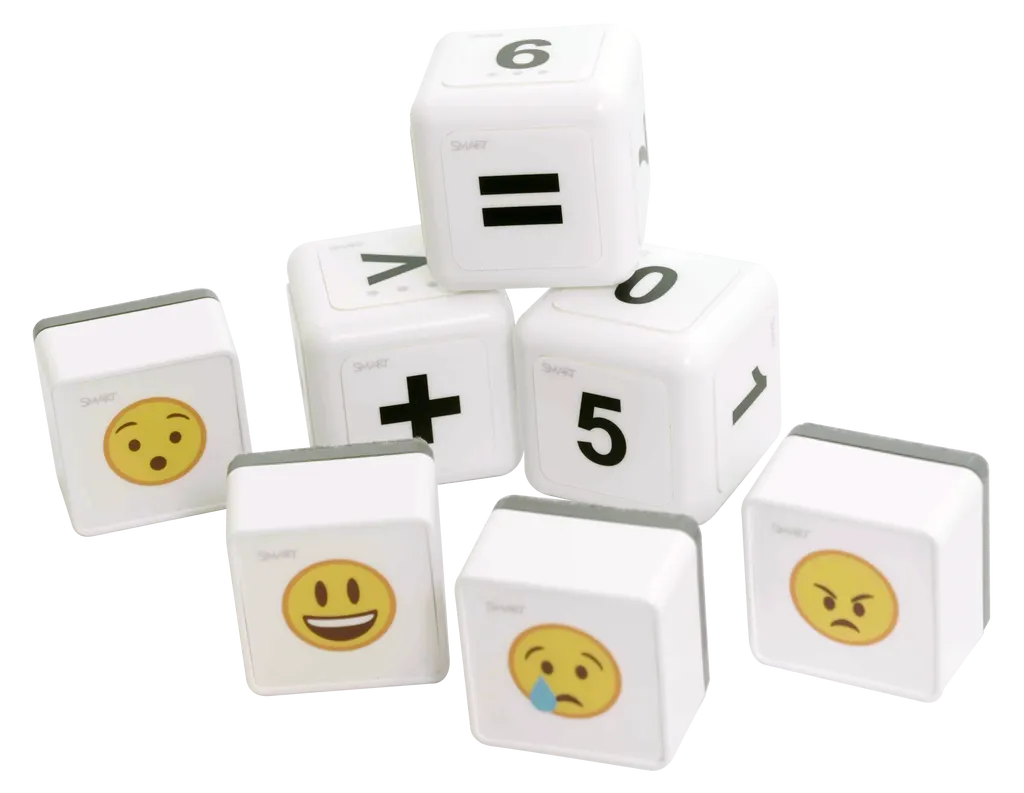
Tool Explorer adds physical programmable cubes, stamps and the SMART MultiStylus to SMART Board interactive displays running iQ 4. The kit includes a 4-pack of cubes showing emoji, numbers and math expressions, and a 4-pack of stamps that dock on the pen tray in place of erasers. It suits inclusive classrooms in Qatar, including learners who take part without speech. Compatible with RX series and MX series displays. Request a quote to confirm your model.

What Tool Explorer adds to a SMART Board

SMART Tool Explorer is an accessory for SMART Board interactive displays running iQ 4. A teacher places physical objects on the screen, the board recognises them, and each tool becomes a digital interaction without tapping through menus. The kit centres on two sets: a 4-pack of programmable cubes and a 4-pack of programmable stamps that dock magnetically on the pen tray in place of erasers. Students learn by rolling, stamping and moving, while the lesson content stays on the screen.

The cubes carry emoji, numbers and math expressions, and all six sides can be customised, so one set can support several subjects. The stamps are easy to grip, which helps learners with limited dexterity.

Which displays to check before ordering

Tool Explorer works with the RX series and the MX series. RX series boards run iQ 4 and support the tools directly. MX series boards need the SMART MultiStylus connected before Tool Explorer features become available, so the stylus belongs in the planning for any MX purchase. If a display runs a different operating system from iQ 4, the tools will not be recognised, so confirm the model and software status of each board when you request a quote.

Where it fits in Qatar classrooms

  • Inclusive support unit in a primary school in Al Sadd: a pupil who communicates without speech answers questions by placing a stamp or turning a cube, and the whole class stays in the same lesson.
  • Maths lessons in an international school in Lusail: the cubes show numbers and expressions, and the teacher changes images from the iQ 4 gallery folder with a tap when a new unit starts.
  • Mixed-ability groups in Arabic and English literacy: teachers prepare tool sets with different images so each group works at its own pace on the same board.

Planning the purchase

Tool Explorer is an accessory for a board you already have, so the panel itself stays in place. Count the classrooms that will use it and list each display model before requesting a quote. SmartRooms Qatar can supply and deliver to all eight municipalities of Qatar, arrange professional installation, and carry out a free site survey if the room layout is changing. Schools and government bodies can order on a purchase order (LPO) or through a government tender, including Monaqasat. Quotations are usually issued within one working day, and products are covered by the manufacturer's warranty.

Want to check whether Tool Explorer suits your boards? Request a quote from SmartRooms Qatar and we will confirm compatibility, quantities and what each quotation includes for your classrooms.

Highlights

  • Programmable cubes showing emoji, numbers and math expressions
  • Four-pack of stamps that dock magnetically on the pen tray
  • Works with iQ 4 on RX series and MX series SMART Boards
  • MX series boards need the SMART MultiStylus connected
  • Tools are recognised automatically without searching for images
  • Change any tool to a new image with a tap in iQ 4

Estimated timeline

Quotation within 1 working day · delivery timing depends on stock availability, and we confirm it with your quotation.


Specifications

Source: manufacturer · checked Oct 2026
The full specification and datasheet for this model are available on request; we send them with your quotation.

Downloads

1 file from the manufacturer

Questions about SMART Tool Explorer

What exactly is SMART Tool Explorer?
Tool Explorer is a set of physical tools for SMART Board displays running iQ 4. When a tool is placed on the screen, the board recognises it and turns it into a digital interaction, so students learn by moving and touching rather than tapping alone. The set includes a 4-pack of programmable cubes and a 4-pack of programmable stamps, and it is used with the SMART MultiStylus on MX series boards.
Which SMART Boards support Tool Explorer?
Tool Explorer works on SMART Board RX series interactive displays running iQ 4. MX series displays are also supported, but the SMART MultiStylus must be connected before Tool Explorer features become available. Tell the SmartRooms Qatar team your exact display model when you request a quote so compatibility is confirmed before you order.
Can Tool Explorer be used on a board that does not run iQ 4?
No. The tools are designed for SMART Board displays running iQ 4, and the recognition and customisation features depend on that software. If an existing panel runs another operating system, Tool Explorer will not work with it. Check the software on each classroom display and include that detail in your quotation request.
Do teachers need to install software or drivers?
Teachers change tools directly on the board using the iQ 4 Tool Explorer app, and the manufacturer's materials describe no separate downloads or drivers for this accessory. For a school in Doha rolling it out across many rooms, the setup is handled at board level rather than installed laptop by laptop, which keeps IT planning straightforward.
How are the programmable cubes customised?
The 4-pack of cubes carries emoji, numbers and math expressions, and all six sides can be customised. Using the iQ 4 Tool Explorer app, a teacher can change a tool to any image with a tap, and popular images are included in the iQ 4 gallery folder. A maths teacher in Al Rayyan can set up a new counting activity without designing artwork first.
Can pupils who do not speak use Tool Explorer to answer questions?
Yes. The approach supports learners who engage and express themselves without relying on verbal language. A pupil answers by placing a stamp or turning a cube, and the board recognises the tool automatically, so there is no need to search for images or select options. This suits a learning support unit or any inclusive classroom in Qatar with non-verbal pupils in whole-class lessons.
Are the stamps suitable for pupils with limited grip?
The stamps are described as easy to grip and accessible to learners with dexterity limitations. They dock magnetically on the pen tray in place of erasers, so they stay with the board. Before buying for a particular pupil, ask the SmartRooms Qatar team to confirm which tool sets suit that pupil's needs when you request a quote.
Which subjects suit Tool Explorer?
Tool Explorer is aimed at maths, literacy, science and social-emotional learning. Teachers can customise tools with numbers, symbols, images or emojis, so one interactive flat panel can support several activities in a single day. It suits an Arabic-curriculum school in Al Khor where lessons move between Arabic reading and maths in the same room.
Is the SMART MultiStylus included with Tool Explorer?
The manufacturer describes the SMART MultiStylus as a separate all-in-one tool, and MX series boards need it connected. Its materials do not confirm that it comes in every package, so the SmartRooms Qatar team will confirm exactly what each quotation includes for your display type.
Does installing Tool Explorer require changes to the classroom?
Tool Explorer is an accessory that works with a display you already have, so the key planning question is whether the existing board meets the model and iQ 4 requirements, not the room layout. If the classroom is being reorganised or the display position will change, request a free site survey from SmartRooms Qatar before placing the order.
Can a school buy Tool Explorer for several classrooms on one purchase order?
Yes. Schools and government bodies in Qatar can order on a purchase order (LPO) or through a government tender, including Monaqasat. List the number of classrooms and the display model in each one in your request. SmartRooms Qatar usually issues quotations within one working day, and payment can be made by bank transfer, cheque or purchase order.

Similar models

BenQ CM7505 BenQ Board CM7505 75-inch Interactive Display
75″ UHD 3840 × 2160 pixels Ultra Precision IR
SMART SBID-6286S-V3 SMART Board 6086S-V3 86-inch Interactive Display with iQ
86″ 4K UHD (3840 × 2160) HyPr Touch with InGlass
SMART SBID-6286S-V3-P SMART Board 6086S-V3 Pro 86-inch Interactive Display with iQ
86″ 4K UHD (3840 × 2160) HyPr Touch with InGlass
Clevertouch Clevertouch Edge 65" Clevertouch Edge 65" 4K Interactive Display with Camera and Speakers
65″ 4K UHD (3840x2160 @60Hz) Android 15
Clevertouch Clevertouch Edge 86" Clevertouch Edge 86" 4K Interactive Flat Panel
86″ 4K UHD (3840x2160 @60Hz) Android 15
Email Call


