





Thursday, 22 October 2026 · 11 Jumada I 1448 AH Sun – Thu · 9:00 – 18:00
+971 56 914 9477 العربية
WhatsApp

DSCDX65IE5

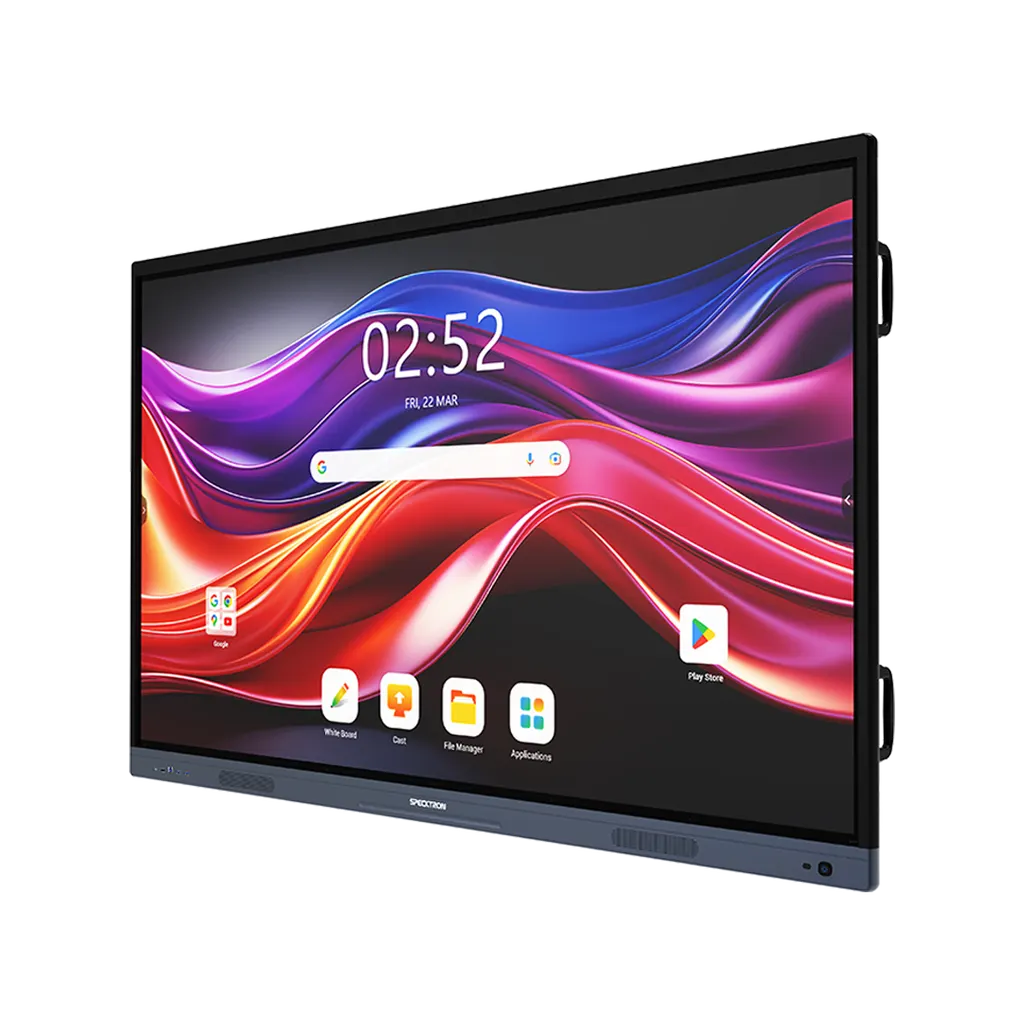
Specktron DSCDX65IE5 CDX-i 65-inch Interactive Display

Resolution
3840 × 2160 (4K UHD)
Touch
50-Point Multi-Touch with…
System
Android 14 (Upgradable)
Storage
8GB RAM / 64GB ROM
WhatsApp
Priceon request
QuotationWithin 1 working day
DeliveryConfirmed with your quote, based on stock
Overview

The Specktron CDX-i 65-inch (DSCDX65IE5) is an interactive display for classrooms and meeting rooms, with a 4K UHD panel, 50-point touch, 8GB RAM and Android 14. Its 400-nit panel, 2 x 20W speakers and wireless screen sharing suit teaching spaces and small boardrooms in Doha, Lusail and Al Wakrah. Ask SmartRooms Qatar for a quote.

A 65-inch panel sized for classrooms and working meeting rooms

The CDX-i 65-inch model, DSCDX65IE5, is a floor-standing interactive display from the Specktron CDX-i series with a 3840 × 2160 (4K UHD) panel and a 9H toughened, anti-glare glass front. It is built for teachers, trainers and staff who need a large touch surface in a room that does not need a lecture hall. At this size it suits a standard classroom or a meeting room where a small team sits around a table.

The specifications that matter for daily teaching and meetings

Resolution and brightness decide how far away content stays readable. The panel offers a 4000:1 contrast ratio and 400 nits of brightness, with a viewing angle listed as 178/178, so someone seated at the side of the room can read the same slide as someone in front. The 50-point infrared touch supports finger, stylus and palm input, which allows more than one person to write or annotate on the surface.

The unit runs on a quad-core processor with 8GB RAM and 64GB of internal storage. The standard operating system is Android 14, which the source describes as upgradable, and the display carries Google EDLA certification, gives access to the Play Store and receives automatic over-the-air updates. Two 20W speakers are built in, enough for many classrooms and meeting rooms, though larger halls should discuss audio needs before ordering.

Where the 65-inch CDX-i fits in Qatar

  • A private school in Al Wakrah refitting its classrooms can place a floor-standing panel at the front of the room in place of a projector and a traditional whiteboard.
  • A corporate office in West Bay can install it in a meeting room where teams join calls from Doha and from abroad, and where attendees share content wirelessly from their own laptops or phones.
  • A training centre in Education City can use the AI whiteboard, which the source describes for lesson planning, equation solving, translation and content summarisation, to prepare group sessions.

What to plan before ordering

The display needs floor space, a power point and a clear cable route to its ports. The rear panel provides two HDMI inputs, one VGA input, audio in and audio out, three USB 2.0 ports, two USB 3.0 ports, two USB-C ports for data only, two USB touch connections, one SPDIF output, one RS232 port, two LAN ports and a TF card slot. List the sources you will connect before choosing a stand or accessories.

The compatible accessories listed for the series are a Wireless Dongle, a 48MP AI Camera, an OPS Windows Module and Stands. The source lists optional Windows configurations for the range, so confirm in the quotation whether one is available for this size. Because the unit stands on the floor, a free site survey from SmartRooms Qatar can confirm floor space, the power route and the distance from windows, where sun glare and dust can affect a screen.

Ordering from SmartRooms Qatar

SmartRooms Qatar supplies the DSCDX65IE5 to organisations across Qatar, with delivery to all eight municipalities and professional installation. Schools ordering several units for a phased refit can issue a purchase order (LPO) or bid for a government tender, including through Monaqasat. Payment can be made by bank transfer, cheque or purchase order, and the product is covered by the manufacturer's warranty. Request a quote with your room size, the number of units and the sources you plan to connect, and the team will reply with a quotation, usually within one working day.

Highlights

  • 3840 × 2160 4K UHD resolution on a 65-inch panel
  • 400 nits brightness with a 4000:1 contrast ratio
  • 50-point infrared multi-touch with finger, stylus and palm input
  • Quad-core processor, 8GB RAM and 64GB internal storage
  • Android 14 with Google EDLA certification and OTA updates
  • Two 20W speakers and 9H toughened anti-glare glass

Classroom fit

At 65″ the farthest student should sit within about 4.9 m (6× the screen height).

Estimated timeline

Quotation within 1 working day · delivery timing depends on stock availability, and we confirm it with your quotation.

Specifications

14 specifications · Source: manufacturer · checked Oct 2026
Specifications14
Available Sizes
65", 75", 86"
Resolution
3840 × 2160 (4K UHD)
Brightness
400 nits (65”, 75”) | 450 nits (86”)
Contrast Ratio
4000:1
Viewing Angle
178/178
Touch Technology(IR)
50-Point Multi-Touch with Adaptive Technology
RAM / Storage
8GB RAM / 64GB ROM
Processor
Quad-Core
Operating System
Android 14 (Upgradable), Optional Windows (i5/i7 configurations with up to 16GB RAM + 512GB SSD)
Speakers
2 x 20W
Glass
9H Toughened Anti-Glare
Wireless Connectivity
BYOM Support, Wireless Screen Sharing with Touchback, Wireless Dongle
Updates
OTA (Over-the-Air)
Input/Output Ports
2x HDMI In, 1x VGA-In, 1x Audio In, 1 xAudio Out, 3x USB 2.0, 2x USB3.0, 2x USB-C (Data only), 2x USB Touch, 1x SPDIF, 1xRS232, 2X LAN, 1xTF Card


Downloads

0 files from the manufacturer
No downloadable files are listed for this model yet. Ask us and we will send the datasheet.

Questions about DSCDX65IE5

What is the Specktron CDX-i 65-inch DSCDX65IE5 best suited for?
The DSCDX65IE5 suits classrooms, training rooms and smaller meeting rooms where a 65-inch screen is comfortable to read across the space. It is a floor-standing interactive display with 4K UHD resolution, 50-point touch and Android 14. Schools, universities and corporate teams in Doha, Lusail or Al Rayyan are typical buyers. Request a quote to confirm whether this size fits your room before ordering.
What resolution and brightness does the 65-inch model offer?
The panel runs at 3840 × 2160 (4K UHD) and is rated at 400 nits of brightness with a 4000:1 contrast ratio. The viewing angle is listed as 178/178, so content stays readable from the side of the room. The 65-inch and 75-inch models share the 400-nit rating, while the 86-inch model is rated at 450 nits. For a room with strong daylight, ask our team to review window positions during the site survey.
How does the touch function work on this display?
The screen uses infrared touch with 50-point multi-touch and adaptive technology. It accepts finger, stylus and palm input, so a teacher can write with a pen while a student uses a finger on the same surface. The touch system is listed as infrared, so the frame and surface should be kept clear of obstructions to maintain accurate input. Confirm the installation position with the team before fixing the unit in place.
Does the display run Android or Windows?
The standard operating system is Android 14, which the source describes as upgradable, with Google EDLA certification, Play Store access and automatic over-the-air updates. The source also lists optional Windows configurations with i5 or i7 processors, up to 16GB RAM and a 512GB SSD. Confirm in the quotation whether a Windows configuration is available for the 65-inch model and which one suits your software needs.
Can teachers and staff share laptops or phones wirelessly?
Yes. The source lists wireless screen sharing with touchback and BYOM support, which means staff can bring their own devices into the room. The listed mirroring works with Windows, Mac, Android and iOS devices. A Wireless Dongle is also listed as a compatible accessory, and the quotation should confirm whether it is needed for your setup and how many devices your team expects to connect at once.
Is this display suitable for a classroom in Al Wakrah or Al Khor?
A 65-inch panel suits a standard classroom in a private school in Al Wakrah or Al Khor where interactive lessons replace a projector and whiteboard. The 50-point touch, the AI whiteboard and the built-in 2 x 20W speakers cover many everyday lesson needs. Before ordering, check the room dimensions and the position of the power points, and ask for a free site survey from SmartRooms Qatar.
How should a corporate meeting room in West Bay plan the installation?
For a boardroom or meeting room in West Bay, plan the floor space, the power point and the cable route before delivery. The rear ports include two HDMI inputs, two USB-C data ports and two LAN ports, which helps decide where laptops and network cables will connect. SmartRooms Qatar offers professional installation and a free site survey, so the room layout can be checked before the unit arrives.
Can this model be used in a hot lobby or near a window?
The source data does not give an operating temperature range or an outdoor rating for this model, so confirm the location with SmartRooms Qatar before placing it in a hot lobby or near a window. In Qatar, summer temperatures can exceed 45°C and dust storms are common. The team can advise on a suitable position and environment during the site survey and before you request a quote.
What accessories can be added to the 65-inch display?
The compatible accessories listed for the series are a Wireless Dongle, a 48MP AI Camera, an OPS Windows Module and Stands. OPS is a standard slot for a plug-in computer module, so the OPS Windows Module is the accessory to consider if you need a Windows computer inside the display. Choose the stand and any camera with your quotation so the mounting and room setup are planned together.
How many ports does the display have for connecting sources?
The rear panel has two HDMI inputs, one VGA input, one audio input and one audio output, three USB 2.0 ports, two USB 3.0 ports, two USB-C ports for data only, two USB touch connections, one SPDIF output, one RS232 port, two LAN ports and one TF card slot. This gives room for laptops, media players and control systems. List the sources you plan to use so the team can confirm the connections with your quotation.
How do schools and government bodies buy this display in Qatar?
SmartRooms Qatar supplies schools and government bodies, accepts purchase orders (LPOs) and takes part in government tenders, including through Monaqasat. Payment can be made by bank transfer, cheque or purchase order. The product is covered by the manufacturer's warranty. To start, request a quote with the number of units, the room sizes and the connections needed, and the team will respond with a quotation, usually within one working day.
Does the display have built-in sound and glass protection suitable for busy rooms?
Yes, the display includes two 20W speakers and a front panel made of 9H toughened anti-glare glass. The anti-glare finish reduces reflections from windows and ceiling lights, which helps students and attendees read the screen in bright rooms. For large halls where speaker coverage matters, discuss audio requirements with SmartRooms Qatar before ordering, since the built-in speakers are suited to classrooms and meeting rooms.

Similar models

BenQ CM7505 BenQ Board CM7505 75-inch Interactive Display
75″ UHD 3840 × 2160 pixels Ultra Precision IR
SMART SBID-6286S-V3 SMART Board 6086S-V3 86-inch Interactive Display with iQ
86″ 4K UHD (3840 × 2160) HyPr Touch with InGlass
SMART SBID-6286S-V3-P SMART Board 6086S-V3 Pro 86-inch Interactive Display with iQ
86″ 4K UHD (3840 × 2160) HyPr Touch with InGlass
Clevertouch Clevertouch Edge 65" Clevertouch Edge 65" 4K Interactive Display with Camera and Speakers
65″ 4K UHD (3840x2160 @60Hz) Android 15
Clevertouch Clevertouch Edge 86" Clevertouch Edge 86" 4K Interactive Flat Panel
86″ 4K UHD (3840x2160 @60Hz) Android 15
Email Call


