





Thursday, 22 October 2026 · 11 Jumada I 1448 AH Sun – Thu · 9:00 – 18:00
+971 56 914 9477 العربية
WhatsApp

DSUDX65S2KPA

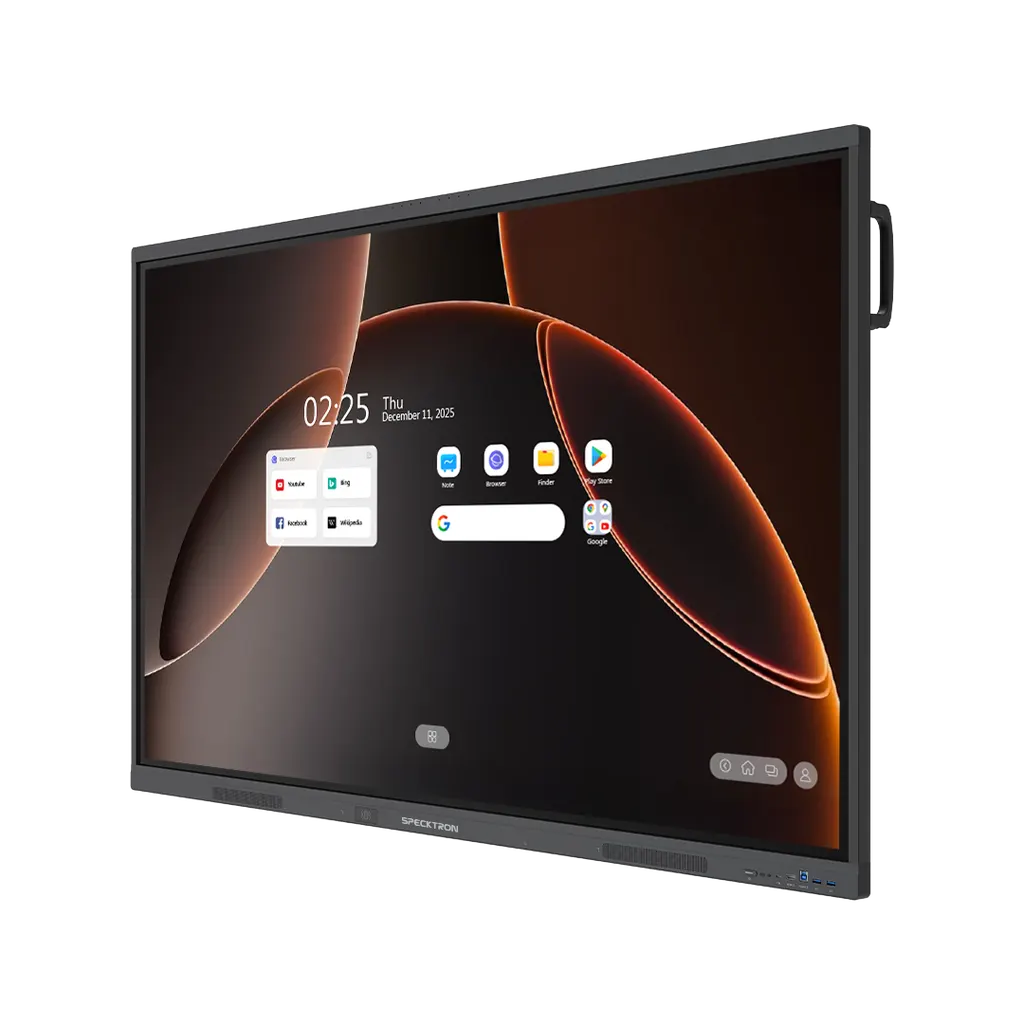
Specktron UDX-S2 ProEdu 65-inch Interactive Display (DSUDX65S2KPA)

Resolution
4K UHD
Touch
50-Point Multi-Touch with…
System
Android 14
Memory
8 GB
WhatsApp
Priceon request
QuotationWithin 1 working day
DeliveryConfirmed with your quote, based on stock
Overview

The Specktron UDX-S2 ProEdu 65-inch is a 4K UHD interactive display built for classrooms and training rooms. Its 50-point adaptive touch, octa-core processor, 8 GB RAM and built-in AI whiteboard support hands-on lessons, while NFC login loads each user's profile instantly. Google EDLA certification and wireless sharing for up to nine devices suit smaller teaching spaces in Doha and across Qatar. Request a quote from SmartRooms Qatar.

What the UDX-S2 ProEdu 65-inch is

The Specktron DSUDX65S2KPA is the 65-inch model in the UDX-S2 ProEdu Series, an interactive display built for teaching rooms. Its 4K UHD panel is rated at 400 nits, and its touch layer tracks 50 points at once, so a teacher and several students can write, drag and annotate on the same screen. The series is described as AI-ready and carries Google EDLA certification.

Processing, sharing and login

The panel runs on an octa-core processor with 8 GB of RAM and 128 GB of storage. A 6 TOPS NPU handles on-device AI tasks. The built-in AI whiteboard offers lesson generation, equation solving, translation and summaries, so lesson material can be prepared on the panel itself.

  • Wireless sharing: up to nine devices can share their screens, with two-way touch control and instant web access.
  • NFC login: a password-less tap loads each user's profile, files, settings and preferences.
  • Ports: three HDMI inputs, one HDMI output, VGA, four USB 3.0, a 65W USB-C, a 15W USB-C, LAN in and out, RS232 and a TF card slot.

Where it fits across Qatar

A private school in Al Wakrah fitting out new primary classrooms can use the 65-inch size in rooms where students sit close to the board. Teachers who move between Arabic and English lessons can agree with the team how the translation tools fit their curriculum before ordering. A training centre in Education City or a corporate training room in the Industrial Area can use the panel for short courses that need written working shown on screen, with NFC login letting different trainers sign in quickly between sessions.

Planning the installation

  • Choose between wall mounting and a stand. Stands are a listed compatible accessory.
  • Check the wall, the mounting height and the cable route to power and sources. A free site survey from SmartRooms Qatar helps before wall-mounting.
  • Confirm the environment. The source data gives no operating temperature range, so ask about rooms near windows or open entrances, where summer heat above 45°C and dust can matter.
  • If Windows is needed, the optional Windows configurations and the OPS Windows Module are listed options.
  • Decide whether the wireless dongle accessory is needed for your device setup.

Products are covered by the manufacturer's warranty. Schools and government entities can order through an LPO or a Monaqasat tender, and quotations are usually issued within one working day. Request a quote from SmartRooms Qatar with your room size, mounting preference and number of units, and we will confirm the configuration, accessories and an estimated lead time with your quotation.

Highlights

  • 65-inch 4K UHD panel rated at 400 nits brightness
  • 50-point multi-touch with adaptive technology
  • Octa-core processor, 8 GB RAM, 128 GB storage
  • Google EDLA certified and AI-ready platform
  • Password-less NFC login loads personal profiles
  • Wireless sharing for up to nine devices

Classroom fit

At 65″ the farthest student should sit within about 4.9 m (6× the screen height).

Estimated timeline

Quotation within 1 working day · delivery timing depends on stock availability, and we confirm it with your quotation.

Specifications

14 specifications · Source: manufacturer · checked Oct 2026
Specifications14
Available Sizes
65", 75", 86"
Resolution
4K UHD
Brightness
400 nits
Viewing Angle
178/178
Touch Technology(IR)
50-Point Multi-Touch with Adaptive Technology
Processor
Octa-Core
RAM
8 GB
Storage
128 GB
Operating System
Android 14, Optional Windows (i5/i7 configurations with up to 16GB RAM + 512GB SSD)
Speakers
2 x 20W
Glass
9H Toughened Anti-Fingerprint Glass
Wireless Connectivity
BYOM Support, Wireless Screen Sharing with Touchback, Wireless Dongle
Updates
OTA (Over-the-Air)
Input/Output Ports
3x HDMI In, 1x HDMI Out, 1x VGA, 1x Audio In, 1x Audio-Out, 4x USB 3.0, 1x USB 2.0, 1xUSB-C (65W), 1xUSB-C(15W), 2x USB-B Touch, 1x LAN in, 1xLAN out, 1x SPDIF, 1x RS232, 1x DIP-In, 1x TF-Card


Downloads

0 files from the manufacturer
No downloadable files are listed for this model yet. Ask us and we will send the datasheet.

Questions about DSUDX65S2KPA

What is the Specktron DSUDX65S2KPA designed for?
It is a 65-inch interactive display for classrooms and training rooms, built around a 4K UHD panel with 400 nits brightness and a 50-point touch layer. Teachers use it to write over live video, annotate slides and run lessons from one screen, and the built-in AI whiteboard adds lesson generation and translation tools.
Is the 65-inch size right for my room?
The 65-inch model suits smaller classrooms, tutorial rooms and small meeting rooms where viewers sit relatively close to the screen. Larger halls usually need the 75-inch or 86-inch versions, which have their own listings. Send your room dimensions and seating layout with your quote request so SmartRooms Qatar can check the fit.
How does the 50-point touch work in practice?
The touch layer supports 50-point multi-touch with adaptive technology. Users can write naturally, annotate over a live video source and convert handwriting into digital text. Several students can work at the board at the same time, which suits group tasks and maths problems where working needs to be shown on screen.
Can teachers share laptops and tablets wirelessly?
Yes. The panel supports wireless screen sharing for up to nine devices, with screen mirroring, two-way touch control and instant web access. Wireless dongles are also listed as a compatible accessory, so you can decide during your quote whether your device setup needs one.
Which ports does the panel offer for connecting a PC or lesson laptop?
The panel has three HDMI inputs, one HDMI output, a VGA port, audio in and audio out, four USB 3.0 ports, one USB 2.0 port, a 65W USB-C port and a 15W USB-C port. It also has two USB-B touch ports, LAN in and LAN out, an RS232 port and a TF card slot.
Does the UDX-S2 ProEdu 65-inch come with Windows?
The standard configuration runs an Android-based system with 8 GB RAM and 128 GB storage. Windows is offered as an optional configuration with i5 or i7 options, up to 16 GB RAM and a 512 GB SSD. The OPS Windows Module is listed as a compatible accessory, so state your software needs when requesting a quote.
How could NFC login help a shared classroom?
Password-less NFC login loads a user's profile, files, settings and preferences as soon as they sign in. At a secondary science room in Education City shared by four teachers on a timetable, each teacher's workspace is ready at the changeover, which reduces the time spent setting up between lessons.
Can an Arabic-curriculum school in Al Rayyan use the translation features?
The AI whiteboard is described as offering translation, summaries and equation solving. The source data does not list an Arabic interface or language packs, so confirm language support for your curriculum with the SmartRooms Qatar team before ordering. Schools that mix Arabic and English lessons can raise this in the quote request.
Is the panel suitable for a classroom near a window or an open entrance?
The source data gives no operating temperature range or dust rating, so placement should be confirmed rather than assumed. In Qatar, summer heat above 45°C and dust storms affect equipment near windows and open lobbies. Ask for placement advice in your quote request and keep the panel out of direct sunlight.
What should we plan before wall-mounting a 65-inch panel?
Confirm the wall structure, mounting height, cable route to the power socket and the position of your input sources. SmartRooms Qatar offers a free site survey before installation, which we recommend for wall-mounted panels of this size. Stands are a compatible accessory if the wall is not suitable.
How are updates and classroom management handled across several panels?
The panel includes Bytello OS for classroom management and receives updates over the air (OTA). For a school fitting out several rooms, this means software changes can be delivered to each panel without manual upgrades at every desk. Include the number of rooms in your quote request so the team can plan the setup.
How do we order several units for a school?
Schools and government entities can issue a purchase order (LPO) or take part in tenders, including Monaqasat. Payment can be made by bank transfer, cheque or purchase order, and quotations are usually issued within one working day. Ask for one quote covering all panels, stands and accessories.

Similar models

BenQ CM7505 BenQ Board CM7505 75-inch Interactive Display
75″ UHD 3840 × 2160 pixels Ultra Precision IR
SMART SBID-6286S-V3 SMART Board 6086S-V3 86-inch Interactive Display with iQ
86″ 4K UHD (3840 × 2160) HyPr Touch with InGlass
SMART SBID-6286S-V3-P SMART Board 6086S-V3 Pro 86-inch Interactive Display with iQ
86″ 4K UHD (3840 × 2160) HyPr Touch with InGlass
Clevertouch Clevertouch Edge 65" Clevertouch Edge 65" 4K Interactive Display with Camera and Speakers
65″ 4K UHD (3840x2160 @60Hz) Android 15
Clevertouch Clevertouch Edge 86" Clevertouch Edge 86" 4K Interactive Flat Panel
86″ 4K UHD (3840x2160 @60Hz) Android 15
Email Call


