





Thursday, 22 October 2026 · 11 Jumada I 1448 AH Sun – Thu · 9:00 – 18:00
+971 56 914 9477 العربية
WhatsApp

DSUDX75S2KFN

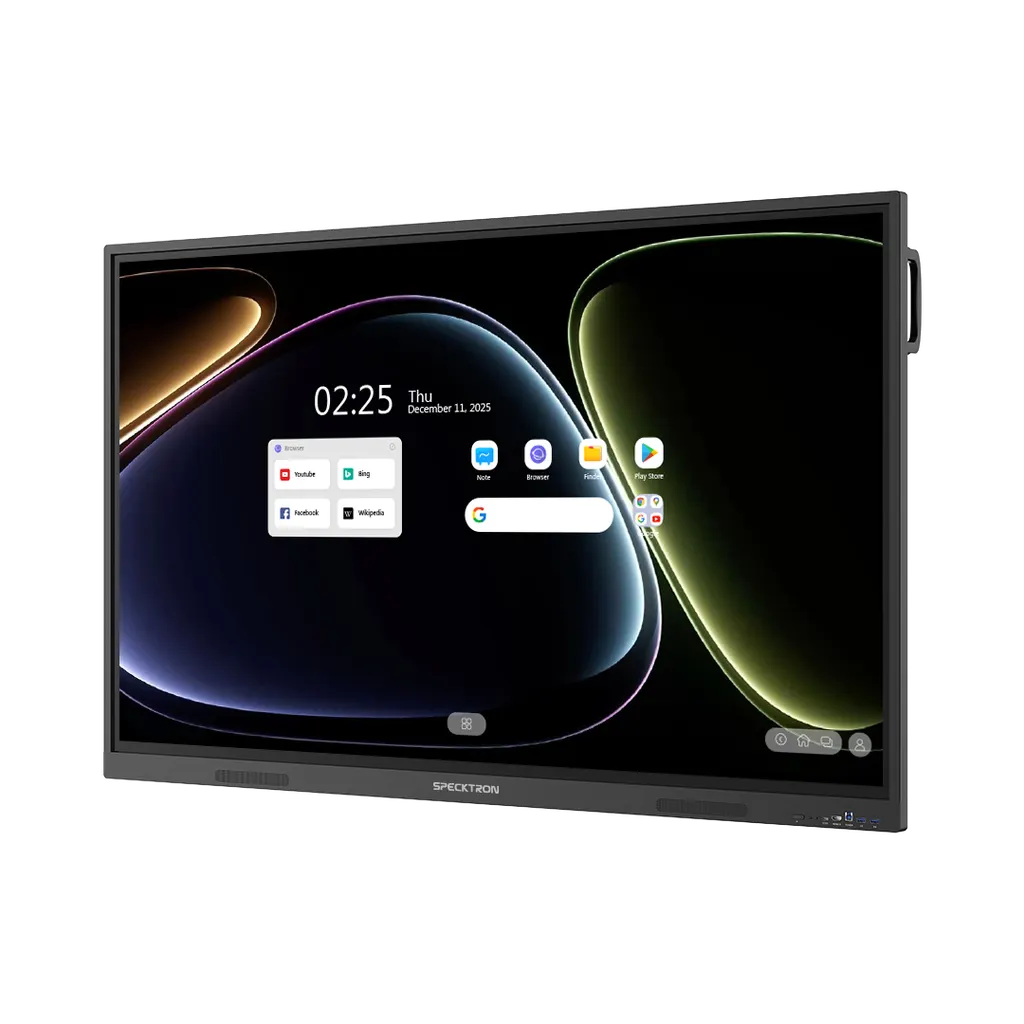
Specktron UDX-S2 ProLite 75-inch Interactive Display (DSUDX75S2KFN)

Resolution
4K UHD
Touch
50-Point Multi-Touch with…
System
Android 16
Memory
8/16 GB *varies per SKU
WhatsApp
Priceon request
QuotationWithin 1 working day
DeliveryConfirmed with your quote, based on stock
Overview

The Specktron DSUDX75S2KFN is a 75-inch 4K UHD interactive display for classrooms and meeting rooms across Qatar. It runs Android 16 on an Octa-Core CPU with a 6 TOPS NPU, offers 50-point infrared touch with live annotation, and shares wirelessly with up to nine devices. It is Google EDLA certified and can take an optional Windows OPS module. Request a quote from SmartRooms Qatar.

What this 75-inch display does in a room

The Specktron DSUDX75S2KFN is a 75-inch interactive display built around a 4K UHD panel rated at 400 nits, with a 178/178 viewing angle so people seated to the side can still read the screen. Its 50-point infrared touch layer uses adaptive technology, so several people can write or move content at the same time. Live mark-enabled touch lets a presenter annotate directly over a live video feed, and handwriting can be converted into digital text so notes are not lost after the session.

Processing comes from an Octa-Core CPU with a 6 TOPS NPU for AI tasks. The panel runs Android 16, is Google EDLA certified, and gives access to the Play Store and Google Workspace. The AI-compatible whiteboard supports lesson generation, equation solving, translation, summaries and interactive teaching, which helps staff prepare lessons and meeting notes without building every page by hand.

Facts to check against your room

  • Display: 4K UHD resolution at 400 nits.
  • Audio: two built-in 20W speakers.
  • Surface: 9H toughened, anti-fingerprint glass.
  • Memory and storage: 8GB or 16GB RAM and 128GB or 256GB storage, depending on the SKU.
  • Updates and management: over-the-air updates and a centralised device management system.

Ports include three HDMI inputs and one HDMI output, three USB 3.0 and one USB 2.0 port, a USB-C port for data transfer, two USB-B touch connections, a LAN port, audio input and output, SPDIF and RS232. That mix covers laptops, media players and external systems in most classrooms and meeting rooms.

Where it fits across Qatar

A private school in Al Wakrah refitting a set of primary classrooms might choose the 75-inch size for rooms where students sit in several rows. The touch surface supports group activities at the board, and the built-in speakers cover a standard classroom without an extra sound system, although a site survey should check the acoustics of larger rooms.

A training centre in Msheireb running hands-on workshops can let trainees share screens wirelessly from up to nine devices, so each participant can present an exercise without swapping cables. In a boardroom in West Bay, where Doha staff brief colleagues abroad, the 4K panel suits shared documents and presentations, and the optional Windows module matters if the room needs desktop applications.

What to plan before you order

Decide whether the room needs Android alone or the optional Intel i5 or i7 OPS module for Windows. Windows configurations come with up to 16GB RAM and 512GB SSD, and RAM and storage vary by SKU, so confirm the exact configuration in your quotation. Stands and the OPS Windows module are listed as compatible accessories, and a wireless dongle is listed too.

The source data does not give the panel's weight, wall-mount pattern or operating temperature range. Before wall installation, or placing the display near windows or in a space that is not air-conditioned, ask the SmartRooms Qatar team to confirm the environment. A free site survey helps plan power points, cable routes and viewing distances, and for several units a single LPO can cover the full order.

Request a quote

If you are specifying the Specktron DSUDX75S2KFN for a classroom, meeting room or training space in Qatar, request a quote from SmartRooms Qatar. Tell us the room size, the number of units, the stand or mounting option and whether you need the Windows module, and we will return a quotation usually within one working day.

Highlights

  • 4K UHD panel rated at 400 nits with 178/178 viewing angle
  • 50-point infrared touch with adaptive technology
  • Octa-Core CPU with 6 TOPS NPU running Android 16
  • Google EDLA certified with Play Store access
  • Wireless screen sharing from up to nine devices
  • Optional Intel i5 or i7 OPS module adds Windows capability

Classroom fit

At 75″ the farthest student should sit within about 5.6 m (6× the screen height).

Estimated timeline

Quotation within 1 working day · delivery timing depends on stock availability, and we confirm it with your quotation.

Specifications

14 specifications · Source: manufacturer · checked Oct 2026
Specifications14
Available Sizes
65", 75", 86"
Resolution
4K UHD
Brightness
400 nits
Viewing Angle
178/178
Touch Technology(IR)
50-Point Multi-Touch with Adaptive Technology
Processor
Octa-Core
RAM
8/16 GB *varies per SKU
Storage
128GB/256GB *varies per SKU
Operating System
Android 16, Optional Windows (i5/i7 configurations with up to 16GB RAM + 512GB SSD)
Speakers
2 x 20W
Glass
9H Toughened Anti-Fingerprint Glass
Wireless Connectivity
BYOM Support, Wireless Screen Sharing with Touchback, Wireless Dongle
Updates
OTA (Over-the-Air)
Input/Output Ports
3x HDMI In, 1x HDMI Out, 3x USB 3.0, 1x USB 2.0, 1xUSB-C (Data Transfer), 2x USB-B Touch, 1x LAN (In/Out), 1x Audio In/Out, 1x SPDIF, 1x RS232.


Downloads

0 files from the manufacturer
No downloadable files are listed for this model yet. Ask us and we will send the datasheet.

Questions about DSUDX75S2KFN

Who is the Specktron DSUDX75S2KFN designed for?
It suits medium-sized classrooms, training rooms and meeting rooms where a 75-inch screen is the right size for the group. The 4K UHD panel, 400-nit brightness and 178/178 viewing angle help people at the side of the room read content clearly. Schools, universities and corporate teams in Qatar often choose this size for rooms where the front row needs to work hands-on at the board.
How many people can use the touch screen at the same time?
The touch layer supports 50 points with adaptive technology, so several users can write or move objects at once. Live mark-enabled touch lets a presenter annotate over live video, and two-way touch control is available when a connected device is shared wirelessly. For a group lesson or brainstorm in a Doha meeting room, students or colleagues can take turns at the panel without needing a second board.
What operating system does it run, and what does Google certification mean?
The panel runs Android 16 and is Google EDLA certified. The specification also lists Play Store access, Google Workspace integration and enterprise-grade security. For an organisation in Qatar, this means approved apps can be installed from the Play Store and the panel can be used alongside Google Workspace accounts. Windows is not included on the standard configuration and needs the optional OPS module.
Can I get a full Windows PC inside the panel?
Yes, through the optional Intel i5 or i7 OPS module, which turns the panel into a Windows PC without an external computer. Windows configurations come with up to 16GB RAM and 512GB SSD. RAM and storage vary by SKU, so confirm the exact configuration when you request a quote. The OPS Windows module is listed as a compatible accessory for this model.
How many devices can share their screen wirelessly?
The specification lists wireless screen sharing from up to nine devices, with screen mirroring and touchback. BYOM support and a wireless dongle are also listed as connectivity options. In a Qatari classroom or office where cable routing is limited, teachers and presenters can connect their own devices quickly without running cables across the room.
A private school in Al Wakrah is refitting several classrooms. How should it order?
Ask SmartRooms Qatar for a quotation that lists each classroom, the model and any stand or Windows module. Once approved, a single LPO can cover the full order. SmartRooms Qatar supplies and installs the units, offers a free site survey to confirm positions in each room, and accepts payment by bank transfer, cheque or purchase order.
Can a government ministry in Doha buy this display through a tender?
Yes. SmartRooms Qatar supplies government ministries and authorities and can respond to government tenders, including those published on Monaqasat. Include the exact model code DSUDX75S2KFN and the 75-inch size in the specification so the evaluation committee compares like with like. Add any stand or OPS module requirement at the same time to keep the bid consistent.
Would this suit a training centre running hands-on workshops?
A training centre in Msheireb running workshops can use wireless sharing so trainees present from their own laptops without swapping cables. Up to nine devices can share at once, and the 50-point touch lets several participants annotate the same screen. The SparkyAI-compatible whiteboard can also help trainers build interactive exercises during the session.
Which ports matter for connecting laptops and external systems?
The panel has three HDMI inputs, one HDMI output, three USB 3.0 ports, one USB 2.0 port, a USB-C port for data transfer, two USB-B touch connections, a LAN port, audio input and output, an SPDIF port and an RS232 port. Use the RS232 port for serial connections to external control systems, and confirm cable lengths and port positions during the site survey.
Can it be placed next to a window or in a hot space?
The source data does not list an operating temperature range, so SmartRooms Qatar cannot confirm suitability for locations with high heat or direct sunlight. Before placing it near windows, in a lobby with glass doors or in any space that is not air-conditioned, ask the team to confirm the environment. Qatar summers above 45°C make this check important for any display.
How should it be mounted, and what should I plan for?
Stands are listed as a compatible accessory. The source data does not give the weight or wall-mount pattern, so do not assume a bracket fits until the site survey is complete. Plan the power point position, cable routes, viewing distance from the front rows and the location of the OPS module if you need Windows. SmartRooms Qatar offers a free site survey to check these points before installation.

Similar models

BenQ CM7505 BenQ Board CM7505 75-inch Interactive Display
75″ UHD 3840 × 2160 pixels Ultra Precision IR
SMART SBID-6286S-V3 SMART Board 6086S-V3 86-inch Interactive Display with iQ
86″ 4K UHD (3840 × 2160) HyPr Touch with InGlass
SMART SBID-6286S-V3-P SMART Board 6086S-V3 Pro 86-inch Interactive Display with iQ
86″ 4K UHD (3840 × 2160) HyPr Touch with InGlass
Clevertouch Clevertouch Edge 65" Clevertouch Edge 65" 4K Interactive Display with Camera and Speakers
65″ 4K UHD (3840x2160 @60Hz) Android 15
Clevertouch Clevertouch Edge 86" Clevertouch Edge 86" 4K Interactive Flat Panel
86″ 4K UHD (3840x2160 @60Hz) Android 15
Email Call


