





Thursday, 22 October 2026 · 11 Jumada I 1448 AH Sun – Thu · 9:00 – 18:00
+971 56 914 9477 العربية
WhatsApp

FLIPView

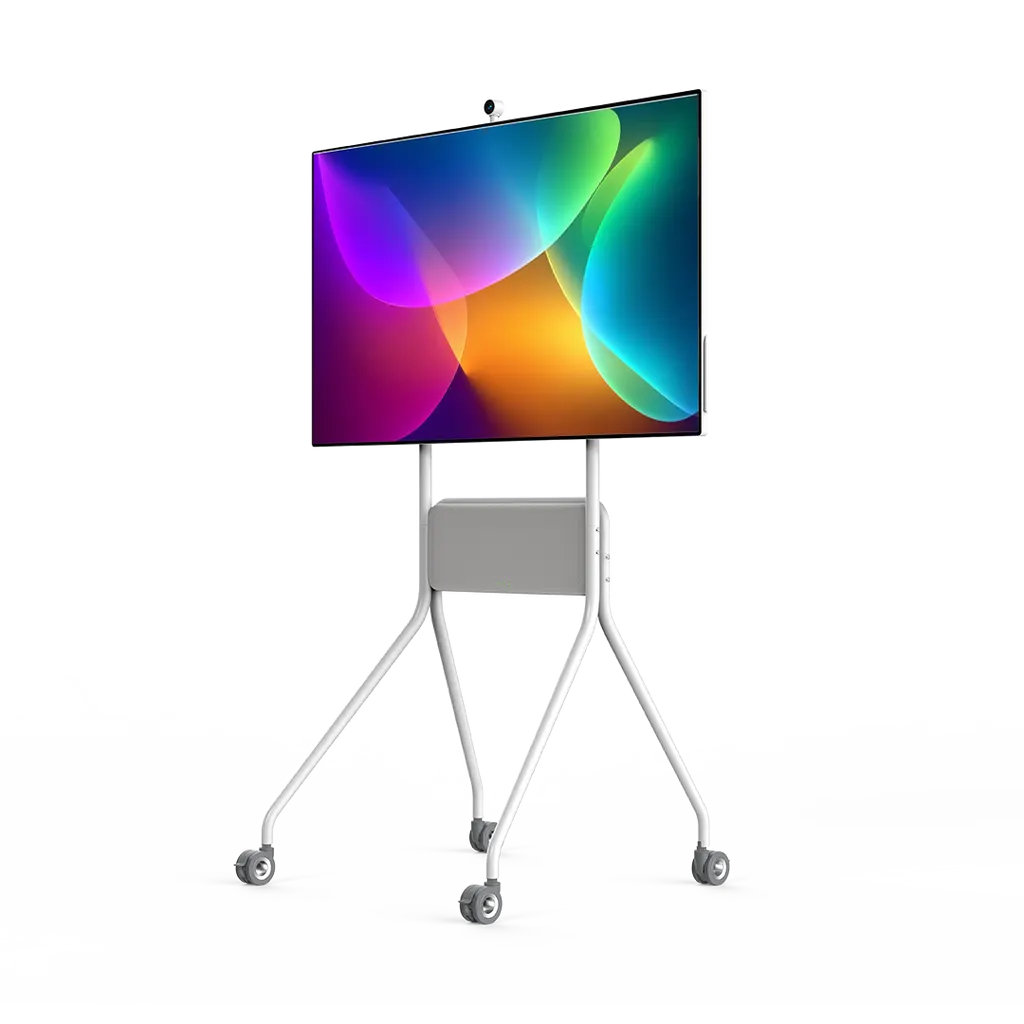
Specktron FLIPVIEW 55-inch Rotating 4K Interactive Smart Mobile Display

Screen size
55"
Resolution
3840 × 2160
Touch
20 PCAP
System
Android 13
WhatsApp
Priceon request
QuotationWithin 1 working day
DeliveryConfirmed with your quote, based on stock
PDFDownload datasheet (FLIPView Brochure.pdf)
Overview

Rotating between landscape and portrait, this 55-inch 4K interactive touchscreen suits meeting rooms and collaboration spaces across Qatar. It offers 3840 × 2160 resolution, 20-point PCAP touch, built-in 2×10W speakers, an 8-channel microphone array and wireless sharing over WiFi 6. Teams in Doha, West Bay and Lusail can present, annotate and join video calls from one screen.

What the FLIPVIEW does in a meeting room

The Specktron FLIPVIEW is a 55-inch interactive display built around a 4K panel at 3840 × 2160 resolution. Its 20-point PCAP touch lets several people write, draw and move content at the same time, and its native annotation tools turn a presentation into a working session. The screen turns between landscape and portrait, so one unit can show a wide slide deck in the morning and a tall document or floor plan in the afternoon.

Specifications that matter to buyers

  • Display: 55-inch panel with ELED backlight, 400 nits brightness, 1,200:1 typical contrast ratio, 8ms typical response time and 178° horizontal and vertical viewing angles.
  • Audio and video calls: 2 × 10W built-in speakers, an 8-channel microphone array and Type-C camera support.
  • Computing: Octa-core processor, Mali G610 GPU, 8GB RAM, 128GB storage and Android 13.
  • Connectivity: HDMI In (2.1), HDMI Out, Type-C with 15W, two USB 3.0 Type-A ports, one USB 3.0 Type-B port, LAN, SPDIF, RS232 and WiFi 6.
  • Power: AC 100V to 240V at 50/60 Hz, 190W power consumption and under 0.5W in standby.

Where it fits across Qatar

A consultancy meeting room in Msheireb often needs one screen for a small team that moves between slides and long documents. Turning the FLIPVIEW to portrait keeps a contract or spreadsheet readable without sideways scrolling. The built-in speakers and microphone array let a video call start from the screen itself, although room acoustics should be checked during the site survey.

A private school in Al Rayyan fitting out a teacher collaboration room can use the touchscreen for group projects, with students annotating a shared document in turn. A sales office in Lusail can present floor plans in portrait for tall drawings and in landscape for site plans, marking them up with the native annotation tools during the client meeting.

What to plan before ordering

The manufacturer data for this model does not list dimensions, weight or mounting options, so confirm these before issuing a purchase order. A free site survey from SmartRooms Qatar can check the room layout, the power point and the network or WiFi 6 coverage. The power input covers Qatar's 240 V, 50 Hz supply. The operating temperature range is not listed in the source data, so if the unit will sit near a window or in a lobby exposed to heat, ask the team to confirm the environment, given summer temperatures above 45°C and dust storms.

Request a quote

SmartRooms Qatar supplies the FLIPVIEW with delivery to all eight municipalities of Qatar, professional installation and a manufacturer's warranty. Quotations are usually issued within one working day, and purchase orders and government tenders, including Monaqasat, are handled routinely. Request a quote for this FLIPVIEW model, stating your room size, quantity and installation requirements.

Highlights

  • 55-inch 4K panel at 3840 × 2160 resolution
  • Rotates between landscape and portrait viewing modes
  • 20-point PCAP touch with native annotation tools
  • Built-in 2×10W speakers and 8-channel microphone array
  • HDMI In 2.1, Type-C 15W, USB 3.0, LAN and WiFi 6
  • Android 13 with 8GB RAM and 128GB storage

Estimated timeline

Quotation within 1 working day · delivery timing depends on stock availability, and we confirm it with your quotation.

Specifications

22 specifications · Source: manufacturer · checked Oct 2026
Specifications22
Size
55"
Backlight Type
ELED
Resolution
3840 × 2160
Brightness
400 nits
Contrast Ratio
1200:1 (Typ)
Response Time
8ms (Typ.)
Pixel Pitch
0.315(H) × 0.315(V) mm
Refreshing Frequency
60 Hz
Viewing Angle
178°(H) / 178°(V)
Color Gamut
85% NTSC
Display Colors
1.07G (8bit + FRC)
Touch Points
20 PCAP
CPU
Octa-core Processor 4 × Cortex A76 + 4 × Cortex A55
GPU
Mali G610
RAM
8GB
Storage
128GB
Operating System
Android 13
Ports
HDMI In × 1 (2.1), HDMI Out × 1, Type-C × 1 (15W), USB 3.0 (A) × 2, USB 3.0 (B) × 1, LAN × 1, SPDIF × 1, RS232 × 1
Wireless
WiFi 6
Audio Output Power
2 × 10W
Power Requirements
AC 100V ~ 240V, 50/60 Hz
Power Consumption
190W

Downloads

2 files from the manufacturer

Questions about FLIPView

Who is the Specktron FLIPVIEW best suited to?
The FLIPVIEW suits huddle rooms, small and mid-sized meeting rooms and team collaboration areas where people share one screen. A 55-inch panel is a good fit for these spaces rather than a lecture hall, where a larger display would be needed. Its 4K resolution keeps text sharp at close range, which helps teams in offices in Doha and West Bay reviewing documents together.
Can the FLIPVIEW be turned between landscape and portrait?
Yes. The screen rotates between landscape and portrait viewing modes, so the same unit can show wide presentations or tall documents. In a procurement office in Doha, a tender specification or spreadsheet can be read in portrait without scrolling sideways, then switched back to landscape for slides. The source data does not list mount options, so confirm the mounting arrangement with the quotation team.
What resolution and brightness does the screen offer?
The 55-inch panel runs at 3840 × 2160 resolution, which is 4K, with 400 nits brightness, a 1,200:1 typical contrast ratio and 178° viewing angles both horizontally and vertically. Those viewing angles suit a room where people sit at different points around the screen. The 8ms typical response time keeps moving content smooth, and the panel is rated at 85% NTSC colour gamut.
How does the touch and annotation function work?
The screen uses 20-point PCAP touch, so it recognises up to 20 touch points at once. Native annotation tools let presenters write over slides and open content, while split-screen and multi-window support lets a team work on several tasks at the same time. This matters in workshops where several people need to edit or mark up one shared screen during a single session.
What audio and camera support does it include for video calls?
The FLIPVIEW includes 2 × 10W built-in speakers, an 8-channel microphone array and Type-C camera support. These features let a team join a video call from the screen itself and connect a compatible camera through the Type-C port. The source data does not name specific cameras, so confirm camera compatibility with the SmartRooms Qatar team before ordering.
Which ports and wireless options connect laptops and other devices?
The unit provides HDMI In (2.1), HDMI Out, Type-C with 15W, two USB 3.0 Type-A ports, one USB 3.0 Type-B port, LAN, SPDIF, RS232 and WiFi 6. HDMI or Type-C connects a laptop directly, WiFi 6 supports wireless screen sharing, and the LAN port suits rooms with fixed network points where a wired connection is preferred.
Does the FLIPVIEW work with Qatar's power supply?
The power input is rated AC 100V to 240V at 50/60 Hz, which includes Qatar's 240 V, 50 Hz mains supply. Power consumption is 190W, and standby draw is under 0.5W. Ask the SmartRooms Qatar team to confirm the plug and cable arrangement and the dedicated socket needed for the installation before the unit is placed.
What operating system and storage does it run?
The FLIPVIEW runs Android 13 on an octa-core processor with a Mali G610 GPU, 8GB of RAM and 128GB of storage. For IT managers, these specifications describe the device's built-in platform. Confirm with the SmartRooms Qatar team which software and network settings your organisation requires before the installation date is agreed.
How could a private school in Al Rayyan use this screen in a collaboration room?
Teachers can use the FLIPVIEW in a collaboration room for group projects, where students take turns annotating a shared document on the touchscreen. Portrait mode suits writing-based tasks such as drafting paragraphs, while landscape mode suits slides and diagrams. The 20-point touch allows more than one student to interact with the screen at once.
Would a sales office in Lusail use this model to present floor plans?
Yes. Portrait mode suits tall elevations and layouts, while landscape suits wide site plans. Sales staff can mark up plans during a client meeting with the native annotation tools, and the 4K resolution keeps fine detail such as room labels readable. A 55-inch screen works best in a meeting room of modest size, so check the room layout during the site survey.
Can the FLIPVIEW sit near a window in a Doha office with afternoon sun?
The source data for this model does not list an operating temperature range, so the environment must be confirmed before use. Given summer temperatures above 45°C and dust storms, ask SmartRooms Qatar to check the position, direct sunlight and airflow during a free site survey. Keep the unit away from direct sun and outdoor exposure unless the team confirms it is suitable.
How do schools and government buyers order several FLIPVIEW units?
SmartRooms Qatar accepts purchase orders (LPOs), government tenders including Monaqasat, and payment by bank transfer, cheque or purchase order. Quotations are usually issued within one working day. For a school or ministry ordering several units, state the number of rooms, the mounting needs and the delivery locations in your request so the quotation covers all eight municipalities correctly.

Similar models

BenQ CM7505 BenQ Board CM7505 75-inch Interactive Display
75″ UHD 3840 × 2160 pixels Ultra Precision IR
SMART SBID-6286S-V3 SMART Board 6086S-V3 86-inch Interactive Display with iQ
86″ 4K UHD (3840 × 2160) HyPr Touch with InGlass
SMART SBID-6286S-V3-P SMART Board 6086S-V3 Pro 86-inch Interactive Display with iQ
86″ 4K UHD (3840 × 2160) HyPr Touch with InGlass
Clevertouch Clevertouch Edge 65" Clevertouch Edge 65" 4K Interactive Display with Camera and Speakers
65″ 4K UHD (3840x2160 @60Hz) Android 15
Clevertouch Clevertouch Edge 86" Clevertouch Edge 86" 4K Interactive Flat Panel
86″ 4K UHD (3840x2160 @60Hz) Android 15
Email Call




