





Thursday, 22 October 2026 · 11 Jumada I 1448 AH Sun – Thu · 9:00 – 18:00
+971 56 914 9477 العربية
WhatsApp

FLXView

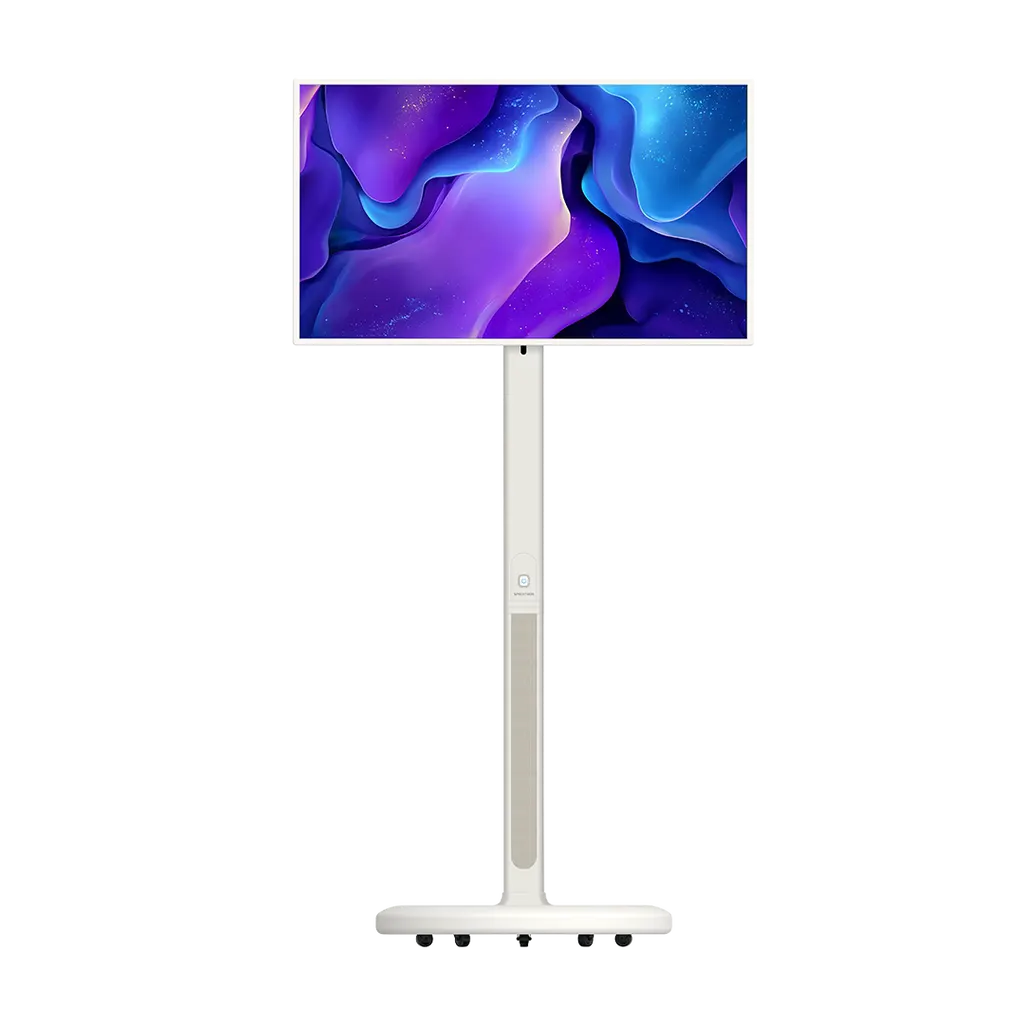
Specktron FLXView 31.5-inch 4K Smart Mobile Display

Screen size
31.5"
Resolution
4K UHD
Touch
Capacitive
System
Android 14
WhatsApp
Priceon request
QuotationWithin 1 working day
DeliveryConfirmed with your quote, based on stock
PDFDownload datasheet (FLXView Brochure.pdf)
Overview

Rolling between rooms on a compact stand, the Specktron FLXView pairs a 31.5-inch 4K UHD touchscreen with Android 14, 8GB RAM and a 5-hour battery. It rotates between landscape and portrait, adjusts in height by 200mm and supports 10 touch points. Suited to training rooms, meetings and event areas across Qatar where one screen must serve several spaces. Request a quote from SmartRooms Qatar.

What the FLXView is and how it is used

The Specktron FLXView is a mobile interactive display rather than a wall-mounted panel. It pairs a 31.5-inch 4K UHD capacitive touchscreen with Android 14 and a built-in battery, all on a compact mobile stand that can move between rooms. The model is marketed as a 32-inch unit, and the display size in its specification is 31.5 inches. Because one screen can serve several spaces, it suits teams that need presentation, video call and collaboration capability without fixing a panel to a wall.

Image, touch and processing specifications

The 4K UHD panel is rated at 300 nits brightness, with a typical contrast ratio of 1,200:1 and a typical colour gamut of 85% NTSC. Viewing angles are 178 degrees horizontally and vertically. The 8ms typical response time and 60Hz frequency suit video playback and handwritten annotation. The capacitive touchscreen supports 10 touch points. Inside, an octa-core processor (4 cores at A72 and 4 at A53, up to 2.0GHz) works with a Mali G52 MC3 GPU, a 6T NPU, 8GB RAM and 128GB eMMC storage.

Portability, adjustment and power

  • Battery: 9600mAh ternary lithium battery, rated at 5 hours of working time.
  • Height: 200mm of vertical adjustment.
  • Rotation: 90 degrees for landscape or portrait use.
  • Tilt: from -25 to 30 degrees.
  • Power draw: up to 45W in use and up to 1W on standby.

These figures matter when you plan a day of use. Five hours covers a long workshop or a half-day event, but a full working day in a busy office will need the unit connected to power at some point. The source data does not describe the charger or the charging time, so ask the SmartRooms Qatar team to confirm the charging arrangement before ordering.

Three places it fits across Qatar

A training centre in Education City running short workshops across several rooms can roll the FLXView into whichever room is in use, rotate it to portrait for reviewing documents, and cast a participant's laptop without cables.

A hotel meeting room in West Bay hosting client presentations can reposition the screen to suit the room layout and tilt it for standing or seated presenters. The 2 × 10W speakers and built-in microphone support video calls with remote partners.

A property sales team in Lusail running a display area during a project launch can use the screen for floor plans and video walkthroughs, then move it to another space when the event ends.

What to plan before you order

  • Confirm the operating environment. The source data gives no operating temperature range, so keep the unit indoors, away from direct sun and dusty entrances, and check placement with SmartRooms Qatar before using it in marquees or near large glazing.
  • Check wireless coverage. Wi-Fi 6 and Bluetooth 5.4 are listed, so test the signal in every room where casting will be used.
  • Plan the wired inputs. There is one HDMI input, three Type-C ports and one USB 3.0 port, so decide which devices will connect by cable.
  • Check the route. Measure doorways and lift access, because the stand must pass through them.

SmartRooms Qatar offers free site surveys, so we can check your rooms and routes before you commit. Purchase orders and government tenders, including Monaqasat, are supported. Request a quote and our team will usually respond with a quotation within one working day.

Highlights

  • 31.5-inch 4K UHD capacitive touchscreen with 10 touch points
  • Android 14 with 8GB RAM and 128GB eMMC storage
  • 9600mAh built-in battery rated for up to 5 hours
  • 200mm height adjustment, 90-degree rotation and -25 to 30 degree tilt
  • Wi-Fi 6, Bluetooth 5.4 and wireless casting from laptops or phones
  • 2 × 10W speakers and built-in microphone

Estimated timeline

Quotation within 1 working day · delivery timing depends on stock availability, and we confirm it with your quotation.

Specifications

28 specifications · Source: manufacturer · checked Oct 2026
Specifications28
Touch Type
Capacitive
Display Size
31.5"
Resolution
4K UHD
View Angle (CR>10)
178°(H) / 178°(V)
Color Gamut
85% NTSC (Typ.)
Brightness
300 nits
Contrast Ratio
1200:1 (Typ.)
Response Time
8ms (Typ.)
Frequency
60Hz
Panel Grade
A
Touch Points
10
CPU
4 Core A72 + 4 Core A53, Max 2.0GHz
GPU
Mali G52 MC3
NPU
6T
RAM
8GB
EMMC
128GB
WiFi & Bluetooth
WiFi 6 + BT 5.4
Operating System
Android 14
Speakers
2 × 10W
Battery Type and Capacity
Ternary Lithium Battery 9600mAh
Power Consumption
≤45W
Standby Power Consumption
≤1W
Working Hours
5H
I/O Ports
3 × Type-C, 1 × USB 3.0, 1 × HDMI in
Microphone
Built-in
Vertical Height Adjustment
200mm
Rotation Angle
90°
Tilt Angle
-25° ~ 30°

Downloads

2 files from the manufacturer

Questions about FLXView

Who is the Specktron FLXView best suited for?
The FLXView suits organisations that need one interactive screen across several spaces instead of a fixed panel in one room. Its 31.5-inch 4K touchscreen, Android 14 platform and 5-hour battery make it practical for presentations, video calls, training sessions and digital content that moves between meeting rooms, reception areas and event spaces.
Can the FLXView replace a wall-mounted interactive flat panel?
For a boardroom that always uses the same wall, a fixed interactive flat panel is usually the better choice. The FLXView is a mobile unit: its stand offers 200mm of vertical height adjustment, 90-degree rotation and a tilt range from -25 to 30 degrees. It fits best where the screen must change rooms or orientation during the day. Request a quote and we can advise which option fits your layout.
How long does the battery last in use?
The built-in 9600mAh ternary lithium battery is rated for up to 5 hours of wireless use. That covers a long workshop or a half-day event. For a full working day, plan to connect the unit to power during breaks. The source data does not give a charging time or describe the charger, so SmartRooms Qatar will confirm the charging details before you order.
How many people can touch the screen at once?
The capacitive touchscreen supports 10 touch points, so several people can write, annotate or move content at the same time. Supported gestures include pinch, zoom, swipe and tap. This helps in group sessions in classrooms, design studios and planning meetings, where the presenter at the front of the room is not the only person interacting with the screen.
Can laptops and phones connect without cables?
Yes. The FLXView supports wireless casting, which mirrors content from laptops or phones, and it has Wi-Fi 6 and Bluetooth 5.4. For wired sources, the unit has one HDMI input, three Type-C ports and one USB 3.0 port. Because the HDMI port is listed as an input, plan wired laptop feeds to come into the screen. Test casting on your own network before the event.
Is the FLXView suitable for outdoor use or very hot rooms in Qatar?
The source data gives no operating temperature range and no outdoor or dust rating, so do not place the unit in marquees, open terraces or near large windows without checking first. Summer temperatures in Qatar can exceed 45 degrees Celsius. Keep the FLXView in air-conditioned indoor spaces and confirm the environment with the SmartRooms Qatar team before installation.
How could a training centre in Education City use the FLXView?
A training centre running short workshops across several rooms can move one FLXView to whichever room is in use. Rotate it to portrait for document review, adjust the height for seated or standing participants, and cast a participant's laptop without cables. The 10-point touch lets two or more learners annotate together. Check Wi-Fi coverage and doorway widths in each room first.
Would a hotel meeting room in West Bay find it useful?
Yes, for client presentations and breakout sessions where the room layout changes. The 2 × 10W speakers and built-in microphone support video calls with partners abroad, and the 178-degree viewing angles help attendees see the picture clearly from the side of the room. The presenter can tilt the screen from -25 to 30 degrees. Check the room's climate before placing the unit near glazed walls.
Can the FLXView be used with Arabic-language menus and content?
The source data does not state language support for the operating system, so confirm this before ordering if your team works mainly in Arabic. The unit runs Android 14, which gives access to apps and streaming tools, and it can display any content your team prepares. For ministries and schools that work in Arabic and English, ask SmartRooms Qatar to confirm the language settings and app availability.
Do we need a site survey before delivery if the unit is mobile?
A site survey is still useful. Check the route through doorways and lifts, the floor surface, power points, and Wi-Fi coverage in each room where casting will happen. SmartRooms Qatar offers free site surveys across Qatar, including Doha, Lusail and Al Khor, before you receive a quotation. The source data does not list stand dimensions, so measure doorways on site against the stand.
Can we order several units through a purchase order or government tender?
Yes. SmartRooms Qatar accepts purchase orders (LPOs) and government tenders, including Monaqasat, and payment by bank transfer, cheque or purchase order. Equipping several classrooms or a ministry floor works well under a single LPO. Request a quote that lists the number of units and the rooms they will serve, and the team will usually reply within one working day.

Similar models

BenQ CM7505 BenQ Board CM7505 75-inch Interactive Display
75″ UHD 3840 × 2160 pixels Ultra Precision IR
SMART SBID-6286S-V3 SMART Board 6086S-V3 86-inch Interactive Display with iQ
86″ 4K UHD (3840 × 2160) HyPr Touch with InGlass
SMART SBID-6286S-V3-P SMART Board 6086S-V3 Pro 86-inch Interactive Display with iQ
86″ 4K UHD (3840 × 2160) HyPr Touch with InGlass
Clevertouch Clevertouch Edge 65" Clevertouch Edge 65" 4K Interactive Display with Camera and Speakers
65″ 4K UHD (3840x2160 @60Hz) Android 15
Clevertouch Clevertouch Edge 86" Clevertouch Edge 86" 4K Interactive Flat Panel
86″ 4K UHD (3840x2160 @60Hz) Android 15
Email Call




